
Implementing iOS NSAttributedString HTML Render by Yourself
Alternative Solutions for iOS NSAttributedString DocumentType.html

Photo by Florian Olivo
[TL;DR] 2023/03/12
Re-developed using a different approach: ”ZMarkupParser HTML String to NSAttributedString Tool“. For technical details and the development story, please visit “The Story of Manually Building an HTML Parser”.
Origin
Since the release of iOS 15 last year, the app has been plagued by a persistent crash issue. According to data from the past 90 days (2022/03/11~2022/06/08), it caused over 2.4K crashes, affecting more than 1.4K users.
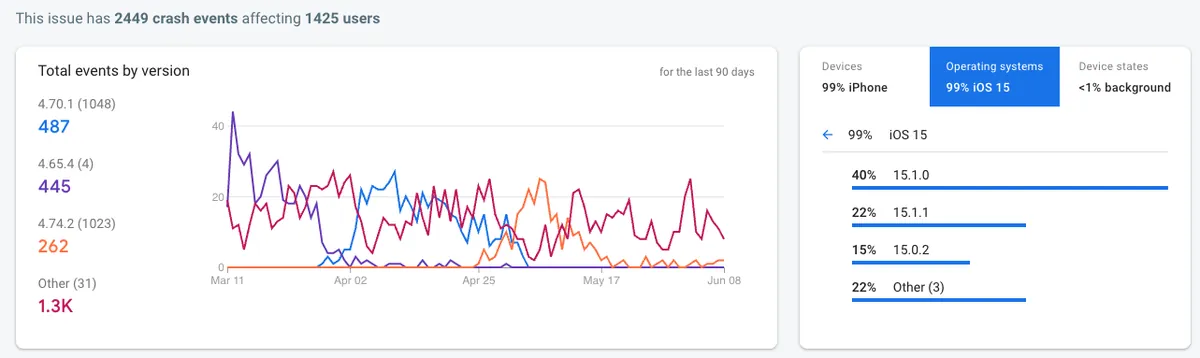
From the data, it appears that Apple has fixed (or reduced the occurrence of) this major crash issue in iOS versions ≥ 15.2, as the data shows a declining trend.
Most affected versions: iOS 15.0.X ~ iOS 15.X.X
It was also found that iOS 12 and iOS 13 have occasional crashes, so this issue has likely existed for a long time. However, the crash rate was nearly 100% in the early versions of iOS 15.
Crash Reason:
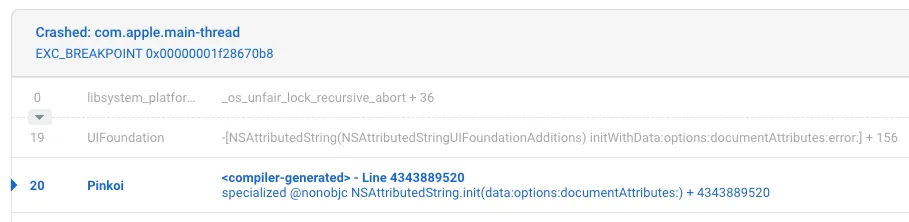
<compiler-generated> line 2147483647 specialized @nonobjc NSAttributedString.init(data:options:documentAttributes:)
NSAttributedString crashes with Crashed: com.apple.main-thread EXC_BREAKPOINT 0x00000001de9d4e44 during initialization.
It is also possible that the operation is not being performed on the Main Thread.
Reproduction Steps:
When this issue suddenly appeared in large numbers, the development team was puzzled; re-testing the points in the Crash Log showed no problems, and it was unclear under what conditions users experienced it. Until one time, by coincidence, I switched to “Low Power Mode” and the problem was triggered!! WTF !!!

Solution
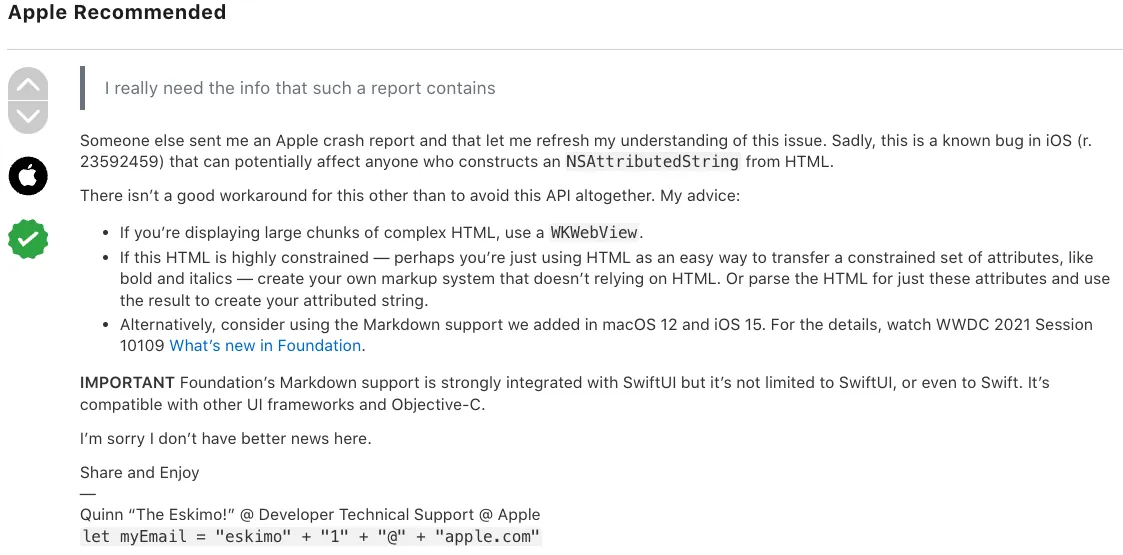
After some searching, I found many similar cases online and also found the earliest identical crash issue thread on the App Developer Forums, which received a response from the official team:
-
This is a known iOS Foundation Bug: present since iOS 12
-
For rendering complex HTML without usage constraints: please use WKWebView
-
With rendering constraints: You can write your own HTML Parser & Render
-
Directly Using Markdown as Rendering Constraint: iOS ≥ 15 NSAttributedString can directly render text using Markdown format
Rendering constraints means limiting the rendering formats supported by the app, such as only supporting bold, italic, and hyperlinks.
Supplement. Rendering Complex HTML — Creating Text with Decorative Effects
Can coordinate an interface together with the backend:
{
  "content":[
    {"type":"text","value":"Paragraph 1 plain text"},
    {"type":"text","value":"Paragraph 2 plain text"},
    {"type":"text","value":"Paragraph 3 plain text"},
    {"type":"text","value":"Paragraph 4 plain text"},
    {"type":"image","src":"https://zhgchg.li/logo.png","title":"ZhgChgLi"},
    {"type":"text","value":"Paragraph 5 plain text"}
  ]
}
Can be combined with Markdown to add support for text rendering, or refer to Medium’s approach:
"Paragraph": {
    "text": "code in text, and link in text, and ZhgChgLi, and bold, and I, only i",
    "markups": [
      {
        "type": "CODE",
        "start": 5,
        "end": 7
      },
      {
        "start": 18,
        "end": 22,
        "href": "http://zhgchg.li",
        "type": "LINK"
      },
      {
        "type": "STRONG",
        "start": 50,
        "end": 63
      },
      {
        "type": "EM",
        "start": 55,
        "end": 69
      }
    ]
}
The meaning of code in text, and link in text, and ZhgChgLi, and bold, and I, only i in this text:
- Characters 5 to 7 should be marked as code (wrapped with `Text` format)
- Characters 18 to 22 should be marked as a link (using [Text](URL) format)
- Characters 50 to 63 should be marked as bold (using *Text* format)
- Characters 55 to 69 should be marked as italic (using _Text_ format)
With a standardized and describable structure, the app can render natively on its own, achieving optimal performance and user experience.
The pitfalls of using UITextView for text wrapping can be referenced in my previous article: iOS UITextView 文繞圖編輯器 (Swift)
Why?
Before implementing the solution, let’s first return to examine the problem itself. I personally believe that the main cause of this issue is not from Apple; the official bug is just the trigger.
The main issue comes from treating the App side as Web for rendering. The advantage is fast Web development, using the same API Endpoint without distinguishing Clients, delivering HTML flexibly to render any desired content. The downside is that HTML is not a common interface for Apps, App Engineers are not expected to know HTML, performance is very poor, it can only run on the Main Thread, results are unpredictable during development, and supported specifications cannot be confirmed.
Tracing back the problem often reveals that the original requirements were unclear, making it impossible to determine which specifications the app needs to support. In the pursuit of speed, HTML was directly used as the interface between the app and the web.
Very Poor Performance
Additional performance note: tests show a 5 to 20 times speed difference between using NSAttributedString DocumentType.html directly and implementing custom rendering.
Better
Since this is for an app, a better approach should start from the perspective of app development. Adjusting requirements in an app is much more costly than on the web. Effective app development should be based on iterative adjustments with clear specifications. At the moment, you need to confirm the supported specifications, and if changes are needed later, plan time to expand the specifications. You cannot just quickly change things on a whim. This reduces communication costs and increases work efficiency.
-
Confirming the scope of requirements
-
Confirm Supported Specifications
-
Confirm interface specifications (Markdown/BBCode/… can continue to use HTML, but it must be constrained, for example only using
<b>/<i>/<a>/<u>, and the program must clearly inform developers) -
Implementing a Custom Rendering Mechanism
-
Maintenance and Iteration of Supported Specifications
[2023/02/27 Updated] [TL;DR]:
Updated approach: do not use XMLParser due to zero fault tolerance:
<br> / <Congratulation!> / <b>Bold<i>Bold+Italic</b>Italic</i>
All three scenarios may cause XMLParser to throw an error and show a blank result.
When using XMLParser, the HTML string must fully comply with XML rules and cannot tolerate errors like browsers or NSAttributedString.DocumentType.html.

Rewrite using pure Swift, parse HTML tags with Regex and tokenize them, analyze and correct tag accuracy (fix missing end tags & misaligned tags), then convert to an abstract syntax tree. Finally, use the Visitor Pattern to map HTML tags to abstract styles, producing the final NSAttributedString result; no parser libraries are used.
— —
How?
The die is cast. Returning to the main topic, now that we are using HTML to render NSAttributedString, how can we solve the crashes and performance issues mentioned above?
Inspired by
Strip HTML Remove HTML
Before discussing HTML Render, let’s first talk about Strip HTML. As mentioned in the previous “Why?” section, where the app gets HTML from and what kind of HTML it receives should be defined in the specifications; it shouldn’t be that the app “might” get HTML and therefore needs to strip it.
To quote my former manager: This is just too crazy, right?
Option 1. NSAttributedString
let data = "<div>Text</div>".data(using: .unicode)!
let attributed = try NSAttributedString(data: data, options: [.documentType: NSAttributedString.DocumentType.html, .characterEncoding: String.Encoding.utf8.rawValue], documentAttributes: nil)
let string = attributed.string
-
Using NSAttributedString to render HTML and then extracting the string will give you a clean String.
-
The same issue as in this chapter: iOS 15 frequently crashes, has poor performance, and can only operate on the Main Thread.
Option 2. Regex
htmlString = "<div>Test</div>"
// Remove all HTML tags using regular expression
htmlString.replacingOccurrences(of: "<[^>]+>", with: "", options: .regularExpression, range: nil)
-
The simplest and most effective way
-
Regex cannot guarantee complete accuracy. For example,
<p foo=">now what?">Paragraph</p>is valid HTML but will be stripped incorrectly.
Option 3. XMLParser
Following the approach of SwiftRichString, use XMLParser from Foundation to parse HTML as XML and implement your own HTML Parser & Strip functionality.
import UIKit
// Ref: https://github.com/malcommac/SwiftRichString
final class HTMLStripper: NSObject, XMLParserDelegate {
private static let topTag = "source"
private var xmlParser: XMLParser
private(set) var storedString: String
// The XML parser sometimes splits strings, which can break localization-sensitive
// string transforms. Work around this by using the currentString variable to
// accumulate partial strings, and then reading them back out as a single string
// when the current element ends, or when a new one is started.
private var currentString: String?
// MARK: - Initialization
init(string: String) throws {
let xmlString = HTMLStripper.escapeWithUnicodeEntities(string)
let xml = "<\(HTMLStripper.topTag)>\(xmlString)</\(HTMLStripper.topTag)>"
guard let data = xml.data(using: String.Encoding.utf8) else {
throw XMLParserInitError("Unable to convert to UTF8")
}
self.xmlParser = XMLParser(data: data)
self.storedString = ""
super.init()
xmlParser.shouldProcessNamespaces = false
xmlParser.shouldReportNamespacePrefixes = false
xmlParser.shouldResolveExternalEntities = false
xmlParser.delegate = self
}
/// Parse and generate attributed string.
func parse() throws -> String {
guard xmlParser.parse() else {
let line = xmlParser.lineNumber
let shiftColumn = (line == 1)
let shiftSize = HTMLStripper.topTag.lengthOfBytes(using: String.Encoding.utf8) + 2
let column = xmlParser.columnNumber - (shiftColumn ? shiftSize : 0)
throw XMLParserError(parserError: xmlParser.parserError, line: line, column: column)
}
return storedString
}
// MARK: XMLParserDelegate
@objc func parser(_ parser: XMLParser, didStartElement elementName: String, namespaceURI: String?, qualifiedName qName: String?, attributes attributeDict: [String: String]) {
foundNewString()
}
@objc func parser(_ parser: XMLParser, didEndElement elementName: String, namespaceURI: String?, qualifiedName qName: String?) {
foundNewString()
}
@objc func parser(_ parser: XMLParser, foundCharacters string: String) {
currentString = (currentString ?? "").appending(string)
}
// MARK: Support Private Methods
func foundNewString() {
if let currentString = currentString {
storedString.append(currentString)
self.currentString = nil
}
}
// handle html entity / html hex
// Perform string escaping to replace all characters which are not supported by NSXMLParser
// into the specified encoding with decimal entity.
// For example, if your string contains '&' character parser will break the style.
// This option is active by default.
// ref: https://github.com/malcommac/SwiftRichString/blob/e0b72d5c96968d7802856d2be096202c9798e8d1/Sources/SwiftRichString/Support/XMLStringBuilder.swift
static func escapeWithUnicodeEntities(_ string: String) -> String {
guard let escapeAmpRegExp = try? NSRegularExpression(pattern: "&(?!(#[0-9]{2,4}\\|[A-z]{2,6});)", options: NSRegularExpression.Options(rawValue: 0)) else {
return string
}
let range = NSRange(location: 0, length: string.count)
return escapeAmpRegExp.stringByReplacingMatches(in: string,
options: NSRegularExpression.MatchingOptions(rawValue: 0),
range: range,
withTemplate: "&")
}
}
let test = "我<br/><a href=\"http://google.com\">同意</a>提供<b><i>個</i>人</b>身分證字號/護照/居留<span style=\"color:#FF0000;font-size:20px;word-spacing:10px;line-height:10px\">證號碼</span>,以供<i>跨境物流</i>方通關<span style=\"background-color:#00FF00;\">使用</span>,並已<img src=\"g.png\"/>了解跨境<br/>商品之物<p>流需</p>求"
let stripper = try HTMLStripper(string: test)
print(try! stripper.parse())
// I agree to provide personal ID number/passport/residence permit number for cross-border logistics clearance use, and have understood the logistics needs of cross-border products.
Use Foundation XML Parser to process String, implement XMLParserDelegate with currentString to store the String. Since the String may be split into multiple parts, foundCharacters can be called multiple times. In didStartElement and didEndElement, save the current result and clear currentString when the string starts and ends.
-
The advantage is that it also converts HTML Entities to actual characters, e.g.
g -> g -
The advantage is that it supports complex HTML, but XMLParser will fail if the HTML is not well-formed, e.g.,
<br>instead of<br/>.
I personally think that simply stripping HTML Option 2. is the better method. This method is introduced because rendering HTML uses the same principle, so let’s start with this as a simple example :)
HTML Render w/XMLParser
Using XMLParser to implement it ourselves, similar to the Strip principle, we can add corresponding rendering methods for each parsed Tag.
Requirements:
-
Support Extendable Tags to Parse
-
Support setting Tag Default Style e.g. apply link style to Tag
-
Support parsing
styleattributes, as HTML explicitly specifies display styles likestyle="color:red" -
Style support includes changing text weight, size, underline, line spacing, letter spacing, background color, and text color.
-
Does not support complex tags like Image Tag, Table Tag, etc.
You can reduce features according to your own specification needs. For example, if background color adjustment is not required, you don’t need to expose the option for setting background color.
This article is just a conceptual implementation, not a Best Practice in architecture; if there are clear specifications and usage, consider applying some Design Patterns to achieve better maintainability and scalability.
⚠️⚠️⚠️ Attention ⚠️⚠️⚠️
A reminder again, if your app is new or you can fully switch to Markdown format, it is still recommended to use the above method. Writing your own renderer in this article is too complex and will not perform better than Markdown.
Even if you are using iOS < 15 which does not support native Markdown, you can still find expert-made Markdown Parser solutions on Github.
HTMLTagParser
protocol HTMLTagParser {
    static var tag: String { get } // Declare the Tag Name to parse, e.g. a
    var storedHTMLAttributes: [String: String]? { get set } // Parsed attributes will be stored here, e.g. href, style
    var style: AttributedStringStyle? { get } // Style to apply for this Tag

    func render(attributedString: inout NSMutableAttributedString) // Implement logic to render HTML to attributedString
}
Declare parsable HTML Tag entities for easy expansion and management.
AttributedStringStyle
protocol AttributedStringStyle {
    var font: UIFont? { get set }
    var color: UIColor? { get set }
    var backgroundColor: UIColor? { get set }
    var wordSpacing: CGFloat? { get set }
    var paragraphStyle: NSParagraphStyle? { get set }
    var customs: [NSAttributedString.Key: Any]? { get set } // Universal setting interface, it is recommended to abstract it after confirming supported specs and close this interface
    func render(attributedString: inout NSMutableAttributedString)
}


// abstract implement
extension AttributedStringStyle {
    func render(attributedString: inout NSMutableAttributedString) {
        let range = NSMakeRange(0, attributedString.length)
        if let font = font {
            attributedString.addAttribute(NSAttributedString.Key.font, value: font, range: range)
        }
        if let color = color {
            attributedString.addAttribute(NSAttributedString.Key.foregroundColor, value: color, range: range)
        }
        if let backgroundColor = backgroundColor {
            attributedString.addAttribute(NSAttributedString.Key.backgroundColor, value: backgroundColor, range: range)
        }
        if let wordSpacing = wordSpacing {
            attributedString.addAttribute(NSAttributedString.Key.kern, value: wordSpacing as Any, range: range)
        }
        if let paragraphStyle = paragraphStyle {
            attributedString.addAttribute(NSAttributedString.Key.paragraphStyle, value: paragraphStyle, range: range)
        }
        if let customAttributes = customs {
            attributedString.addAttributes(customAttributes, range: range)
        }
    }
}
Declare styles available for setting on Tag.
HTMLStyleAttributedParser
// only support tag attributes listed below
// can set color, font size, line height, word spacing, background color

enum HTMLStyleAttributedParser: String {
    case color = "color"
    case fontSize = "font-size"
    case lineHeight = "line-height"
    case wordSpacing = "word-spacing"
    case backgroundColor = "background-color"

    func render(attributedString: inout NSMutableAttributedString, value: String) -> Bool {
        let range = NSMakeRange(0, attributedString.length)
        switch self {
        case .color:
            if let color = convertToiOSColor(value) {
                attributedString.addAttribute(NSAttributedString.Key.foregroundColor, value: color, range: range)
                return true
            }
        case .backgroundColor:
            if let color = convertToiOSColor(value) {
                attributedString.addAttribute(NSAttributedString.Key.backgroundColor, value: color, range: range)
                return true
            }
        case .fontSize:
            if let size = convertToiOSSize(value) {
                attributedString.addAttribute(NSAttributedString.Key.font, value: UIFont.systemFont(ofSize: CGFloat(size)), range: range)
                return true
            }
        case .lineHeight:
            if let size = convertToiOSSize(value) {
                let paragraphStyle = NSMutableParagraphStyle()
                paragraphStyle.lineSpacing = size
                attributedString.addAttribute(NSAttributedString.Key.paragraphStyle, value: paragraphStyle, range: range)
                return true
            }
        case .wordSpacing:
            if let size = convertToiOSSize(value) {
                attributedString.addAttribute(NSAttributedString.Key.kern, value: size, range: range)
                return true
            }
        }

        return false
    }

    // convert 36px -> 36
    private func convertToiOSSize(_ string: String) -> CGFloat? {
        guard let regex = try? NSRegularExpression(pattern: "^([0-9]+)"),
              let firstMatch = regex.firstMatch(in: string, options: [], range: NSRange(location: 0, length: string.utf16.count)),
              let range = Range(firstMatch.range, in: string),
              let size = Float(String(string[range])) else {
            return nil
        }
        return CGFloat(size)
    }

    // convert html hex color #ffffff to UIKit Color
    private func convertToiOSColor(_ hexString: String) -> UIColor? {
        var cString: String = hexString.trimmingCharacters(in: .whitespacesAndNewlines).uppercased()

        if cString.hasPrefix("#") {
            cString.remove(at: cString.startIndex)
        }

        if (cString.count) != 6 {
            return nil
        }

        var rgbValue: UInt64 = 0
        Scanner(string: cString).scanHexInt64(&rgbValue)

        return UIColor(
            red: CGFloat((rgbValue & 0xFF0000) >> 16) / 255.0,
            green: CGFloat((rgbValue & 0x00FF00) >> 8) / 255.0,
            blue: CGFloat(rgbValue & 0x0000FF) / 255.0,
            alpha: CGFloat(1.0)
        )
    }
}
Implement Style Attributed Parser to parse style="color:red;font-size:16px", but since CSS styles have many possible settings, it’s necessary to list the supported range.
extension HTMLTagParser {

    func render(attributedString: inout NSMutableAttributedString) {
        defaultStyleRender(attributedString: &attributedString)
    }

    func defaultStyleRender(attributedString: inout NSMutableAttributedString) {
        // setup default style to NSMutableAttributedString
        style?.render(attributedString: &attributedString)

        // setup & override HTML style (style="color:red;background-color:black") to NSMutableAttributedString if is exists
        // any html tag can have style attribute
        if let style = storedHTMLAttributes?["style"] {
            let styles = style.split(separator: ";").map { $0.split(separator: ":") }.filter { $0.count == 2 }
            for style in styles {
                let key = String(style[0])
                let value = String(style[1])

                if let styleAttributed = HTMLStyleAttributedParser(rawValue: key), styleAttributed.render(attributedString: &attributedString, value: value) {
                    print("Unsupport style attributed or value[\(key):\(value)]")
                }
            }
        }
    }
}
Applying HTMLStyleAttributedParser & HTMLStyleAttributedParser Abstract Implementation.
Some Implementation Examples of Tag Parser & AttributedStringStyle
struct LinkStyle: AttributedStringStyle {
   var font: UIFont? = UIFont.systemFont(ofSize: 14)
   var color: UIColor? = UIColor.blue
   var backgroundColor: UIColor? = nil
   var wordSpacing: CGFloat? = nil
   var paragraphStyle: NSParagraphStyle?
   var customs: [NSAttributedString.Key: Any]? = [.underlineStyle: NSUnderlineStyle.single.rawValue]
}

struct ATagParser: HTMLTagParser {
    // <a></a>
    static let tag: String = "a"
    var storedHTMLAttributes: [String: String]? = nil
    let style: AttributedStringStyle? = LinkStyle()

    func render(attributedString: inout NSMutableAttributedString) {
        defaultStyleRender(attributedString: &attributedString)
        if let href = storedHTMLAttributes?["href"], let url = URL(string: href) {
            let range = NSMakeRange(0, attributedString.length)
            attributedString.addAttribute(NSAttributedString.Key.link, value: url, range: range)
        }
    }
}
struct BoldStyle: AttributedStringStyle {
   var font: UIFont? = UIFont.systemFont(ofSize: 14, weight: .bold)
   var color: UIColor? = UIColor.black
   var backgroundColor: UIColor? = nil
   var wordSpacing: CGFloat? = nil
   var paragraphStyle: NSParagraphStyle?
   var customs: [NSAttributedString.Key: Any]? = [.underlineStyle: NSUnderlineStyle.single.rawValue]
}

struct BoldTagParser: HTMLTagParser {
    // <b></b>
    static let tag: String = "b"
    var storedHTMLAttributes: [String: String]? = nil
    let style: AttributedStringStyle? = BoldStyle()
}
struct SpanTagParser: HTMLTagParser {
    // <span></span>
    static let tag: String = "span"
    var storedHTMLAttributes: [String: String]? = nil
    var style: AttributedStringStyle? = DefaultTextStyle()
}
HTMLToAttributedStringParser: Core Implementation of XMLParserDelegate
// Ref: https://github.com/malcommac/SwiftRichString
final class HTMLToAttributedStringParser: NSObject {
private static let topTag = "source"
private var xmlParser: XMLParser?
private(set) var attributedString: NSMutableAttributedString = NSMutableAttributedString()
private(set) var supportedTagRenders: [HTMLTagParser] = []
private let defaultStyle: AttributedStringStyle
/// Styles applied at each fragment.
private var renderingTagRenders: [HTMLTagParser] = []
// The XML parser sometimes splits strings, which can break localization-sensitive
// string transforms. Work around this by using the currentString variable to
// accumulate partial strings, and then reading them back out as a single string
// when the current element ends, or when a new one is started.
private var currentString: String?
// MARK: - Initialization
init(defaultStyle: AttributedStringStyle) {
self.defaultStyle = defaultStyle
super.init()
}
func register(_ tagRender: HTMLTagParser) {
if let index = supportedTagRenders.firstIndex(where: { type(of: $0).tag == type(of: tagRender).tag }) {
supportedTagRenders.remove(at: index)
}
supportedTagRenders.append(tagRender)
}
/// Parse and generate attributed string.
func parse(string: String) throws -> NSAttributedString {
var xmlString = HTMLToAttributedStringParser.escapeWithUnicodeEntities(string)
// make sure <br/> format is correct XML
// because Web may use <br> to present <br/>, but <br> is not a valid XML
xmlString = xmlString.replacingOccurrences(of: "<br>", with: "<br/>")
let xml = "<\(HTMLToAttributedStringParser.topTag)>\(xmlString)</\(HTMLToAttributedStringParser.topTag)>"
guard let data = xml.data(using: String.Encoding.utf8) else {
throw XMLParserInitError("Unable to convert to UTF8")
}
let xmlParser = XMLParser(data: data)
xmlParser.shouldProcessNamespaces = false
xmlParser.shouldReportNamespacePrefixes = false
xmlParser.shouldResolveExternalEntities = false
xmlParser.delegate = self
self.xmlParser = xmlParser
attributedString = NSMutableAttributedString()
guard xmlParser.parse() else {
let line = xmlParser.lineNumber
let shiftColumn = (line == 1)
let shiftSize = HTMLToAttributedStringParser.topTag.lengthOfBytes(using: String.Encoding.utf8) + 2
let column = xmlParser.columnNumber - (shiftColumn ? shiftSize : 0)
throw XMLParserError(parserError: xmlParser.parserError, line: line, column: column)
}
return attributedString
}
}
// MARK: Private Method
private extension HTMLToAttributedStringParser {
func enter(element elementName: String, attributes: [String: String]) {
// elementName = tagName, EX: a,span,div...
guard elementName != HTMLToAttributedStringParser.topTag else {
return
}
if let index = supportedTagRenders.firstIndex(where: { type(of: $0).tag == elementName }) {
var tagRender = supportedTagRenders[index]
tagRender.storedHTMLAttributes = attributes
renderingTagRenders.append(tagRender)
}
}
func exit(element elementName: String) {
if !renderingTagRenders.isEmpty {
renderingTagRenders.removeLast()
}
}
func foundNewString() {
if let currentString = currentString {
// currentString != nil ,ex: <i>currentString</i>
var newAttributedString = NSMutableAttributedString(string: currentString)
if !renderingTagRenders.isEmpty {
for (key, tagRender) in renderingTagRenders.enumerated() {
// Render Style
tagRender.render(attributedString: &newAttributedString)
renderingTagRenders[key].storedHTMLAttributes = nil
}
} else {
defaultStyle.render(attributedString: &newAttributedString)
}
attributedString.append(newAttributedString)
self.currentString = nil
} else {
// currentString == nil ,ex: <br/>
var newAttributedString = NSMutableAttributedString()
for (key, tagRender) in renderingTagRenders.enumerated() {
// Render Style
tagRender.render(attributedString: &newAttributedString)
renderingTagRenders[key].storedHTMLAttributes = nil
}
attributedString.append(newAttributedString)
}
}
}
// MARK: Helper
extension HTMLToAttributedStringParser {
// handle html entity / html hex
// Perform string escaping to replace all characters which are not supported by NSXMLParser
// into the specified encoding with decimal entity.
// For example if your string contains '&' character parser will break the style.
// This option is active by default.
// ref: https://github.com/malcommac/SwiftRichString/blob/e0b72d5c96968d7802856d2be096202c9798e8d1/Sources/SwiftRichString/Support/XMLStringBuilder.swift
static func escapeWithUnicodeEntities(_ string: String) -> String {
guard let escapeAmpRegExp = try? NSRegularExpression(pattern: "&(?!(#[0-9]{2,4}\\|[A-z]{2,6});)", options: NSRegularExpression.Options(rawValue: 0)) else {
return string
}
let range = NSRange(location: 0, length: string.count)
return escapeAmpRegExp.stringByReplacingMatches(in: string,
options: NSRegularExpression.MatchingOptions(rawValue: 0),
range: range,
withTemplate: "&")
}
}
// MARK: XMLParserDelegate
extension HTMLToAttributedStringParser: XMLParserDelegate {
func parser(_ parser: XMLParser, didStartElement elementName: String, namespaceURI: String?, qualifiedName qName: String?, attributes attributeDict: [String: String]) {
foundNewString()
enter(element: elementName, attributes: attributeDict)
}
func parser(_ parser: XMLParser, didEndElement elementName: String, namespaceURI: String?, qualifiedName qName: String?) {
foundNewString()
guard elementName != HTMLToAttributedStringParser.topTag else {
return
}
exit(element: elementName)
}
func parser(_ parser: XMLParser, foundCharacters string: String) {
currentString = (currentString ?? "").appending(string)
}
}
Applying the logic of Strip, we can combine the parsed structure by using elementName to identify the current Tag and apply the corresponding Tag Parser along with the defined Style.
Test Result
let test = "我<br/><a href=\"http://google.com\">同意</a>提供<b><i>個</i>人</b>身分證字號/護照/居留<span style=\"color:#FF0000;font-size:20px;word-spacing:10px;line-height:10px\">證號碼</span>,以供<i>跨境物流</i>方通關<span style=\"background-color:#00FF00;\">使用</span>,並已<img src=\"g.png\"/>了解跨境<br/>商品之物<p>流需</p>求"
let render = HTMLToAttributedStringParser(defaultStyle: DefaultTextStyle())
render.register(ATagParser())
render.register(BoldTagParser())
render.register(SpanTagParser())
//...
print(try! render.parse(string: test))

// Result:
// 我{
//     NSColor = "UIExtendedGrayColorSpace 0 1";
//     NSFont = "\".SFNS-Regular 14.00 pt. P [] (0x13a012970) fobj=0x13a012970, spc=3.79\"";
//     NSParagraphStyle = "Alignment 4, LineSpacing 3, ParagraphSpacing 0, ParagraphSpacingBefore 0, HeadIndent 0, TailIndent 0, FirstLineHeadIndent 0, LineHeight 0/0, LineHeightMultiple 0, LineBreakMode 0, Tabs (\n    28L,\n    56L,\n    84L,\n    112L,\n    140L,\n    168L,\n    196L,\n    224L,\n    252L,\n    280L,\n    308L,\n    336L\n), DefaultTabInterval 0, Blocks (\n), Lists (\n), BaseWritingDirection -1, HyphenationFactor 0, TighteningForTruncation NO, HeaderLevel 0 LineBreakStrategy 0 PresentationIntents (\n) ListIntentOrdinal 0 CodeBlockIntentLanguageHint ''";
// }同意{
//     NSColor = "UIExtendedSRGBColorSpace 0 0 1 1";
//     NSFont = "\".SFNS-Regular 14.00 pt. P [] (0x13a012970) fobj=0x13a012970, spc=3.79\"";
//     NSLink = "http://google.com";
//     NSUnderline = 1;
// }提供{
//     NSColor = "UIExtendedGrayColorSpace 0 1";
//     NSFont = "\".SFNS-Regular 14.00 pt. P [] (0x13a012970) fobj=0x13a012970, spc=3.79\"";
//     NSParagraphStyle = "Alignment 4, LineSpacing 3, ParagraphSpacing 0, ParagraphSpacingBefore 0, HeadIndent 0, TailIndent 0, FirstLineHeadIndent 0, LineHeight 0/0, LineHeightMultiple 0, LineBreakMode 0, Tabs (\n    28L,\n    56L,\n    84L,\n    112L,\n    140L,\n    168L,\n    196L,\n    224L,\n    252L,\n    280L,\n    308L,\n    336L\n), DefaultTabInterval 0, Blocks (\n), Lists (\n), BaseWritingDirection -1, HyphenationFactor 0, TighteningForTruncation NO, HeaderLevel 0 LineBreakStrategy 0 PresentationIntents (\n) ListIntentOrdinal 0 CodeBlockIntentLanguageHint ''";
// }個{
//     NSColor = "UIExtendedGrayColorSpace 0 1";
//     NSFont = "\".SFNS-Bold 14.00 pt. P [] (0x13a013870) fobj=0x13a013870, spc=3.46\"";
//     NSUnderline = 1;
// }人身分證字號/護照/居留{
//     NSColor = "UIExtendedGrayColorSpace 0 1";
//     NSFont = "\".SFNS-Regular 14.00 pt. P [] (0x13a012970) fobj=0x13a012970, spc=3.79\"";
//     NSParagraphStyle = "Alignment 4, LineSpacing 3, ParagraphSpacing 0, ParagraphSpacingBefore 0, HeadIndent 0, TailIndent 0, FirstLineHeadIndent 0, LineHeight 0/0, LineHeightMultiple 0, LineBreakMode 0, Tabs (\n    28L,\n    56L,\n    84L,\n    112L,\n    140L,\n    168L,\n    196L,\n    224L,\n    252L,\n    280L,\n    308L,\n    336L\n), DefaultTabInterval 0, Blocks (\n), Lists (\n), BaseWritingDirection -1, HyphenationFactor 0, TighteningForTruncation NO, HeaderLevel 0 LineBreakStrategy 0 PresentationIntents (\n) ListIntentOrdinal 0 CodeBlockIntentLanguageHint ''";
// }證號碼{
//     NSColor = "UIExtendedSRGBColorSpace 1 0 0 1";
//     NSFont = "\".SFNS-Regular 20.00 pt. P [] (0x13a015fa0) fobj=0x13a015fa0, spc=4.82\"";
//     NSKern = 10;
//     NSParagraphStyle = "Alignment 4, LineSpacing 10, ParagraphSpacing 0, ParagraphSpacingBefore 0, HeadIndent 0, TailIndent 0, FirstLineHeadIndent 0, LineHeight 0/0, LineHeightMultiple 0, LineBreakMode 0, Tabs (\n    28L,\n    56L,\n    84L,\n    112L,\n    140L,\n    168L,\n    196L,\n    224L,\n    252L,\n    280L,\n    308L,\n    336L\n), DefaultTabInterval 0, Blocks (\n), Lists (\n), BaseWritingDirection -1, HyphenationFactor 0, TighteningForTruncation NO, HeaderLevel 0 LineBreakStrategy 0 PresentationIntents (\n) ListIntentOrdinal 0 CodeBlockIntentLanguageHint ''";
// },以供跨境物流方通關{
//     NSColor = "UIExtendedGrayColorSpace 0 1";
//     NSFont = "\".SFNS-Regular 14.00 pt. P [] (0x13a012970) fobj=0x13a012970, spc=3.79\"";
//     NSParagraphStyle = "Alignment 4, LineSpacing 3, ParagraphSpacing 0, ParagraphSpacingBefore 0, HeadIndent 0, TailIndent 0, FirstLineHeadIndent 0, LineHeight 0/0, LineHeightMultiple 0, LineBreakMode 0, Tabs (\n    28L,\n    56L,\n    84L,\n    112L,\n    140L,\n    168L,\n    196L,\n    224L,\n    252L,\n    280L,\n    308L,\n    336L\n), DefaultTabInterval 0, Blocks (\n), Lists (\n), BaseWritingDirection -1, HyphenationFactor 0, TighteningForTruncation NO, HeaderLevel 0 LineBreakStrategy 0 PresentationIntents (\n) ListIntentOrdinal 0 CodeBlockIntentLanguageHint ''";
// }使用{
//     NSBackgroundColor = "UIExtendedSRGBColorSpace 0 1 0 1";
//     NSColor = "UIExtendedGrayColorSpace 0 1";
//     NSFont = "\".SFNS-Regular 14.00 pt. P [] (0x13a012970) fobj=0x13a012970, spc=3.79\"";
//     NSParagraphStyle = "Alignment 4, LineSpacing 3, ParagraphSpacing 0, ParagraphSpacingBefore 0, HeadIndent 0, TailIndent 0, FirstLineHeadIndent 0, LineHeight 0/0, LineHeightMultiple 0, LineBreakMode 0, Tabs (\n    28L,\n    56L,\n    84L,\n    112L,\n    140L,\n    168L,\n    196L,\n    224L,\n    252L,\n    280L,\n    308L,\n    336L\n), DefaultTabInterval 0, Blocks (\n), Lists (\n), BaseWritingDirection -1, HyphenationFactor 0, TighteningForTruncation NO, HeaderLevel 0 LineBreakStrategy 0 PresentationIntents (\n) ListIntentOrdinal 0 CodeBlockIntentLanguageHint ''";
// },並已了解跨境商品之物流需求{
//     NSColor = "UIExtendedGrayColorSpace 0 1";
//     NSFont = "\".SFNS-Regular 14.00 pt. P [] (0x13a012970) fobj=0x13a012970, spc=3.79\"";
//     NSParagraphStyle = "Alignment 4, LineSpacing 3, ParagraphSpacing 0, ParagraphSpacingBefore 0, HeadIndent 0, TailIndent 0, FirstLineHeadIndent 0, LineHeight 0/0, LineHeightMultiple 0, LineBreakMode 0, Tabs (\n    28L,\n    56L,\n    84L,\n    112L,\n    140L,\n    168L,\n    196L,\n    224L,\n    252L,\n    280L,\n    308L,\n    336L\n), DefaultTabInterval 0, Blocks (\n), Lists (\n), BaseWritingDirection -1, HyphenationFactor 0, TighteningForTruncation NO, HeaderLevel 0 LineBreakStrategy 0 PresentationIntents (\n) ListIntentOrdinal 0 CodeBlockIntentLanguageHint ''";
// }
Display Result:

Done!
This completes our implementation of HTML rendering using XMLParser, while maintaining extensibility and standardization. You can manage and understand the supported string rendering types in the app directly from the code.
Complete Github Repo as follows
This article is also published on my personal blog: [Click here] .
If you have any questions or feedback, feel free to contact me.


Comments