
Design Patterns 的實戰應用紀錄—In WKWebView with Builder, Strategy & Chain of Responsibility Pattern
封裝 iOS WKWebView 時使用到的 Design Patterns 場景 (策略、責任鏈、建造模式)。
Photo by Dean Pugh
About Design Patterns
每次講 Design Patterns 之前都要提一下,最經典的 GoF 23 種設計模式發表至今已過去 30 年 (1994 年發行),工具、語言的變化、軟體開發模式的變遷已經不可同日而語,後續在不同領域也延伸出許多新的設計模式;Design Patterns 並不是萬能解、也不是唯一解,他的存在更像是一種「語言代稱」在適合的場景套用適合的設計模式,可以減少開發協作的障礙,例如:這邊套用策略模式,後續維護擴充的人,就可以直接依照策略模式的架構進行迭代,並且設計模式多半都解耦的不錯,對於擴充性、測試性也有顯著的幫助。
Design Patterns 的使用心法
- 不是唯一解
- 不是萬能解
- 不能硬套,需按照要解決問題的類型(創建?行為?結構?)、目的選擇對應的設計模式
- 不能魔改,魔改容易造成後續維護的人誤會,跟語言一樣大家都用蘋果都叫 Apple,如果自己定義叫 Banana 就會變成是一個需要特別知道的開發成本
- 盡可能避開關鍵字,例如 Factory Pattern 習慣命名為
XXXFactory,那如果不是工廠模式就不該使用此命名關鍵字 - 謹慎自己創造模式 ,同前述雖然經典的只有 23 種,但經歷各個領域多年的演化也有很多新的模式,可以先參考網路資料找到適合的模式(畢竟三個臭皮匠勝過一個諸葛亮),真的沒有再來提出新的設計模式並盡可能發表讓不同領域、不同場境的人一起檢視跟調整
- 程式終究是寫給人維護的,只要好維護、好擴充,不一定要使用設計模式
- 團隊要有 Design Patterns 的共識才適合使用
- Design Pattern 可以再套 Design Pattern 組合技
- Design Patterns 上手要經過實務不斷地淬鍊,才會越來越有什麼場景適合或不適合套用的敏銳度
輔助神器 ChatGPT
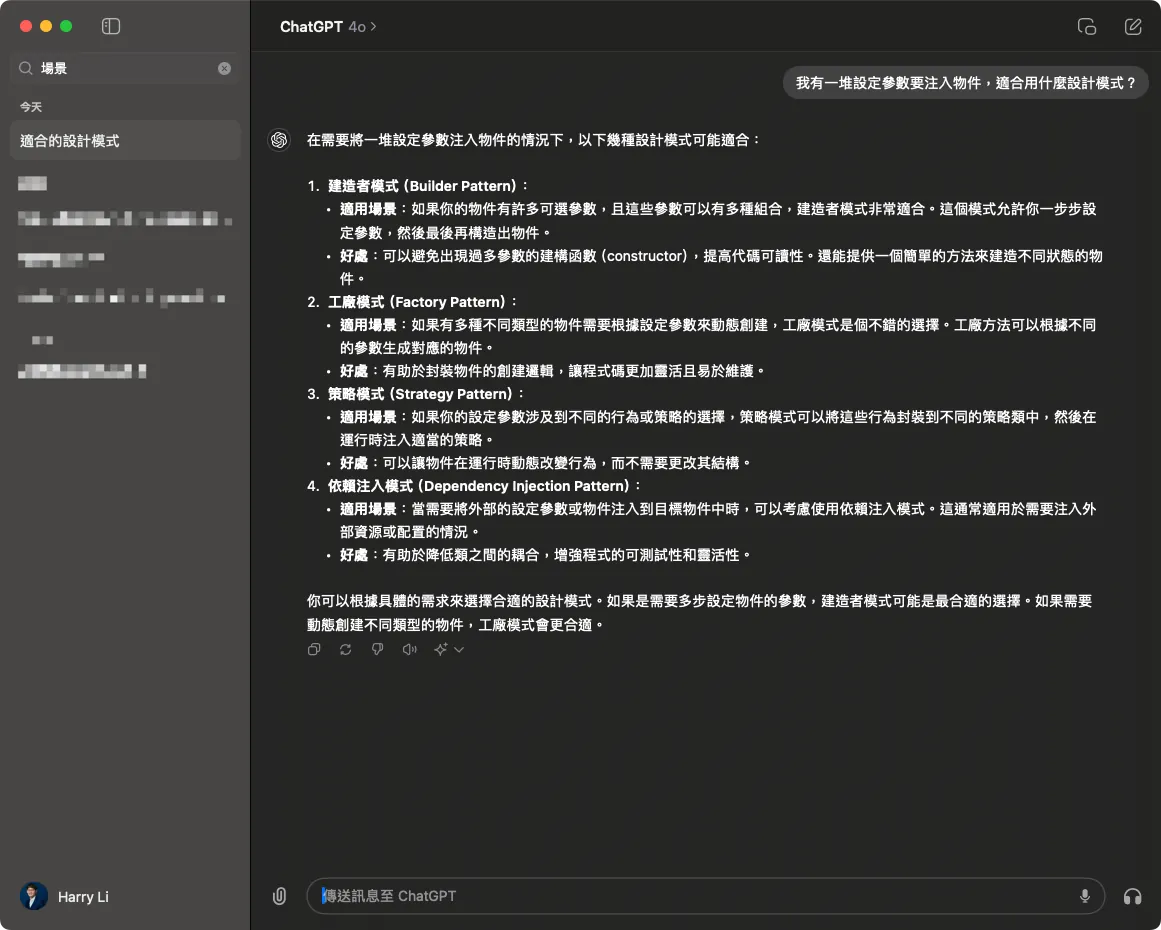
自從有了 ChatGPT 學習 Design Patterns 設計模式的實務應用就更容易,只要把你的問題具體的描述給他,問他有哪些設計模式適合這個場景,他都能給出幾個可能適合的模式並且附上說明;雖然不是每個答案都那麼適合,但他至少給出了幾個可行方向,我們只要再深入這幾個模式結合自己實務場景的問題,最後都能選到不錯的解法!
WKWebView 的 Design Patterns 實戰應用場景
這次的 Design Patterns 實戰應用是在收斂目前 Codebase 中的 WKWebView 物件功能特性,並開發統一的 WKWebView 元件時在幾個合適的邏輯抽象點套用 Design Patterns 的心得紀錄分享。
完整 Demo 專案程式碼會附在文末。
原始無抽象的寫法
class WKWebViewController: UIViewController {

    // MARK - 定義一些變數、開關 讓外部 init 時注入特性...

    // 模擬商業邏輯:開關 Match 特殊路徑開原生頁面
    let noNeedNativePresent: Bool
    // 模擬商業邏輯:開關 DeeplinkManager 檢查
    let deeplinkCheck: Bool
    // 模擬商業邏輯:是開首頁嗎?
    let isHomePage: Bool
    // 模擬商業邏輯:要注入到 WKWebView 的 WKUserScript 的腳本
    let userScripts: [WKUserScript]
    // 模擬商業邏輯:要注入到 WKWebView 的 WKScriptMessageHandler 的腳本
    let scriptMessageHandlers: [String: WKScriptMessageHandler]
    // 是否允許從 WebView 取得 Title 複寫 ViewController Title
    let overrideTitleFromWebView: Bool

    let url: URL

    // ...
}
// ...
extension OldWKWebViewController: WKNavigationDelegate {
    // MARK - iOS WKWebView 的 navigationAction Delegate,用於讓我們決定即將載入的連結要怎麼處理
    // 結束務必呼叫 decisionHandler(.allow) or decisionHandler(.cancel)
    // decisionHandler(.cancel) 將中斷載入即將載入的頁面

    // 這邊模擬了不同的變數、開關會有不同的邏輯處理:

    func webView(_ webView: WKWebView, decidePolicyFor navigationAction: WKNavigationAction, decisionHandler: @escaping (WKNavigationActionPolicy) -> Void) {
        guard let url = navigationAction.request.url else {
            decisionHandler(.allow)
            return
        }

        // 模擬商業邏輯:WebViewController deeplinkCheck == true (代表需要過 DeepLinkManager 檢查並開啟頁面)
        if deeplinkCheck {
            print("DeepLinkManager.open(\(url.absoluteString)")
            // 模擬 DeepLinkManager 邏輯,URL 能成功打開則打開並結束流程。
            // if DeepLinkManager.open(url) == true {
                decisionHandler(.cancel)
                return
            // }
        }

        // 模擬商業邏輯:WebViewController isHomePage == true (代表是開主頁) & WebView 正在瀏覽首頁,則切換 TabBar Index
        if isHomePage {
            if url.absoluteString == "https://zhgchg.li" {
                print("Switch UITabBarController to Index 0")
                decisionHandler(.cancel)
            }
        }

        // 模擬商業邏輯:WebViewController noNeedNativePresent == false (代表需要 Match 特殊路徑開原生頁面)
        if !noNeedNativePresent {
            if url.pathComponents.count >= 3 {
                if url.pathComponents[1] == "product" {
                    // match http://zhgchg.li/product/1234
                    let id = url.pathComponents[2]
                    print("Present ProductViewController(\(id)")
                    decisionHandler(.cancel)
                } else if url.pathComponents[1] == "shop" {
                    // match http://zhgchg.li/shop/1234
                    let id = url.pathComponents[2]
                    print("Present ShopViewController(\(id)")
                    decisionHandler(.cancel)
                }
                // more...
            }
        }

        decisionHandler(.allow)
    }
}
// ...
問題
- 設定變數、開關攤在 Class 當中,不清楚哪些是設定使用
- 直接暴露 WKUserScript 變數設定給外部,我們希望能管控注入的 JS,只允許注入特定行為
- 無法控制 WKScriptMessageHandler 的註冊規則
- 如果要 init 差不多的 WebView 需要重複寫注入參數的規則,參數規則無法復用
navigationAction Delegate內部靠變數控制流程,如果要刪改流程或順序都要動到整個 Code,也可能改壞本來就正常的流程
Builder Pattern 建造者模式
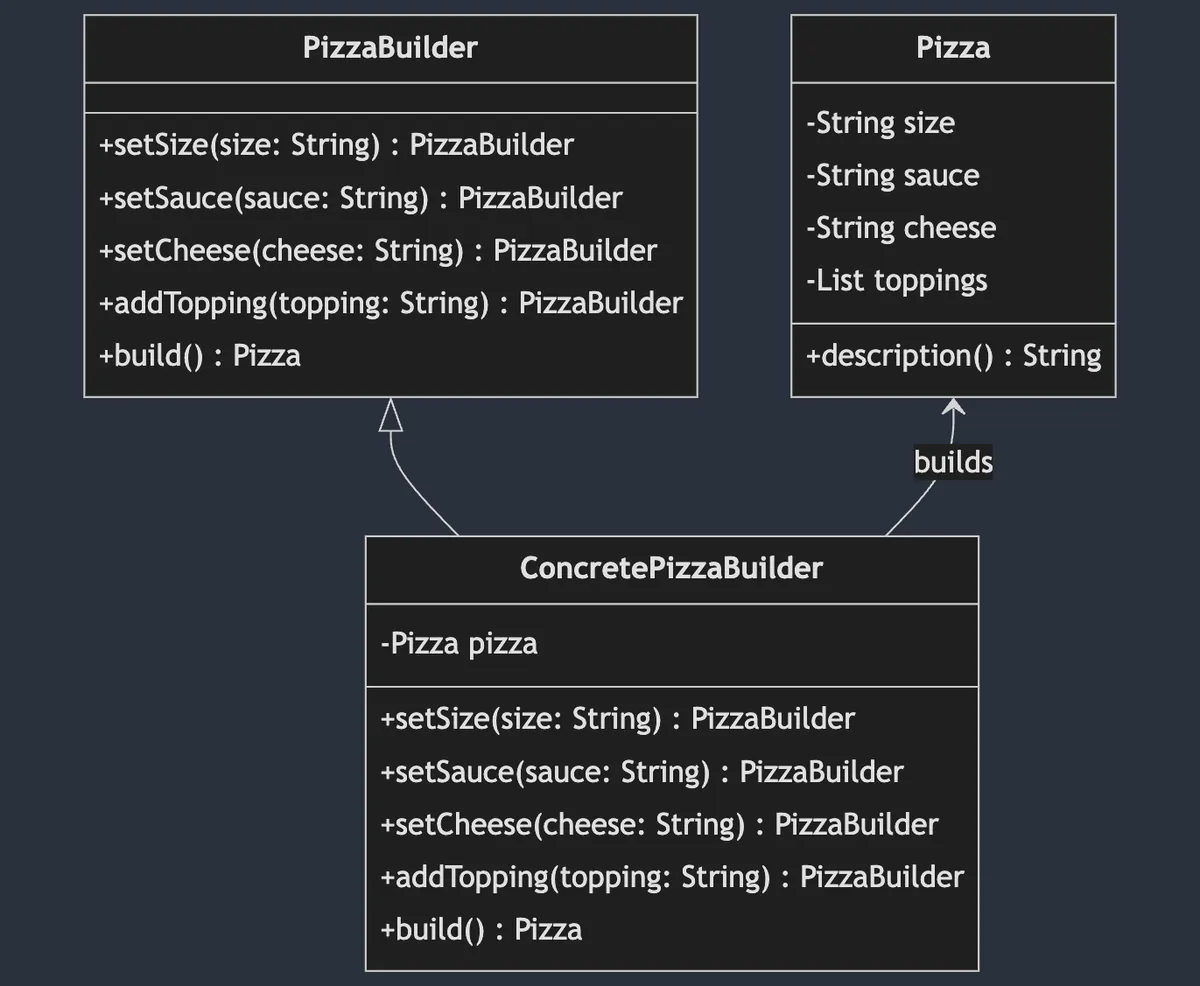
Builder Pattern(建造者模式) 屬於 創建型 設計模式,將創建物件的步驟與邏輯分離,操作者可一步一步設定參數並且復用設定,並在最後創建出目標物件,另外同樣的創建步驟也可以創建出不同的對象實現。
上圖以製作 Pizza 為例,先將 Pizza 製作的步驟拆成好幾個方法,並宣告在 PizzaBuilder 這個 Protocol (Interface), ConcretePizzaBuilder 為實際製作 Pizza 的物件,可能為 素食 PizzaBuilder & 葷食 PizzaBuilder ;不同的 Builder 原料可能不一樣,但最終都會 build() 產出 Pizza 物件。
WKWebView 場景
回到 WKWebView 場景,我們的最終產出物件是 MyWKWebViewConfiguration ,我們把所有 WKWebView 會需要設定的變數全統一放到這個物件當中,並使用 Builder Pattern MyWKWebViewConfigurator 逐步完成 Configuration 的構建工作。
public struct MyWKWebViewConfiguration {
    let headNavigationHandler: NavigationActionHandler?
    let scriptMessageStrategies: [ScriptMessageStrategy]
    let userScripts: [WKUserScript]
    let overrideTitleFromWebView: Bool
    let url: URL
}
// 全部參數都只對 Module 內暴露 (Internal)
MyWKWebViewConfigurator (Builder Pattern)
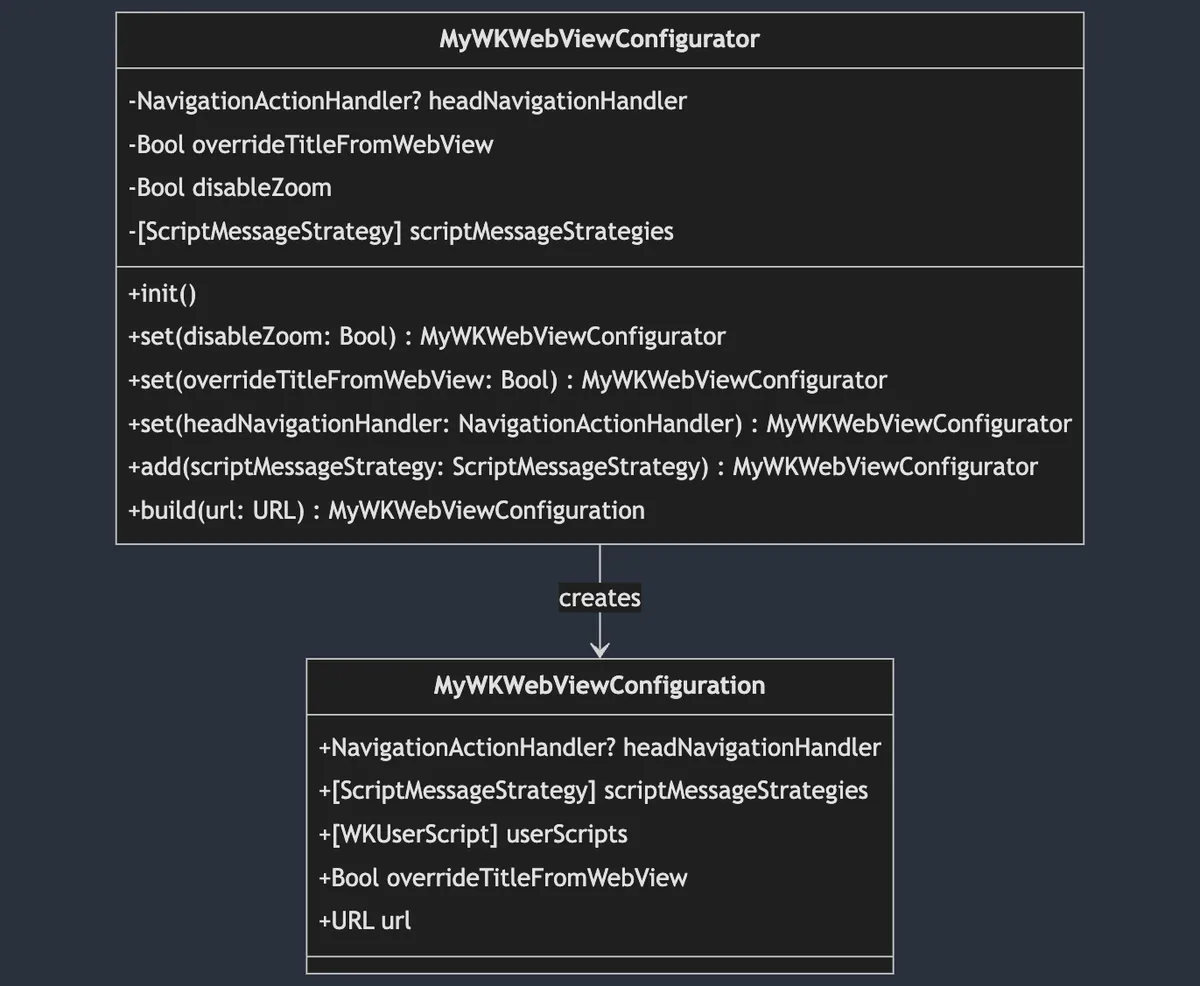
這邊因為我只有 Build for MyWKWebView 的需求,因此沒有再把
MyWKWebViewConfigurator多拆 Protocol(Interface)。
public final class MyWKWebViewConfigurator {

    private var headNavigationHandler: NavigationActionHandler? = nil
    private var overrideTitleFromWebView: Bool = true
    private var disableZoom: Bool = false
    private var scriptMessageStrategies: [ScriptMessageStrategy] = []

    public init() {

    }

    // 參數封裝、內控
    public func set(disableZoom: Bool) -> Self {
        self.disableZoom = disableZoom
        return self
    }

    public func set(overrideTitleFromWebView: Bool) -> Self {
        self.overrideTitleFromWebView = overrideTitleFromWebView
        return self
    }

    public func set(headNavigationHandler: NavigationActionHandler) -> Self {
        self.headNavigationHandler = headNavigationHandler
        return self
    }

    // 可以把新增邏輯規則封裝在裡面
    public func add(scriptMessageStrategy: ScriptMessageStrategy) -> Self {
        scriptMessageStrategies.removeAll(where: { type(of: $0).identifier == type(of: scriptMessageStrategy).identifier })
        scriptMessageStrategies.append(scriptMessageStrategy)
        return self
    }

    public func build(url: URL) -> MyWKWebViewConfiguration {
        var userScripts:[WKUserScript] = []
        // 產生時才附加
        if disableZoom {
            let script = "var meta = document.createElement('meta'); meta.name='viewport'; meta.content='width=device-width, initial-scale=1.0, maximum-scale=1.0, user-scalable=no'; document.getElementsByTagName('head')[0].appendChild(meta);"
            let disableZoomScript = WKUserScript(source: script, injectionTime: .atDocumentEnd, forMainFrameOnly: true)
            userScripts.append(disableZoomScript)
        }

        return MyWKWebViewConfiguration(headNavigationHandler: headNavigationHandler, scriptMessageStrategies: scriptMessageStrategies, userScripts: userScripts, overrideTitleFromWebView: overrideTitleFromWebView, url: url)
    }
}
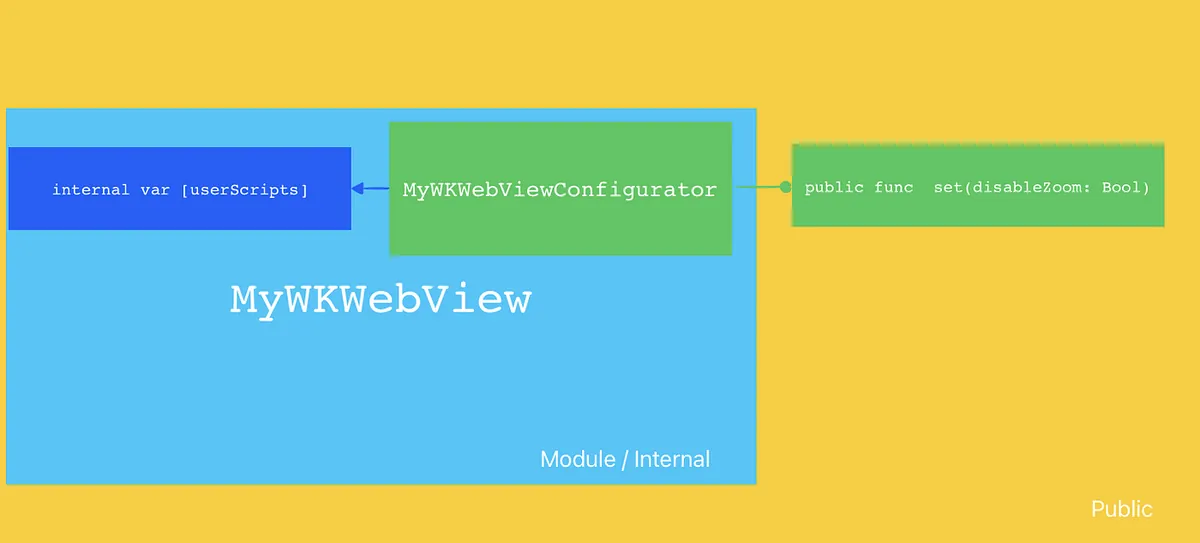
多拆了一層也可以更好的使用 Access Control 隔離參數的使用權限,以本場景為例就是我們希望依然可以直接注入 WKUserScript 到 MyWKWebView 當中,但我們又不希望把開口開的這麼大讓使用的人可以隨意注入,因此結合 Builder Pattern + Swift Access Control,當 MyWKWebView 已經被放 Module 中後 MyWKWebViewConfigurator 對外封裝成操作方法 func set(disableZoom: Bool) ,對內在產生 MyWKWebViewConfiguration 時再附加上 WKUserScript , MyWKWebViewConfiguration 所有參數對外都是不可更改並且只能透過 MyWKWebViewConfigurator 產生。
MyWKWebViewConfigurator + Simple Factory 簡單工廠
當有了 MyWKWebViewConfigurator Builder 之後我們可以再建立一個簡單工廠封裝、復用建立步驟。
struct MyWKWebViewConfiguratorFactory {
    enum ForType {
        case `default`
        case productPage
        case payment
    }

    static func make(for type: ForType) -> MyWKWebViewConfigurator {
        switch type {
        case .default:
            return MyWKWebViewConfigurator()
                .add(scriptMessageStrategy: PageScriptMessageStrategy())
                .set(overrideTitleFromWebView: false)
                .set(disableZoom: false)
        case .productPage:
            return Self.make(for: .default).set(disableZoom: true).set(overrideTitleFromWebView: true)
        case .payment:
            return MyWKWebViewConfigurator().set(headNavigationHandler: paymentNavigationActionHandler)
        }
    }
}
Chain of Responsibility Pattern 責任鏈模式
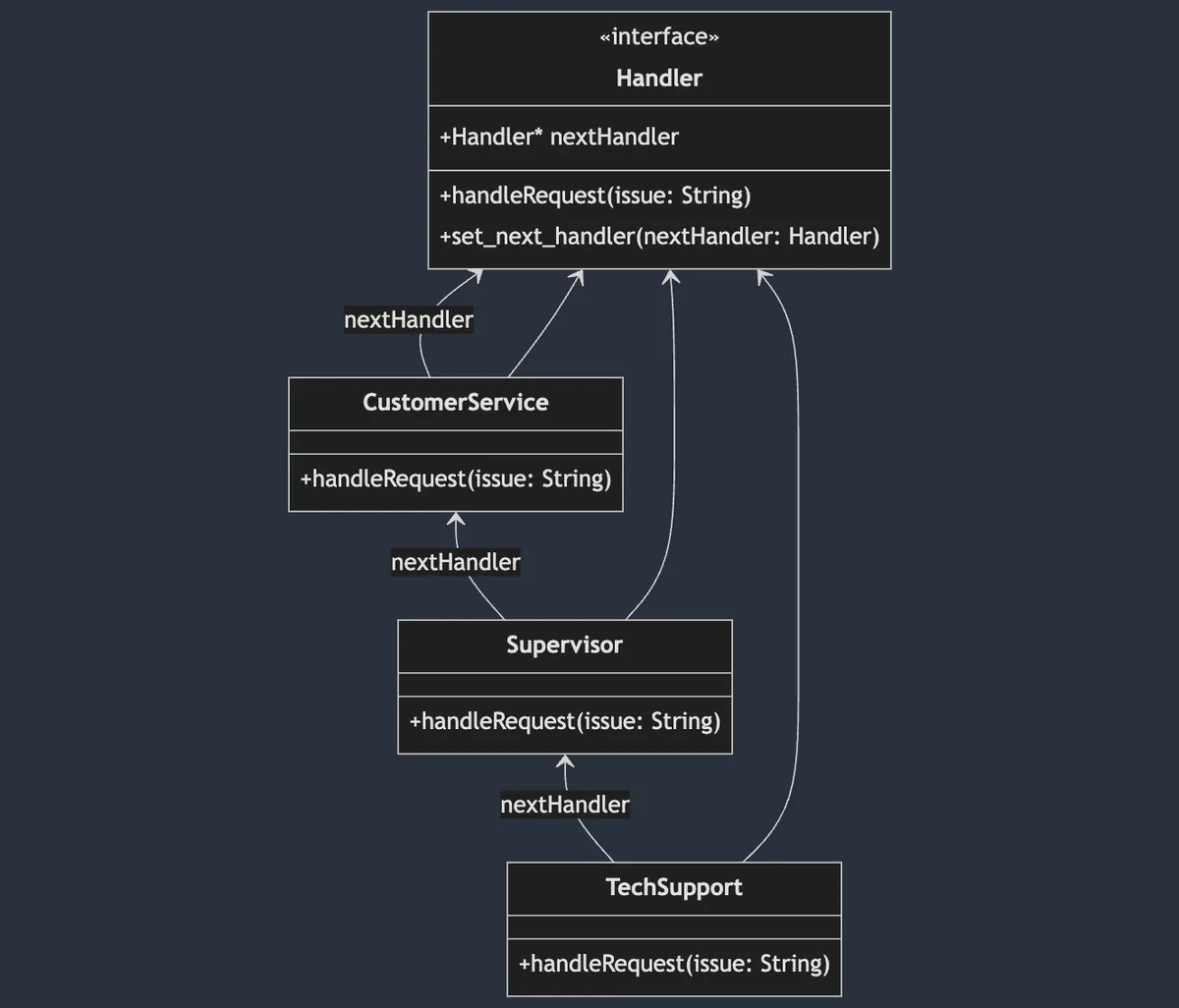
責任鏈模式(Chain of Responsibility Pattern)屬於 行為型 設計模式,它將對象處理的操作封裝並使用鏈式結構串聯起來,請求操作會沿著鏈條傳遞,直到有被處理為止;串聯的操作封裝可以自由彈性的組合、更改順序。
責任鏈專注在東西進來你有沒有要處理,沒有就 Skip ,因此不能處理一半或是修改了輸入物件然後丟給下一個;如果是這種需求那是另一個 Interceptor Pattern 。
上圖是以 Tech Support (or OnCall..) 為例,問題物件進來之後會先經過 CustomerService 如果他不能處理就往下一層 Supervisor 丟,如果還是不能處理再繼續往下到 TechSupport ;另外也可以針對不同問題組成不同的責任鏈,例如如果是大客戶的問題會直接從 Supervisor 開始處理;在 Swift UIKit 的 Responder Chain 也是使用了責任鏈模式,回應使用者在 UI 上的操作。
WKWebView 場景
在我們 WKWebView 的場景中,主要是套用在 func webView(_ webView: WKWebView, decidePolicyFor navigationAction: WKNavigationAction, decisionHandler: @escaping (WKNavigationActionPolicy) -> Void) 這個 Delegate 方法。
當系統收到網址請求時會經過這個方法讓我們決定是否要允許跳轉,並在結束處理後呼叫
decisionHandler(.allow)ordecisionHandler(.cancel)告知結果。
在 WKWebView 的實作上就會出現很多判斷或是有的頁面處理跟別人不一樣要繞開:
// 原始寫法...
func webView(_ webView: WKWebView, decidePolicyFor navigationAction: WKNavigationAction, decisionHandler: @escaping (WKNavigationActionPolicy) -> Void) {
        guard let url = navigationAction.request.url else {
            decisionHandler(.allow)
            return
        }

        // 模擬商業邏輯:WebViewController deeplinkCheck == true (代表需要過 DeepLinkManager 檢查並開啟頁面)
        if deeplinkCheck {
            print("DeepLinkManager.open(\(url.absoluteString)")
            // 模擬 DeepLinkManager 邏輯,URL 能成功打開則打開並結束流程。
            // if DeepLinkManager.open(url) == true {
                decisionHandler(.cancel)
                return
            // }
        }

        // 模擬商業邏輯:WebViewController isHomePage == true (代表是開主頁) & WebView 正在瀏覽首頁,則切換 TabBar Index
        if isHomePage {
            if url.absoluteString == "https://zhgchg.li" {
                print("Switch UITabBarController to Index 0")
                decisionHandler(.cancel)
            }
        }

        // 模擬商業邏輯:WebViewController noNeedNativePresent == false (代表需要 Match 特殊路徑開原生頁面)
        if !noNeedNativePresent {
            if url.pathComponents.count >= 3 {
                if url.pathComponents[1] == "product" {
                    // match http://zhgchg.li/product/1234
                    let id = url.pathComponents[2]
                    print("Present ProductViewController(\(id)")
                    decisionHandler(.cancel)
                } else if url.pathComponents[1] == "shop" {
                    // match http://zhgchg.li/shop/1234
                    let id = url.pathComponents[2]
                    print("Present ShopViewController(\(id)")
                    decisionHandler(.cancel)
                }
                // more...
            }
        }

        // more...
        decisionHandler(.allow)
}
隨著時間推移功能越來越複雜,這邊的邏輯也會越來越多,如果又扯到處理順序也要不一樣就會變成一場災難。
NavigationActionHandler (Chain of Responsibility Pattern)
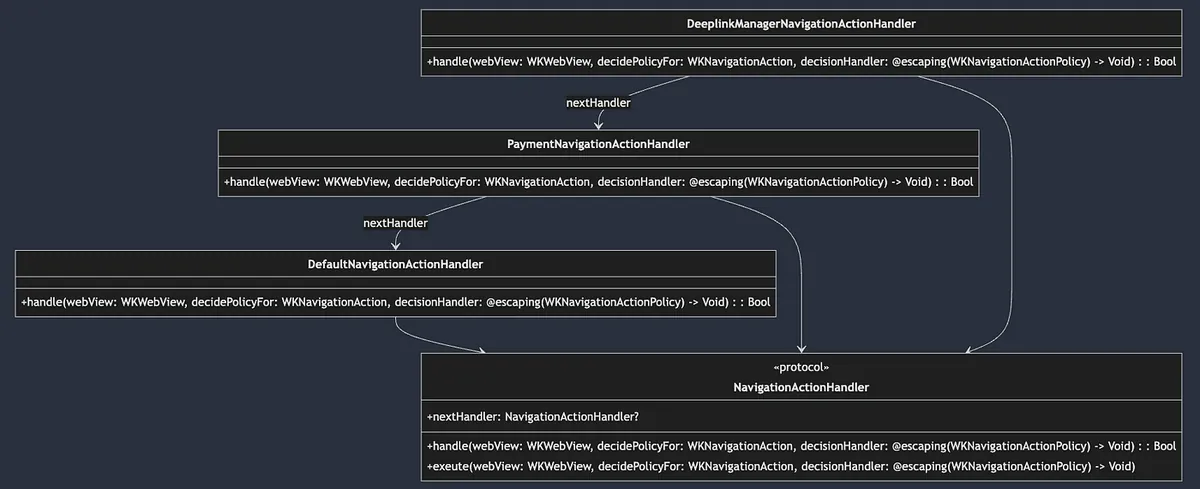
先定義好 Handler Protocol:
public protocol NavigationActionHandler: AnyObject {
    var nextHandler: NavigationActionHandler? { get set }

    /// Handles navigation actions for the web view. Returns true if the action was handled, otherwise false.
    func handle(webView: WKWebView, decidePolicyFor navigationAction: WKNavigationAction, decisionHandler: @escaping (WKNavigationActionPolicy) -> Void) -> Bool
    /// Executes the navigation action policy decision. If the current handler does not handle it, the next handler in the chain will be executed.
    func exeute(webView: WKWebView, decidePolicyFor navigationAction: WKNavigationAction, decisionHandler: @escaping (WKNavigationActionPolicy) -> Void)
}

public extension NavigationActionHandler {
    func exeute(webView: WKWebView, decidePolicyFor navigationAction: WKNavigationAction, decisionHandler: @escaping (WKNavigationActionPolicy) -> Void) {
        if !handle(webView: webView, decidePolicyFor: navigationAction, decisionHandler: decisionHandler) {
            self.nextHandler?.exeute(webView: webView, decidePolicyFor: navigationAction, decisionHandler: decisionHandler) ?? decisionHandler(.allow)
        }
    }
}
- 操作會在
func handle()實現,如果有接下來處理則回傳true否則回傳false func exeute()是預設的鏈訪問實現,會從這邊執行遍歷整個操作鏈,預設行為是當func handle()為false(代表此節點無法處理) 則自動呼叫下一個nextHandler的execute()繼續處理,直到結束。
實現:
// 預設實現,通常放到最後
public final class DefaultNavigationActionHandler: NavigationActionHandler {
    public var nextHandler: NavigationActionHandler?

    public init() {

    }

    public func handle(webView: WKWebView, decidePolicyFor navigationAction: WKNavigationAction, decisionHandler: @escaping (WKNavigationActionPolicy) -> Void) -> Bool {
        decisionHandler(.allow)
        return true
    }
}

//
final class PaymentNavigationActionHandler: NavigationActionHandler {
    var nextHandler: NavigationActionHandler?

    func handle(webView: WKWebView, decidePolicyFor navigationAction: WKNavigationAction, decisionHandler: @escaping (WKNavigationActionPolicy) -> Void) -> Bool {
        guard let url = navigationAction.request.url else {
            return false
        }

        // 模擬商業邏輯:Payment 付款相關、兩階段驗證 WebView...etc
        print("Present Payment Verify View Controller")
        decisionHandler(.cancel)
        return true
    }
}

//
final class DeeplinkManagerNavigationActionHandler: NavigationActionHandler {
    var nextHandler: NavigationActionHandler?

    func handle(webView: WKWebView, decidePolicyFor navigationAction: WKNavigationAction, decisionHandler: @escaping (WKNavigationActionPolicy) -> Void) -> Bool {
        guard let url = navigationAction.request.url else {
            return false
        }


        // 模擬 DeepLinkManager 邏輯,URL 能成功打開則打開並結束流程。
        // if DeepLinkManager.open(url) == true {
            decisionHandler(.cancel)
            return true
        // } else {
            return false
        //
    }
}

// More...
使用:
extension MyWKWebViewController: WKNavigationDelegate {
    public func webView(_ webView: WKWebView, decidePolicyFor navigationAction: WKNavigationAction, decisionHandler: @escaping (WKNavigationActionPolicy) -> Void) {
       let headNavigationActionHandler = DeeplinkManagerNavigationActionHandler()
       let defaultNavigationActionHandler = DefaultNavigationActionHandler()
       let paymentNavigationActionHandler = PaymentNavigationActionHandler()

       headNavigationActionHandler.nextHandler = paymentNavigationActionHandler
       paymentNavigationActionHandler.nextHandler = defaultNavigationActionHandler

       headNavigationActionHandler.exeute(webView: webView, decidePolicyFor: navigationAction, decisionHandler: decisionHandler)
    }
}
這樣當請求收到後,就會照著我們定義的處理鏈依序處理。
結合前面的 Builder Pattern MyWKWebViewConfigurator 將 headNavigationActionHandler 開成參數出去,就能從外部決定這個 WKWebView 的處理需求、順序:
extension MyWKWebViewController: WKNavigationDelegate {
    public func webView(_ webView: WKWebView, decidePolicyFor navigationAction: WKNavigationAction, decisionHandler: @escaping (WKNavigationActionPolicy) -> Void) {
        configuration.headNavigationHandler?.exeute(webView: webView, decidePolicyFor: navigationAction, decisionHandler: decisionHandler) ?? decisionHandler(.allow)
    }
}

//...
struct MyWKWebViewConfiguratorFactory {
    enum ForType {
        case `default`
        case productPage
        case payment
    }

    static func make(for type: ForType) -> MyWKWebViewConfigurator {
        switch type {
        case .default:
            // 模擬預設情況有這些 handler
            let deplinkManagerNavigationActionHandler = DeeplinkManagerNavigationActionHandler()
            let homePageTabSwitchNavigationActionHandler = HomePageTabSwitchNavigationActionHandler()
            let nativeViewControllerNavigationActionHandlera = NativeViewControllerNavigationActionHandler()
            let defaultNavigationActionHandler = DefaultNavigationActionHandler()

            deplinkManagerNavigationActionHandler.nextHandler = homePageTabSwitchNavigationActionHandler
            homePageTabSwitchNavigationActionHandler.nextHandler = nativeViewControllerNavigationActionHandlera
            nativeViewControllerNavigationActionHandlera.nextHandler = defaultNavigationActionHandler

            return MyWKWebViewConfigurator()
                .add(scriptMessageStrategy: PageScriptMessageStrategy())
                .add(scriptMessageStrategy: UserScriptMessageStrategy())
                .set(headNavigationHandler: deplinkManagerNavigationActionHandler)
                .set(overrideTitleFromWebView: false)
                .set(disableZoom: false)
        case .productPage:
            return Self.make(for: .default).set(disableZoom: true).set(overrideTitleFromWebView: true)
        case .payment:
            // 模擬付款頁面只需要這些 handler,並且 paymentNavigationActionHandler 優先權最高
            let paymentNavigationActionHandler = PaymentNavigationActionHandler()
            let deplinkManagerNavigationActionHandler = DeeplinkManagerNavigationActionHandler()
            let defaultNavigationActionHandler = DefaultNavigationActionHandler()

            paymentNavigationActionHandler.nextHandler = deplinkManagerNavigationActionHandler
            deplinkManagerNavigationActionHandler.nextHandler = defaultNavigationActionHandler

            return MyWKWebViewConfigurator().set(headNavigationHandler: paymentNavigationActionHandler)
        }
    }
}
Strategy Pattern 策略模式
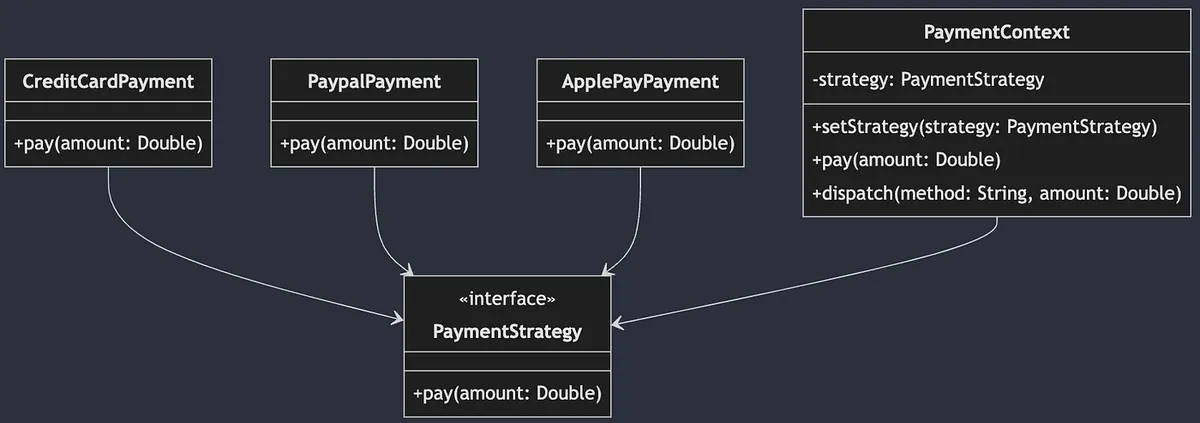
策略模式(Strategy Pattern)屬於 行為型 設計模式,它將實際操作抽象出來,我們可以實現多種不同的操作,讓外部可以根據不同場境彈性的替換使用。
上圖以不同支付方式為例,我們把支付抽象為 Payment Protocol (Interface),然後各種支付方式去實現自己的實作,在 PaymentContext (模擬外部使用)時 依據使用者選擇的付款方式,產生對應的 Payment 實體並統一呼叫 pay() 進行支付。
WKWebView 場景
在 WebView 與 前端頁面的交互中使用。
當前端 JavaScript 呼叫:
window.webkit.messageHandlers.Name.postMessage(Parameters);
就會進到 WKWebView 找到對應
Name的WKScriptMessageHandlerClass 進入執行操作。
系統已經有定義好的 Protocol 跟相應的 func add(_ scriptMessageHandler: any WKScriptMessageHandler, name: String) 方法,我們只需要定義好自己的 WKScriptMessageHandler 實現,並加入到 WKWebView,系統就會依照 Strategy Pattern 策略模式,根據收到的 name 派發給對應的 具體策略 執行。
這邊只做簡單的 Protocol extend WKScriptMessageHandler ,多一個 identifier:String for add(.. name:) 使用:
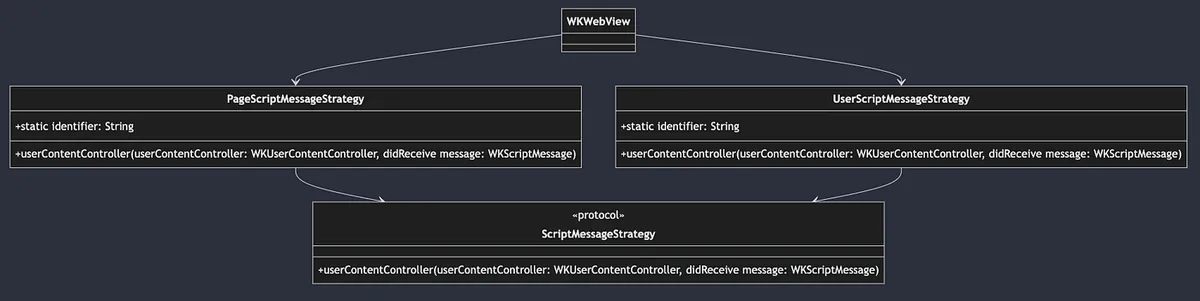
public protocol ScriptMessageStrategy: NSObject, WKScriptMessageHandler {
    static var identifier: String { get }
}
實現:
final class PageScriptMessageStrategy: NSObject, ScriptMessageStrategy {
    static var identifier: String = "page"

    func userContentController(_ userContentController: WKUserContentController, didReceive message: WKScriptMessage) {
        // 模擬 called from js: window.webkit.messageHandlers.page.postMessage("Close");
        print("\(Self.identifier): \(message.body)")
    }
}

//

final class UserScriptMessageStrategy: NSObject, ScriptMessageStrategy {
    static var identifier: String = "user"

    func userContentController(_ userContentController: WKUserContentController, didReceive message: WKScriptMessage) {
        // 模擬 called from js: window.webkit.messageHandlers.user.postMessage("Hello");
        print("\(Self.identifier): \(message.body)")
    }
}
WKWebView 註冊使用:
var scriptMessageStrategies: [ScriptMessageStrategy] = []
scriptMessageStrategies.forEach { scriptMessageStrategy in
  webView.configuration.userContentController.add(scriptMessageStrategy, name: type(of: scriptMessageStrategy).identifier)
}
結合前面的 Builder Pattern MyWKWebViewConfigurator 從外部管理 ScriptMessageStrategy 的註冊:
public final class MyWKWebViewConfigurator {
    //...

    // 可以把新增邏輯規則封裝在裡面
    public func add(scriptMessageStrategy: ScriptMessageStrategy) -> Self {
        // 這邊只有實現重複 identifier 時會先刪除舊的邏輯
        scriptMessageStrategies.removeAll(where: { type(of: $0).identifier == type(of: scriptMessageStrategy).identifier })
        scriptMessageStrategies.append(scriptMessageStrategy)
        return self
    }
    //...
}

//...

public class MyWKWebViewController: UIViewController {
    //...
    public override func viewDidLoad() {
        super.viewDidLoad()

        //...
        configuration.scriptMessageStrategies.forEach { scriptMessageStrategy in
            webView.configuration.userContentController.add(scriptMessageStrategy, name: type(of: scriptMessageStrategy).identifier)
        }
        //...
    }
}
Question: 這個場景也可以改用 Chain of Responsibility Pattern 責任鏈模式嗎?
到這邊有朋友可能會想問,那這邊的 Strategy Pattern 可以用 Chain of Responsibility Pattern 取代嗎?
這兩個設計模式同樣是行為型,可以取代;但實際要看需求場景,在這邊是很典型的 Strategy Pattern,WKWebView 依照 Name 去決定要進入的不同 Strategy;如果我們的需求是不同的 Strategy 之間可能有鏈式依賴或是 recover 關係,例如 AStrategy 如果不做要丟給 BStrategy 做,這時候才會考慮使用 Chain of Responsibility Pattern。
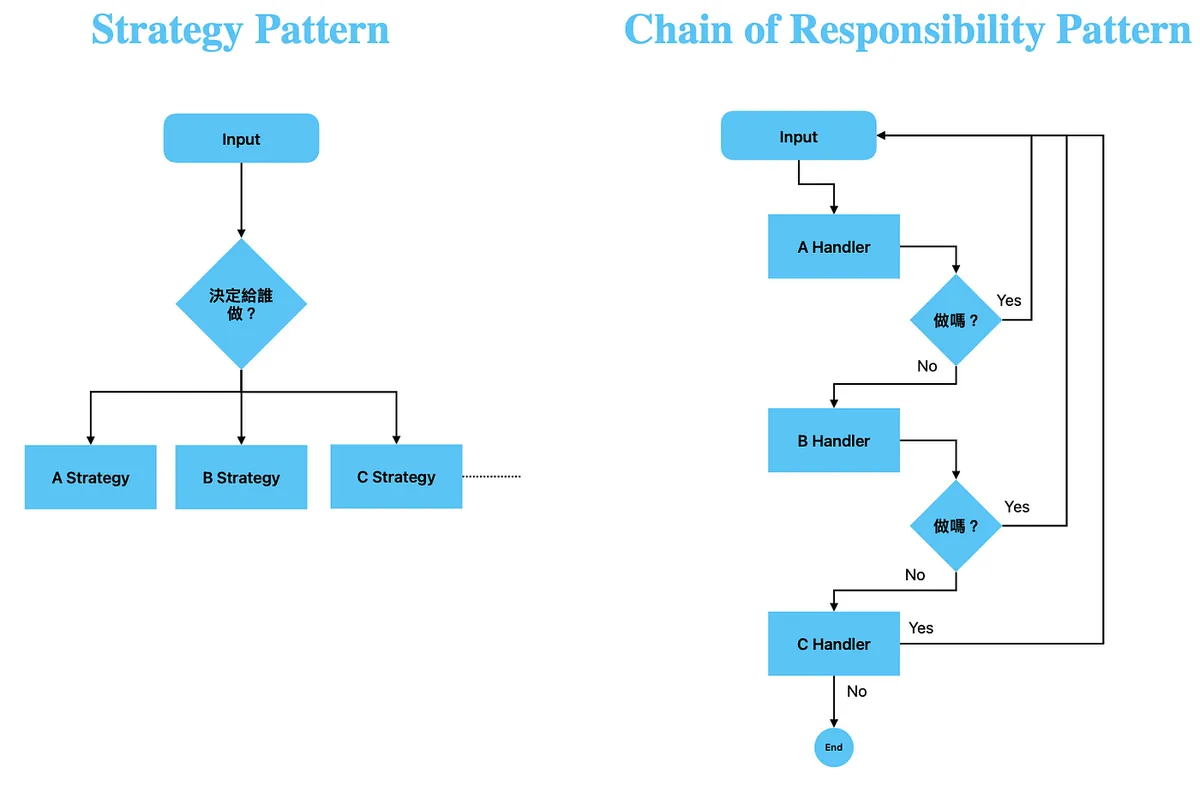
Strategy v.s. Chain of Responsibility
- Strategy Pattern:已有明確派發執行策略且策略與策略之間沒有關係。
- Chain of Responsibility Pattern:執行策略是在個別實現中決定,如果無法處理則往下丟給下一個實現。
複雜場景可以用 Strategy Pattern 裡面再套用 Chain of Responsibility Pattern 組合達成。
最終組合
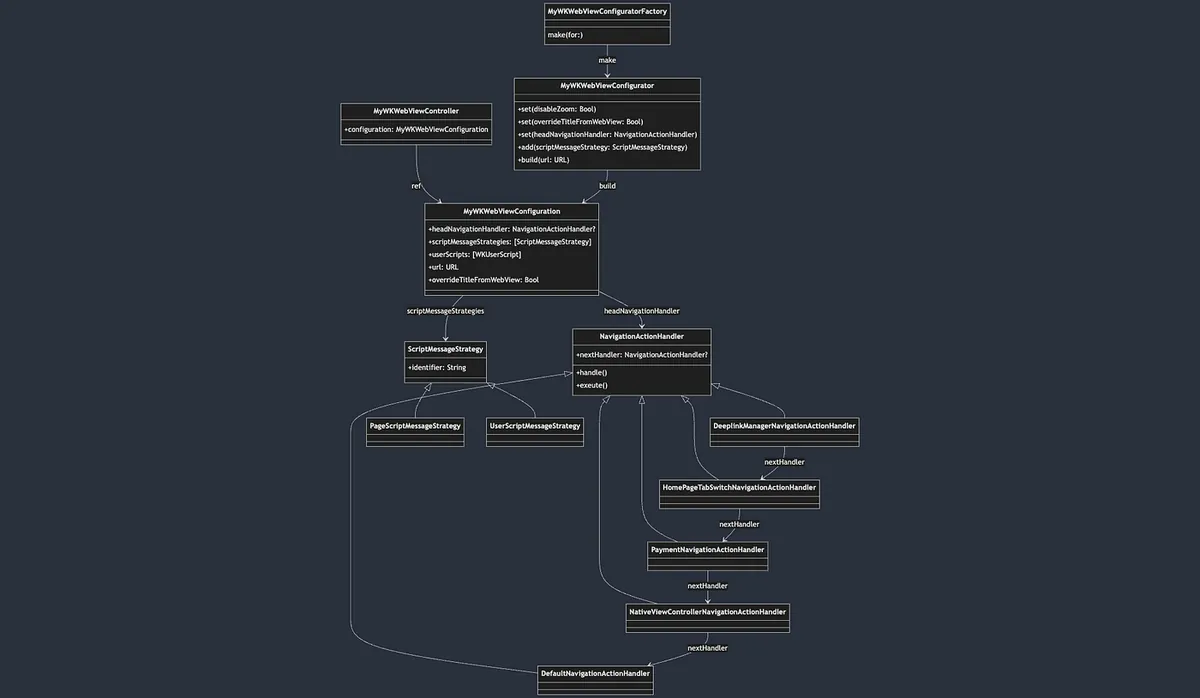
- Simple Factory 簡單工廠模式
MyWKWebViewConfiguratorFactory-> 封裝MyWKWebViewConfigurator產生步驟 - Builder Pattern 建造者模式
MyWKWebViewConfigurator-> 封裝MyWKWebViewConfiguration參數、構建步驟 MyWKWebViewConfiguration注入 -> 給MyWKWebViewController使用- Chain of Responsibility Pattern 責任鏈模式
MyWKWebViewController的func webView(_ webView: WKWebView, decidePolicyFor navigationAction: WKNavigationAction, decisionHandler: @escaping (WKNavigationActionPolicy) -> Void)-> 呼叫headNavigationHandler?.exeute(webView: webView, decidePolicyFor: navigationAction, decisionHandler: decisionHandler)鏈執行處理 - Strategy Pattern 策略模式
MyWKWebViewController的webView.configuration.userContentController.addUserScript(XXX)派發對應的 JS Caller 到對應處理的策略中
留言 · Comments