CI/CD Explained: Boost iOS App Development Stability and Efficiency|Tool Selection Guide
iOS developers struggling with unstable builds and slow releases can implement CI/CD to streamline workflows, enhance team collaboration, and accelerate delivery—discover practical steps and tool choices to transform your development process.
点击这里查看本文章简体中文版本。
點擊這裡查看本文章正體中文版本。
This post was translated with AI assistance — let me know if anything sounds off!
Table of Contents
CI/CD Practical Guide (Part 1): What is CI/CD? How to Build a Stable and Efficient Development Team with CI/CD? Tool Selection?
Using the App (iOS) Team as an example, this will guide you from zero to understanding CI/CD and the real value it brings after implementation.
{:target="_blank"}](/assets/c008a9e8ceca/1*vokpvb4dyWHOnVnF3WGbfw.webp)
Photo by Leif Christoph Gottwald
Preface
After two experiences building App CI/CD in different development teams, I finally have time to organize the journey from “why to do it” to “how to do it.” I can’t guarantee this is the most standard CI/CD workflow, but it is definitely a valuable starting point to help your team begin implementation, improve product stability, and overall development efficiency.
Chapter
This series will start with “What CI/CD is and the value it brings,” then move on to a hands-on guide on “How to build a CI/CD environment using GitHub Actions + self-hosted Runner,” and “Implement CI and CD in app development as an example.” Finally, it will introduce how to “Use Google Apps Script Web App combined with GitHub Actions to create an easy-to-use app packaging platform for cross-team collaboration.” I hope this series will be helpful to you.
Final Outcome
No more nonsense, here is the final result.
{:target="_blank"}](/assets/c008a9e8ceca/1*7-abScyjHQno1XzH4aGkaw.webp)
{:target="_blank"}](/assets/c008a9e8ceca/1*yXMeaOELhqdvMCxIJ5ElBw.gif)
Demo Web App (Please refer to the tutorial below for first-time use)
CI/CD — Fully developed with GitHub Actions, easy to maintain and extend.
CI:
Trigger Unit Tests Automatically on PR Submission
Run corresponding tests based on the scope of changed files
Merge PR only after tests have passed
CD:
Google Apps Script Web App (CD Packaging Interface) allows engineers, QA, and PMs to package the app on computers or mobile devices through this website
GitHub Actions Self-hosted Runner: Use Your Own Machine for Unlimited CI/CD Usage
Integrate Firebase App Distribution API to directly obtain the download link for the packaged test version
Automation :
Automatically Assign Self When Creating a PR
Automatically Assign Random Reviewer on PR
Mark PR Size Label
Demo Web App/Project
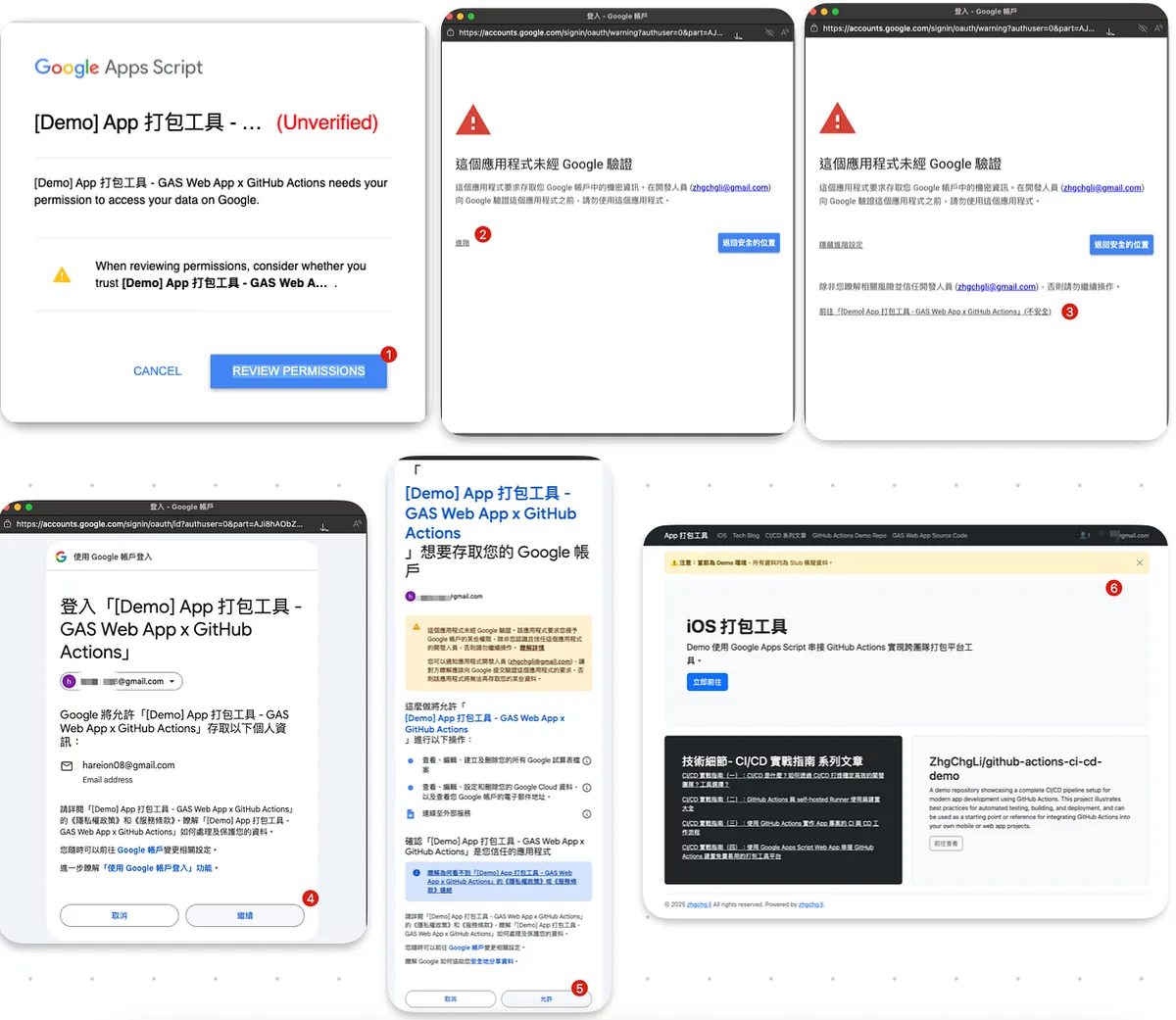
- Online Demo Please follow the authorization steps shown in the image below for first-time use (Demo App Only):

What is CI/CD?
Story — Development Process Without CI/CD
Before discussing what CI/CD really is, let’s set aside the term “CI/CD” and first recall how a startup development team without any workflows would operate. The general process can be summarized in the diagram below:
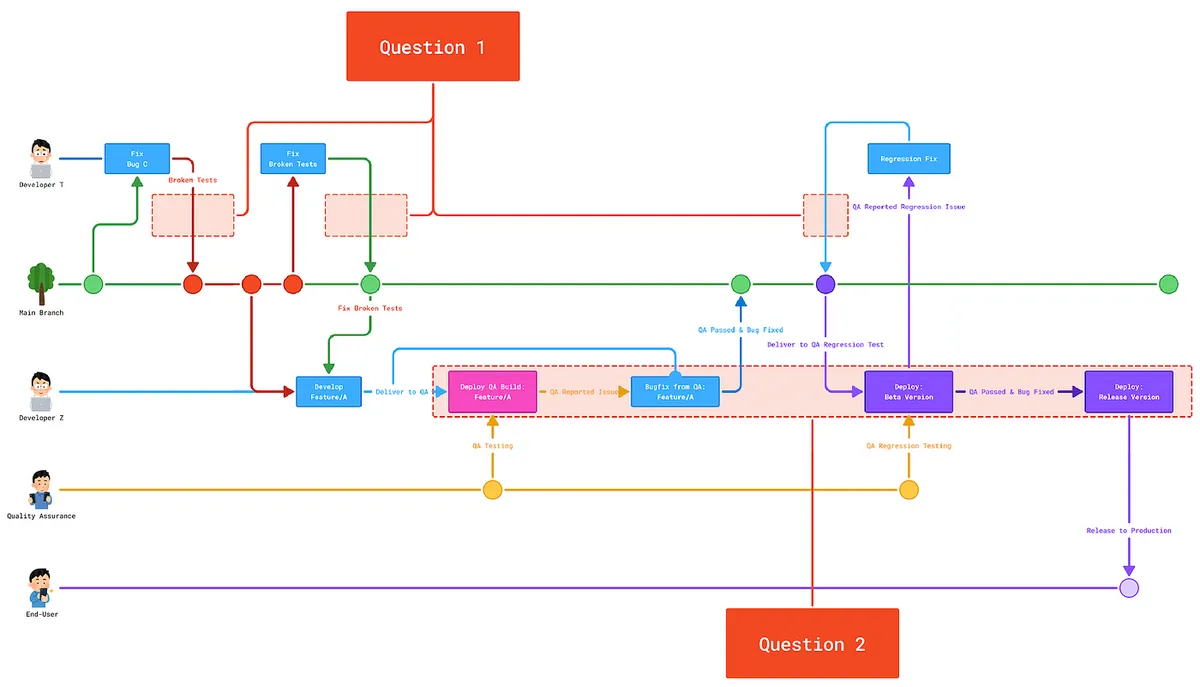
The product has a bug. Developer T creates a branch fix/bug-c from the main branch to fix it. After fixing, the branch is merged back into the main branch.
Next, Developer Z branches feature/a from the main branch to work on requirement A. Halfway through, they notice the feature behaves oddly. After checking, they find that the current feature was broken and tests failed, so they notify Developer T to fix it.
After all development is complete, Developer Z uses his computer to build the version for QA testing, going back and forth with fixes and builds. Once everything is confirmed working, the feature is merged back into the main branch.
At the end of the Sprint, it’s time to package and release to users; Developer Z puts aside current tasks to help package from the main branch for QA to perform Regression testing, similarly repeatedly fixing issues and repackaging, then submits the packaged App for review.
Release to users after Apple/Google review is completed.
Problem
In the above story, we can summarize two major issues.
Question 1: There is no unified inspection mechanism for current correct feature changes.
Code That Does Not Follow Coding Style Can Still Be Merged
Even if the build fails, I can still merge
After changes, basic Unit Tests and important checks can still be merged without passing.
My environment works correctly, but others may not have the same results.
Affects other developers who are currently working
Question 2: Spending a lot of manpower and time on packaging tasks.
Packaging requires engineers to manually package, interrupting their current development work.
Switching between packaging and development causes significant flow disruption.
Cannot perform other development tasks while waiting for packaging.
Engineers’ time cost translates to money.
Manual operations may lead to errors.
QA requests engineers to package (causing back-and-forth communication).
CI — Continuous Integration 持續整合
Corresponding to Question 1, “Continuous Integration” aims to ensure that all changes automatically execute Build & Test in a unified environment, guaranteeing that all modifications pass every test case and meet team standards before entering production — “continuously and automatically ensuring correct code integration into the production environment.”
You can also add Nightly Builds and more automated testing steps to ensure stability.
CD — Continuous Delivery / Deployment Continuous Delivery / Deployment
Corresponding to Question 2, “Continuous Deployment” aims to automatically complete the tedious packaging and deployment process for internal testing (QA, Debug, Staging, Beta…) or external release (Production, Release…) after the code passes the CI stage without errors.
Continuous Deployment: Fully automated deployment directly to the Production environment
Continuous Delivery: Automatically deploys only to the Staging/Debug environment; manual verification is required before deploying to the Production environment.
In the context of App development, it leans more towards Continuous Delivery, where we want a manual check before the app is officially released to ensure the release timing and functionality are correct.
Story — Building a Stable and Efficient Development Team Through CI/CD
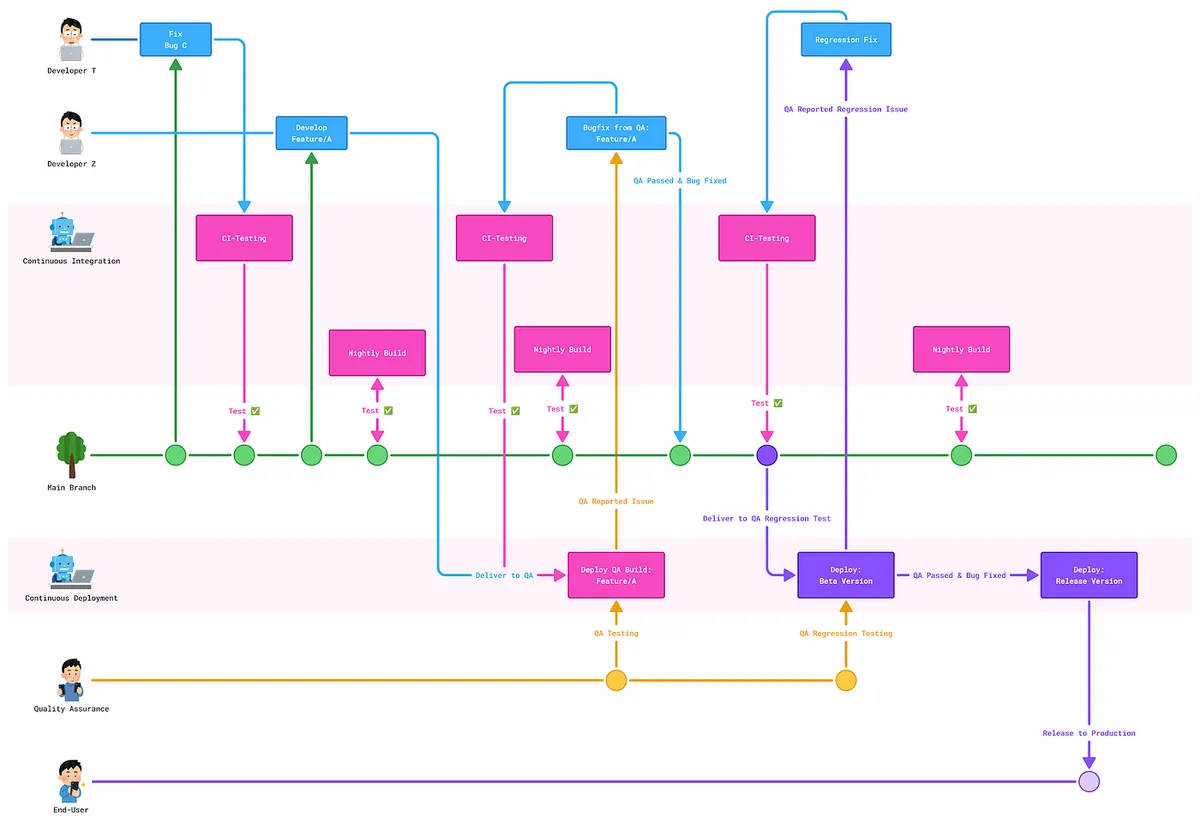
Looking back at our story, after implementing CI/CD:
CI
All changes must pass automated tests before merging into the main branch. A Nightly Build scheduled automated test is added to improve stability.CD
Using CD packaging uniformly, Developer T and Developer Z can fully focus on business development, reducing manual communication and operational errors.
Team Work Efficiency and Product Stability 🚀🚀🚀🚀🚀
The Value of CI/CD
Combining the core Agile principle of “small steps, fast iterations,” CI/CD provides the foundation for stability and work efficiency during frequent and continuous feature iterations.
Automatically Unify Verification of Iteration Results
- Ensure all adjustments meet the expected results, do not affect other functions, and do not impact other team members.
Automate Tedious Deployment Processes
- Allow team members to focus on core business development and reduce manual operation errors
CI/CD Effectiveness
Reviewing the 2021 Pinkoi talk “2021 Pinkoi Tech Career Talk — Secrets of High-Efficiency Engineering Teams”, the core message remains the same: “automation, reducing dependency on people, and focusing on core business.” Implementing CI/CD fully aligns with these three directions, allowing us to estimate its effectiveness using the same approach.
Another point to highlight again is the cost of switching flow:
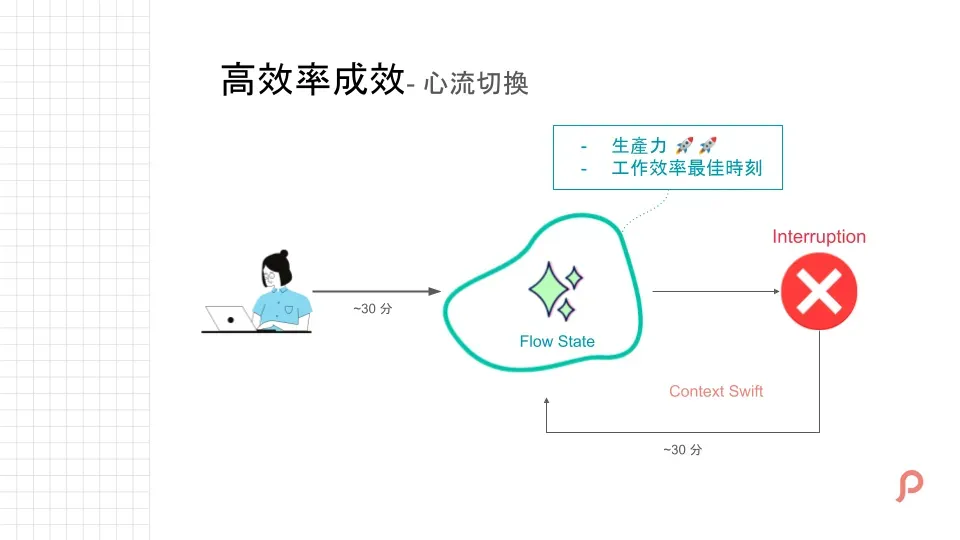
After working continuously for a period, we enter a “flow” state, where our thoughts and productivity peak, enabling the most effective output. However, if interrupted, it takes time to return to this flow state—here, we use 30 minutes as an example.
In scenarios without CI/CD, it might be: Spending a lot of time only to find out something was broken, then going back to communicate and fix it (CI), and QA/PM asking engineers to help build the test version of the app (CD).
CI/CD Effectiveness Estimation
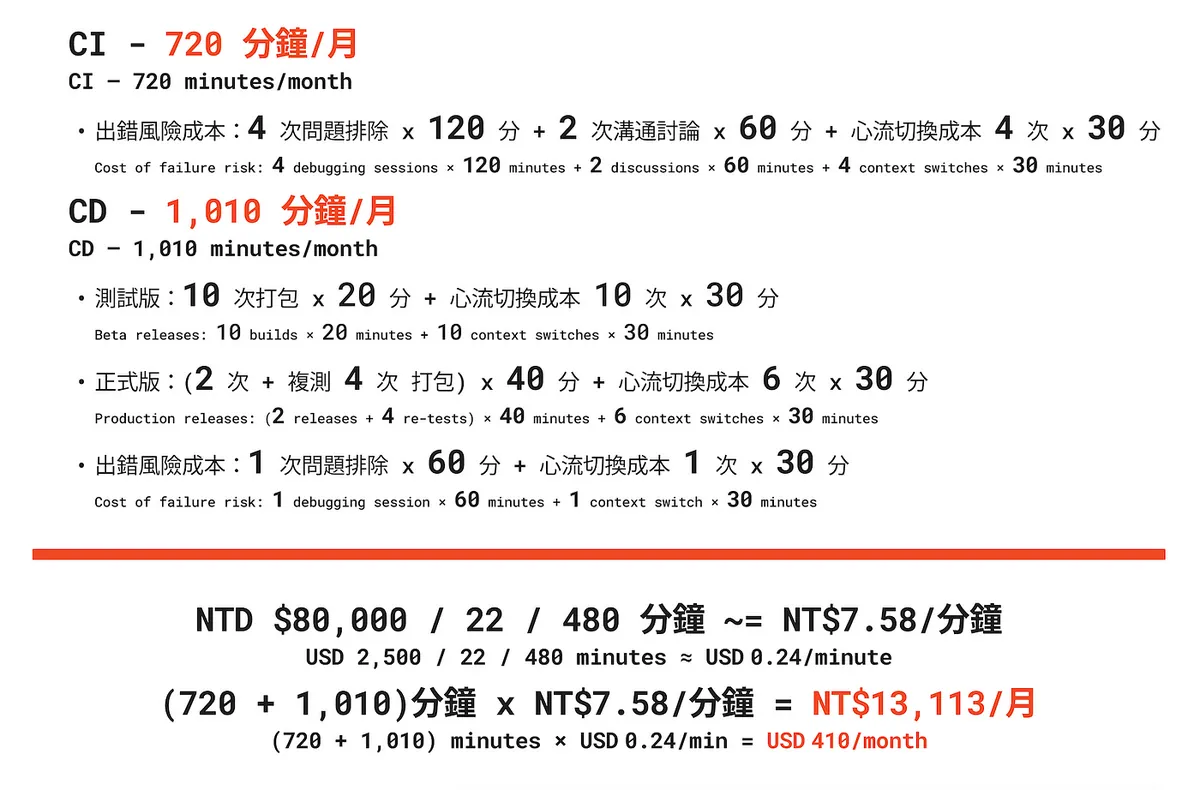
Team size: 6 people / calculated on a monthly basis
Here, we use a monthly basis as an example. Without a CI/CD process, there are 4 unexpected breaks to the main branch each month, causing about 720 minutes of fixing and communication. Additionally, packaging test and release versions and errors from manual operations take about 1,010 minutes in total. With an engineer’s monthly salary of 80,000, this results in a monthly cost waste of approximately 13,000.
CI/CD Setup Cost
Labor Cost:
Following the setup described in this series, it is estimated that 1 person will spend 10 days = 4,800 minutes to complete it. (~= NT$36,384)Equipment and Operating Costs:
Using GitHub Actions self-hosted Runner only requires purchasing 1–2 Mac Mini units initially, or directly using existing retired MacBook Pros as CI/CD Runners to provide service.
For a 6-person team, purchasing a brand new Mac Mini as an example: 32G RAM M4 Mini (= NT$40,900)
The total cost is about NT$80,000, with benefits starting to be realized after roughly six months.
Disclaimer: This is just one way to calculate benefits and may not be the most accurate; it is meant to give everyone a concept to extend, allowing management to see the value of CI/CD and thereby authorize the promotion and completion of the entire workflow.
Tool Selection for CI/CD
Cloud Services Bitrise / XCode Cloud
Bitrise: One of the earliest cloud services focused on App CI/CD. My first experience with CI/CD was using Bitrise. It offers a user-friendly and intuitive step editor, allowing quick setup of App CI/CD workflows.
Drawbacks: Initially, it was a $99 flat fee. When Apple M-series processors were first released, they switched to usage-based billing (a “bait and switch” tactic). At that time, our team’s usage cost at least $500 per month, so we migrated to GitHub Actions.
However, recently checking their website, they now offer 1 App / 1 Concurrent / unlimited usage for $89 per month.XCode Cloud: 100 hours / 1 month / $50 USD. The advantage is its high integration with XCode and app development; however, the downside is that it does not support Android and customizing certain steps can be challenging. For small pure iOS apps, I would consider using it again.
Really worried about cloud services locking you in, so considering on-premise solutions for better control.
On-Premise Services Jenkins / GitHub Actions / Gitlab CI/CD
Gitlab CI/CD:
It was launched earlier than GitHub Actions and offers more complete features. However, since our project is hosted on GitHub, we do not consider using Gitlab CI/CD. Both have similar functions, and this series will use GitHub Actions as an example.GitHub Actions
GitHub launched its CI/CD service in 2018, directly integrated with GitHub projects. It has been continuously improved over the years, offering many pre-built steps (Marketplace) ready to use. It supports self-hosted runners, allowing unlimited use of your own machines (effectively a hybrid cloud).Jenkins:
An open-source, free tool specialized in CI/CD, old but powerful; Jenkins covers everything from application-level task design and permission management to underlying service execution. It also has Plugins available for direct use and was an essential tool for early DevOps CI/CD.
Jenkins v.s. GitHub Actions
TL;DR
For App Teams without dedicated DevOps, it is too challenging for developers to set up and maintain a Jenkins environment from scratch. Few people know how to do it, and it can lead to network security issues. Choosing GitHub Actions instead allows developers to focus solely on designing the CI/CD workflow. By briefly reviewing the official documentation on writing workflows and starting Runners, they can quickly build a free, stable, and secure CI/CD service.
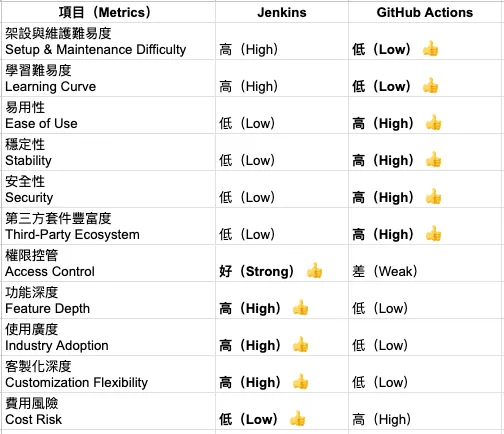
The following comparison is based solely on setting up App CI/CD and does not apply to all technical scenarios.
Setup and Maintenance Difficulty Jenkins »> GitHub Actions
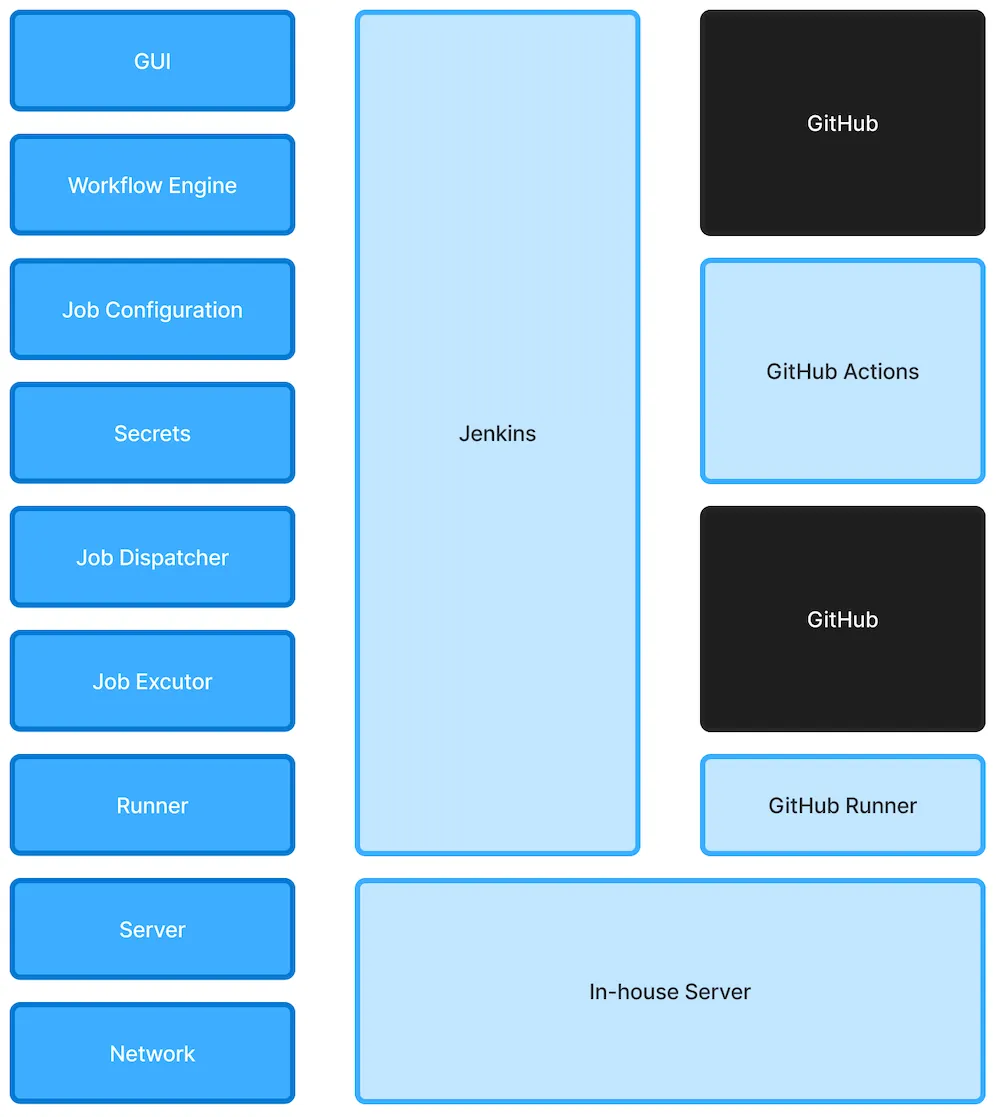
Here is a simple layered structure diagram to explain the difference between the two. As mentioned earlier, Jenkins covers all functions from top to bottom, making self-hosting much more complex. On the other hand, GitHub Actions only requires writing YAML workflows on GitHub. The local machine just needs to register the GitHub self-hosted Runner (completed with 5 commands), and GitHub will automatically dispatch tasks to the local machine. Other issues like GitHub Actions/Runner version upgrades or task dispatching are maintained by GitHub, so we don’t need to handle them.
Another tricky point is that Jenkins is a service independent of Git, so communication between them requires APIs (e.g., GitHub API/WebHook), making the configuration more complex.
I previously surveyed about 30 iOS developers around me. Only a few (2) understood Jenkins, while more than 10 were using GitHub Actions. After all, you can complete CI/CD tasks just by writing some YAML.
Learning Difficulty Jenkins »> GitHub Actions
Just refer to the official documentation to learn about GitHub Actions YAML commands and how to run your own Runner locally.
Stability: GitHub Actions > Jenkins
I think GitHub Actions slightly outperforms Jenkins in this aspect.
Jenkins may crash due to system upgrades or installing conflicting plugins (however, if it runs smoothly and you don’t change anything, it generally has no issues).
GitHub Actions is limited by the GitHub service status (if GitHub goes down, it will also be affected), but such incidents are rare, with an average uptime of 99.9%. If a real issue occurs, you just wait for it to be fixed.
Security: GitHub Actions > Jenkins
Considering that GitHub Actions/Runner services are maintained and automatically updated by GitHub itself, this may be safer compared to Jenkins, which requires manual updates.
Additionally, communication between Jenkins and GitHub requires opening API/WebHook ports, which is relatively risky. GitHub and GitHub Actions integrate seamlessly, and the relationship between GitHub Actions and the self-hosted Runner is observer-based. The self-hosted Runner requests tasks from GitHub, so the Runner itself does not need to open external interfaces.
However, in a fully closed network environment, Jenkins is more secure than GitHub Actions.
Permission Control Jenkins »> GitHub Actions
This point needs special emphasis for comparison: Jenkins allows separate account login permissions for control; GitHub Actions is directly tied to the GitHub repo, so only users with repo access can use it.
That is why the following articles use GAS Web App to build a cross-team operation platform.
Using Jenkins Extensively »> GitHub Actions
In teams with a complete DevOps team, Jenkins is undoubtedly still the preferred choice. After all, in other fields (such as Web, backend, Java…), Jenkins has the longest runtime, the most useful plugins, and can unify the CI/CD setup for all teams, making management easier. It also supports complex CI/CD scenarios like automatic frontend deployment after backend deployment.
GitHub Actions now also supports cross-repo Actions/Runners.
Third-party Plugin Richness Jenkins > GitHub Actions
In terms of quantity, GitHub Actions outnumbers Jenkins, but Jenkins offers deeper and more powerful CI/CD capabilities. Many features in GitHub Actions are primarily automation functions.
Feature Depth Jenkins »> GitHub Actions
This aspect is incomparable. Jenkins has been around for nearly 20 years, while GitHub Actions still needs to add many features; for example: permission management, secret management (currently only plain text is supported, key files must be converted to plain text first), Cache/Artifact currently only supports the Cloud, and so on.
Additionally, GitHub Self-hosted Runner also supports Docker or k8s.
Customizing Jenkins »> GitHub Actions
Jenkins is fully controlled by yourself, allowing greater customization of permissions that can affect the entire system. GitHub Actions can only customize different steps at the application layer.
For example, the built-in Artifacts in GitHub Actions currently do not support self-hosted runners, so you can only use a shell script in the steps to copy files to another directory, and cannot customize Artifacts implementation yourself.
App CI/CD scenarios do not require very advanced features.
Ease of Use: GitHub Actions »> Jenkins
On the interface side, GitHub Actions is a newer tool and is easier to use than Jenkins;
In terms of script configuration, Jenkins uses Pipeline Scripts stored on Jenkins, while GitHub Actions uses YAML files managed within the project Git repository, making it easier to set up than Jenkins.
Cost Risk Jenkins > GitHub Actions
Jenkins is fully open-source and free, giving you complete control. GitHub Actions is partially open-source, but task dispatching and execution are part of GitHub’s closed SaaS service. Currently, GitHub Actions is completely free; you only pay when using GitHub-hosted Runners (for private repos). Using self-hosted runners is free.
Purpose of Google Apps Script Web App and Why It Was Chosen
Another tool option is Google Apps Script Web App. The reason for adding this is that GitHub Actions’ built-in form features are too basic (the interface is too technical and static) and the execution permissions are tied to the GitHub Repo. This makes it very inconvenient if we need to provide access to other functional team members.
As follows:
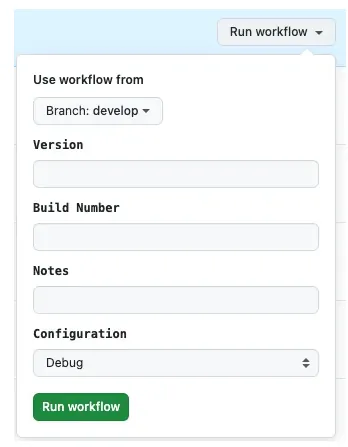
CD packaging often requires the operator to fill in some information, such as Release Notes.
Therefore, we need an “interface” tool to make it easier for other team members or even our own engineers to use.
Required Scenario:
Fill in the required information on this more user-friendly “interface,” connect to project management tools (e.g., Jira, Asana) to get tasks, or directly fetch the PR list from GitHub. Select from the dropdown menu and submit, then trigger GitHub Actions for packaging via the GitHub API.
Slack
The first time we implemented CI/CD, we chose to integrate the Slack API to achieve an effect like the following:
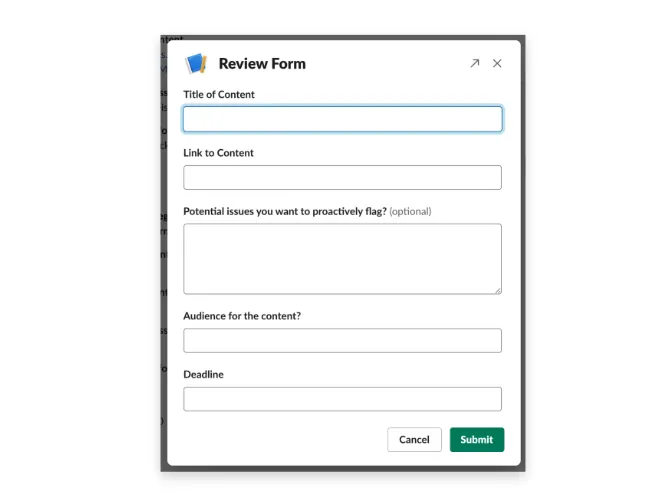
https://slack.com/intl/zh-tw/blog/productivity/workflow-builder-tools-automation-examples
- Partners can directly fill out forms in Slack, trigger CD packaging, and receive Slack notifications.
The operation is smooth and unified within daily office tools (SSOT), requiring no relearning; however, the underlying issue is that development and maintenance costs are very high. One reason is that Slack Outgoing-Webhook API demands a very fast response (within 3 seconds), which basically rules out using simple FAAS services for integration (e.g., Cloud Functions, GAS, Lambda…).
Previously, a team member interested in automation and backend development created a complete backend service using Kotlin+ktor, then deployed a server on GCP for Slack integration.
Development and maintenance costs are extremely high, and handover is very difficult.
Google Apps Script — Web App
Previously shared “Using Google Apps Script Web App Form to Connect Github Action CI/CD Workflow”:
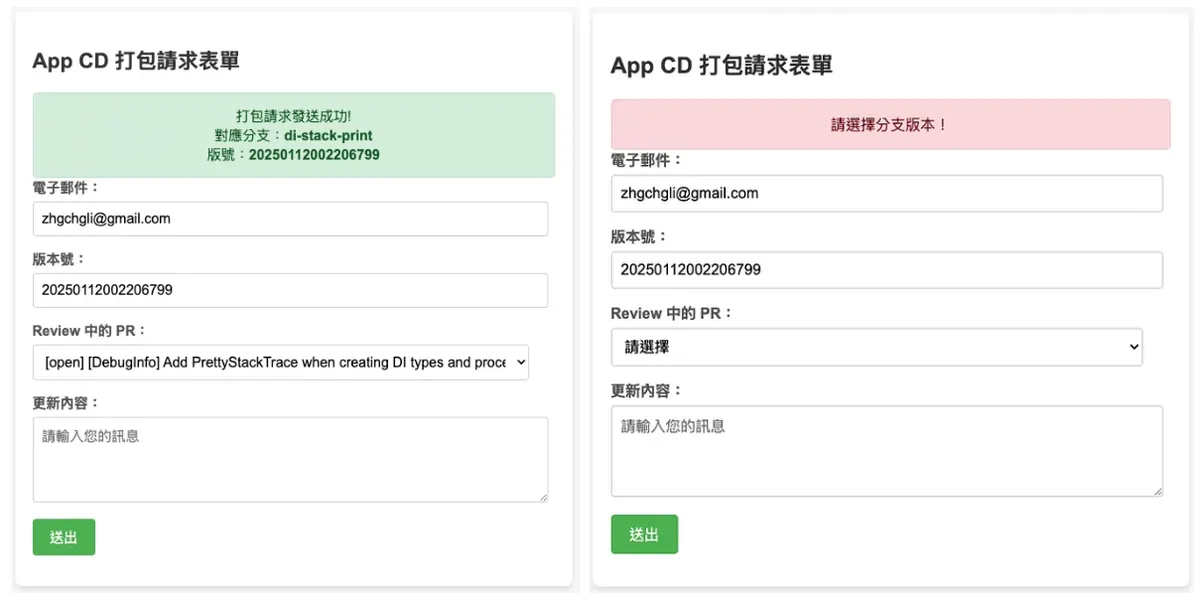
{:target="_blank"}](/assets/c008a9e8ceca/1*NJRcY2ULVylZlsKnBtM27A.webp)
The advantages of using Google Apps Script — Web App are:
Website Web
Similar to Google Workspace enterprise account permission management, access can be restricted to only Google accounts within the organization.
Completely Free
Function as a Service requires no self-hosted server maintenance
Easier to maintain and hand over
Can be operated on mobile devices
AI Can Help!
Whether it’s ChatGPT or other AI tools, they are very familiar with GAS and can directly help us create packaging forms and connect to the GitHub API.Also supports integration with Jira, Asana, and Slack notification APIs
For the second promotion, I switched to using a GAS Web App for the team, which also received great feedback. The only difference from Slack is that you need to bookmark one more URL, and when packaging is needed, you open the URL and operate the packaging through the web form.
Complete App CI/CD Tool Workflow
Here is the complete workflow. The next article will gradually introduce how to use and integrate each tool.
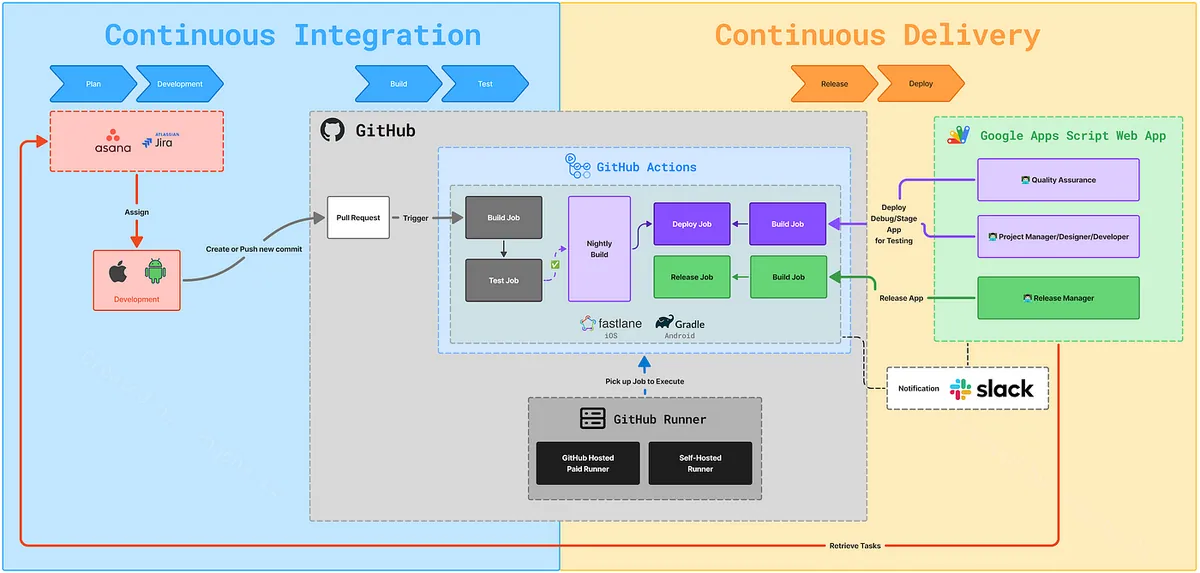
Tool Roles:
GitHub Actions: CI/CD logic script code
GitHub Actions — Self-hosted Runner: The actual environment where CI/CD runs. Using a self-hosted runner allows unlimited task execution by only bearing the cost of the machine purchase.
Google Apps Script Web App: Since packaging is not always done by engineers, a platform is needed for cross-functional partners to use; GAS Web App can quickly create a web tool and share the URL for others to operate.
Asana/Jira: Project management tools that can integrate with the GAS Web App, allowing QA/PM to directly select the tasks they want to package.
Slack: Responsible for receiving execution result notifications
Scenario:
End-User (QA/PM/PD/Developer): Use GAS Web App to submit the packaging form (fetch the Branch corresponding to the Jira or Asana task) -> GAS calls GitHub API -> triggers CD packaging GitHub Actions <- GitHub self-hosted runner listens for the task and pulls it to the machine for execution -> upon completion, Slack notification is sent and GAS Web App packaging status is updated.
End-User (Developer): Open a PR, push new commits to the PR -> trigger the CI test process <- GitHub self-hosted runner listens for tasks and pulls them to the machine for execution -> after completion, comment test results and update Checks.
Summary
This article mainly provides a basic understanding of what CI/CD is and its benefits. Starting from the next article, we will dive into the technical aspects, guiding you step-by-step to learn and implement GitHub Actions CI/CD until achieving the final results mentioned earlier.
Series Articles:
Buy me a coffee
{:target="_blank"}](/assets/c008a9e8ceca/1*QJj54G9gOjtQS-rbHVT1SQ.webp)
If you have any questions or feedback, feel free to contact me.

This post was originally published on Medium (View original post), and automatically converted and synced by ZMediumToMarkdown.