iOS Timer vs DispatchSourceTimer|Safe Usage with Finite State Machine & Design Patterns
Discover how to enhance iOS timer safety by encapsulating DispatchSourceTimer using finite state machines and design patterns, solving common concurrency issues for reliable app performance.
点击这里查看本文章简体中文版本。
點擊這裡查看本文章正體中文版本。
This post was translated with AI assistance — let me know if anything sounds off!
Table of Contents
[iOS] How to Choose and Safely Use Timer and DispatchSourceTimer?
Encapsulating DispatchSourceTimer with Finite State Machine and Design Patterns for Safer and Easier Use.
{:target="_blank"}](/assets/62f68ebeecd3/1*2CWJW1fPOAZdU3nqeJ2JeQ.webp)
Photo by Ralph Hutter
About Timer
In iOS development, the “Timer trigger” is a common requirement; from UI aspects like showing countdowns and banner carousels to data logic tasks like scheduled event sending and periodic data cleanup, we rely on timers to help achieve these goals.
Foundation — Timer (NSTimer)
Timer is probably the most intuitive API that comes to mind first, but there are several points to consider when choosing and using Timer.
Advantages and Disadvantages
Advantages of Timer:
By default, it integrates with UI work and does not require explicitly switching to the Main Thread.
Automatically adjusts trigger timing to optimize power usage
Lower complexity, at most causing retain cycles or forgetting to stop the Timer, but will not directly cause a crash
Disadvantages of Timer:
Accuracy is affected by the RunLoop state and may be delayed during high UI interaction or mode switching.
Does not support advanced operations like
suspend,resume,activate, etc.
Suitable Scenarios
UI-level needs, such as carousel banners (auto-scrolling ScrollView) or coupon countdown timers; these scenarios only require the user to respond to content in the current foreground screen. I choose to use Timer directly for a convenient, fast, and safe solution.
Lifecycle
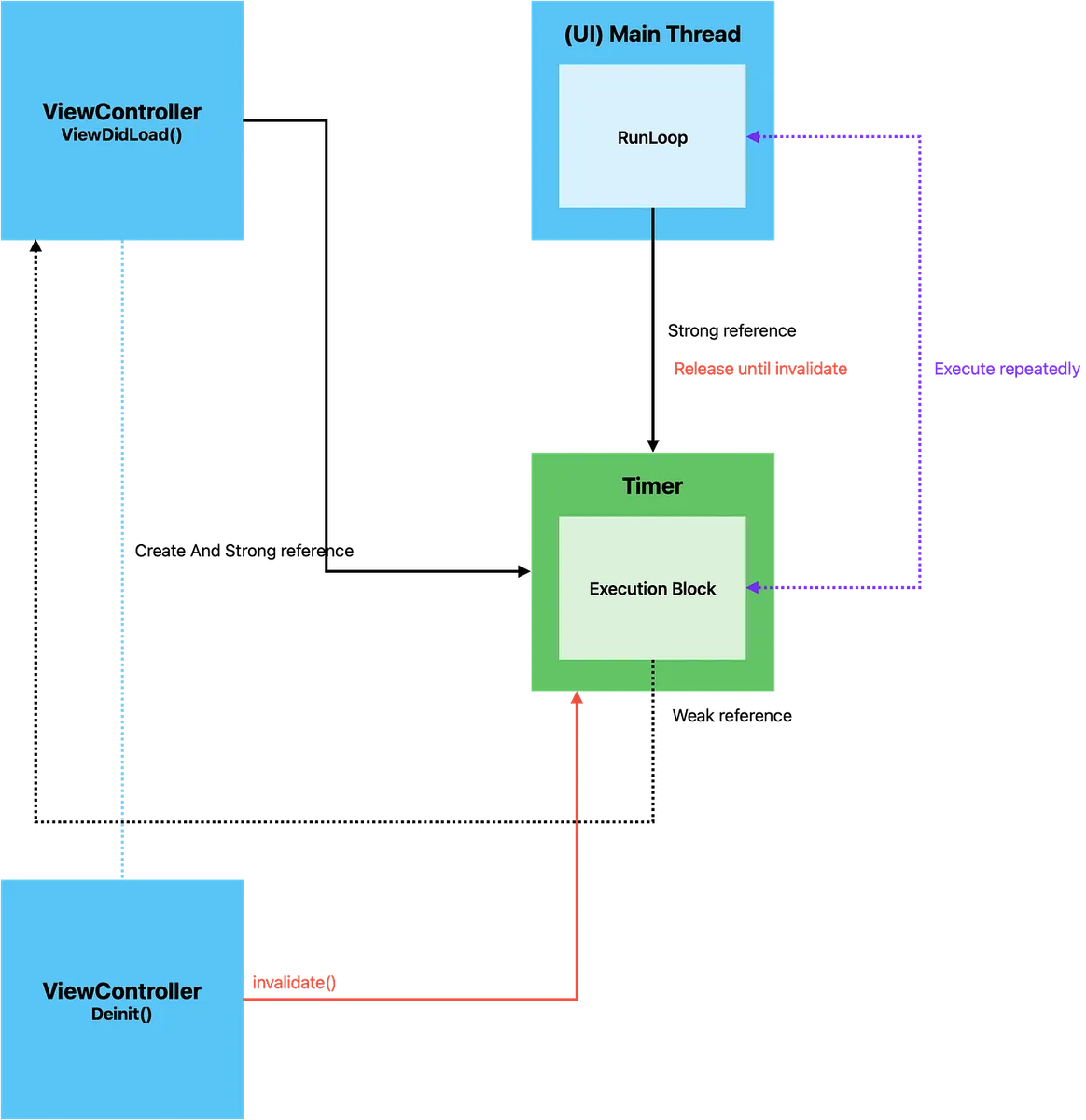
Creating a Timer on the UI Main Thread means the Timer is strongly held by the Main Thread’s RunLoop and is periodically triggered by the RunLoop’s polling mechanism. It will only be released when Timer.invalidate() is called. Therefore, we need to strongly hold the Timer in the ViewController and call Timer.invalidate() in deinit to properly stop and release the Timer after the view is dismissed.
⭐️️️View Controller strongly retains Timer, the Timer’s Execution Block (handler/closure) must use Weak Self; otherwise, it will cause a Retain Cycle.
⭐️️️ Be sure to call Timer invalidate() at the end of the View Controller lifecycle; otherwise, the RunLoop will still hold the Timer and keep it running.
RunLoop is an event processing loop within a Thread that polls and handles events; the system automatically creates a RunLoop for the Main Thread (RunLoop.main), but other Threads may not have a RunLoop.
Usage
We can directly use Timer.scheduledTimer to declare a Timer (it automatically adds to RunLoop.main & Mode: .default):
1
2
3
4
5
6
7
8
9
10
11
12
13
14
15
16
17
18
19
20
21
22
23
24
final class HomeViewController: UIViewController {

    private var timer: Timer?

    deinit {
        self.timer?.invalidate()
        self.timer = nil
    }

    override func viewDidLoad() {
        super.viewDidLoad()
        startCarousel()
    }

    private func startCarousel() {
        self.timer = Timer.scheduledTimer(withTimeInterval: 1, repeats: true, block: { [weak self] _ in
            self?.doSomething()
        })
    }

    private func doSomething() {
        print("Hello World!")
    }
}
You can also declare a Timer object yourself and add it to the RunLoop:
1
2
3
4
5
6
let timer = Timer(timeInterval: 1.0, repeats: true) { [weak self] _ in
  // do something..
}
self.timer = timer
// Adding to RunLoop starts the timer
RunLoop.main.add(timer, forMode: .default)
How to Use Timer
invalidate()stops the Timerfire()triggers immediately once
The Impact of RunLoop Mode
.default: The default added mode, mainly handles UI display.
Will pause first when switching to.trackingmode.tracking: Handles ScrollView scrolling and Gesture recognition..common: Handles both.defaultand.tracking.
⭐️️️⭐️️️⭐️️️Therefore, by default, our Timer is added to the
.defaultmode, which will automatically pause when the user scrolls a ScrollView or performs gestures, and will only resume after the interaction ends. This may cause the Timer to trigger late or fire fewer times than expected.
For this, we can add Timer to the .common Mode to solve the above issue:
1
RunLoop.main.add(timer, forMode: .common)
Grand Central Dispatch — DispatchSourceTimer
Besides Timer, GCD also provides another option called DispatchSourceTimer.
Advantages and Disadvantages
Advantages of DispatchSourceTimer:
Better operational flexibility (supports
suspendandresume)Higher accuracy and reliability: depends on GCD queue
Leeway can be set manually to control power consumption
Stable resident task (GCD queue)
Disadvantages of DispatchSourceTimer:
UI operations require manually switching back to the Main Thread
The API is complex and order-dependent; using it incorrectly will cause a crash
Encapsulation Is Needed for Safe Usage
Suitable Scenarios
Compared to Timer, which is suitable for UI-related scenarios, DispatchSourceTimer is better suited for tasks unrelated to the UI or the current user screen. The most common use cases are sending tracking events, where user-generated events are periodically sent to the server, or regularly cleaning up unused CoreData data. These tasks are ideal for using DispatchSourceTimer.
Life Cycle
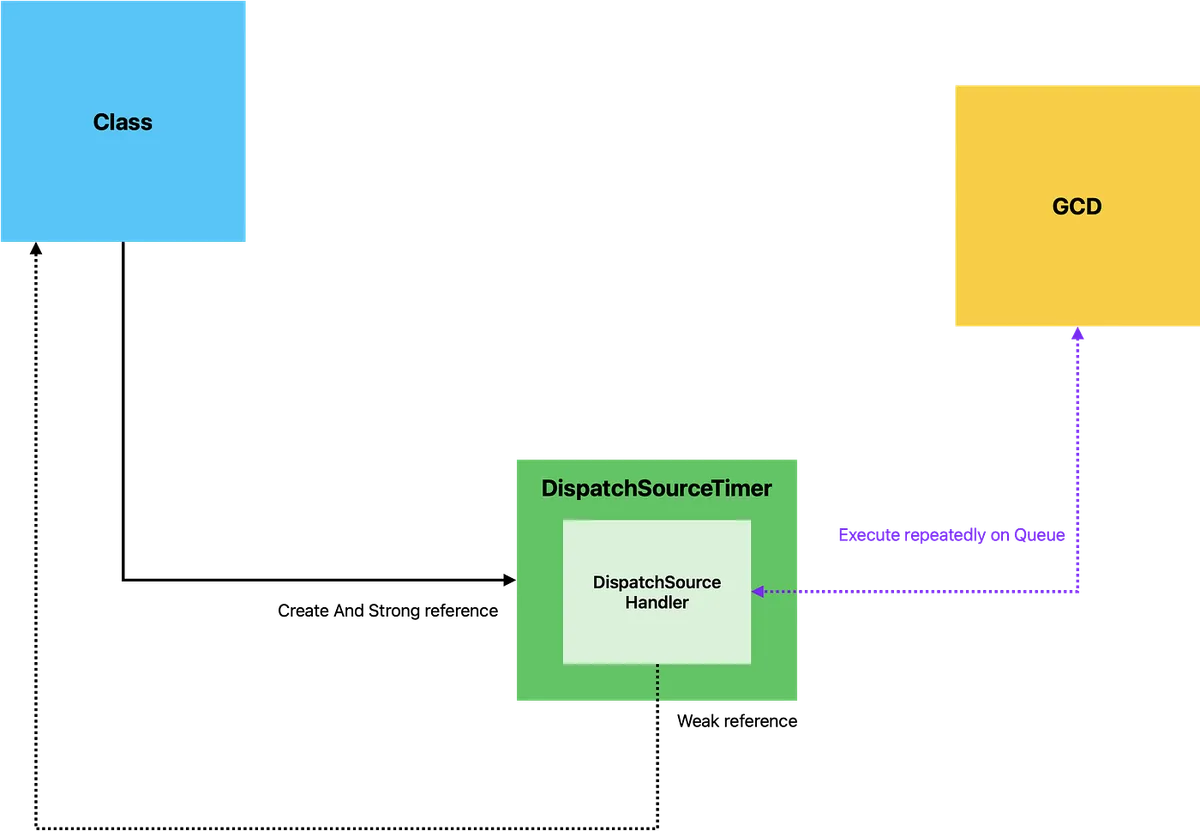
The lifecycle of DispatchSourceTimer depends on whether it is still retained by an external object; the GCD queue itself does not strongly retain the timer’s owner and only handles scheduling and executing events.
Crash Issues
Although DispatchSourceTimer offers more control methods: activate, suspend, resume, cancel; it is extremely sensitive, and calling them in the wrong order will cause immediate crashes (EXC_BREAKPOINT/DispatchSourceTimer), which is very dangerous.
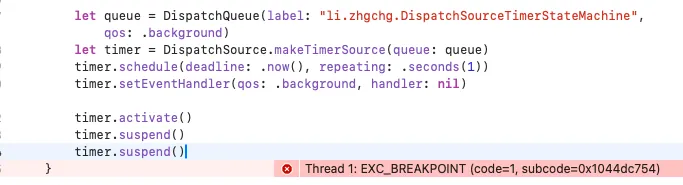
The following situations will cause an immediate crash:
❌ suspend() and resume() are not used in pairs
Calling suspend() again after suspend()
Calling resume() again after resume()❌ Calling cancel() after suspend()
You need to call resume() before cancel()❌ Timer is released (nil) while in suspend() state
❌ Calling other operations after cancel()
Using Finite-State Machine to Encapsulate Operations
Moving on to another key point of this article: How to safely use DispatchSourceTimer?
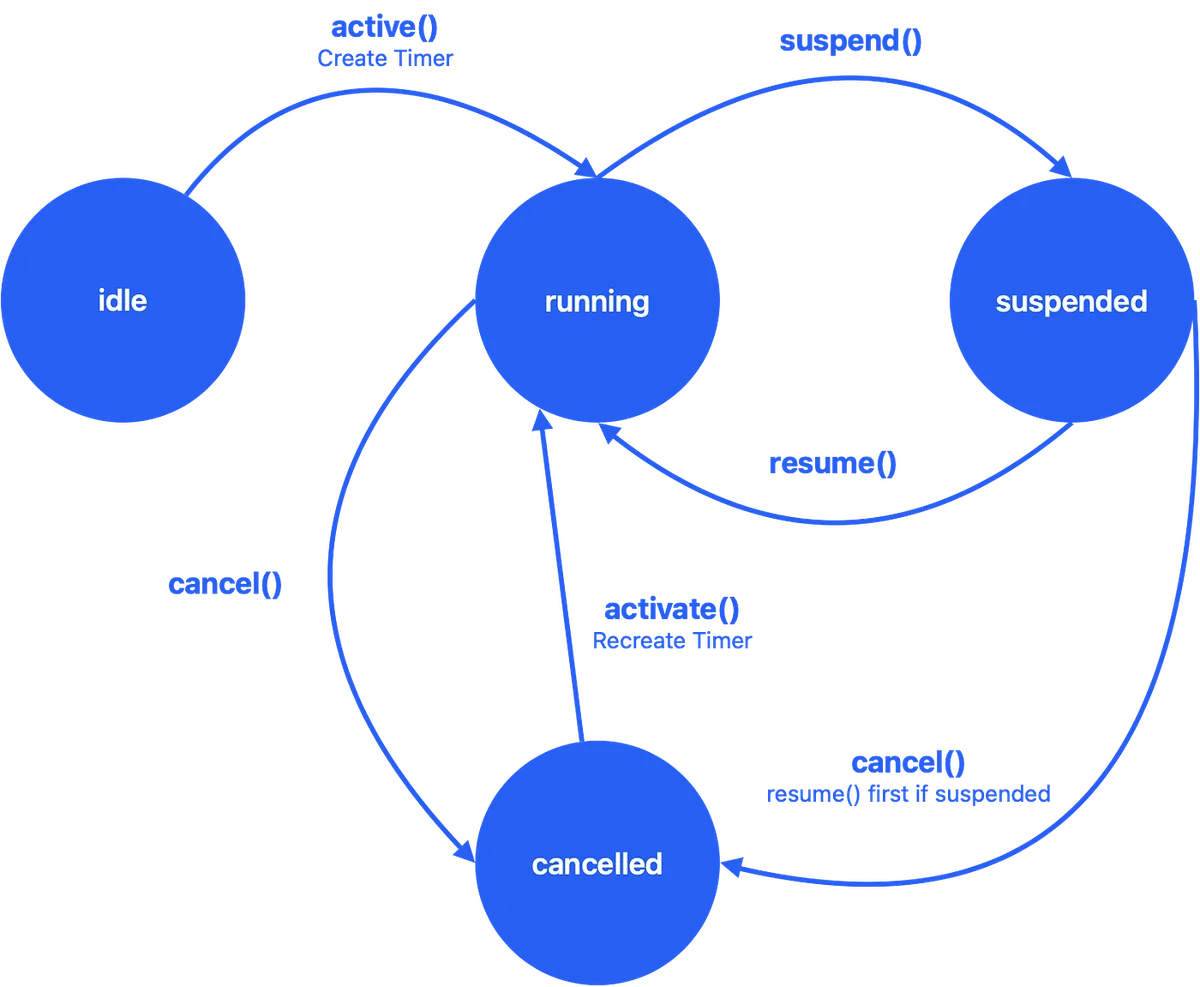
As shown in the above image, we use a finite state machine to encapsulate DispatchSourceTimer operations, making it safer and easier to use:
1
2
3
4
5
6
7
8
9
10
11
12
13
14
15
16
17
18
19
20
21
22
23
24
25
26
27
28
29
30
31
32
33
34
35
36
37
38
39
40
41
42
43
44
45
46
47
48
49
50
51
52
53
54
55
56
57
58
59
60
61
62
63
64
65
66
67
68
69
70
71
72
73
74
75
76
77
78
79
80
81
82
83
84
85
86
87
88
89
90
91
92
93
94
95
96
97
98
final class DispatchSourceTimerMachine {
    // States of the finite state machine
    private enum TimerState {
        // Initial state
        case idle
        // Running
        case running
        // Suspended
        case suspended
        // Cancelled
        case cancelled
    }

    private var timer: DispatchSourceTimer?
    private lazy var timerQueue: DispatchQueue = {
        DispatchQueue(label: "li.zhgchg.DispatchSourceTimerMachine", qos: .background)
    }()

    private var _state: TimerState = .idle

    deinit {
        // When the owner object is deallocated, cancel the timer synchronously
        // Not mandatory (handler is weak), but ensures the flow is as expected
        if _state == .suspended {
            timer?.resume()
            _state = .running
        }
        if _state == .running {
            timer?.cancel()
            timer = nil
            _state = .cancelled
        }
    }

    // Start the Timer
    func activate(repeatTimeInterval: DispatchTimeInterval, handler: DispatchSource.DispatchSourceHandler?) {
        // Timer can only be activated in idle or cancelled state
        guard [.idle, .cancelled].contains(_state) else { return }

        // Create Timer and activate()
        let timer = makeTimer(repeatTimeInterval: repeatTimeInterval, handler: handler)
        self.timer = timer
        timer.activate()

        // Switch to running state
        _state = .running
    }

    // Suspend the Timer
    func suspend() {
        // Timer can only be suspended when running
        guard [.running].contains(_state) else { return }

        // Suspend Timer
        timer?.suspend()

        // Switch to suspended state
        _state = .suspended
    }

    // Resume the Timer
    func resume() {
        // Timer can only be resumed when suspended
        guard [.suspended].contains(_state) else { return }

        // Resume Timer
        timer?.resume()

        // Switch to running state
        _state = .running
    }

    // Cancel the Timer
    func cancel() {
        // Timer can only be cancelled when suspended or running
        guard [.suspended, .running].contains(_state) else { return }

        // If currently suspended, resume first before cancelling
        // This is a DispatchSourceTimer limitation; can only cancel when running
        if _state == .suspended {
            self.resume()
        }

        // Cancel Timer
        timer?.cancel()
        timer = nil

        // Switch to cancelled state
        _state = .cancelled
    }

    private func makeTimer(repeatTimeInterval: DispatchTimeInterval, handler: DispatchSourceProtocol.DispatchSourceHandler?) -> DispatchSourceTimer {
        let timer = DispatchSource.makeTimerSource(queue: timerQueue)
        timer.schedule(deadline: .now(), repeating: repeatTimeInterval)
        timer.setEventHandler(qos: .background, handler: handler)
        return timer
    }
}
We simply use a finite state machine to encapsulate the logic of “which states can transition to which” and “what actions each state requires.” Calls made in the wrong state are ignored (no crashes). We also added some optimizations, such as allowing cancel in the suspended state and reactivating from the cancelled state.
Further Reading:
Previously, I wrote another article “Design Patterns Practical Application|Encapsulating Socket.IO Real-time Communication Architecture”, where I also used a finite state machine and additionally applied the State Pattern.
Finite-State Machine: Focuses on controlling state transitions and the actions to perform.
State Pattern: Focuses on the behavior logic within each state.
Using Serial Queue to Manage Finite State Machine Transitions
Even after ensuring safe use of DispatchSourceTimer with a state machine, the issue is not fully resolved. We cannot guarantee that calls to DispatchSourceTimerMachine from outside occur on the same thread. If multiple threads operate on this object, race conditions may still cause crashes.
1
2
3
4
5
6
7
8
9
10
11
12
13
14
15
16
17
18
19
20
21
22
23
24
25
26
27
28
29
30
31
32
33
34
35
36
37
38
39
40
41
42
43
44
45
46
47
48
49
50
51
52
53
54
55
56
57
58
59
60
61
62
63
64
65
66
67
68
69
70
71
72
73
74
75
76
77
78
79
80
81
82
83
84
85
86
87
88
89
90
91
92
93
94
95
96
97
98
99
100
101
102
103
104
105
106
107
108
109
110
111
112
113
114
115
116
117
118
119
120
121
122
123
124
125
126
127
128
129
130
131
132
final class DispatchSourceTimerMachine {
    // States of the finite state machine
    private enum TimerState {
        // Initial state
        case idle
        // Running
        case running
        // Suspended
        case suspended
        // Cancelled
        case cancelled
    }

    private var timer: DispatchSourceTimer?
    private lazy var timerQueue: DispatchQueue = {
        DispatchQueue(label: "li.zhgchg.DispatchSourceTimerMachine", qos: .background)
    }()

    private var _state: TimerState = .idle

    private static let operationQueueSpecificKey = DispatchSpecificKey<ObjectIdentifier>()
    private lazy var operationQueueSpecificValue: ObjectIdentifier = ObjectIdentifier(self)
    private lazy var operationQueue: DispatchQueue = {
        let queue = DispatchQueue(label: "li.zhgchg.DispatchSourceTimerMachine.operationQueue")
        queue.setSpecific(key: Self.operationQueueSpecificKey, value: operationQueueSpecificValue)
        return queue
    }()
    private func operation(async: Bool = true, _ work: @escaping () -> Void) {
        if DispatchQueue.getSpecific(key: Self.operationQueueSpecificKey) == operationQueueSpecificValue {
            work()
        } else {
            if async {
                operationQueue.async(execute: work)
            } else {
                operationQueue.sync(execute: work)
            }
        }
    }

    deinit {
        // When the owner object disappears, synchronously cancel the timer
        // Not required (handler is weak), but ensures the flow is as expected
        // Ensure sync execution completes
        operation(async: false) { [self] in
            if _state == .suspended {
                timer?.resume()
                _state = .running
            }
            if _state == .running {
                timer?.cancel()
                timer = nil
                _state = .cancelled
            }
        }
    }

    // Start the Timer
    func activate(repeatTimeInterval: DispatchTimeInterval, handler: DispatchSource.DispatchSourceHandler?) {
        operation { [weak self] in
            guard let self = self else { return }
            // Only idle or cancelled states can activate the Timer
            guard [.idle, .cancelled].contains(_state) else { return }

            // Create Timer and activate()
            let timer = makeTimer(repeatTimeInterval: repeatTimeInterval, handler: handler)
            self.timer = timer
            timer.activate()

            // Switch to running state
            _state = .running
        }
    }

    // Suspend the Timer
    func suspend() {
        operation { [weak self] in
            guard let self = self else { return }
            // Only running state can suspend the Timer
            guard [.running].contains(_state) else { return }

            // Suspend the Timer
            timer?.suspend()

            // Switch to suspended state
            _state = .suspended
        }
    }

    // Resume the Timer
    func resume() {
        operation { [weak self] in
            guard let self = self else { return }
            // Only suspended state can resume the Timer
            guard [.suspended].contains(_state) else { return }

            // Resume the Timer
            timer?.resume()

            // Switch to running state
            _state = .running
        }
    }

    // Cancel the Timer
    func cancel() {
        operation { [weak self] in
            guard let self = self else { return }
            // Only suspended or running states can cancel the Timer
            guard [.suspended, .running].contains(_state) else { return }

            // If currently suspended, resume first then cancel
            // This is a DispatchSourceTimer limitation: can only cancel when running
            if _state == .suspended {
                self.resume()
            }

            // Cancel the Timer
            timer?.cancel()
            timer = nil

            // Switch to cancelled state
            _state = .cancelled
        }
    }

    private func makeTimer(repeatTimeInterval: DispatchTimeInterval, handler: DispatchSourceProtocol.DispatchSourceHandler?) -> DispatchSourceTimer {
        let timer = DispatchSource.makeTimerSource(queue: timerQueue)
        timer.schedule(deadline: .now(), repeating: repeatTimeInterval)
        timer.setEventHandler(qos: .background, handler: handler)
        return timer
    }
}
Now, we can safely use the DispatchSourceTimerMachine object as a Timer without worries:
1
2
3
4
5
6
7
8
9
10
11
12
13
14
15
16
17
18
19
20
21
22
23
24
25
26
27
28
29
30
31
final class TrackingEventSender {

    private let timerMachine = DispatchSourceTimerMachine()
    public var events: [String: String] = []

    // Start periodic tracking
    func startTracking() {
        timerMachine.activate(repeatTimeInterval: .seconds(30)) { [weak self] in
            self?.sendTrackingEvent()
        }
    }

    // Pause tracking (e.g., when App goes to background)
    func pauseTracking() {
        timerMachine.suspend()
    }

    // Resume tracking (e.g., when App returns to foreground)
    func resumeTracking() {
        timerMachine.resume()
    }

    // Stop tracking (e.g., when leaving the page)
    func stopTracking() {
        timerMachine.cancel()
    }

    private func sendTrackingEvent() {
        // send events to server...
    }
}
The section on how to safely use DispatchSourceTimer has ended. Next, we will extend to several Design Patterns to help us abstract objects for testing and to abstract the execution logic of DispatchSourceHandler.
Extension — Using Adapter Pattern + Factory Pattern to Create DispatchSourceTimer (Facilitates Abstract Testing)
DispatchSourceTimer is a GCD Objective-C object, making it difficult to mock in tests (no Protocol available); therefore, we need to define our own Protocol + Factory Pattern to generate it, allowing TimerStateMachine to be testable.
Adapter Pattern— Encapsulating DispatchSourceTimer Operations:
1
2
3
4
5
6
7
8
9
10
11
12
13
14
15
16
17
18
19
20
21
22
23
24
25
26
27
28
29
30
31
32
33
34
35
36
37
38
39
40
41
42
43
44
public protocol TimerAdapter {
    func schedule(repeating: DispatchTimeInterval)
    func setEventHandler(handler: DispatchSourceProtocol.DispatchSourceHandler?)
    func activate()
    func suspend()
    func resume()
    func cancel()
}

// Adapter implementation for DispatchSourceTimer
final class DispatchSourceTimerAdapter: TimerAdapter {
    // Original DispatchSourceTimer
    private let timer: DispatchSourceTimer

    init(label: String = "li.zhgchg.DispatchSourceTimerAdapter") {
        let queue = DispatchQueue(label: label, qos: .background)
        let timer = DispatchSource.makeTimerSource(queue: queue)
        self.timer = timer
    }

    func schedule(repeating: DispatchTimeInterval) {
        timer.schedule(deadline: .now(), repeating: repeating)
    }

    func setEventHandler(handler: DispatchSourceProtocol.DispatchSourceHandler?) {
        timer.setEventHandler(qos: .background, handler: handler)
    }

    func activate() {
        timer.activate()
    }

    func suspend() {
        timer.suspend()
    }

    func resume() {
        timer.resume()
    }

    func cancel() {
        timer.cancel()
    }
}
Factory Pattern — Abstract method to create TimerAdapter:
1
2
3
4
5
6
7
8
9
10
11
12
13
protocol DispatchSourceTimerAdapterFactorySpec {
    func makeTimer(repeatTimeInterval: DispatchTimeInterval, handler: DispatchSourceProtocol.DispatchSourceHandler?) -> TimerAdapter
}

// Encapsulates the creation steps of DispatchSourceTimerAdapter
final class DispatchSourceTimerAdapterFactory: DispatchSourceTimerAdapterFactorySpec {
    public func makeTimer(repeatTimeInterval: DispatchTimeInterval, handler: DispatchSourceProtocol.DispatchSourceHandler?) -> TimerAdapter {
        let timer = DispatchSourceTimerAdapter()
        timer.schedule(repeating: repeatTimeInterval)
        timer.setEventHandler(handler: handler)
        return timer
    }
}
Combined Usage:
1
2
3
4
5
6
7
8
9
10
11
12
13
14
15
16
17
18
19
20
21
22
23
24
25
26
27
var stateMachine = DispatchSourceTimerMachine(timerFactory: DispatchSourceTimerAdapterFactory())

//
final class DispatchSourceTimerMachine {
    // Omitted..
    private var timer: TimerAdapter?
    private let timerFactory: DispatchSourceTimerAdapterFactorySpec
    public init(timerFactory: DispatchSourceTimerAdapterFactorySpec) {
        self.timerFactory = timerFactory
    }
    // Omitted..

    func activate(repeatTimeInterval: DispatchTimeInterval, handler: DispatchSource.DispatchSourceHandler?) {
        onQueue { [weak self] in
            guard let self else { return }
            guard [.idle, .cancelled].contains(_state) else { return }
            // Use Factory to make Timer
            let timer = timerFactory.makeTimer(repeatTimeInterval: repeatTimeInterval, handler: handler)
            self.timer = timer

            timer.activate()
            _state = .running
        }
    }

    // Omitted..
}
This allows us to write Mock Objects for TimerAdapter / DispatchSourceTimerAdapterFactorySpec during testing to run unit tests.
Extension — Using the Strategy Pattern to Encapsulate DispatchSourceHandler Tasks
Assuming we want the DispatchSourceHandler to execute tasks that can change dynamically, we can use the Strategy Pattern to encapsulate the work content.
TrackingHandlerStrategy:
1
2
3
4
5
6
7
8
9
10
11
12
13
14
15
16
17
18
19
20
protocol TrackingHandlerStrategy {
    static var target: String { get }
    func execute()
}

// Home Event
final class HomeTrackingHandlerStrategy: TrackingHandlerStrategy {
    static var target: String = "home"
    func execute() {
       // fetch home event logs..and send
    }
}

// Product Event
final class ProductTrackingHandlerStrategy: TrackingHandlerStrategy {
    static var target: String = "product"
    func execute() {
       // fetch product event logs..and send
    }
}
Combined Usage:
1
2
3
4
5
6
7
8
9
10
11
12
13
14
15
16
17
18
19
20
21
22
23
24
25
26
27
28
29
30
31
32
33
34
35
36
37
38
39
40
41
42
43
44
45
46
47
var sender = TrackingEventSender()
sender.register(event: HomeTrackingHandlerStrategy())
sender.register(event: ProductTrackingHandlerStrategy())
sender.startTracking()

// ...

//

final class TrackingEventSender {

    private let timerMachine = DispatchSourceTimerMachine()
    private var events: [String: TrackingHandlerStrategy] = [:]

    // Register required event strategies
    func register(event: TrackingHandlerStrategy) {
        events[type(of: event).target] = event
    }

    func retrive<T: TrackingHandlerStrategy>(event: T.Type) -> T? {
        return events[event.target] as? T
    }

    // Start periodic tracking
    func startTracking() {
        timerMachine.activate(repeatTimeInterval: .seconds(30)) { [weak self] in
            self?.events.values.forEach { event in
                event.execute()
            }
        }
    }

    // Pause tracking (e.g., app enters background)
    func pauseTracking() {
        timerMachine.suspend()
    }

    // Resume tracking (e.g., app enters foreground)
    func resumeTracking() {
        timerMachine.resume()
    }

    // Stop tracking (e.g., page leaves)
    func stopTracking() {
        timerMachine.cancel()
    }
}
Acknowledgments
Thanks to Ethan Huang for donating 5 Beers:

Indeed, I haven’t written much for almost half a year. Just started a new job and am continuously seeking inspiration! 💪
The next article might share the process of managing certificates with Fastlane Match and setting up a Self-hosted Runner, or it could cover Bitbucket Pipeline, or the AppStoreConnect API…
Further Reading
Practical Application of Design Patterns (Encapsulating Socket.io)
Practical Application of Design Patterns (Encapsulating WKWebView)
If you have any questions or feedback, feel free to contact me.

This post was originally published on Medium (View original post), and automatically converted and synced by ZMediumToMarkdown.