
CI/CD Practical Guide (Part 2): Complete Guide to Using and Building GitHub Actions and Self-hosted Runner
A Complete Guide to Understanding GitHub Actions and Self-hosted Runner Operation with Step-by-Step Tutorials.

Photo by Dan Taylor
Preface
In the previous article “CI/CD Practical Guide (Part 1): What is CI/CD? How to Build a Stable and Efficient Development Team with CI/CD? Tool Selection?”, we introduced what CI/CD is, its benefits, and tool selection. This article will focus on the architecture and usage of GitHub Actions and Self-hosted Runner, and guide you step-by-step to create several interesting automation workflows to help you get started.
GitHub Actions Architecture Flowchart
Before we begin, let’s first clarify the operational architecture, workflow relationships, and responsibilities of GitHub Actions.
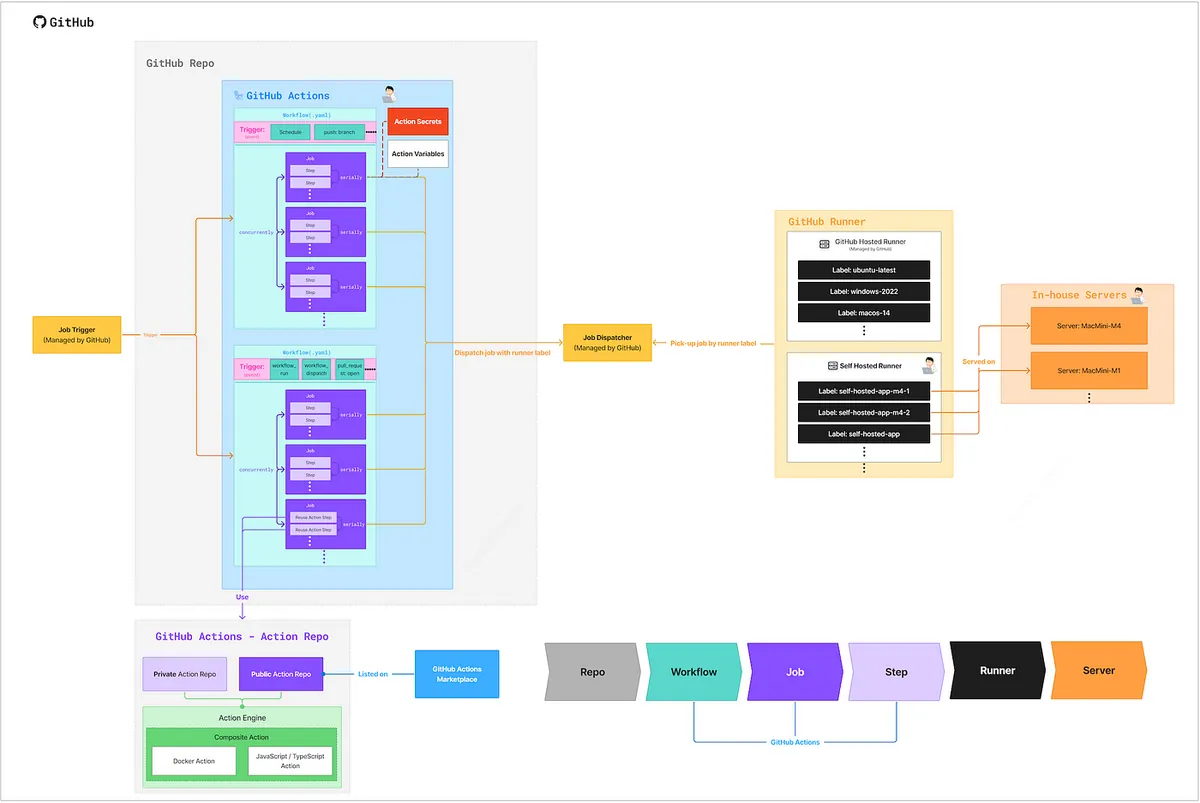
GitHub Repo
- In the world of GitHub Actions, all Actions (Workflow YAML files) must be stored within a Git Repo (
REPO/.github/workflows/).
GitHub Repo — Actions Secrets
Repo → Settings → Secrets and variables → Actions → Secrets.
-
Store Secret Keys and Tokens used in Actions steps
e.g. Slack Bot Token, Apple Store Connect API .p8 Key -
Secrets cannot be viewed in the Action Log and are automatically masked with ****
-
Secrets cannot be viewed or edited; they can only be overwritten.
-
Secrets currently only support plain text content and cannot upload files
- For binary keys, please refer to the official steps to store after Base64 encoding. -
The method for storing iOS development certificates can be found in the official guide: Installing an Apple certificate on macOS runners for Xcode development
-
You can store organization-level Secrets to share across Repos.
GitHub Repo — Actions Variables
Repo → Settings → Secrets and variables → Actions → Variables.
-
Store commonly used variables in Actions steps
e.g. Simulator iOS version, working directory -
Variable contents can be viewed and edited
-
Variable contents can be output in the Action Log
-
Variables only support plain text. You can also store JSON strings and parse them yourself for use.
-
You can store organization-level Variables and share them across Repos.
GitHub Actions — Trigger
-
The Most Important Starting Point in GitHub Actions — Trigger Events (Conditions)
-
Only GitHub Actions that match the trigger event will run
-
The full list of events is available in the official documentation.
-
It basically covers all event scenarios in CI/CD and automation.
But if a special scenario lacks a specific event, you must use other events combined with Job conditions or use a Schedule to manually check.
For example, if there is no PR Merged event, you can usepull_request: closed+ Jobif: github.event.pull_request.merged == trueto achieve this.
Common Events:
-
schedule(cron): Scheduled execution (same as crontab)
Can be used for automation: periodic PR checks, scheduled builds, running automation scripts on a schedule
All run on main / develop (Default Branch). -
pull_request:: PR related events
When a PR is opened, assigned, labeled, new commits are pushed, etc. -
issues,issue_comment: Issue-related events
When an Issue is opened, a new comment is added, etc. -
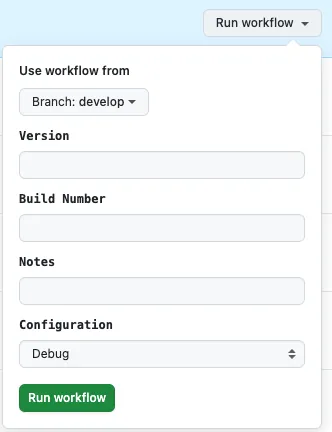
workflow_dispatch: Manual trigger; you can set required input fields, and GitHub Actions provides a simple form for users to fill in information.
e.g.:
-
workflow_call: Triggers another Action (Workflow) to execute a task. -
workflow_run: Triggers this task when another Action (Workflow) runs a job.
For more event types and configuration details, please refer to the official documentation.
GitHub Actions — Workflow
-
a.k.a Action
-
Write .yaml files using YAML, and place all files under
REPO/.github/workflows/. -
Use the Workflow YAML file in the main branch as the source
If you can’t see the Action under development or encounter errors on other branches, try merging back into the main branch first. -
The most basic unit in GitHub Actions, each Workflow represents a CI/CD or automation task.
-
A Workflow can call another Workflow to execute tasks
(This feature can be used to separate core Workflows and calling Workflows) -
This section defines the job name, execution strategy, trigger events, job tasks, and all other Action-related settings.
-
The current file structure does not support subdirectories.
-
Actions are completely free (Public and Private Repo)
GitHub Actions — Workflow — Job
-
Execution Units in GitHub Actions
-
Tasks in a Workflow include the following
-
Each Workflow can have multiple Jobs
-
Each Job must specify which Runner Label to use. During execution, the corresponding Runner machine will run the task.
-
Multiple Jobs Run Concurrently (use
needsto enforce order if needed) -
Each Job should be treated as an independent execution unit (each as a Sandbox). If a Job produces resource files that need to be used by subsequent Jobs or Workflows, you must Upload Artifacts or move them to a shared output directory on the self-hosted runner.
-
A Job can output a string for other Jobs to reference.
(For example, the execution result true or false) -
If no specific workflow conditions are set, when multiple Jobs are running and one Job fails, the other Jobs will continue to run.
GitHub Actions — Reuse Workflow/Job
-
Defining
on: workflow_callin a Workflow allows it to be encapsulated and reused as a Job by other Workflows. -
Sharing and usage across Repos within the same organization
-
Therefore, CI/CD tasks shared across Repos can be placed in a common Repo for joint use.
GitHub Actions — Workflow — Job — Step
-
The Smallest Executable Unit in GitHub Actions
-
The script that actually runs the tasks within a Job
-
Each Job can have multiple Steps
-
Multiple Steps Execute Sequentially
-
A Step can output a string for subsequent Steps to reference and use.
-
A Step can directly write shell script code
You can use gh cli and current environment variables (e.g., get PR number) to do whatever you want directly. -
If no specific workflow conditions are set, a Step will stop immediately upon an error, and subsequent Steps will not run.
GitHub Actions — Workflow — Job — Reuse Action Step
-
You can directly reuse existing workflows created by experts on the Marketplace.
For example: Comment on a Pull Request. -
You can also package a series of your own workflow Steps into an Action GitHub Repo for reuse in other workflows.
-
Actions from Public Repos can be published to the Marketplace
Packaging Actions supports:
-
Docker Action — means GitHub Actions will pass environment variables into the Docker container, allowing you to handle them as needed, such as with shell scripts, Java, PHP, etc.
-
JavaScript/TypeScript Action — Write GitHub Actions logic directly using node.js, with environment variables provided for reference.
e.g. pozil/auto-assign-issue -
Composite (YAML) — Pure YAML description of task steps (same structure as GitHub Actions — Workflow — Job — Step). You can specify which steps to perform or write shell scripts directly.
Due to space limitations, this article will not cover how to package a GitHub Actions Action. If interested, please refer to the official documentation: tutorials/creating-a-composite-action.
GitHub Runner
-
GitHub dispatches corresponding Jobs to Runners based on Runner Labels.
-
The Runner acts only as a listener, polling and waiting for tasks dispatched by GitHub.
-
Only cares about the Job, not which Action (Workflow) it belongs to.
Therefore, after Action A’s Job-1 finishes, the next one will be Action B’s Job-1, instead of completing all Jobs of Action A before moving to Action B. -
Runners can use either GitHub Hosted Runner or Self-hosted Runner.
GitHub Hosted Runner
- GitHub provides Runners, which can be found in the official Repo list:
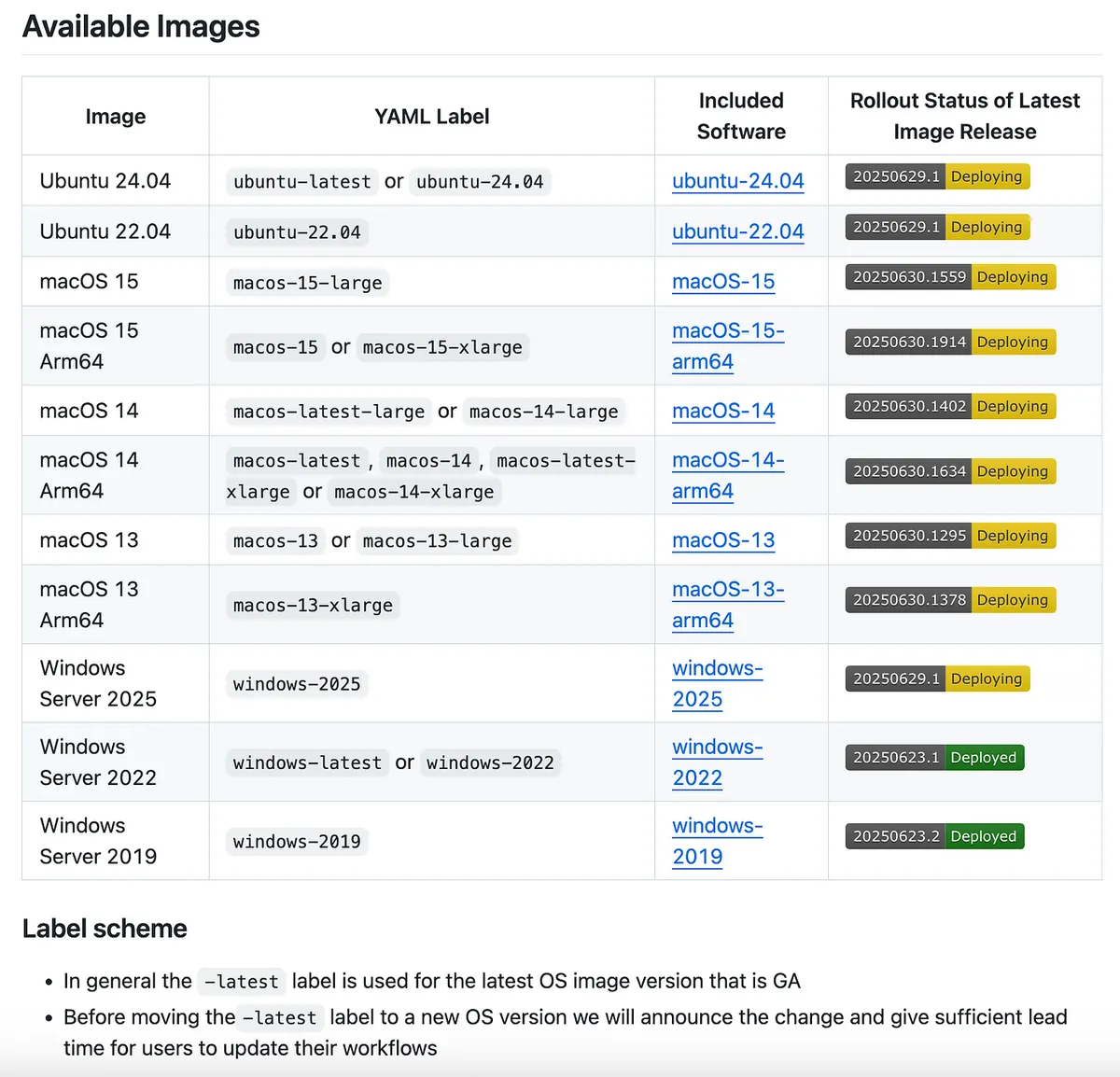
- What is pre-installed on the Runner can be checked here:
e.g. macos-14-arm64
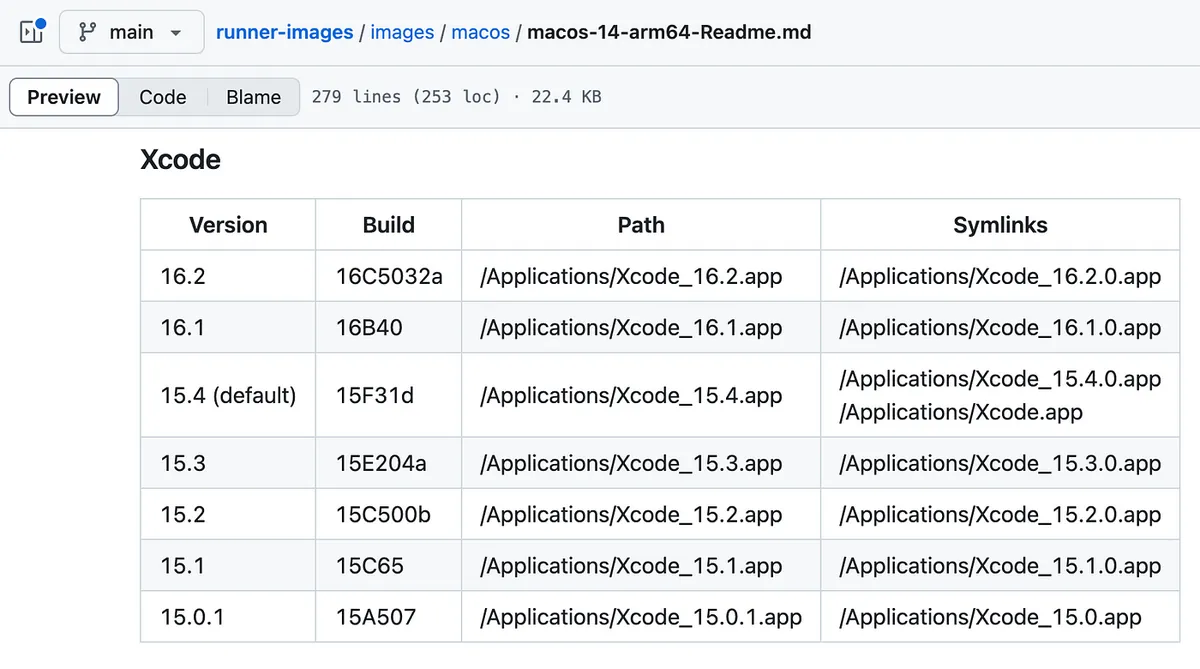
-
For iOS development, prioritize using -arm64 (M-series) processors for the Runner, as they run faster.
-
Just paste the YAML label from the table into the Job
runs-onto use that Runner for the task. -
Public Repo Pricing: Completely free with unlimited usage
-
️ Private Repo Free Tier:
Free tier (varies by account, example given for GitHub Free):
Usage: 2,000 minutes free per month
Storage: 500 MB -
⚠️️Private Repo Billing Method:
After exceeding the free quota, usage-based billing starts (with configurable limits and notifications). Prices vary depending on the operating system and cores of the machine hosting the Runner:
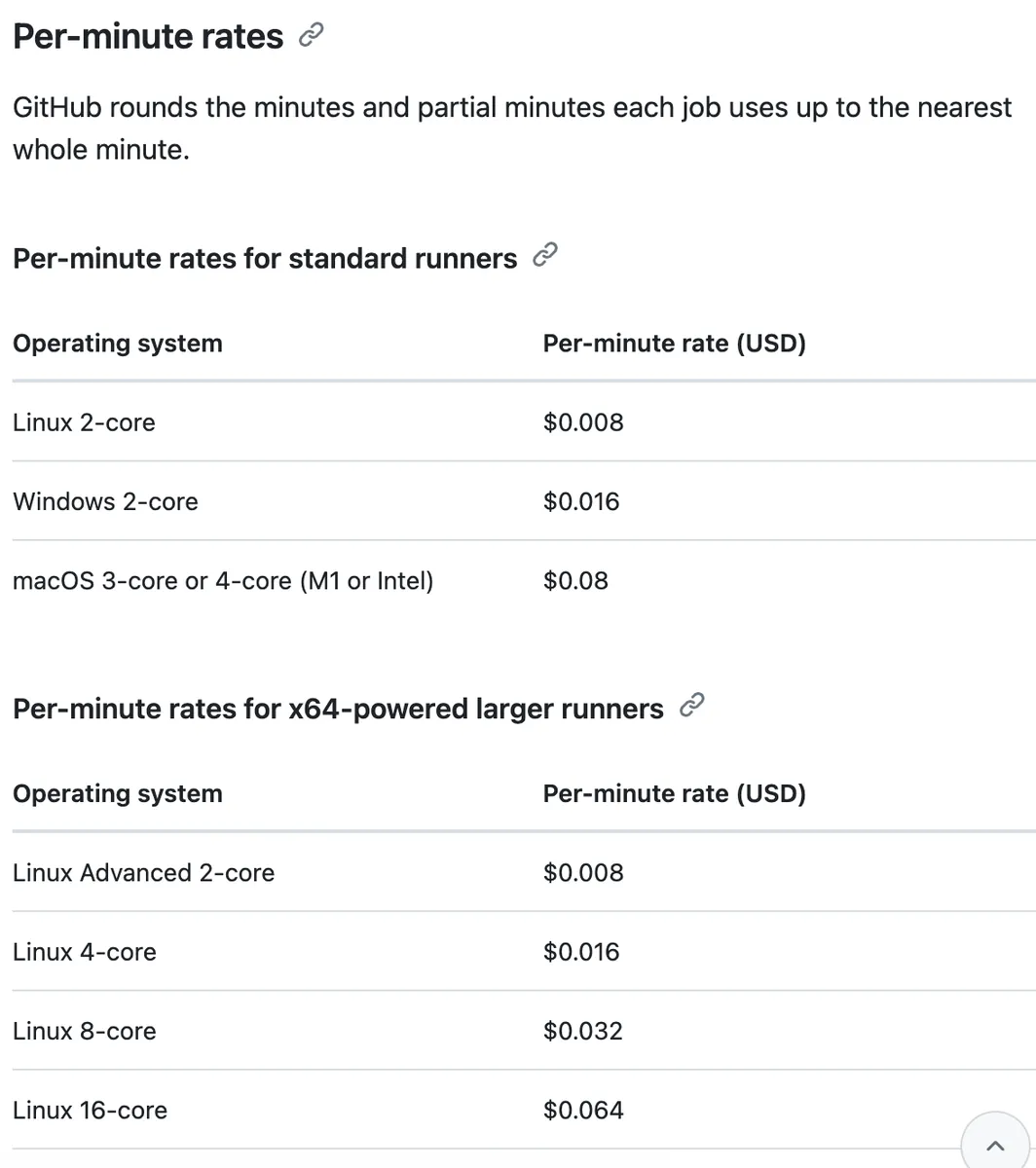
about-billing-for-github-actions
You can see that the price of macOS is high due to the expensive hardware costs.
- Maximum Concurrent Job Limit:
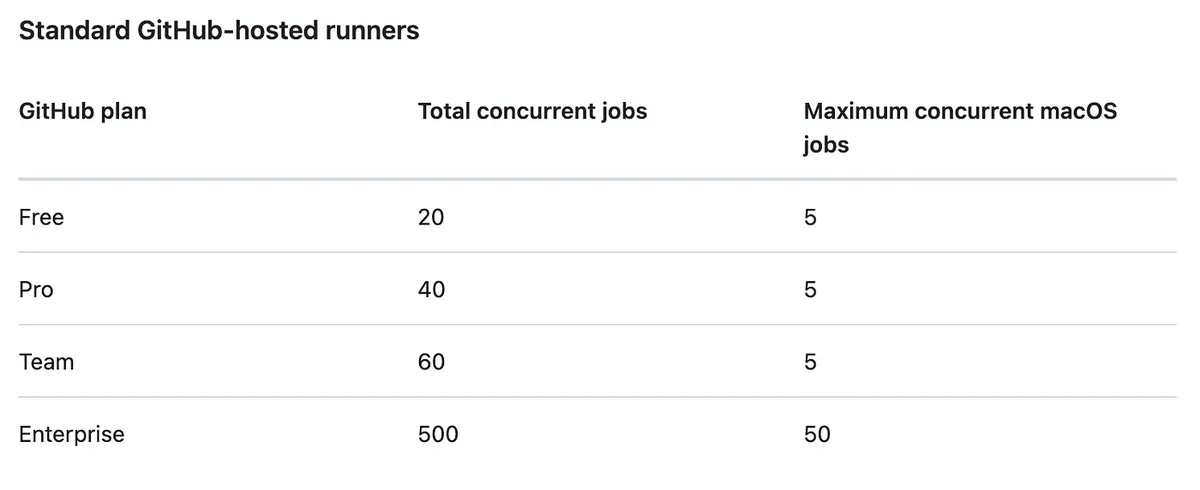
usage-limits-billing-and-administration
This part goes off-topic; our focus is on Self-hosted Runner.
Self-hosted Runner on In-house Server
-
Using Your Own Machine as a Runner
-
One physical machine can run multiple Runners to handle tasks concurrently
-
Free Unlimited Usage Without Restrictions
Only the machine purchase cost, pay once and use endlessly!
Using a 32G RAM M4 Mini (=NT$40,900) as an example, if you use GitHub Hosted Runner, it costs 500 USD per month; buying a machine and setting it up pays off in just over three months! -
Supports Windows, macOS, Linux (x64/ARM/ARM64)
-
Runners Can Be Shared Across Repos Within the Same Organization
-
⚠️ Currently: actions/cache, actions/upload-artifact, and actions/download-artifact only support GitHub cloud services, meaning these contents are still uploaded to GitHub servers and count towards storage usage fees.
You can set up a shared directory on your own machine as an alternative. -
Self-hosted Runner also supports Docker, k8s, but I haven’t explored it.
Setting up a Self-hosted Runner takes only a few steps (ready within 10 minutes) to go online and start running jobs (explained later in this article).
GitHub Workflow x Job x Step x Runner Flow Diagram
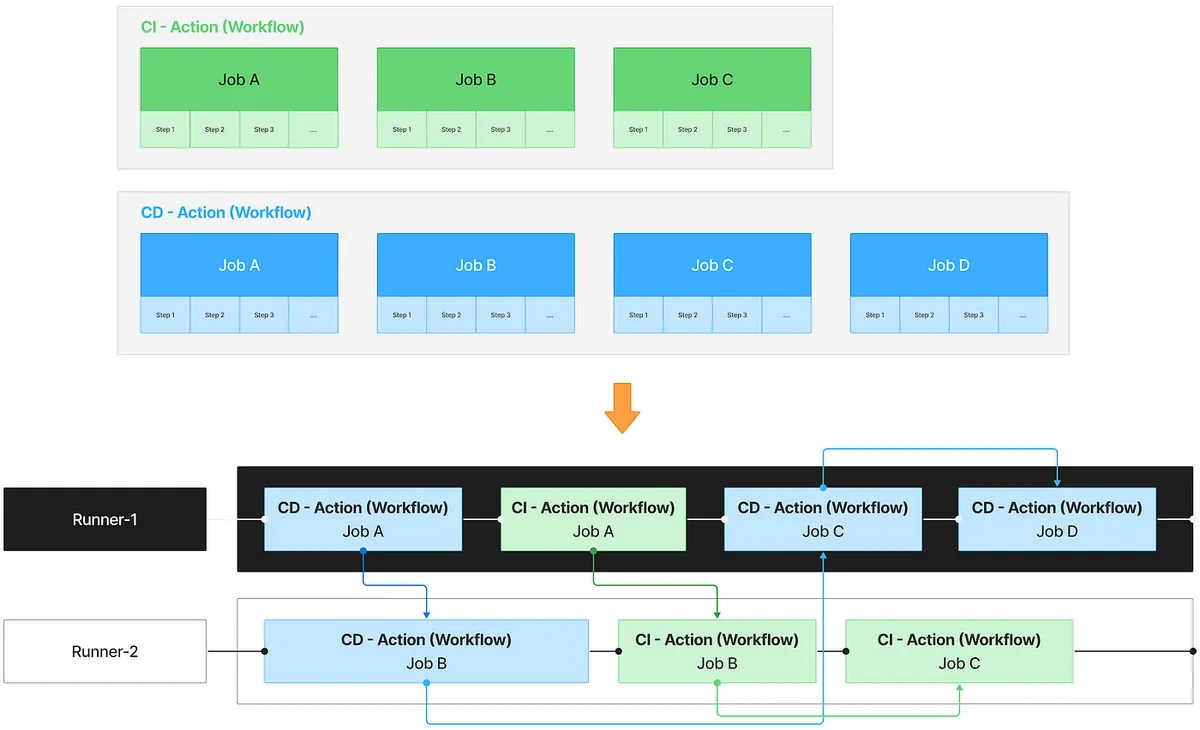
Here is a diagram summarizing the workflow and relationships, assuming we have two Workflows and two Runners:
-
CI — Assume R has 3 Jobs, each with several Steps. Runner Label (run-on) —
self-hosted-app -
CD — There are 4 Jobs, each with several Steps, Runner Label (run-on) —
self-hosted-app -
Runner — There are 2, and both Runner Labels are —
self-hosted-app
As mentioned before, Runners and Workflows dispatch and receive tasks based on the Runner Label. In this example, the same self-hosted-app Runner Label is used. Workflow Jobs run concurrently by default, while Steps are the actual execution contents of each Job and run sequentially in order. When all Steps are completed, the Job is considered finished.
Therefore, the actual execution timeline of a Workflow will shuttle between two Runners to run Jobs. Jobs can run concurrently, and the next Job after the current one finishes is not necessarily the next Job in the same Workflow.
⚠️ This is why ensuring each Job is independent is very important (especially in a Self-hosted Runner environment, where the cleanup after a Job might not be thorough. We might subconsciously assume that the output of one Job can be used directly by the next Job), but it shouldn’t be used this way.
If a Job produces output to be used by subsequent Jobs:
-
Job Output String: Output plain text to a variable for other Jobs to reference
-
Artifact-upload/download: The last step of a Job uploads the execution result to GitHub Artifact, and the first step of another Job downloads it for further processing.
e.g. For example, Job — Packaging → upload the packaged .ipa to Artifact → Job — Deployment → download the .ipa → upload to App Store for deployment
Note: Currently, even Self-hosted Runners upload to GitHub Artifact cloud storage. -
AWS/GCP… Cloud Storage: Same as above, but using your own cloud storage service.
-
[Self-hosted Only] Shared Drive and Directory: If Self-hosted Runners all mount a shared directory, you can create folders based on UUIDs in this directory to store output results. Subsequent Jobs can then read the previous Job’s Output UUID to locate and retrieve the corresponding storage.
Note that Runners on different machines must all mount the same shared directory. -
Complete everything within the Steps of the same Job.
Learn GitHub Actions by Doing — Practical Examples
“Talk less, do more.” The above explanations and process architecture might still feel a bit unclear. Next, we will present three practical examples, guiding you through hands-on practice while explaining the encountered concepts. This way, you can learn by doing and truly understand what GitHub Actions is.
Case — 1
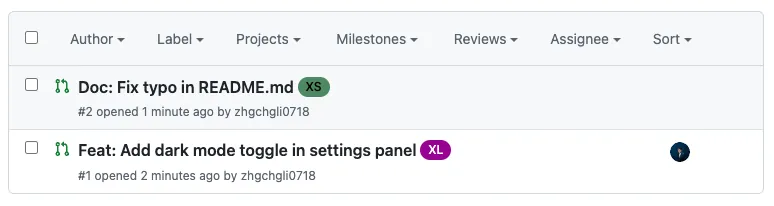
Automatically add a File Changes Size Label after creating a Pull Request to help Reviewers manage their review tasks.
Result Image
Workflow Process
-
User opens a PR, reopens a PR, or pushes new commits to the PR
-
Triggering GitHub Actions Workflow
-
shell script to get the number of file changes
-
Determine Quantity to Label PR
-
Completed
Hands-on Practice
Repo → Actions → New workflow → set up a workflow yourself.
File Name: Automation-PullRequest.yml
Action Workflows can have each task in a separate file, or they can be grouped in the same file based on trigger events or purpose. Since multiple Jobs run concurrently, either approach works. Additionally, because GitHub Actions currently does not support directory structures, having fewer files and using hierarchical file naming makes management easier.
Here, all PR-related event Actions are placed in the same Workflow.
Automation-PullRequest.yml
# Workflow (Action) name
name: Pull Request Automation

# Actions Log title
run-name: "[Pull Request Automation] ${{ github.event.pull_request.title \\|\\| github.ref }}"

# Trigger events
on:
  # PR events
  pull_request:
    # PR - opened, reopened, or new push commit
    types: [opened, synchronize, reopened]

# If a new job starts in the same concurrency group, cancel the running one
# For example, if a push commit triggers a job but another push happens before it runs, the previous job is canceled
concurrency:
  group: ${{ github.workflow }}-${{ github.ref_name }}
  cancel-in-progress: true

# Job tasks
# Jobs run concurrently
jobs:
  # Job ID
  label-pr-by-file-count:
    # Job name (optional, better readability in logs)
    name: Label PR by changes file count

    # If this job fails, it won't affect the entire workflow; other jobs continue
    continue-on-error: true

    # Set maximum timeout to prevent infinite waiting in abnormal cases
    timeout-minutes: 10

    # Runner Label - use GitHub Hosted Runner ubuntu-latest to run the job
    # For private repos, usage counts and may incur costs
    runs-on: ubuntu-latest

    # Job steps
    # Steps run sequentially
    steps:
      # Step name
      - name: Get changed file count and apply label
        # Step ID (optional, only needed if outputs are referenced later)
        id: get-changed-files-count-by-gh
        # Inject external environment variables into runtime
        env:
          # secrets.GITHUB_TOKEN is automatically generated by GitHub Actions, no need to set manually; has some GitHub Repo API scopes
          # https://docs.github.com/en/actions/how-tos/security-for-github-actions/security-guides/use-github_token-in-workflows
          # gh (GitHub CLI) needs GH_TOKEN in ENV to have permission to operate
          GH_TOKEN: ${{ secrets.GITHUB_TOKEN }}
        # Shell script
        # GitHub Hosted Runner comes pre-installed with gh CLI, no need to install in the job
        run: \\|
          #   ${{ github.xxx }} is a GitHub Actions Context expression
          #   Not a shell variable, but replaced by GitHub Actions during YAML parsing
          #   More info: https://docs.github.com/en/actions/learn-github-actions/contexts#github-context

          # Get PR number:
          PR_NUMBER=${{ github.event.pull_request.number }}

          # Get Repo:
          REPO=${{ github.repository }}

          # Use GitHub API (gh CLI) to get the count of changed files
          FILE_COUNT=$(gh pr view $PR_NUMBER --repo $REPO --json files --jq '.files \\| length')

          # Print log
          echo "Changed file count: $FILE_COUNT"

          # Label logic
          if [ "$FILE_COUNT" -lt 5 ]; then
            LABEL="XS"
          elif [ "$FILE_COUNT" -lt 10 ]; then
            LABEL="S"
          elif [ "$FILE_COUNT" -lt 30 ]; then
            LABEL="M"
          elif [ "$FILE_COUNT" -lt 80 ]; then
            LABEL="L"
          elif [ "$FILE_COUNT" -lt 200 ]; then
            LABEL="XL"
          else
            LABEL="XXL"
          fi

          # Use GitHub API (gh CLI) to remove current Size Labels
          EXISTING_LABELS=$(gh pr view "$PR_NUMBER" --repo "$REPO" --json labels --jq '.labels[].name')
          for EXISTING in $EXISTING_LABELS; do
            case "$EXISTING" in
              XS\\|S\\|M\\|L\\|XL\\|XXL)
                echo "🧹 Removing existing label: $EXISTING"
                gh pr edit "$PR_NUMBER" --repo "$REPO" --remove-label "$EXISTING"
                ;;
            esac
          done

          # (Optional) Create label if it doesn't exist
          if ! gh label list --repo "$REPO" \\| grep -q "^$LABEL"; then
            echo "🆕 Creating missing label: $LABEL"
            gh label create "$LABEL" --repo "$REPO" --description "Size label: $LABEL" --color "ededed"
          else
            echo "✅ Label '$LABEL' already exists"
          fi

          # Use GitHub API (gh CLI) to add the label
          gh pr edit $PR_NUMBER --repo $REPO --add-label "$LABEL"
After committing files to the repo’s main branch, opening a new PR will automatically trigger GitHub Actions:
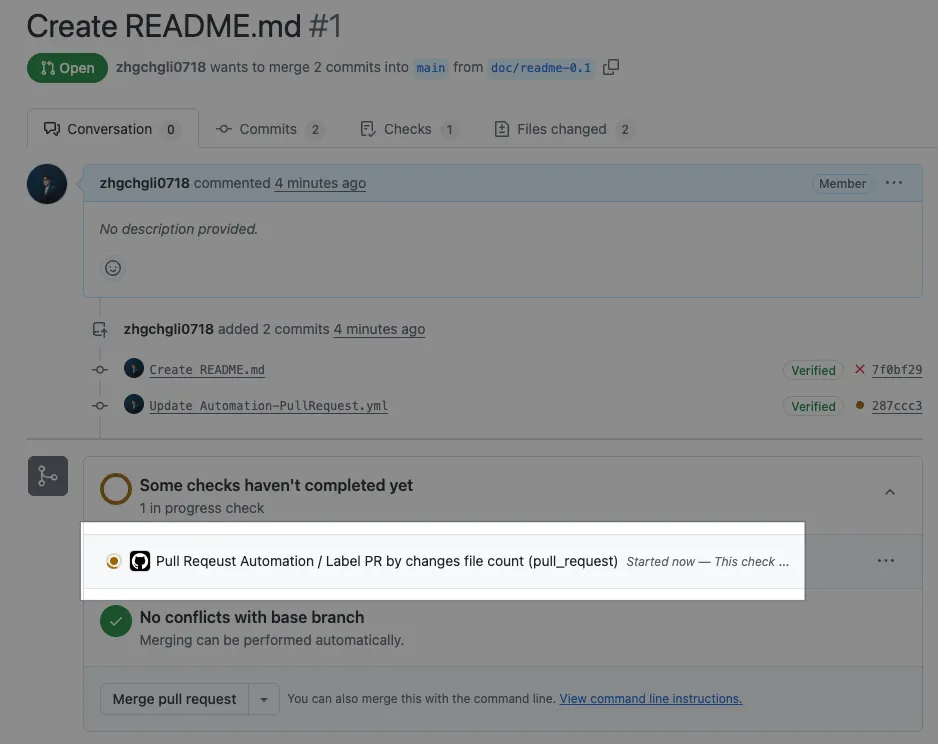
Action execution status showing Queued means the task is waiting for a Runner to pick it up.
Execution Result
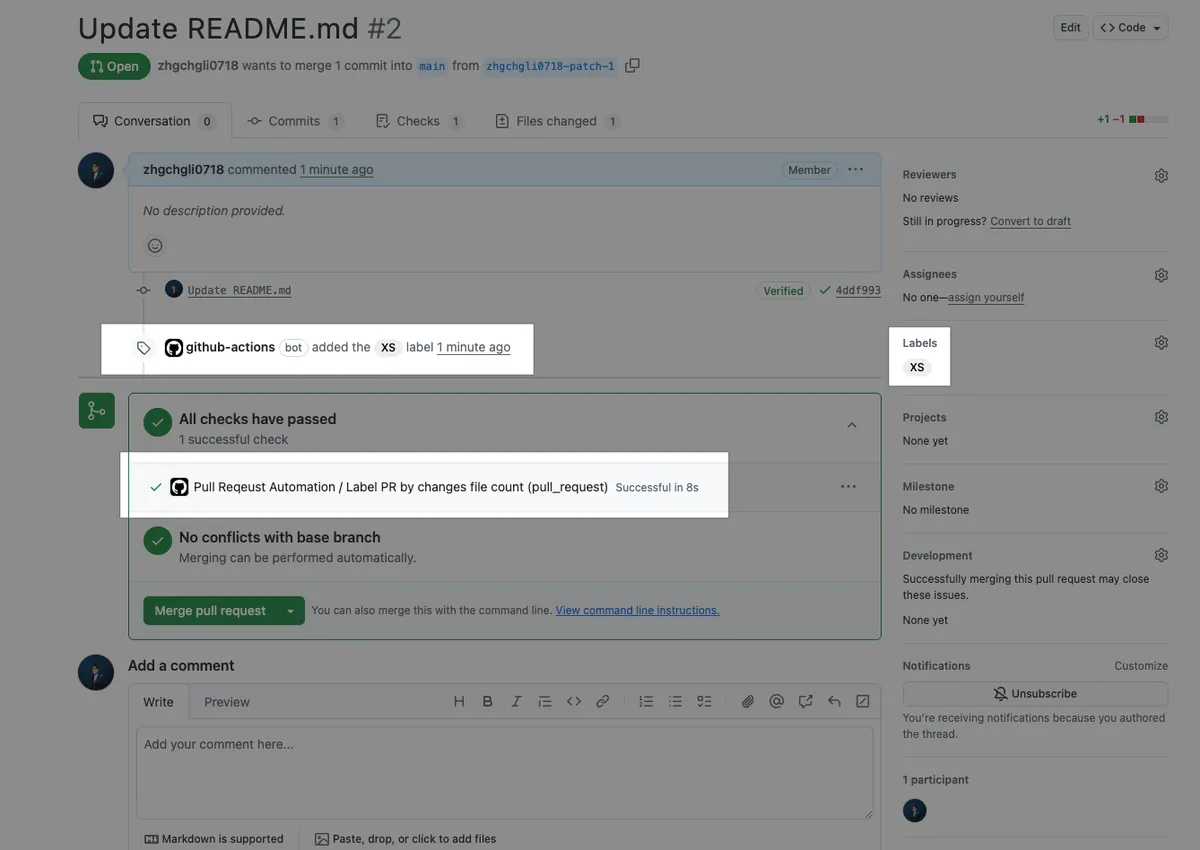
After execution completes successfully, the corresponding Label will be automatically added to the PR! The record will show it was labeled by github-actions.
Full code: Automation-PullRequest.yml
Directly Use Someone Else’s Prebuilt Action Step: pascalgn/size-label-action
Earlier, it was mentioned that you can directly use Actions packaged by others. The task of labeling PR Size already has ready-made solutions available. The above example is only for teaching purposes; in practice, there’s no need to reinvent the wheel.
You can complete the task directly within the Action Workflow Job Step:
# Workflow (Action) name
name: Pull Request Automation

# Trigger events
on:
  # PR events
  pull_request:
    # PR - when opened, reopened, or new push commit
    types: [opened, synchronize, reopened]

# If a new job in the same concurrency group starts, cancel the running one
# For example, if a push commit triggers a job that hasn't started yet and another push happens, cancel the previous job
concurrency:
  group: ${{ github.workflow }}-${{ github.ref_name }}
  cancel-in-progress: true

# Job tasks
# Jobs run concurrently
jobs:
  # Job ID
  label-pr-by-file-count:
    # Job name (optional, better for readable logs)
    name: Label PR by changes file count

    # If this job fails, it won't affect the whole workflow; other jobs continue
    continue-on-error: true

    # Set maximum timeout to prevent endless waiting in abnormal cases
    timeout-minutes: 10

    # Runner label - use GitHub Hosted Runner ubuntu-latest to run the job
    # For private repos, usage is counted and may incur costs
    runs-on: ubuntu-latest

    # Job steps
    # Steps run sequentially
    steps:
      # Step name
      - name: Get changed file count and apply label
        # Step ID (optional, only needed if later steps reference this step's output)
        id: get-changed-files-count-by-gh
        # Use a pre-built action from others
        uses: "pascalgn/[email protected]"
        # Inject external environment variables into the runtime
        # Parameter names and usage refer to docs: https://github.com/pascalgn/size-label-action/tree/main
        env:
          # secrets.GITHUB_TOKEN is automatically generated by GitHub Actions (github-actions identity), no need to set it manually in Secrets, has some GitHub Repo API scopes
          # https://docs.github.com/en/actions/how-tos/security-for-github-actions/security-guides/use-github_token-in-workflows
          GITHUB_TOKEN: "${{ secrets.GITHUB_TOKEN }}"
This packaged Action is a JavaScript Action. The actual execution code can be found in the following file: dist/index.js .
Additional notes on name and run-name:
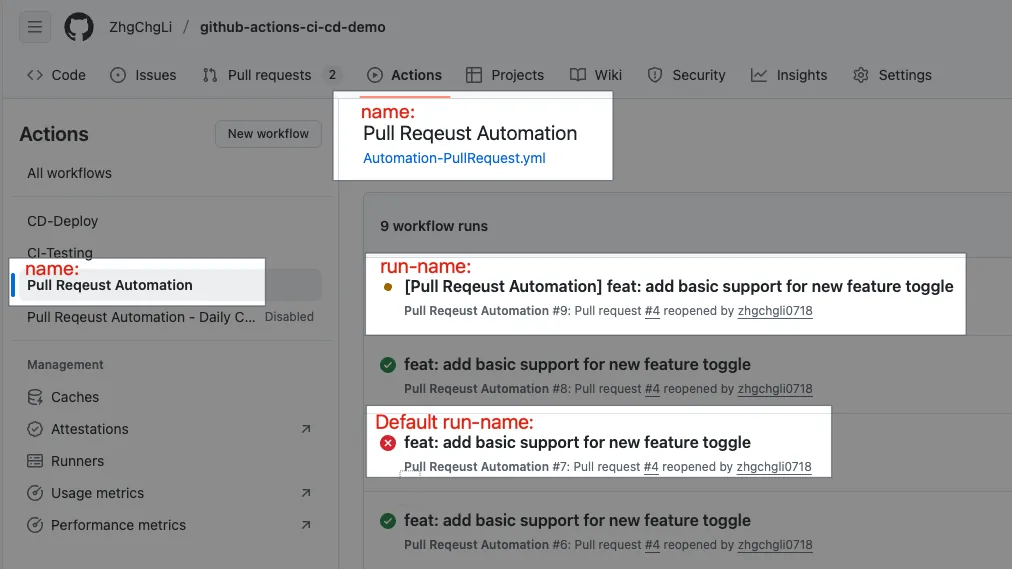
-
name: Name of the Action Workflow
-
run-name: The title of the run record (can include PR Title, Branch, Author, etc.)
For the on:pull_request event, the default is the PR Title.
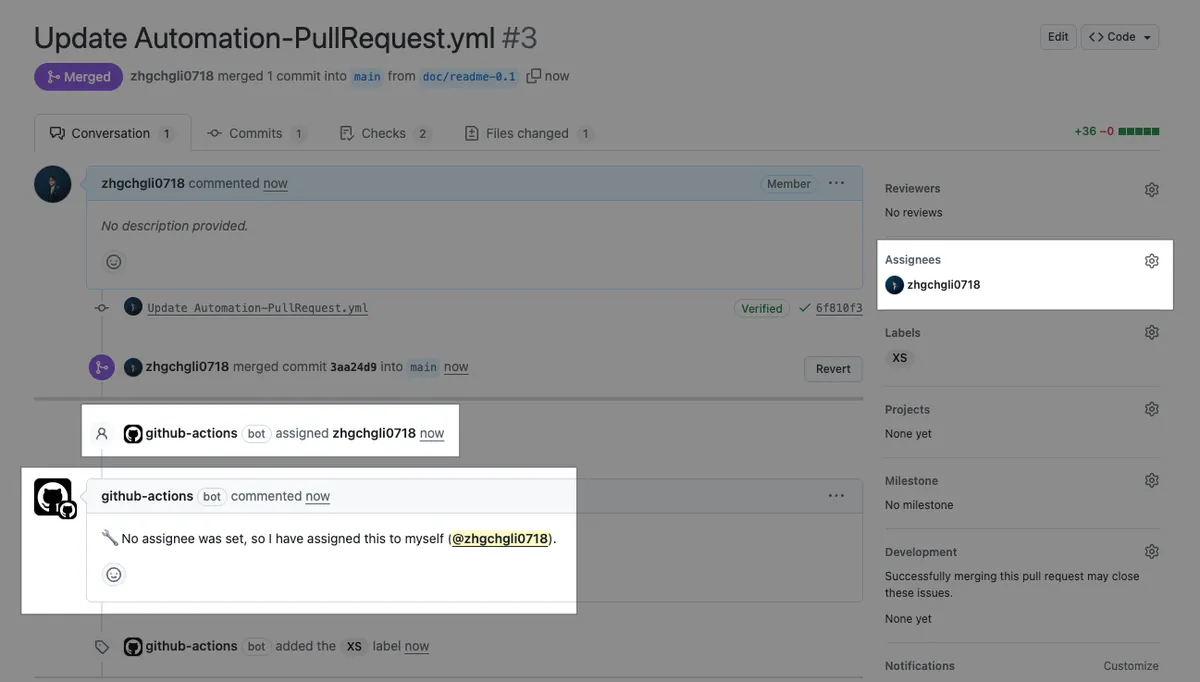
Case — 2
Automatically assign the author and add a comment if there is no Assignee after creating a Pull Request. (This only runs on the initial creation)
Result Image
Workflow Process
-
User Opens a PR
-
Triggering GitHub Actions Workflow
-
GitHub script to get assignee
-
If there is no assignee, assign the PR author & comment a message
-
Completed
Hands-on Practice
Repo → Actions → New workflow → set up a workflow yourself.
File Name: Automation-PullRequest.yml (same as above)
Automation-PullRequest.yml
# Workflow (Action) name
name: Pull Request Automation

# Actions Log title
run-name: "Pull Request Automation - Daily Checker"

# Trigger events
on:
  # PR events
  pull_request:
    # PR - opened, synchronized, reopened
    types: [opened, synchronize, reopened]

# If a new job in the same concurrency group starts, cancel the running one
# For example, if a Push Commit triggers a job that hasn't started yet and another Push Commit occurs, the previous job will be cancelled
concurrency:
  group: ${{ github.workflow }}-${{ github.ref_name }}
  cancel-in-progress: true

# Job tasks
# Jobs run concurrently
jobs:
  # Job ID
  label-pr-by-file-count:
    # Please refer to previous text, omitted....
  # ---------
  assign-self-if-no-assignee:
    name: Automatically assign to self if no assignee is specified
    # Since the trigger event is shared, this job checks itself and only runs when the Pull Request is opened (first created), otherwise it will be skipped
    if: github.event_name == 'pull_request' && github.event.action == 'opened'

    # If this job fails, it won't affect the whole workflow, other jobs will continue
    continue-on-error: true

    # Set maximum timeout to prevent endless waiting in case of abnormal situations
    timeout-minutes: 10

    # Runner Label - use GitHub Hosted Runner ubuntu-latest to run the job
    # For private repos, usage is counted and may incur charges if exceeded
    runs-on: ubuntu-latest

    steps:
      - name: Assign self if No Assignee
        # Use GitHub Script (JavaScript) to write the script (Node.js environment)
        # More convenient and cleaner than using Shell Script directly above
        # No need to inject environment variables or GITHUB_TOKEN manually
        uses: actions/github-script@v7
        with:
          script: \\|
            // github-script automatically injects the context variable for direct JavaScript access
            // https://docs.github.com/en/actions/learn-github-actions/contexts#github-context

            const issue = context.payload.pull_request; // To support Issues too, write as context.payload.issue \\|\\| context.payload.pull_request
            const assignees = issue.assignees \\|\\| [];
            const me = context.actor;

            if (assignees.length === 0) {
              // Assign self as assignee
              await github.rest.issues.addAssignees({
                owner: context.repo.owner,
                repo: context.repo.repo,
                issue_number: issue.number,
                assignees: [me]
              });

              // Post a comment notification
              await github.rest.issues.createComment({
                owner: context.repo.owner,
                repo: context.repo.repo,
                issue_number: issue.number,
                body: `🔧 No assignee was set, so I have assigned this to myself (@${me}).`
              });
            }
This time, we demonstrate using GitHub Script (JavaScript) to write the script, offering more flexibility and easier syntax.
Of course, if you want to follow what I said earlier—one file per task—you can remove the Job If condition and set the trigger directly in the Action Workflow:
Automation-PullRequest-Auto-Assign.yml :
# Workflow(Action) name
name: Pull Request Automation - Auto Assignee Self

# Trigger event
on:
  # PR event
  pull_request:
    # PR - when opened
    types: [opened]

jobs:
  assign-self-if-no-assignee:
    name: Automatically assign to self if no assignee is specified
    runs-on: ubuntu-latest
    steps:
      # Please refer to the previous text, omitted....
After committing files to the repo’s main branch, opening a new PR will automatically trigger GitHub Actions:
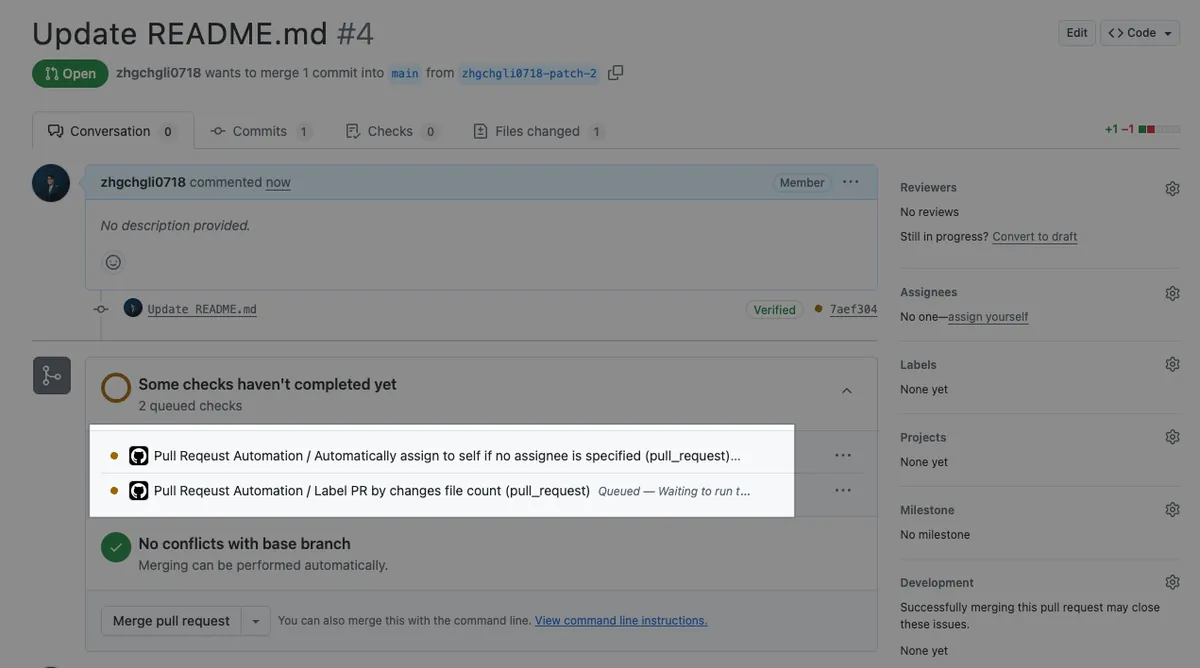
Now there are two Jobs to run!
Execution Result
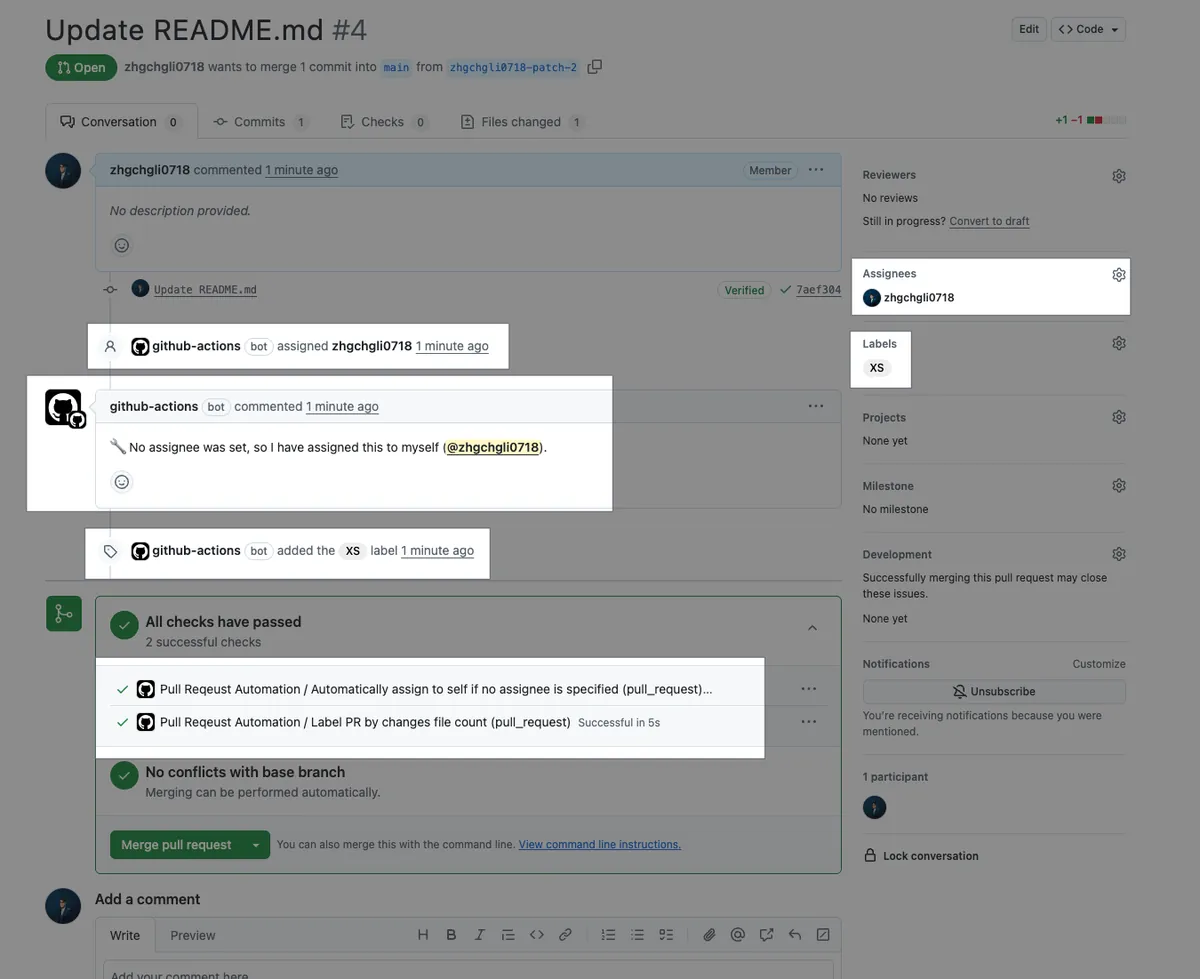
After the execution is complete and successful, if the PR has no Assignees, it will automatically assign the PR author and comment a message. (All actions are performed using the github-actions identity)
Full code: Automation-PullRequest.yml
Test Reopened PR
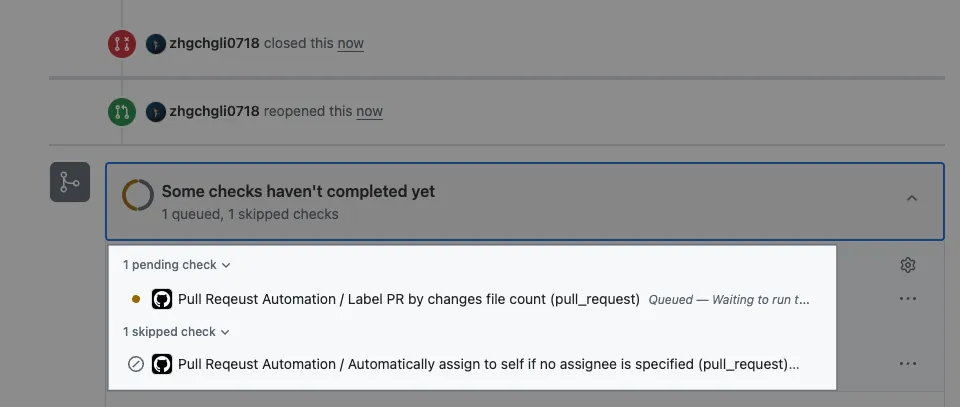
You can see that only the Size Label Job runs, while the Auto Assignee Job is skipped.
This task also has a ready-made Action for direct reuse, see: pozil/auto-assign-issue.
Case — 3
Automatically count the current number of PRs and how long they have been open every day at 9 AM, then send a notification message to the Slack workspace. Also, automatically close PRs that have been open for more than 3 months.
Result Image
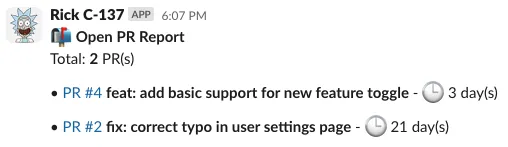
-
Slack workspace receives daily morning reports automatically
-
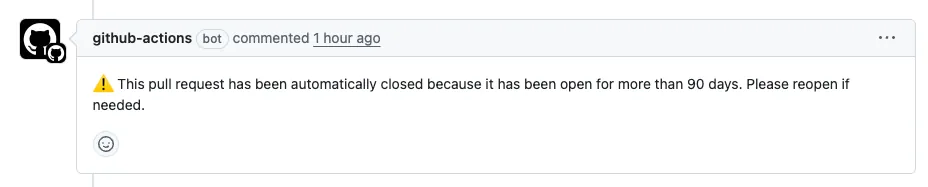
Automatically Close PRs Older Than 90 Days
Workflow Process
-
GitHub Actions Automatically Triggered Every Day at 9 AM
-
Triggering GitHub Actions Workflow
-
GitHub script to get the list of open PRs and count how many days they have been open
-
Send Statistical Report Message to Slack
-
Close PRs Older Than 90 Days
-
Completed
Hands-on Practice
Repo → Actions → New workflow → set up a workflow yourself.
Filename: Automation-PullRequest-Daily.yml
Automation-PullRequest-Daily.yml
# Workflow(Action) name
name: Pull Request Automation - Daily Checker

# Trigger events
on:
  # Scheduled automatic execution
  # https://crontab.guru/
  # UTC time
  schedule:
    # 01:00 UTC = 09:00 UTC+8 daily
    - cron: '0 1 * * *'
  # Manual trigger
  workflow_dispatch:

# Job tasks
# Jobs run concurrently
jobs:
  # Job ID
  caculate-pr-status:
    # Job name (optional, better readability in logs)
    name: Calculate PR Status
    # Runner Label - use GitHub Hosted Runner ubuntu-latest to run the job
    # For Private Repos, usage is counted and may incur costs if exceeded
    runs-on: ubuntu-latest

    # Job Output
    outputs:
      pr_list: ${{ steps.pr-info.outputs.pr_list }}

    # Job steps
    # Steps run sequentially
    steps:
      # Step name
      - name: Fetch open PRs and calculate
        # Set id to reference Output externally
        id: pr-info
        uses: actions/github-script@v7
        with:
          script: \\|
            const now = new Date();
            const per_page = 100;
            let page = 1;
            let allPRs = [];

            while (true) {
              const { data: prs } = await github.rest.pulls.list({
                owner: context.repo.owner,
                repo: context.repo.repo,
                state: 'open',
                per_page,
                page,
              });
              if (prs.length === 0) break;
              allPRs = allPRs.concat(prs);
              if (prs.length < per_page) break;
              page++;
            }

            const result = allPRs.map(pr => {
              const created = new Date(pr.created_at);
              const daysOpen = Math.floor((now - created) / (1000 * 60 * 60 * 24));
              return {
                pr: pr.number.toString(),
                title: pr.title,
                idle: daysOpen
              };
            });

            // Set output, only accepts String
            core.setOutput('pr_list', JSON.stringify(result));
  # ----
  send-pr-summary-message-to-slack:
    name: Send PR Summary Message to Slack
    # Jobs run concurrently by default, use needs to wait for dependent jobs
    needs: [caculate-pr-status]
    runs-on: ubuntu-latest

    steps:
      - name: Generate Message
        # Set id to reference Output externally
        id: gen-msg
        uses: actions/github-script@v7
        with:
          script: \\|
            const prList = JSON.parse(`${{ needs.caculate-pr-status.outputs.pr_list }}`);
            const blocks = [];

            // Title
            blocks.push({
              type: "section",
              text: {
                type: "mrkdwn",
                text: `📬 *Open PR Report*\nTotal: *${prList.length}* PR(s)`
              }
            });

            // One line per PR
            for (const pr of prList) {
              blocks.push({
                type: "section",
                text: {
                  type: "mrkdwn",
                  text: `• <https://github.com/${context.repo.owner}/${context.repo.repo}/pull/${pr.pr}\\|PR #${pr.pr}> *${pr.title}* - 🕒 ${pr.idle} day(s)`
                }
              });
            }

            // Set output, only accepts String
            core.setOutput('blocks', JSON.stringify(blocks));


      # Use official Slack API GitHub Action
      # https://tools.slack.dev/slack-github-action/sending-techniques/sending-data-slack-api-method/
      # Send message
      - name: Post text to a Slack channel
        uses: slackapi/[email protected]
        with:
          method: chat.postMessage
          token: ${{ secrets.SLACK_BOT_TOKEN }}
          payload: \\|
            channel: ${{ vars.SLACK_TEAM_CHANNEL_ID }}
            blocks: ${{ steps.gen-msg.outputs.blocks }}
  # ----
  auto-close-old-prs:
    name: Auto Close Old PRs
    needs: [caculate-pr-status]
    runs-on: ubuntu-latest

    steps:
      - name: Auto close PRs opened more than 90 days
        uses: actions/github-script@v7
        with:
          script: \\|
            const prList = JSON.parse(`${{ needs.caculate-pr-status.outputs.pr_list }}`);
            const oldPRs = prList.filter(pr => pr.idle > 90);

            for (const pr of oldPRs) {
              await github.rest.pulls.update({
                owner: context.repo.owner,
                repo: context.repo.repo,
                pull_number: parseInt(pr.pr),
                state: 'closed'
              });

              await github.rest.issues.createComment({
                owner: context.repo.owner,
                repo: context.repo.repo,
                issue_number: parseInt(pr.pr),
                body: `⚠️ This pull request has been automatically closed because it has been open for more than 90 days. Please reopen if needed.`
              });
            }
            console.log(`Closed ${oldPRs.length} PR(s)`);
In this example, we use:
-
on: schedule
Crontab schedule for automatic triggering and workflow_dispatch for manual triggering -
Job output / Step output (both can only be strings)
-
Multiple jobs run concurrently by default but can use
needsto set time-dependent dependencies. -
Getting Settings from Repo Secrets/Variables
-
Integrating Slack API
Repo Secrets — Add SLACK_BOT_TOKEN
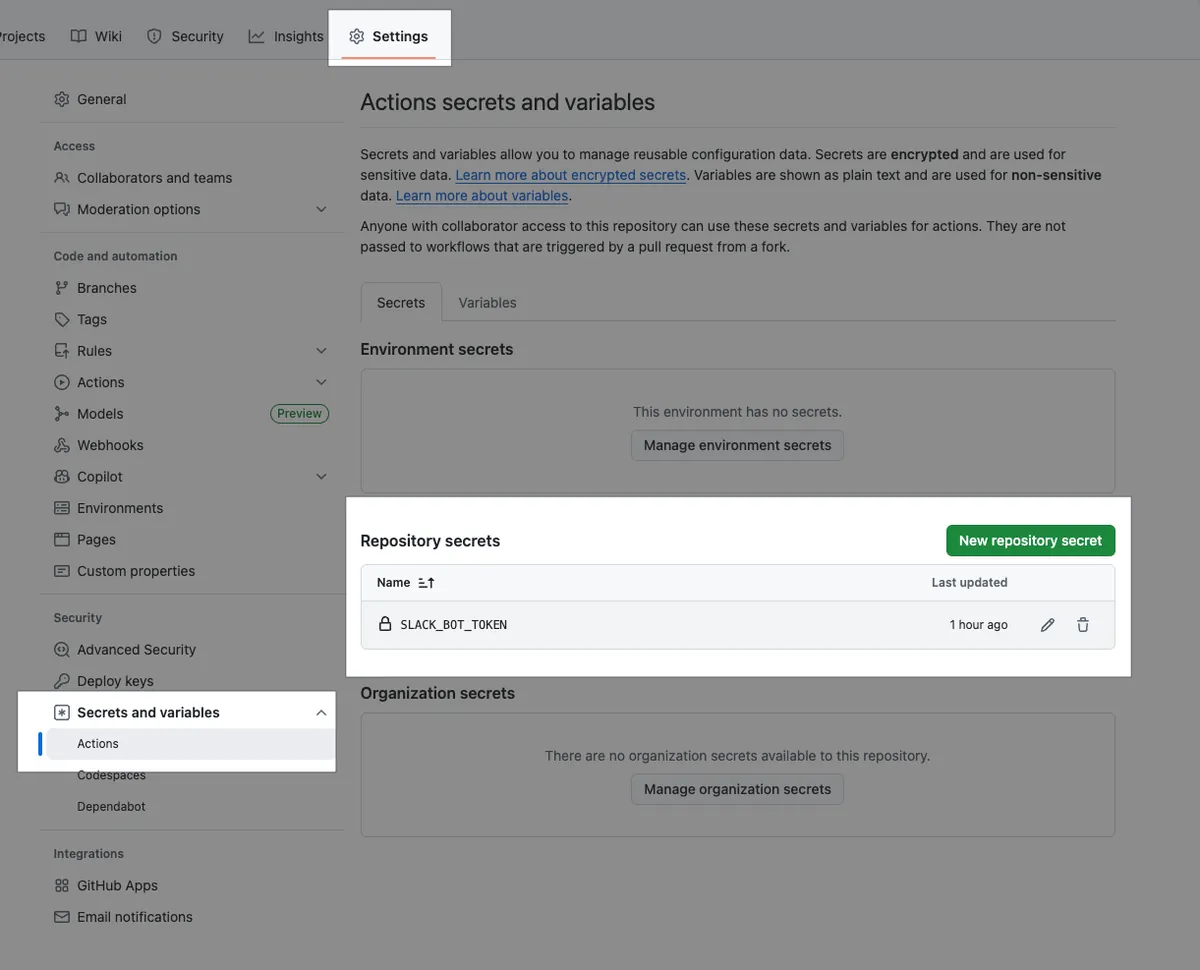
- For setting up a Slack App and configuring message permissions, you can refer to my previous article.
Repo Variables — Add SLACK_TEAM_CHANNEL_ID
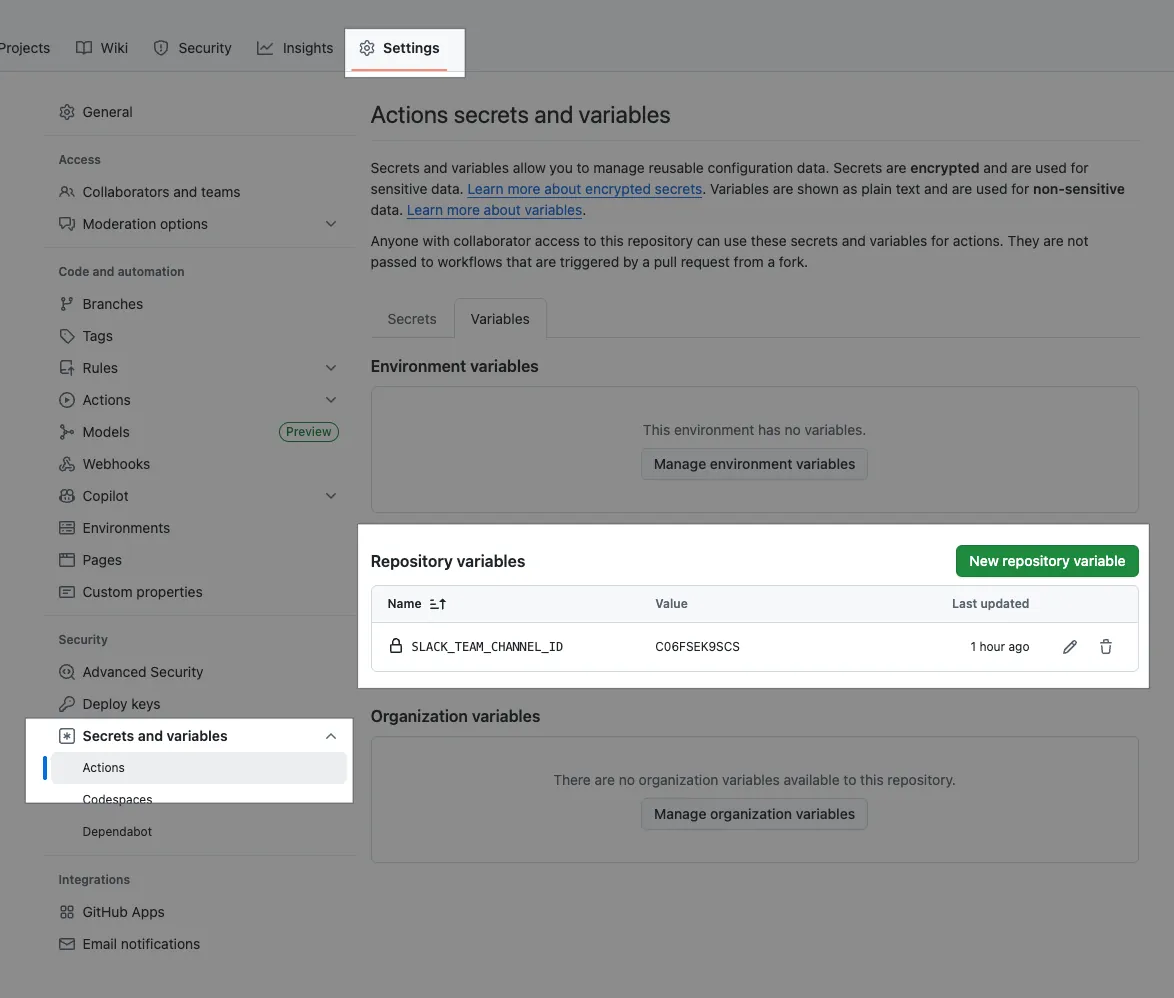
After committing files to the repo’s main branch, go back to Actions and trigger it manually to test:
It will be automatically triggered daily in the future.
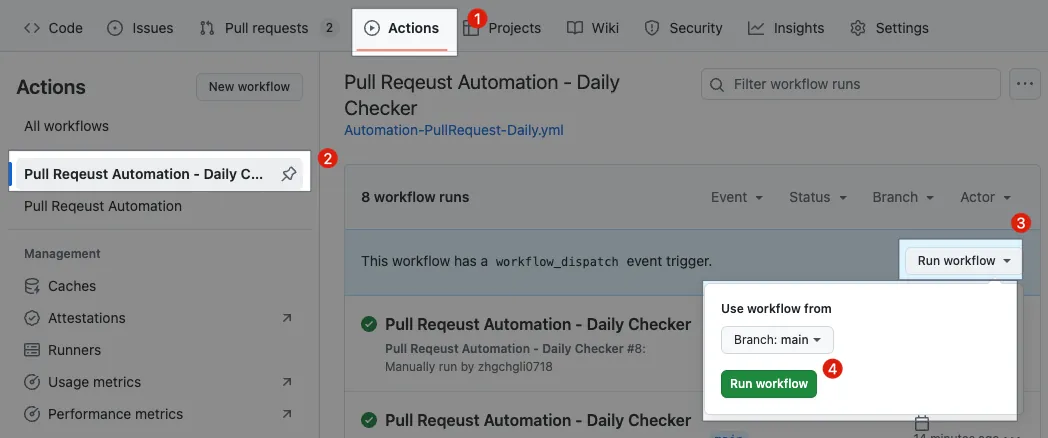
Actions → Pull Request Automation — Daily Checker → Run workflow → Branch: main → Run workflow.
After execution, you can click to view the execution status:
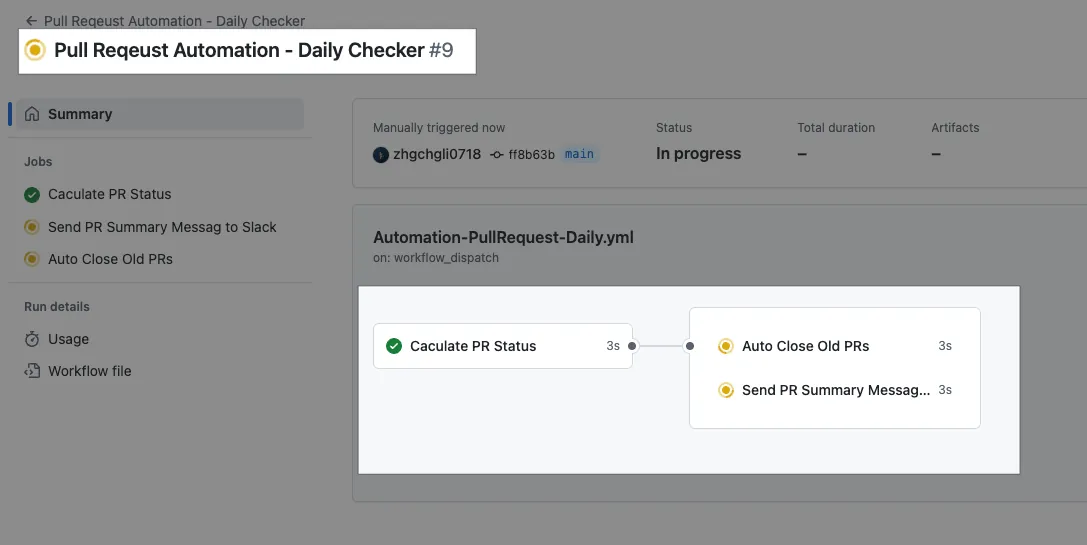
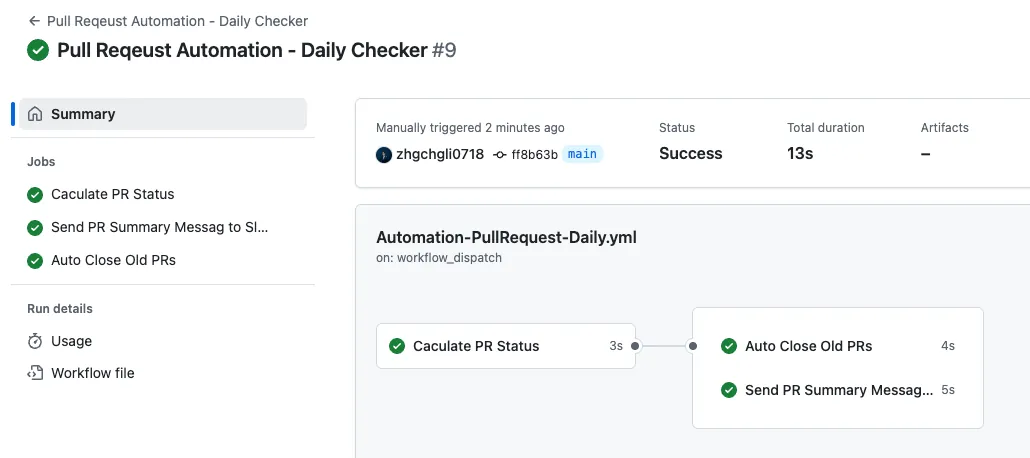
Due to the needs constraint, the job flow will have Calculate PR Status complete first, then Auto Close Old PRs and Send PR Summary Message to Slack will run concurrently.
Execution Result
After all tasks are successfully executed, you can check the Slack message:
Success 🚀🚀🚀
Full code: Automation-PullRequest-Daily.yml
Summary
I hope the three examples above give you a basic understanding of GitHub Actions and inspire your own automation ideas. You can create your own workflows (be sure to first check the Trigger Events), then write scripts to execute them. Also, remember to visit the Marketplace to find existing actions you can use to stand on the shoulders of giants.
This article is just an introduction (it doesn’t even include code checkout). The next article, CI/CD Practical Guide (Part 3): Implementing CI and CD Workflows for App Projects Using GitHub Actions, will cover more advanced and complex GitHub Actions workflows.
GitHub Automation Extended Topics
GitHub can integrate with Slack to subscribe to Repo PR update notifications, Push Default Branch notifications, and more.
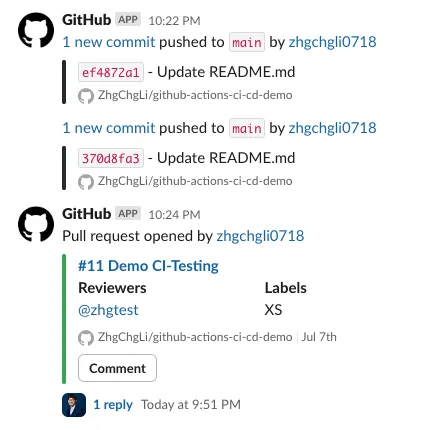
Issue 1. GitHub messages cannot mention people, only GitHub accounts are mentioned, Slack accounts do not receive notifications:
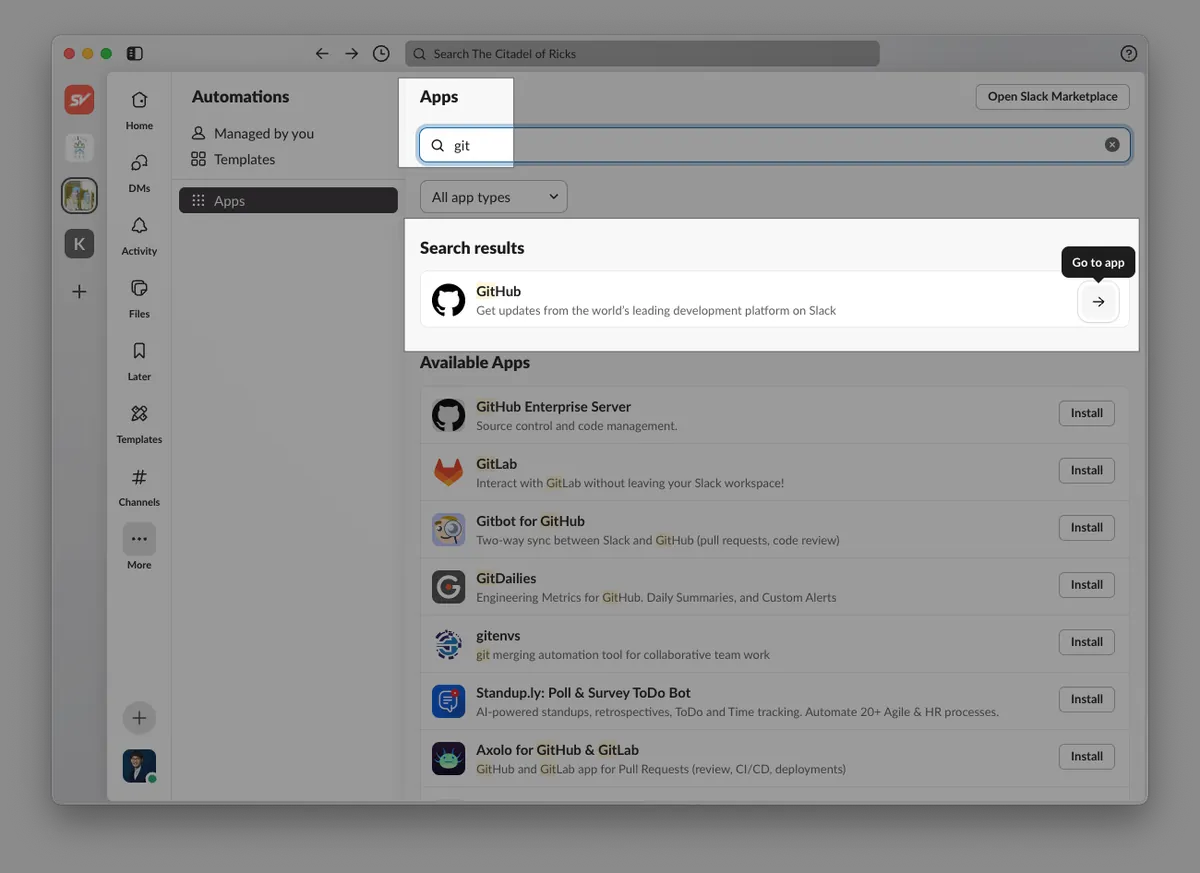
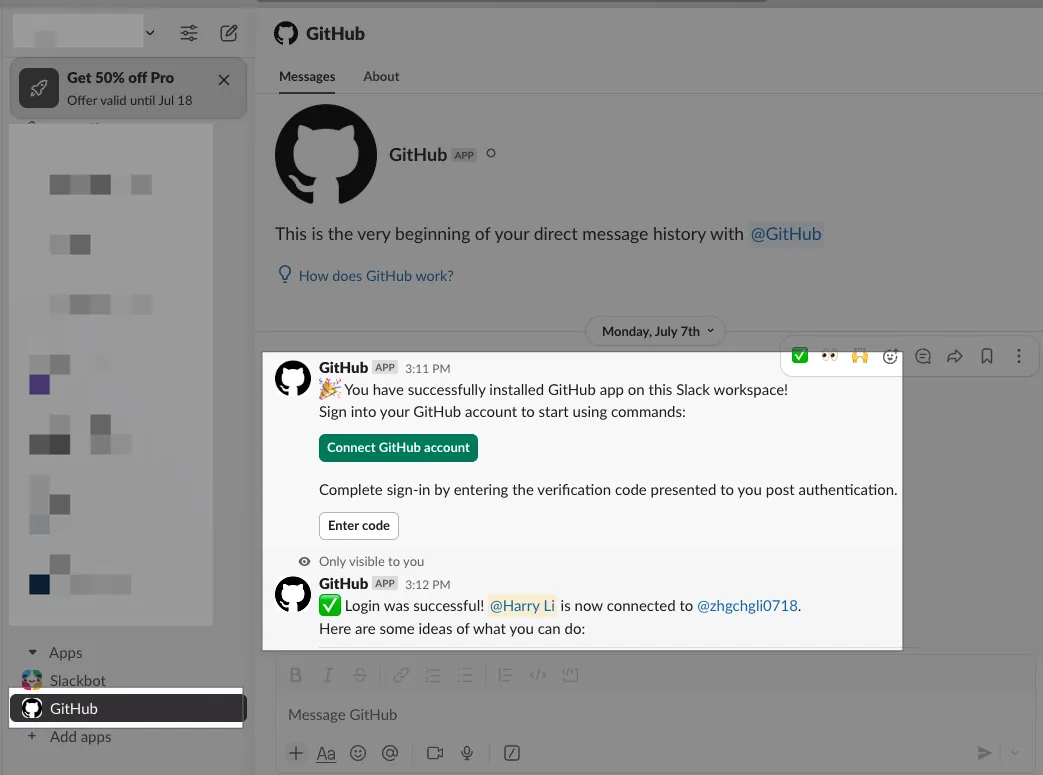
Slack App or search for GitHub in Apps → open the message window → complete the Connect GitHub Account step. This allows GitHub to know your corresponding Slack UID for tagging you.
Question 2. Pull Request Reminder
I remember this was originally a third-party feature, but it was later integrated directly into GitHub. Don’t foolishly write scripts yourself using GitHub Actions!
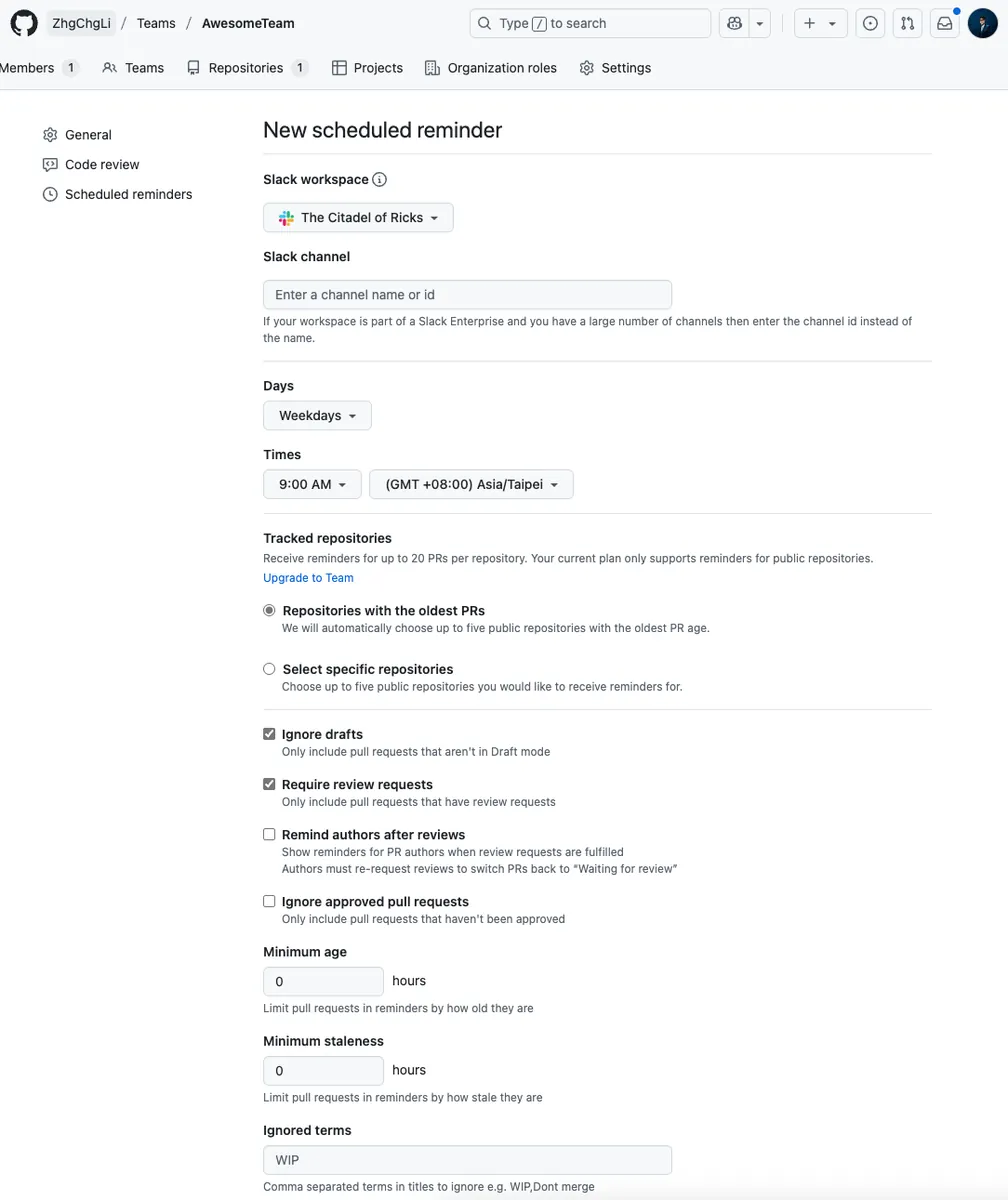
- After entering the Slack Channel and rules and saving, daily reminder messages and Reviewer tagging will be sent automatically. Setup reference can be found here. The result is shown below:
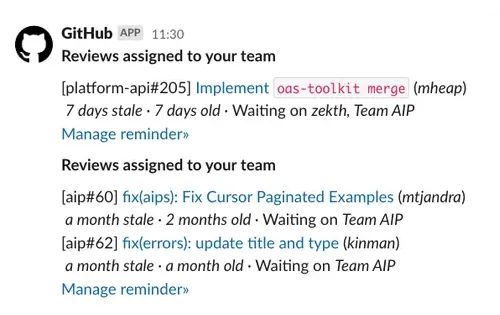
https://michaelheap.com/github-scheduled-reminders/
Issue 4. GitHub PR message, author does not receive notification:
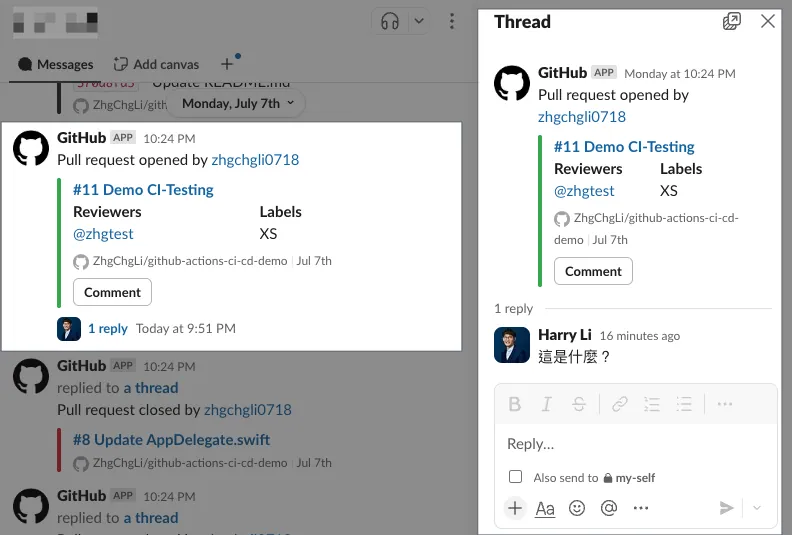
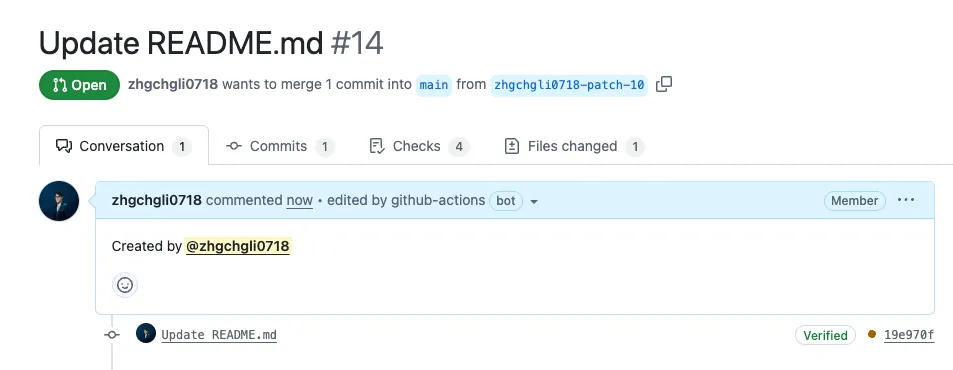
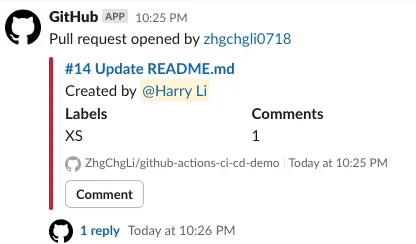
This is a long-standing issue: the PR Slack message does not actually notify the author when someone replies in the threads. The Slack message sent by GitHub only mentions Reviewers, not the Assignee or the PR author.
At this point, GitHub Actions becomes useful as an automation tool. We can add a Job to append the author tag at the end of the PR Description, so the message sent to Slack will also tag the author:
# Workflow (Action) name
name: Pull Request Automation
# Please refer to previous text, omitted....

  # ---------
  append-author-to-pr-description:
    name: Append author to PR description
    # Since this is a shared trigger event, the job itself checks to run only when the Pull Request is opened (first created), otherwise the job will be skipped
    if: github.event_name == 'pull_request' && github.event.action == 'opened'

    # If this job fails, it won't affect the entire workflow, continue with other jobs
    continue-on-error: true

    # Set maximum timeout to prevent endless waiting in abnormal situations
    timeout-minutes: 10

    # Runner Label - use GitHub Hosted Runner ubuntu-latest to run the job
    # For Private Repos, usage is counted and may incur costs if exceeded
    # But such small automation tasks rarely exceed limits
    runs-on: ubuntu-latest
    steps:
      - name: Append author to PR description
        env:
          # secrets.GITHUB_TOKEN is automatically generated during GitHub Actions execution, no need to set manually in Secrets, it has some GitHub Repo API scopes
          # gh (GitHub) CLI needs GH_TOKEN injected into ENV to have permission to operate
          # https://docs.github.com/en/actions/how-tos/security-for-github-actions/security-guides/use-github_token-in-workflows
          GH_TOKEN: ${{ secrets.GITHUB_TOKEN }}

          #   ${{ github.xxx }} is a GitHub Actions Context expression
          #   Not a shell variable, but replaced by GitHub Actions during YAML parsing with corresponding values
          #   More parameters: https://docs.github.com/en/actions/learn-github-actions/contexts#github-context
          PR_NUMBER: ${{ github.event.pull_request.number }}
          AUTHOR_TAG: '@${{ github.event.pull_request.user.login }}'
        run: \\|
          PR_BODY=$(gh pr view $PR_NUMBER --repo ${{ github.repository }} --json body -q ".body")
          NEW_BODY=$(printf "%s\n\nCreated by %s" "$PR_BODY" "$AUTHOR_TAG")
          gh pr edit $PR_NUMBER --repo ${{ github.repository }} --body "$NEW_BODY"
Full code: Automation-PullRequest.yml
When opening a PR, the author information will be automatically added to the description, and the Slack message will correctly tag the author:
Issue 5. GitHub sends too many notification emails, which is very annoying:
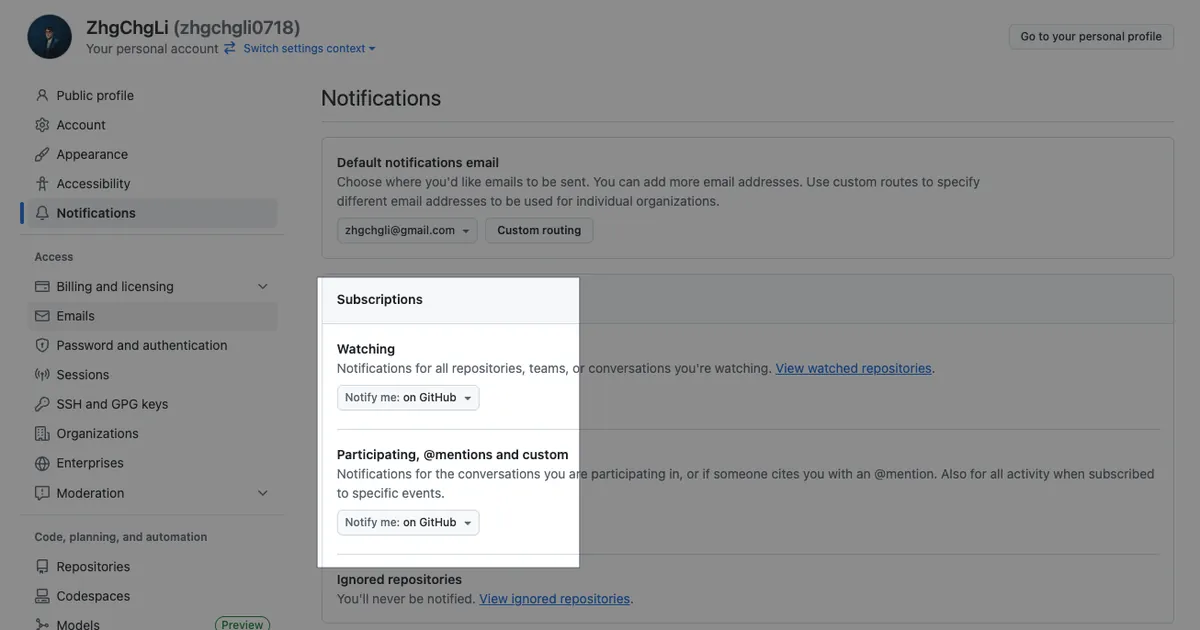
After setting up notifications for both GitHub Repo and Slack, all notifications will be received in Slack. You can go to your GitHub personal settings to turn off email notifications:
Others
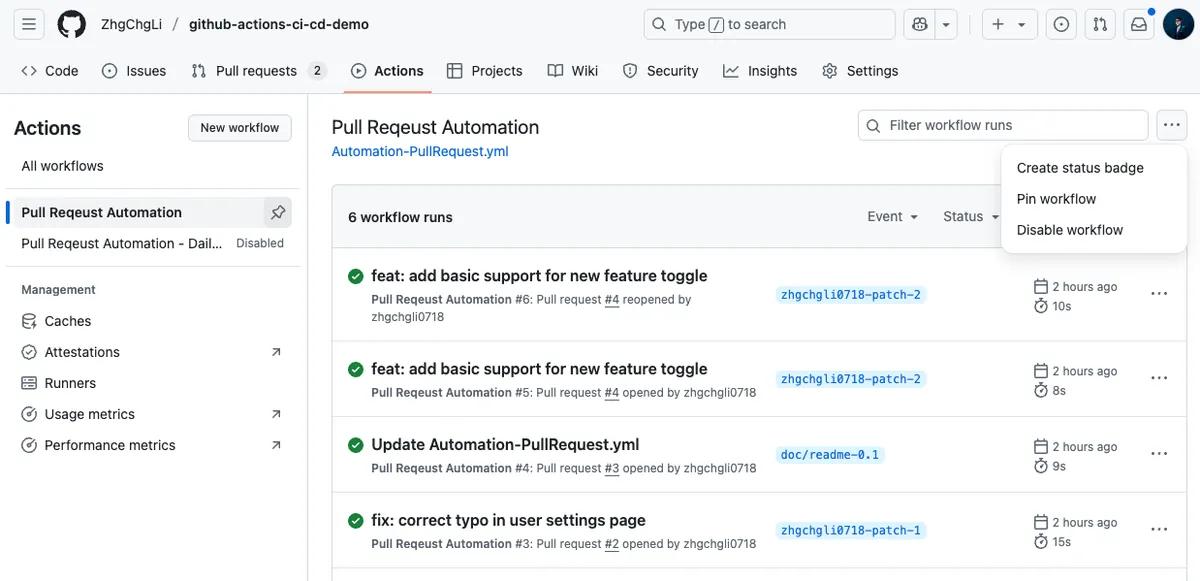
Actions currently do not have a directory structure, but you can pin up to five Actions on the Actions page. You can also disable an Action to pause it.
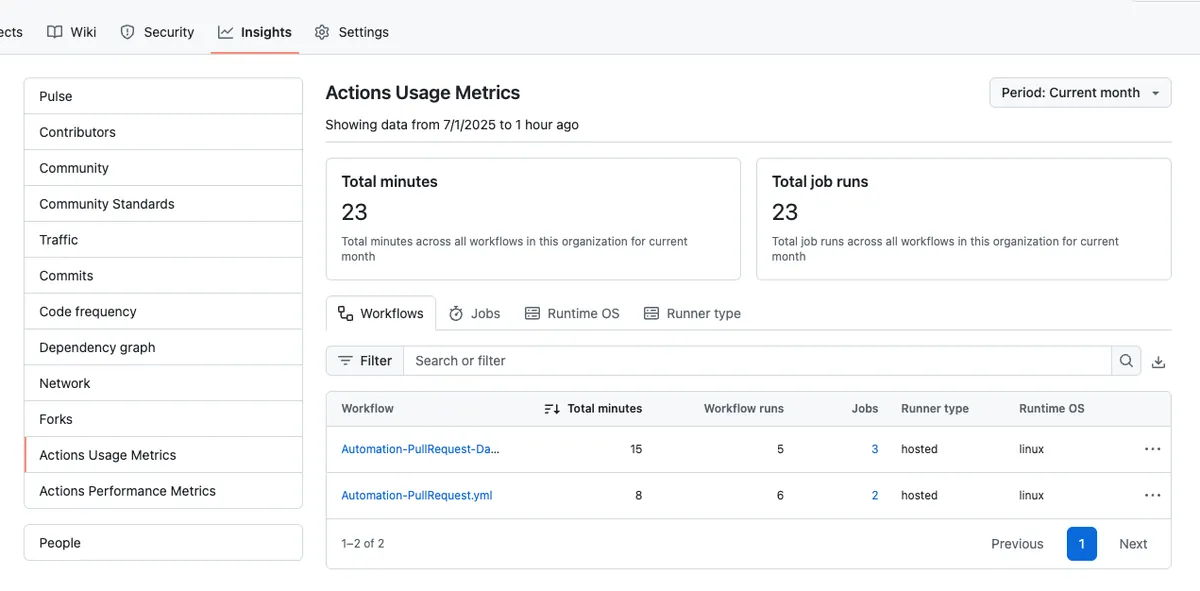
You can view GitHub Actions usage and performance in Insights:
Reuse Workflow Supplement
Next article uses the same Repo to split Reuse Workflow. Here is an additional example of splitting Reuse Workflow across different Repos.
First, define a Reuse Workflow: Automation-label-pr-base-branch.yml: in the ZhgChgLi/github-actions-ci-cd-demo-share-actions repo.
name: Automation-label-pr-base-branch
run-name: "[Automation-label-pr-base-branch] ${{ github.event.inputs.PR_NUMBER \\|\\| github.ref }}"

concurrency:
  group: ${{ github.workflow }}-${{ github.event.inputs.PR_NUMBER \\|\\| github.ref }}
  cancel-in-progress: true

# Trigger events
on:
  # Triggered by other workflows calling this workflow
  workflow_call:
    # Input data
    inputs:
      # PR Number
      PR_NUMBER:
        required: true
        type: string
    # Secret inputs
    secrets:
      GH_TOKEN:
        description: "GitHub token for API access"
        required: true
jobs:
  label-pr-base-branch:
    name: Label PR Base Branch
    continue-on-error: true
    timeout-minutes: 10
    runs-on: ubuntu-latest

    steps:
      - name: Label PR by Base Branch
        id: label-pr-base-branch
        env:
          GH_TOKEN: ${{ secrets.GITHUB_TOKEN }}
        run: \\|
          PR_NUMBER="${{ inputs.PR_NUMBER }}"
          REPO="${{ github.repository }}"

          echo "📦 Processing PR #$PR_NUMBER in repo $REPO"

          # Get the base branch of the PR
          BASE_BRANCH=$(gh pr view "$PR_NUMBER" --repo "$REPO" --json baseRefName --jq '.baseRefName')
          echo "🔖 PR Base Branch: $BASE_BRANCH"

          # Allowed base branch labels
          BRANCH_LABELS=("develop" "main" "master")

          # Check if label is in allowed list
          if [[ " ${BRANCH_LABELS[@]} " =~ " ${BASE_BRANCH} " ]]; then
            LABEL="$BASE_BRANCH"
          else
            echo "⚠️ Base branch '$BASE_BRANCH' not in allowed list, skipping label."
            exit 0
          fi

          # Remove existing base branch labels
          EXISTING_LABELS=$(gh pr view "$PR_NUMBER" --repo "$REPO" --json labels --jq '.labels[].name')
          for EXISTING in $EXISTING_LABELS; do
            if [[ " ${BRANCH_LABELS[@]} " =~ " ${EXISTING} " ]]; then
              echo "🧹 Removing existing base branch label: $EXISTING"
              gh pr edit "$PR_NUMBER" --repo "$REPO" --remove-label "$EXISTING"
            fi
          done

          # Create label if it does not exist
          if ! gh label list --repo "$REPO" \\| grep -q "^$LABEL$"; then
            echo "🆕 Creating missing label: $LABEL"
            gh label create "$LABEL" --repo "$REPO" --description "PR targeting $LABEL branch" --color "ededed"
          else
            echo "✅ Label '$LABEL' already exists"
          fi

          # Add the base branch label
          echo "🏷️ Adding label '$LABEL' to PR #$PR_NUMBER"
          gh pr edit "$PR_NUMBER" --repo "$REPO" --add-label "$LABEL"
Back to our main ZhgChgLi/github-actions-ci-cd-demo repo, add a main Workflow Demo-Reuse-Action-From-Another-Repo.yml:
name: Automation-label-pr-base-branch

on:
  pull_request:
    types: [opened]

jobs:
  call-label-pr-workflow:
    name: Call Base Branch Label Workflow
    # ✅ If the called workflow is in the same repo:
    #    uses: ./.github/workflows/Automation-label-pr-base-branch.yml
    #    Note: This method cannot specify a branch (it always uses the caller workflow's branch)
    #    Example references:
    #    - CD-Deploy-Form.yml calls a workflow in the same repo
    #    - CD-Deploy.yml calls a workflow across repos
    #
    # ✅ If the called workflow is in another repo:
    #    uses: {owner}/{repo}/.github/workflows/{file}.yml@{branch_or_tag}
    #    You can specify a branch or tag
    #    ref: https://github.com/ZhgChgLi/github-actions-ci-cd-demo-share-actions/blob/main/.github/workflows/Automation-label-pr-base-branch.yml
    uses: ZhgChgLi/github-actions-ci-cd-demo-share-actions/.github/workflows/Automation-label-pr-base-branch.yml@main
    with:
      PR_NUMBER: ${{ github.event.number }}

    # To inherit all secrets from the caller workflow, use `inherit`
    # secrets: inherit
    #
    # To pass specific secrets only, specify individually
    secrets:
      GH_TOKEN: ${{ secrets.GITHUB_TOKEN }}
Try creating a PR after committing the files.
Workflow: The main repo’s Demo-Reuse-Action-From-Another-Repo.yml → calls and passes parameters to another repo’s Automation-label-pr-base-branch.yml to run the task → then returns the result to the main repo.
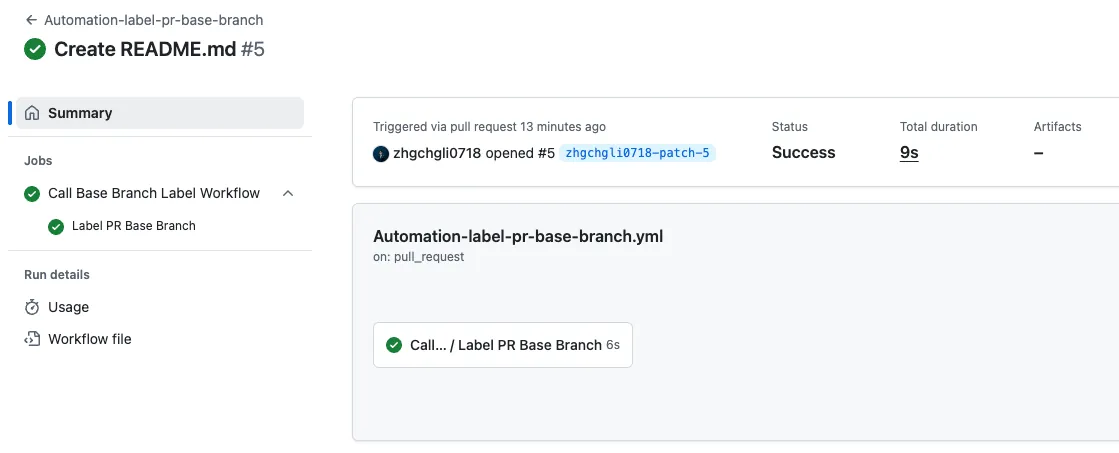
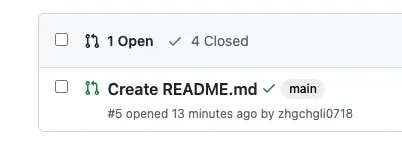
Success!
Private Repo Access Issues
Here is a security note: Public Repos have no issues, but if you reuse a workflow in a Private Repo, it can only be accessed and used by other repos within the same organization + those repos must also be Private + permission must be granted.
-
Public — ZhgChgLi/ReuseRepo+Private or Public-ZhgChgli or harry/myRepo= ✅ -
Private — ZhgChgLi/ReuseRepo+Private or Public— harry/myRepo= ❌ -
Private — ZhgChgLi/ReuseRepo+Public — ZhgChgLi/anotherRepo= ❌ -
Private — ZhgChgLi/ReuseRepo+Private — ZhgChgLi/anotherRepo= ✅
To set allowed methods, go to Reuse Workflow Repo → Settings → Actions → General → Access:
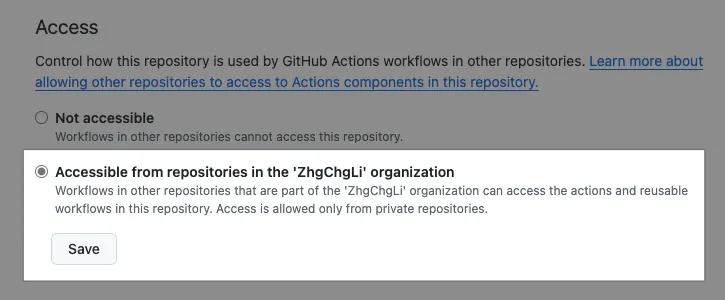
Change the checkbox:
Accessible from repositories in the 'ZhgChgLi' organization
Workflows in other repositories within the 'ZhgChgLi' organization can access the actions and reusable workflows in this repository. Access is allowed only from private repositories.
Click “Save” to save and complete.
If you don’t have access permission, the following error message will appear:
Invalid workflow file: .github/workflows/Demo-reuse-action-from-another-repo.yml#L21
error parsing called workflow
".github/workflows/Demo-reuse-action-from-another-repo.yml"
-> "ZhgChgLi/github-actions-ci-cd-demo-share-actions/.github/workflows/Automation-label-pr-base-branch.yml@main"
: workflow was not found.
Additional GitHub Actions Script Syntax
A supplement for the variable syntax that might confuse everyone: ${{ XXX }}, ${XXX}, or $XXX.
Demo-Env-Vars-.yml:
name: Demo-Env-Vars

on:
  workflow_dispatch:

jobs:
  print-env-vars:
    runs-on: ubuntu-latest

    steps:
      - name: print-env
        run: env
      - name: context-vars-vs-vars
        env:
          SAY_MY_NAME: "Heisenberg"
          # GitHub Actions Context expression, explained below
          FROM_REF: "${{ github.ref }}"
        run: \\|
          # Shell Script:
          # Referencing custom injected ENV variables
          # ${SAY_MY_NAME} or $SAY_MY_NAME both work
          # ${XX} is better when concatenating strings:
          echo "HI: ${SAY_MY_NAME}"

          # 💡 GitHub Actions Context expression
          # This is not a shell variable, but replaced by GitHub Actions during YAML parsing
          # ⚠ Running locally or outside GitHub Actions will fail
          # 🔗 https://docs.github.com/en/actions/learn-github-actions/contexts#github-context
          BRANCH_NAME_FROM_CONTEXT="${{ github.ref }}"

          # 💡 GitHub Actions runtime environment variables
          # These variables are automatically injected by GitHub Actions when the runner runs the shell
          # ✅ Can be pre-defined with export or ENV in other environments
          # 🔗 https://docs.github.com/en/actions/learn-github-actions/environment-variables
          BRANCH_NAME_FROM_ENV_VARS="${GITHUB_REF}"

          echo "FROM_REF: ${FROM_REF}"
          echo "BRANCH_NAME_FROM_CONTEXT: ${BRANCH_NAME_FROM_CONTEXT}"
          echo "BRANCH_NAME_FROM_ENV_VARS: ${BRANCH_NAME_FROM_ENV_VARS}"
      - name: print-github-script-env
        uses: actions/github-script@v7
        env:
          SAY_MY_NAME: "Heisenberg"
          # GitHub Actions Context expression, explained above
          FROM_REF: "${{ github.ref }}"
        with:
          script: \\|
            // GitHub Script: (JavaScript (Node.js)):
            // Get ENV values from process.env
            console.log(`HI: ${process.env.SAY_MY_NAME}`);
            console.log(`FROM_REF: ${process.env.FROM_REF}`);
            // github-script automatically injects context variables for direct JS access
            // https://docs.github.com/en/actions/learn-github-actions/contexts#github-context
            const branch_name_from_context_vars = context.ref;
            console.log(`branch_name_from_context_vars: ${branch_name_from_context_vars}`);
            // You can also use GitHub Actions Context expression (though less meaningful):
            const branch_name_from_context = "${{ github.ref }}";
            console.log(`branch_name_from_context: ${branch_name_from_context}`);

            for (const [key, value] of Object.entries(process.env)) {
              console.log(`${key}=${value}`);
            }
            // The github object in github-script is an Octokit REST API instance
            // used to interact with GitHub API
            // For example:
            // await github.rest.pulls.list({
            //   owner: context.repo.owner,
            //   repo: context.repo.repo,
            //   state: "open"
            //  });
      # gh CLI does NOT use GITHUB_TOKEN by default; requires GH_TOKEN
      - name: gh CLI without GH_TOKEN (expected to fail)
        continue-on-error: true
        run: \\|
          PR_COUNT=$(gh pr list --repo $GITHUB_REPOSITORY --json number --jq 'length')
          echo "Found $PR_COUNT open pull requests"

      - name: gh CLI with GH_TOKEN (expected to succeed)
        env:
          # Assign GH_TOKEN so gh CLI can authenticate
          # https://docs.github.com/en/actions/how-tos/security-for-github-actions/security-guides/use-github_token-in-workflows
          GH_TOKEN: ${{ secrets.GITHUB_TOKEN }}
        run: \\|
          PR_COUNT=$(gh pr list --repo $GITHUB_REPOSITORY --json number --jq 'length')
          echo "Found $PR_COUNT open pull requests"

      - name: github-script auto-authentication (no GH_TOKEN needed)
        uses: actions/github-script@v7
        with:
          script: \\|
            // github = Octokit REST client (auto-authenticated with GITHUB_TOKEN)
            const pulls = await github.rest.pulls.list({
              owner: context.repo.owner,
              repo: context.repo.repo,
              state: "open"
            });
            console.log(`Found ${pulls.data.length} open pull requests`);
${{ XXX }} GitHub Actions Context Expressions
-
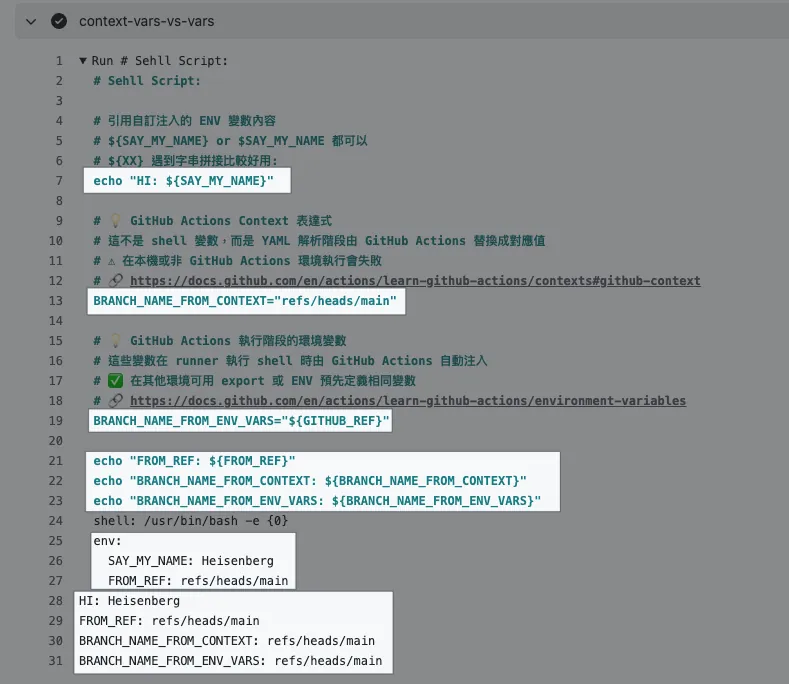
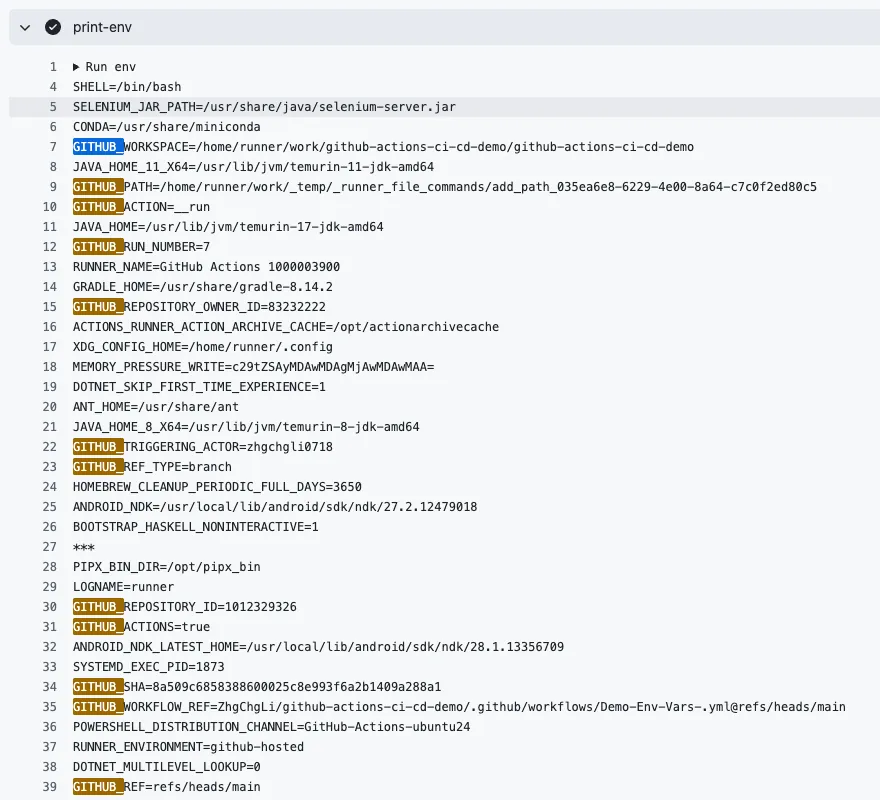
${{ XXX }}is a GitHub Actions Context expression, replaced by GitHub Actions with the corresponding value during the YAML parsing phase (as shown in the above imageBRANCH_NAME_FROM_CONTEXT). -
A complete list of usable expressions can be found in the official documentation.
-
${XXX}or$XXXare actual environment variables.${XXX}is more convenient for string concatenation. -
GitHub Actions injects some default environment variables. For the full list, please refer to the official documentation.
actions/github-script@v7
-
In
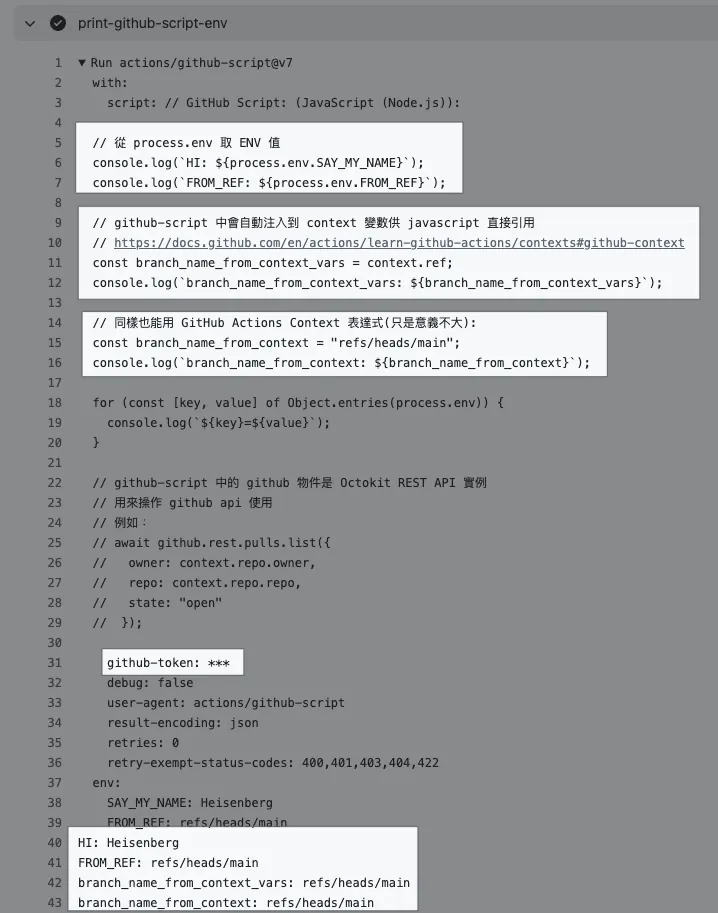
github-script, you can also use${{ XXX }}, which is a GitHub Actions Context expression, but it is not very meaningful; because in the github-script environment, context variables are injected by default and can be directly referenced in JavaScript. -
In
github-script, thegithubobject is an instance of the Octokit REST API. -
github-scriptcan also inject variables fromenv:, but you need to access them using${process.env.xxx}. -
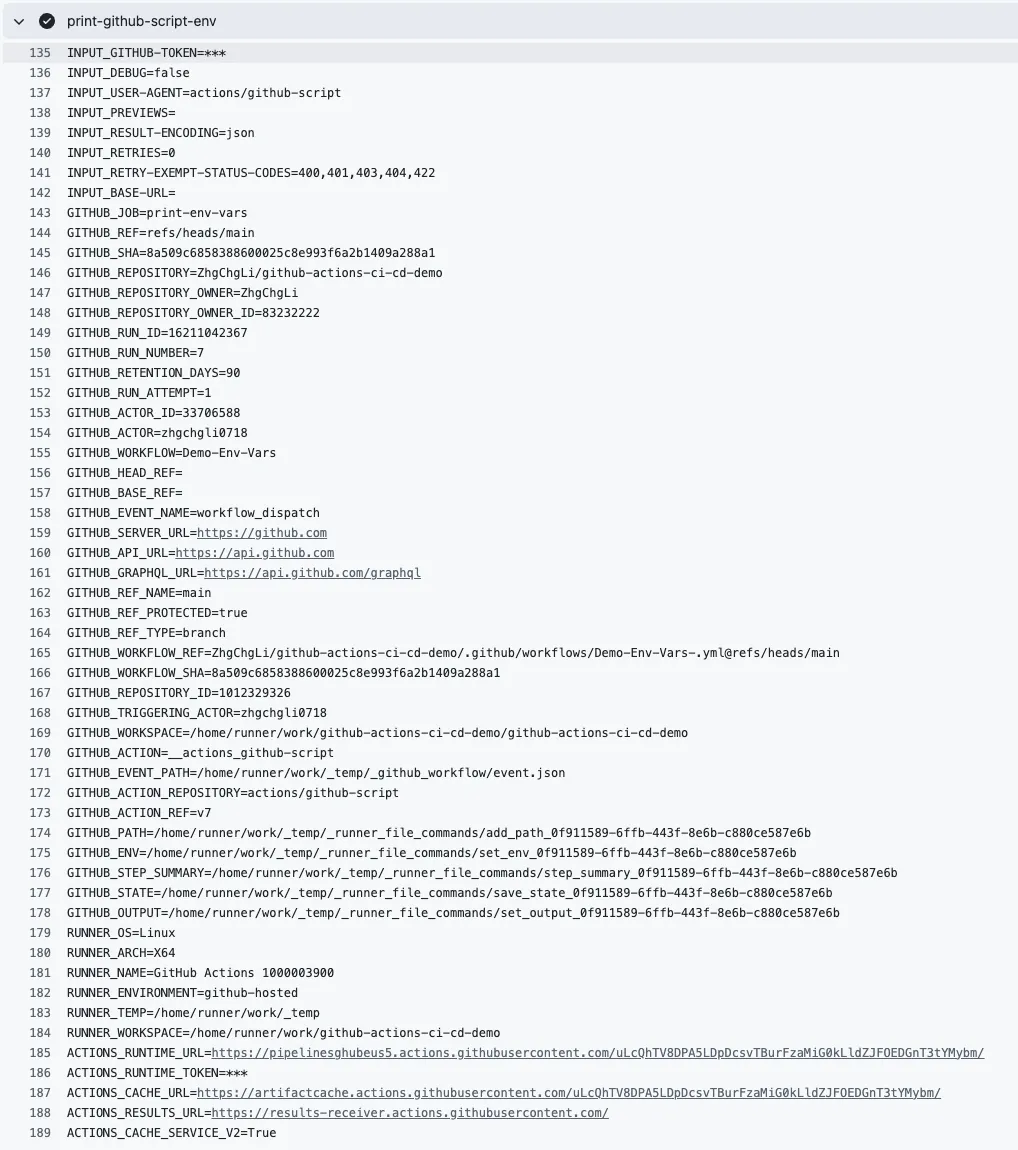
Some environment variables are injected by default. For the full list, see the official documentation. Access them via
${process.env.xxx}; however, since there is already thecontextvariable, accessing them this way is not very meaningful.
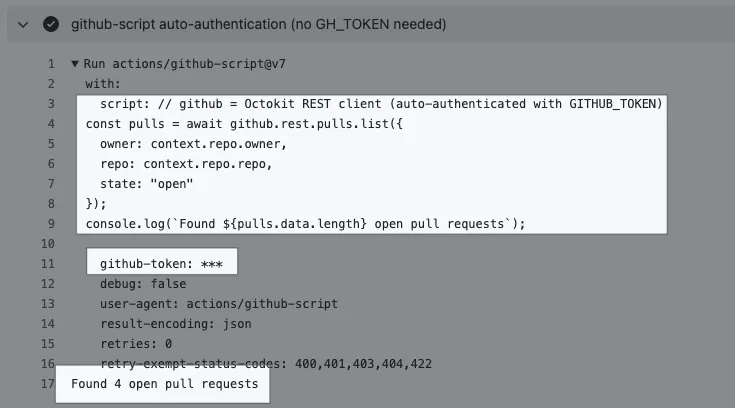
github-scriptautomatically includes thegithub-token, no need to specify it.
gh cli GH_TOKEN
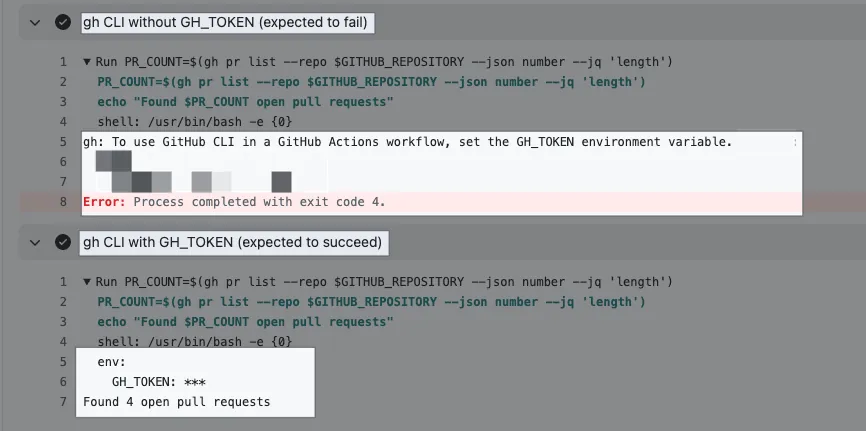
-
When using
gh cliin GitHub Actions Shell Script, you need to specify theGH_TOKENparameter -
You can directly use the default token —
secrets.GITHUB_TOKEN(automatically generated during GitHub Actions execution) -
The default token has some basic permissions. If the command requires higher permissions, use a Personal Access Token. For teams, it is recommended to create a PAT using a shared account.
Full code: Demo-Env-Vars-.yml
GitHub Actions is already developed. The next step is to replace the GitHub Hosted Runner with your own Self-hosted Runner.
GitHub Hosted Runner offers a free quota of 2,000 minutes per month (starting point). Running small automation tasks usually takes little time and runs on Linux machines at a low cost, so you might not even reach the free limit; it’s not necessary to switch to a Self-hosted Runner. Switching runners also requires ensuring the runner environment is set up correctly (for example, GitHub Hosted Runner comes with the gh CLI pre-installed, but for a self-hosted Runner, you need to install it yourself). This article switches runners purely for teaching purposes.
Self-hosted Runner is only needed when running CI/CD tasks.
Adding a Self-hosted Runner
This article uses macOS M1 as an example.
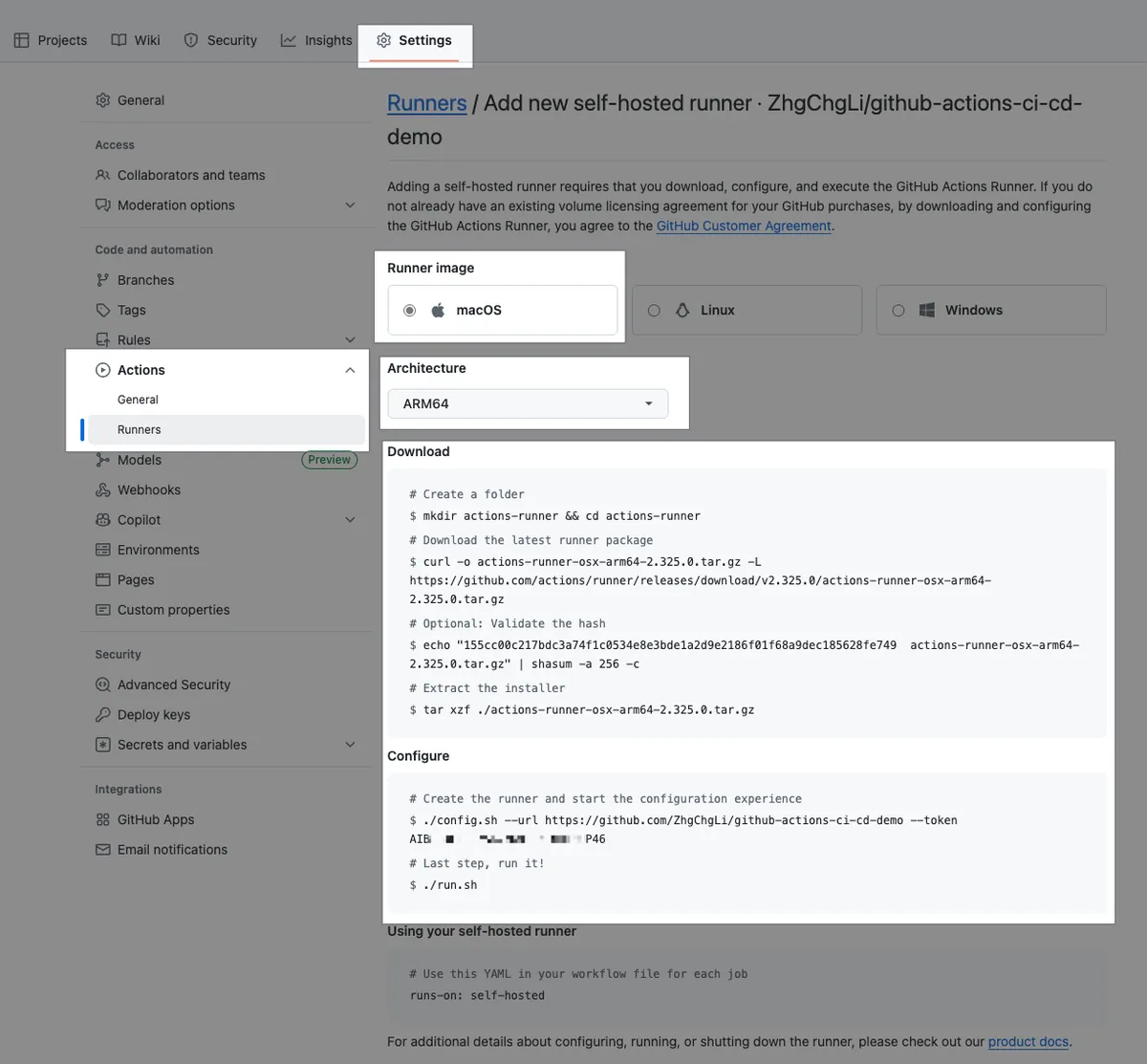
-
Settings → Actions → Runners → New self-hosted runner.
-
Runner image: macOS
-
Architecture: Remember to select ARM64 on M1 for faster execution
Open a Terminal on a physical computer.
Complete the following steps on your local computer according to the Download instructions:
# Create the Runner directory at your desired path
mkdir actions-runner && cd actions-runner
# Download the Runner image
curl -o actions-runner-osx-x64-2.325.0.tar.gz -L https://github.com/actions/runner/releases/download/v2.325.0/actions-runner-osx-x64-2.325.0.tar.gz

# Optional: Validate the hash
echo "0562bd934b27ca0c6d8a357df00809fbc7b4d5524d4aeb6ec152e14fd520a4c3  actions-runner-osx-x64-2.325.0.tar.gz" \\| shasum -a 256 -c

# Extract the archive
tar xzf ./actions-runner-osx-x64-2.325.0.tar.gz
The above is for reference only; it is recommended to follow the steps in your settings page to get the latest version of the Runner image.

Configure:
# Please refer to the setup page for the command; the token changes over time
./config.sh --url https://github.com/ORG/REPO --token XXX
You will be asked to input sequentially:
-
Enter the name of the runner group to add this runner to: [press Enter for Default] Just press Enter
Only runners registered at the Organization level have the Group feature -
Enter the name of runner: [press Enter for ZhgChgLideMacBook-Pro] You can enter the desired Runner name, e.g.
app-runner-1or just press Enter -
This runner will have the following labels: ‘self-hosted’, ‘macOS’, ‘X64’
Enter any additional labels (ex. label-1,label-2): [press Enter to skip]
Enter the Runner labels you want to set. You can add custom labels for easier use later
As mentioned before, GitHub Actions/Runner picks tasks based on matching labels. If you only use the default labels, the Runner might pick up jobs meant for other runners in the organization. It’s safest to add a custom label.
Here, I randomly set a labelself-hosted-zhgchgli -
Enter name of work folder: [press Enter for _work] Press Enter directly
When you see √ Settings Saved., it means the setup is complete.
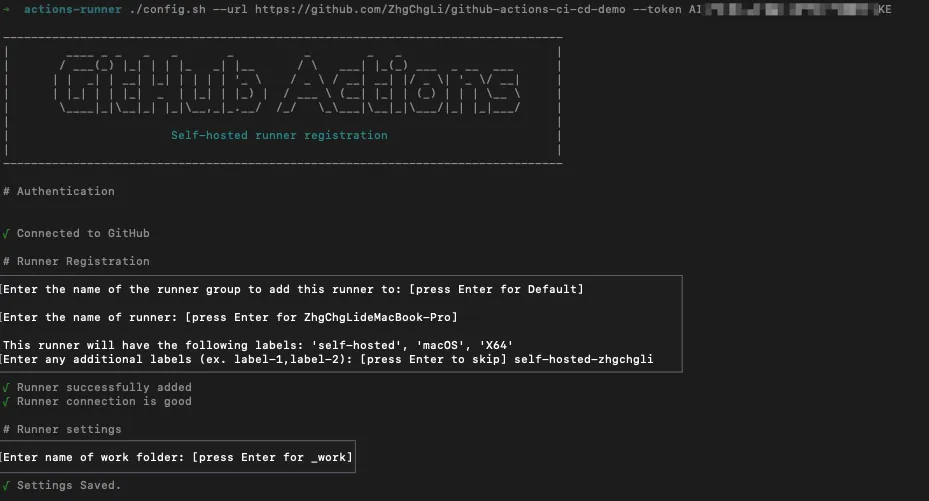
Start the Runner:
./run.sh
When you see √ Connected to GitHub and Listening for Jobs, it means the Actions runner is already listening for tasks:
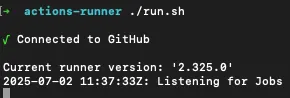
This Terminal window will keep receiving tasks as long as it remains open.
🚀🚀🚀You can run multiple Runners on the same computer by opening multiple Terminals in different directories.
Back on the Repo settings page, you can also see the Runner waiting for tasks:
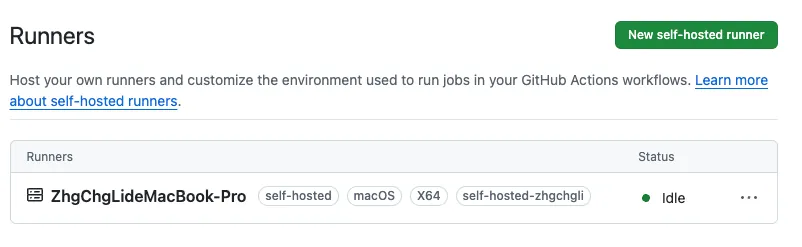
Status:
-
Idle: idle, waiting for tasks
-
Active: A task is currently running
-
Offline: Runner is offline
Workflow (GitHub Actions) Runner Switching to Self-hosted Runner
Using Automation-PullRequest.yml as an example:
# Please refer to the previous text, omitted....
jobs:
  label-pr-by-file-count:
    # Please refer to the previous text, omitted....
    runs-on: [self-hosted-zhgchgli]
    # Please refer to the previous text, omitted....
  # ---------
  assign-self-if-no-assignee:
    # Please refer to the previous text, omitted....
    runs-on: [self-hosted-zhgchgli]

    steps:
      # Please refer to the previous text, omitted....
After committing files to the repo’s main branch, reopen the PR to trigger and verify the Actions.
Back in the Runner Terminal, you can see a new task has arrived, showing its execution and results:

Failed because my local computer does not have the gh cli environment installed:

After installing gh on the physical machine using brew install gh, trigger the execution again:

Success! Now this task runs entirely on our own computer, without using GitHub Hosted Runner and without any charges.
We can click into the Action Log to check which Runner and machine the task is running on:
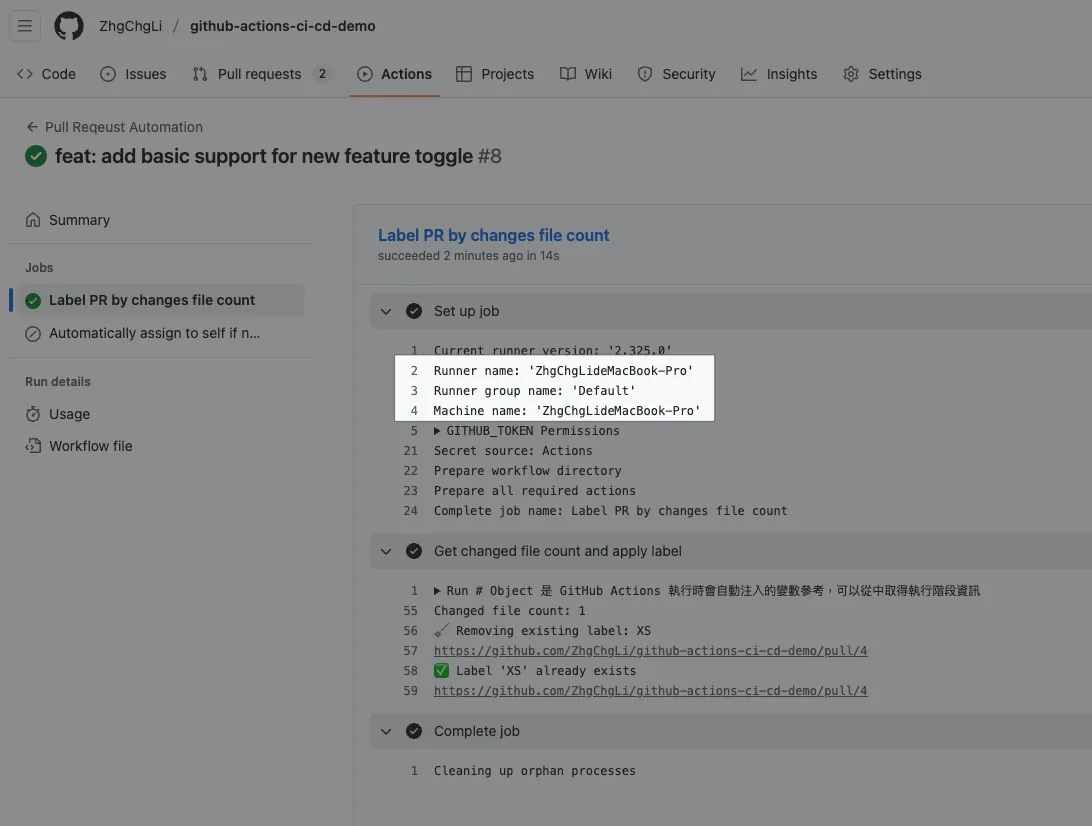
runs-on: [ Runner Label] Setting
This is AND, not OR. GitHub Runner does not currently support OR when selecting Runners to execute.
For example: [self-hosted, macOS, app] → means the Runner must have all three labels self-hosted, macOS, app to match and take the job.
If a Job wants to test results across different Runner environments simultaneously, you can use the matrix parameter:
jobs:
  test:
    runs-on: ${{ matrix.runner }}
    strategy:
      matrix:
        runner:
          - [self-hosted, linux, high-memory]
          - [self-hosted, macos, xcode-15]

    steps:
      - run: echo "Running on ${{ matrix.runner }}"
This Job will run once in parallel on each of the following two Runner Labels Runners:
-
self-hosted, linux, high-memory
-
self-hosted, macos, xcode-15
Runner is currently not supported for:
- OR Selecting a Runner
- Runner weight settings
Register Runner as a Service
You can refer to the official document “Configuring the self-hosted runner application as a service” to register the Runner directly as a system service. This allows it to run in the background (without keeping the Terminal open) and start automatically after boot.
If you have multiple runners, remember to adjust the settings in Customizing the self-hosted runner service to register different names.
On the iOS side, I have an issue to investigate and exclude: after switching to a background Service, I encounter errors during Archive (suspected to be related to keychain permissions). I didn’t have time to fix it then, so I temporarily used the foreground Terminal Runner.
For a traditional foreground app to start automatically on boot, you need to add a launch configuration file in ~/Library/LaunchAgents:
actions.runner.REPO.RUNNER_NAME.plist:
<?xml version="1.0" encoding="UTF-8"?>
<!DOCTYPE plist PUBLIC "-//Apple//DTD PLIST 1.0//EN" "http://www.apple.com/DTDs/PropertyList-1.0.dtd">
<plist version="1.0">
 <dict>
  <key>Label</key>
  <string>actions.runner.REPO.RUNNER_NAME</string>
  <!-- Specify Terminal.app to launch -->
  <key>ProgramArguments</key>
  <array>
   <string>/usr/bin/open</string>
   <string>-a</string>
   <string>Terminal</string>
   <string>/Users/zhgchgli/Documents/actions-runner/run.sh</string>
  </array>
  <key>RunAtLoad</key>
  <true/>
  <key>WorkingDirectory</key>
  <string>/Users/zhgchgli/Documents/actions-runner</string>
 </dict>
</plist>
For those interested in diving deeper into DevOps, you can refer to the official k8s Runner documentation.
Complete Project Repo
Official Documentation

For more detailed setup instructions, please refer to the official documentation.
AI Can Help!
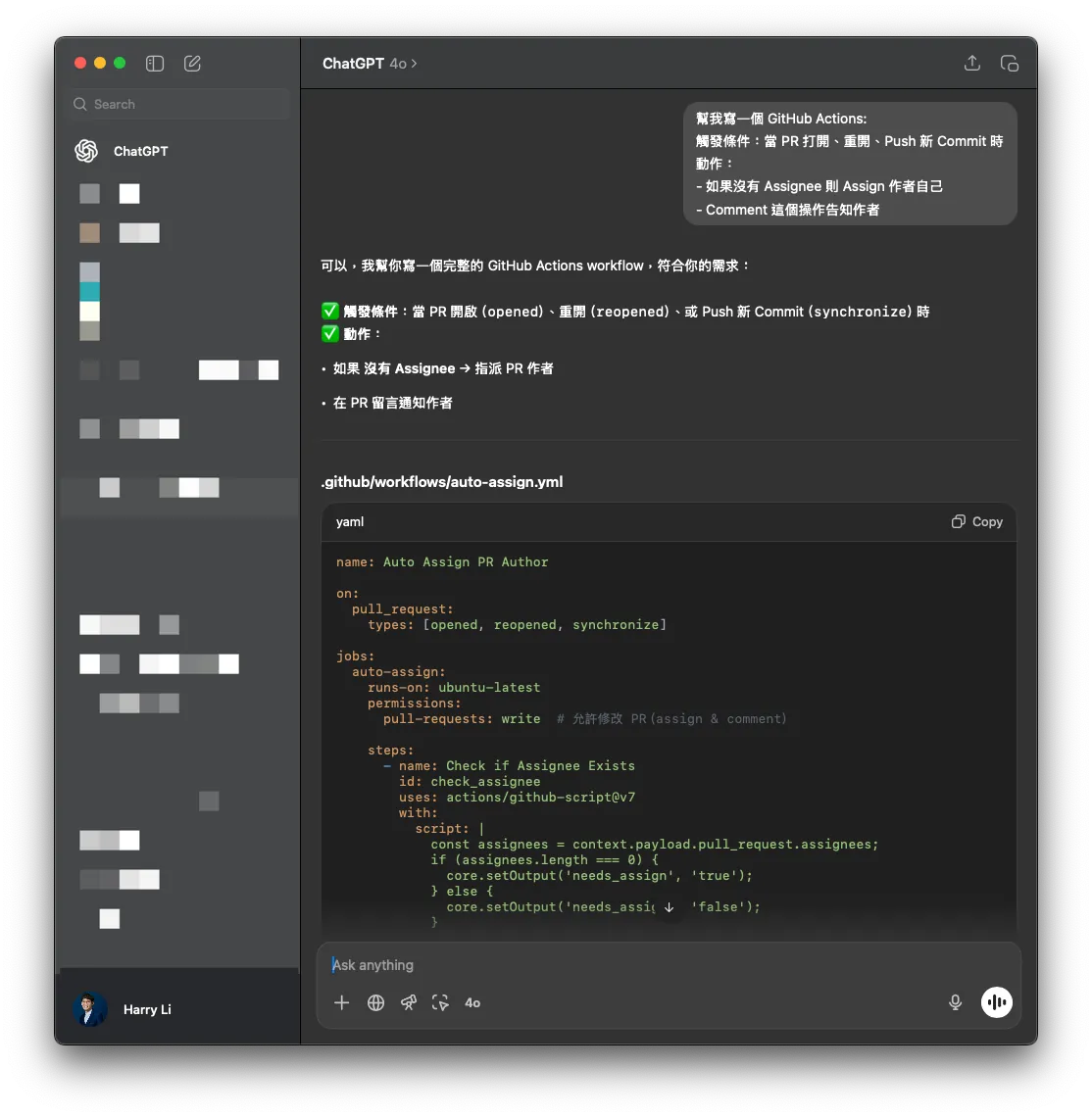
Providing ChatGPT with complete steps and timing can help you create ready-to-use GitHub Actions!
Summary
You should now have a solid understanding of GitHub Actions + Self-hosted Runner. In the next article, I will start using an App (iOS) CI/CD case to guide you step-by-step through building the entire process.
Series Articles:
🍺 Buy me a beer on PayPal



Comments