
Practical Application Records of Design Patterns
Problem Scenarios and Applied Design Patterns When Encapsulating the Socket.IO Client Library Requirements

Photo by Daniel McCullough
Preface
This article documents real development scenarios where Design Patterns were applied to solve problems. It covers the background of the requirements, actual problem scenarios (What?), reasons for applying patterns (Why?), and implementation details (How?). It is recommended to read from the beginning for better continuity.
This article introduces four scenarios encountered during the development of this requirement and seven Design Patterns applied to address these scenarios.
Background
Organization Structure
Our company split into multiple Feature Teams and a Platform Team this year. The Feature Teams focus mainly on user-side requirements, while the Platform Team serves internal members. One of the Platform Team’s tasks is to introduce technology, build infrastructure, and ensure systematic integration to pave the way for Feature Teams when developing their requirements.
Current Requirements
Feature Teams want to change the original messaging function (fetching message data via API when entering the page, requiring refresh to get the latest messages) to real-time communication (able to receive the latest messages instantly and send messages).
Platform Team Work
The Platform Team focuses not only on the immediate real-time communication needs but also on long-term development and reusability. After evaluation, the WebSocket two-way communication mechanism is indispensable in modern apps. Besides the current requirements, there will be many future opportunities to use it. With available manpower, the team invested in designing and developing the interface.
Goal:
-
Encapsulating Pinkoi Server-Side and Socket.IO Communication and Authentication Logic
-
Encapsulate Socket.IO’s complex operations, providing an extensible and user-friendly interface based on Pinkoi’s business needs
-
Unified cross-platform interface (Socket.IO Android and iOS client libraries support different features and interfaces)
-
Feature side does not need to understand the Socket.IO mechanism
-
Feature side does not need to manage complex connection states
-
Future WebSocket bidirectional communication needs can be directly supported.
Time and Manpower:
-
One person assigned for iOS and one for Android respectively
-
Development Schedule: Duration 3 weeks
Technical Details
This feature will be supported on Web, iOS, and Android platforms; it requires introducing a WebSocket two-way communication protocol. The backend plans to use the Socket.io service directly.
First of all, Socket != WebSocket
For details about Socket, WebSocket, and technical aspects, please refer to the following two articles:
In short:
Socket is an abstract interface for the TCP/UDP transport layer, while WebSocket is a transport protocol at the application layer.
The relationship between Socket and WebSocket is like the relationship between a dog and a hot dog—there is no relation.
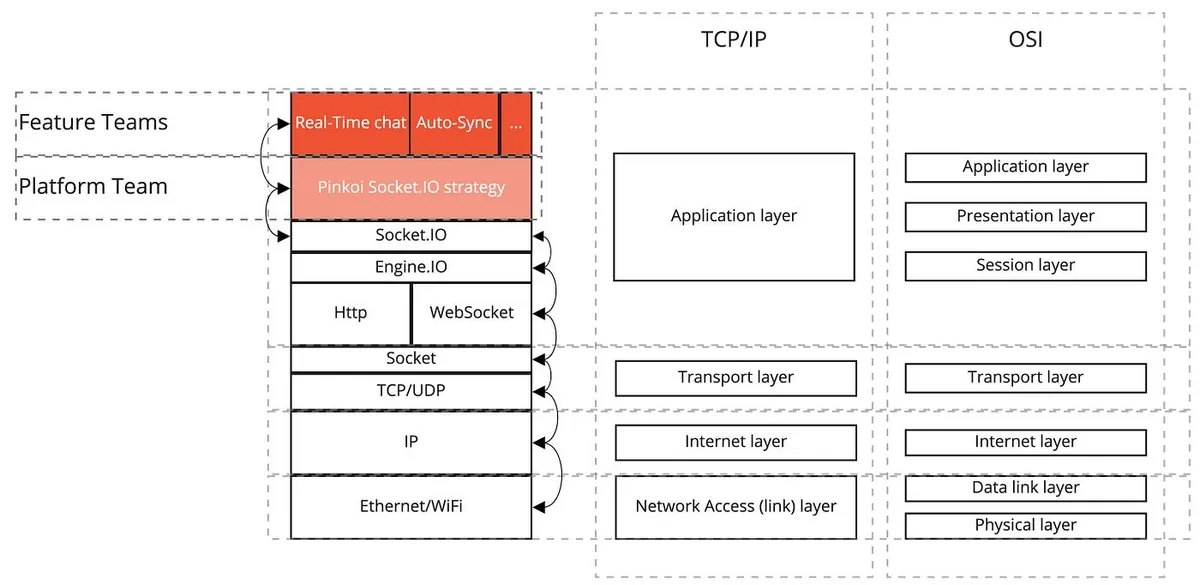
Socket.IO is an abstraction layer built on top of Engine.IO, which itself is a wrapper around WebSocket. Each layer only handles communication between its adjacent layers and does not allow cross-layer operations (e.g., Socket.IO cannot directly manipulate the WebSocket connection).
Socket.IO/Engine.IO implements many convenient features beyond basic WebSocket connections (e.g., offline event sending mechanism, HTTP-like request mechanism, Room/Group mechanism, etc.).
The main responsibility of the Platform Team layer is to bridge the logic between Socket.IO and the Pinkoi Server Side, providing support for upper Feature Teams during feature development.
Socket.IO Swift Client has pitfalls
-
It has not been updated for a long time (the latest version is still from 2019), so it is unclear if it is still maintained.
-
Client & Server Side Socket IO versions must match. On the server side, you can add
{allowEIO3: true}or specify the same version on the client side with.version. Otherwise, the connection will fail. -
Naming conventions, interfaces, and official website examples often do not match.
-
The official Socket.io examples are all based on the Web, but the Swift Client does not necessarily support all the features shown on the official site.
In this implementation, we found that the iOS Library does not have an offline event sending mechanism
(which we implemented ourselves—please keep reading).
It is recommended to experiment first to see if the desired mechanism is supported before adopting Socket.IO.
Socket.IO Swift Client is a wrapper based on the Starscream WebSocket Library, and can fallback to Starscream if needed.
The background information ends here. Next, we move on to the main topic.
Design Patterns
Design patterns are essentially solutions to common problems in software design. You don’t have to use design patterns to develop, design patterns may not fit every scenario, and no one says you can’t create your own new design patterns.
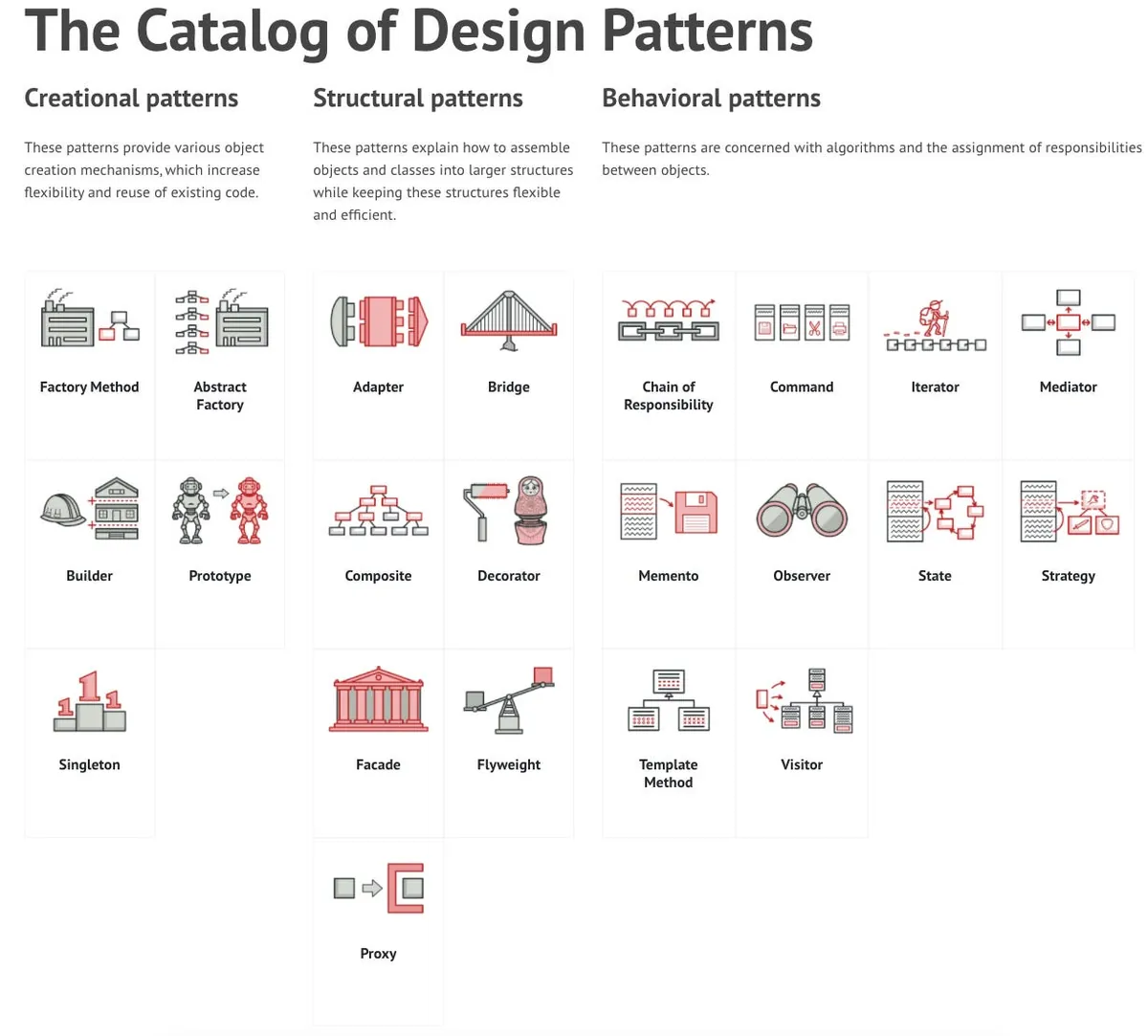
The Catalog of Design Patterns
The existing design patterns (The 23 Gang of Four Design Patterns) are common knowledge in software design. Once a XXX Pattern is mentioned, everyone immediately understands the corresponding architectural blueprint without further explanation. This also makes future maintenance easier to follow the context. Being industry-proven methods, they rarely require extensive time to review object dependency issues. Choosing the appropriate pattern for the right scenario can reduce communication and maintenance costs, and improve development efficiency.
Design patterns can be combined, but it is not recommended to drastically alter existing patterns, forcefully apply them without reason, or use patterns in the wrong context (e.g., using Chain of Responsibility to create objects). Doing so defeats their purpose and may confuse future maintainers.
Design Patterns Mentioned in This Article:
Each will be explained one by one later, including the scenario it was used in and the reason for using it.
This article focuses on the application of Design Patterns rather than Socket.IO operations. Some examples are simplified for clarity and are not suitable for real Socket.IO encapsulation.
Due to space limitations, this article will not detail the architecture of each design pattern. Please click the links for each pattern to understand their structures before continuing.
The demo code will be written in Swift.
Requirement Scenario 1.
What?
-
Reuse the same object when requesting a Connection with the same Path on different pages or objects.
-
Connection should be an abstract interface, not directly dependent on the Socket.IO object.
Why?
-
Reduce memory usage and the time and data costs of repeated connections.
-
Reserve space for future replacement with other frameworks
How?
-
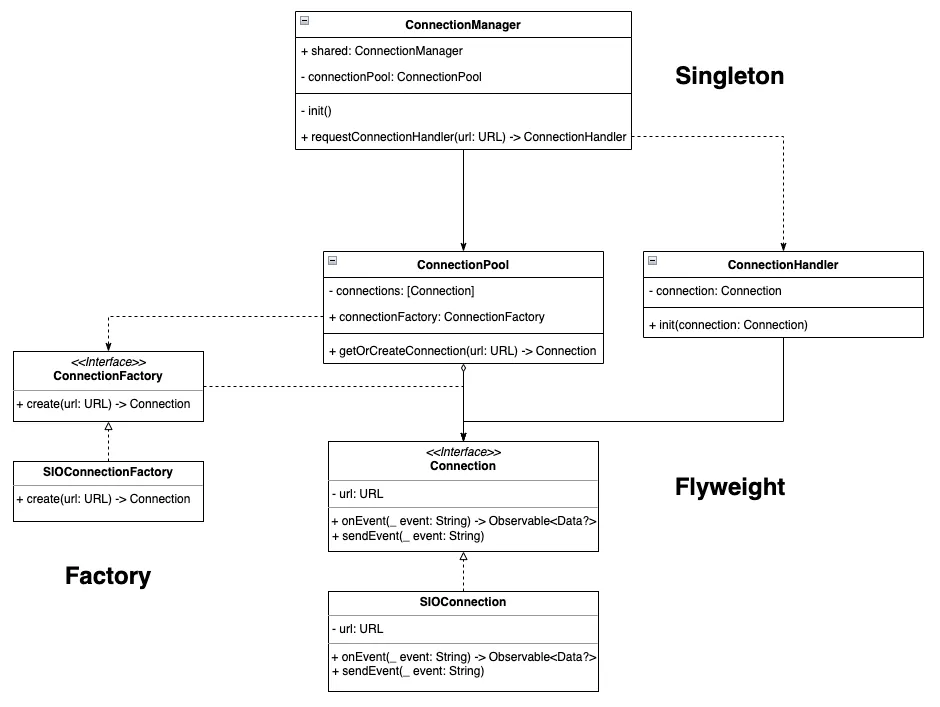
Singleton Pattern: A creational pattern that ensures a class has only one instance.
-
Flyweight Pattern: A structural pattern that shares common states among multiple objects for reuse.
-
Factory Pattern: A creational pattern that abstracts object creation methods, allowing external replacement.
Practical Use Case:
-
Singleton Pattern: The
ConnectionManagerexists as a single instance throughout the App Lifecycle, managing access toConnection. -
Flyweight Pattern:
ConnectionPoolserves as a shared pool of Connections. Connections are obtained via methods from this pool, with logic to return an existing Connection when the URL Path matches.
ConnectionHandleracts as an external operator and state manager forConnection. -
Factory Pattern:
ConnectionFactorycooperates with the Flyweight Pattern above to create a newConnectionthrough this factory interface when no reusable connection is found in the pool.
import Combine
import Foundation

protocol Connection {
    var url: URL {get}
    var id: UUID {get}

    init(url: URL)

    func connect()
    func disconnect()

    func sendEvent(_ event: String)
    func onEvent(_ event: String) -> AnyPublisher<Data?, Never>
}

protocol ConnectionFactory {
    func create(url: URL) -> Connection
}

class ConnectionPool {

    private let connectionFactory: ConnectionFactory
    private var connections: [Connection] = []

    init(connectionFactory: ConnectionFactory) {
        self.connectionFactory = connectionFactory
    }

    func getOrCreateConnection(url: URL) -> Connection {
        if let connection = connections.first(where: { $0.url == url }) {
            return connection
        } else {
            let connection = connectionFactory.create(url: url)
            connections.append(connection)
            return connection
        }
    }

}

class ConnectionHandler {
    private let connection: Connection
    init(connection: Connection) {
        self.connection = connection
    }

    func getConnectionUUID() -> UUID {
        return connection.id
    }
}

class ConnectionManager {
    static let shared = ConnectionManager(connectionPool: ConnectionPool(connectionFactory: SIOConnectionFactory()))
    private let connectionPool: ConnectionPool
    private init(connectionPool: ConnectionPool) {
        self.connectionPool = connectionPool
    }

    //
    func requestConnectionHandler(url: URL) -> ConnectionHandler {
        let connection = connectionPool.getOrCreateConnection(url: url)
        return ConnectionHandler(connection: connection)
    }
}

// Socket.IO Implementation
class SIOConnection: Connection {
    let url: URL
    let id: UUID = UUID()

    required init(url: URL) {
        self.url = url
        //
    }

    func connect() {
        //
    }

    func disconnect() {
        //
    }

    func sendEvent(_ event: String) {
        //
    }

    func onEvent(_ event: String) -> AnyPublisher<Data?, Never> {
        //
        return PassthroughSubject<Data?, Never>().eraseToAnyPublisher()
    }
}

class SIOConnectionFactory: ConnectionFactory {
    func create(url: URL) -> Connection {
        //
        return SIOConnection(url: url)
    }
}
//

print(ConnectionManager.shared.requestConnectionHandler(url: URL(string: "wss://pinkoi.com/1")!).getConnectionUUID().uuidString)
print(ConnectionManager.shared.requestConnectionHandler(url: URL(string: "wss://pinkoi.com/1")!).getConnectionUUID().uuidString)

print(ConnectionManager.shared.requestConnectionHandler(url: URL(string: "wss://pinkoi.com/2")!).getConnectionUUID().uuidString)

// output:
// D99F5429-1C6D-4EB5-A56E-9373D6F37307
// D99F5429-1C6D-4EB5-A56E-9373D6F37307
// 599CF16F-3D7C-49CF-817B-5A57C119FE31
Requirement Scenario 2.
What?
As described in the background technical details, the Socket.IO Swift Client’s Send Event does not support offline sending (while the Web/Android versions of the library do), so the iOS side needs to implement this feature on its own.
The amazing thing is that Socket.IO Swift Client - onEvent supports offline subscription.
Why?
-
Cross-Platform Feature Unification
-
The code is easy to understand
How?
- Command Pattern: A behavioral pattern that encapsulates operations into objects, allowing queuing, delaying, canceling, and other grouped actions.
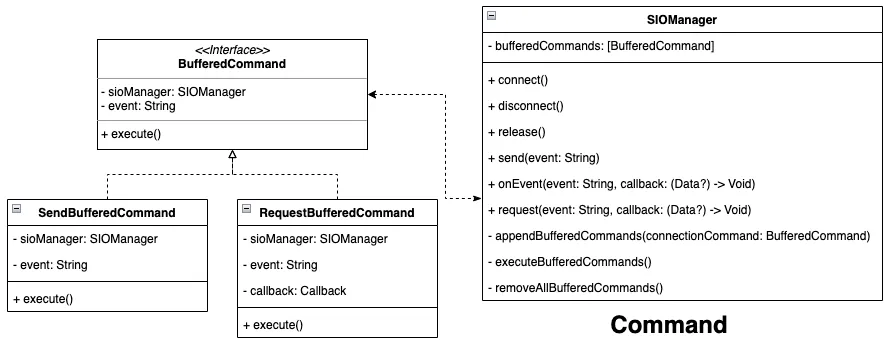
- Command Pattern:
SIOManageris the lowest-level wrapper for communicating with Socket.IO. Itssendandrequestmethods operate on Socket.IO Send Events. When the current Socket.IO connection is offline, the request parameters are stored inbufferedCommands. Once reconnected, these are processed one by one (First In First Out).
protocol BufferedCommand {
    var sioManager: SIOManagerSpec? { get set }
    var event: String { get }

    func execute()
}

struct SendBufferedCommand: BufferedCommand {
    let event: String
    weak var sioManager: SIOManagerSpec?

    func execute() {
        sioManager?.send(event)
    }
}

struct RequestBufferedCommand: BufferedCommand {
    let event: String
    let callback: (Data?) -> Void
    weak var sioManager: SIOManagerSpec?

    func execute() {
        sioManager?.request(event, callback: callback)
    }
}

protocol SIOManagerSpec: AnyObject {
    func connect()
    func disconnect()
    func onEvent(event: String, callback: @escaping (Data?) -> Void)
    func send(_ event: String)
    func request(_ event: String, callback: @escaping (Data?) -> Void)
}

enum ConnectionState {
    case created
    case connected
    case disconnected
    case reconnecting
    case released
}

class SIOManager: SIOManagerSpec {

    var state: ConnectionState = .disconnected {
        didSet {
            if state == .connected {
                executeBufferedCommands()
            }
        }
    }

    private var bufferedCommands: [BufferedCommand] = []

    func connect() {
        state = .connected
    }

    func disconnect() {
        state = .disconnected
    }

    func send(_ event: String) {
        guard state == .connected else {
            appendBufferedCommands(connectionCommand: SendBufferedCommand(event: event, sioManager: self))
            return
        }

        print("Send:\(event)")
    }

    func request(_ event: String, callback: @escaping (Data?) -> Void) {
        guard state == .connected else {
            appendBufferedCommands(connectionCommand: RequestBufferedCommand(event: event, callback: callback, sioManager: self))
            return
        }

        print("request:\(event)")
    }

    func onEvent(event: String, callback: @escaping (Data?) -> Void) {
        //
    }

    func appendBufferedCommands(connectionCommand: BufferedCommand) {
        bufferedCommands.append(connectionCommand)
    }

    func executeBufferedCommands() {
        // First in, first out
        bufferedCommands.forEach { connectionCommand in
            connectionCommand.execute()
        }
        bufferedCommands.removeAll()
    }

    func removeAllBufferedCommands() {
        bufferedCommands.removeAll()
    }
}

let manager = SIOManager()
manager.send("send_event_1")
manager.send("send_event_2")
manager.request("request_event_1") { _ in
    //
}
manager.state = .connected
The same approach can also be applied to onEvent.
Extension: You can also apply the Proxy Pattern and treat the Buffer functionality as a type of Proxy.
Requirement Scenario 3.
What?
Connection has multiple states, with ordered states and transitions between them, and each state allows different operations.
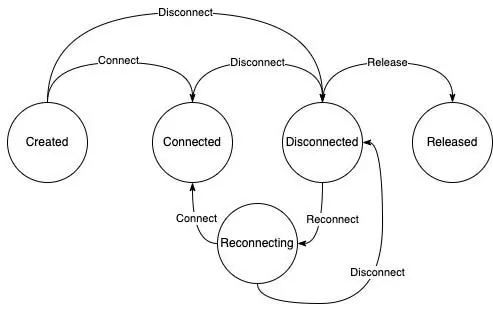
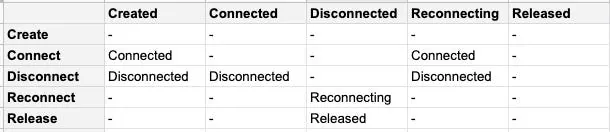
-
Created: Object is created, allowing transition to ->
Connectedor directly toDisconnected -
Connected: Connected to Socket.IO, allowed ->
Disconnected -
Disconnected: Disconnected from Socket.IO, allows ->
Reconnecting,Released -
Reconnecting: Attempting to reconnect to Socket.IO, allowed states ->
Connected,Disconnected -
Released: The object has been marked for memory deallocation and does not allow any operations or state transitions.
Why?
-
The logic and expression of states and state transitions are not easy.
-
Limiting operations based on state (e.g., cannot call Send Event when State = Released) using if..else makes the code hard to maintain and read
How?
-
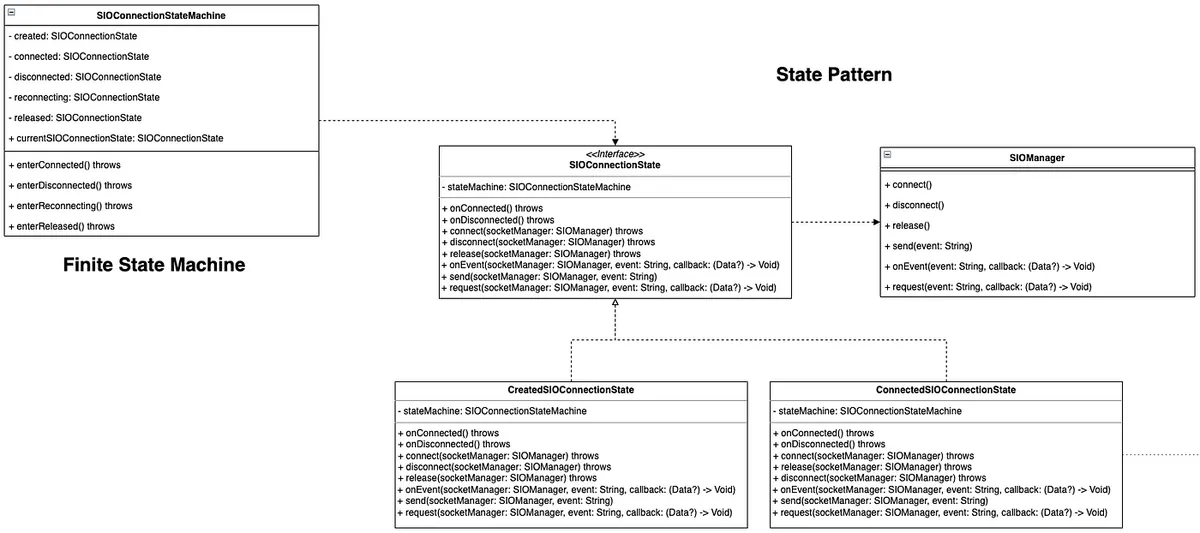
Finite State Machine: Manage transitions between states
-
State Pattern: A behavioral pattern where an object handles different behaviors based on its state changes.
-
Finite State Machine:
SIOConnectionStateMachineis the state machine implementation, withcurrentSIOConnectionStateas the current state. The statescreated,connected,disconnected,reconnecting, andreleasedrepresent possible transitions.
enterXXXState() throwsimplements allowed and disallowed (throw error) transitions when entering a state from the current state. -
State Pattern:
SIOConnectionStateis an abstract interface for operation methods used by all states.
protocol SIOManagerSpec: AnyObject {
    func connect()
    func disconnect()
    func onEvent(event: String, callback: @escaping (Data?) -> Void)
    func send(_ event: String)
    func request(_ event: String, callback: @escaping (Data?) -> Void)
}

enum ConnectionState {
    case created
    case connected
    case disconnected
    case reconnecting
    case released
}

class SIOManager: SIOManagerSpec {

    var state: ConnectionState = .disconnected {
        didSet {
            if state == .connected {
                executeBufferedCommands()
            }
        }
    }

    private var bufferedCommands: [BufferedCommand] = []

    func connect() {
        state = .connected
    }

    func disconnect() {
        state = .disconnected
    }

    func send(_ event: String) {
        guard state == .connected else {
            appendBufferedCommands(connectionCommand: SendBufferedCommand(event: event, sioManager: self))
            return
        }

        print("Send:\(event)")
    }

    func request(_ event: String, callback: @escaping (Data?) -> Void) {
        guard state == .connected else {
            appendBufferedCommands(connectionCommand: RequestBufferedCommand(event: event, callback: callback, sioManager: self))
            return
        }

        print("request:\(event)")
    }

    func onEvent(event: String, callback: @escaping (Data?) -> Void) {
        //
    }

    func appendBufferedCommands(connectionCommand: BufferedCommand) {
        bufferedCommands.append(connectionCommand)
    }

    func executeBufferedCommands() {
        // First in, first out
        bufferedCommands.forEach { connectionCommand in
            connectionCommand.execute()
        }
        bufferedCommands.removeAll()
    }

    func removeAllBufferedCommands() {
        bufferedCommands.removeAll()
    }
}

let manager = SIOManager()
manager.send("send_event_1")
manager.send("send_event_2")
manager.request("request_event_1") { _ in
    //
}
manager.state = .connected

//

class SIOConnectionStateMachine {

    private(set) var currentSIOConnectionState: SIOConnectionState!

    private var created: SIOConnectionState!
    private var connected: SIOConnectionState!
    private var disconnected: SIOConnectionState!
    private var reconnecting: SIOConnectionState!
    private var released: SIOConnectionState!

    init() {
        self.created = SIOConnectionCreatedState(stateMachine: self)
        self.connected = SIOConnectionConnectedState(stateMachine: self)
        self.disconnected = SIOConnectionDisconnectedState(stateMachine: self)
        self.reconnecting = SIOConnectionReconnectingState(stateMachine: self)
        self.released = SIOConnectionReleasedState(stateMachine: self)

        self.currentSIOConnectionState = created
    }

    func enterConnected() throws {
        if [created.connectionState, reconnecting.connectionState].contains(currentSIOConnectionState.connectionState) {
            enter(connected)
        } else {
            throw SIOConnectionStateMachineError("\(currentSIOConnectionState.connectionState) can't enter to Connected")
        }
    }

    func enterDisconnected() throws {
        if [created.connectionState, connected.connectionState, reconnecting.connectionState].contains(currentSIOConnectionState.connectionState) {
            enter(disconnected)
        } else {
            throw SIOConnectionStateMachineError("\(currentSIOConnectionState.connectionState) can't enter to Disconnected")
        }
    }

    func enterReconnecting() throws {
        if [disconnected.connectionState].contains(currentSIOConnectionState.connectionState) {
            enter(reconnecting)
        } else {
            throw SIOConnectionStateMachineError("\(currentSIOConnectionState.connectionState) can't enter to Reconnecting")
        }
    }

    func enterReleased() throws {
        if [disconnected.connectionState].contains(currentSIOConnectionState.connectionState) {
            enter(released)
        } else {
            throw SIOConnectionStateMachineError("\(currentSIOConnectionState.connectionState) can't enter to Released")
        }
    }

    private func enter(_ state: SIOConnectionState) {
        currentSIOConnectionState = state
    }
}


protocol SIOConnectionState {
    var connectionState: ConnectionState { get }
    var stateMachine: SIOConnectionStateMachine { get }
    init(stateMachine: SIOConnectionStateMachine)

    func onConnected() throws
    func onDisconnected() throws


    func connect(socketManager: SIOManagerSpec) throws
    func disconnect(socketManager: SIOManagerSpec) throws
    func release(socketManager: SIOManagerSpec) throws

    func request(socketManager: SIOManagerSpec, event: String, callback: @escaping (Data?) -> Void) throws
    func onEvent(socketManager: SIOManagerSpec, event: String, callback: @escaping (Data?) -> Void) throws
    func send(socketManager: SIOManagerSpec, event: String) throws
}

struct SIOConnectionStateMachineError: Error {
    let message: String

    init(_ message: String) {
        self.message = message
    }

    var localizedDescription: String {
        return message
    }
}

class SIOConnectionCreatedState: SIOConnectionState {

    let connectionState: ConnectionState = .created
    let stateMachine: SIOConnectionStateMachine

    required init(stateMachine: SIOConnectionStateMachine) {
        self.stateMachine = stateMachine
    }

    func onConnected() throws {
        try stateMachine.enterConnected()
    }

    func onDisconnected() throws {
        try stateMachine.enterDisconnected()
    }

    func release(socketManager: SIOManagerSpec) throws {
        throw SIOConnectionStateMachineError("ConnectedState can't release!")
    }

    func onEvent(socketManager: SIOManagerSpec, event: String, callback: @escaping (Data?) -> Void) throws {
        // allow
        // can use Helper to reduce the repeating code
        // e.g. helper.XXX(socketManager: SIOManagerSpec, ....)
    }

    func request(socketManager: SIOManagerSpec, event: String, callback: @escaping (Data?) -> Void) throws {
        // allow
        // can use Helper to reduce the repeating code
        // e.g. helper.XXX(socketManager: SIOManagerSpec, ....)
    }

    func send(socketManager: SIOManagerSpec, event: String) throws {
        // allow
        // can use Helper to reduce the repeating code
        // e.g. helper.XXX(socketManager: SIOManagerSpec, ....)
    }

    func connect(socketManager: SIOManagerSpec) throws {
        // allow
        // can use Helper to reduce the repeating code
        // e.g. helper.XXX(socketManager: SIOManagerSpec, ....)
    }

    func disconnect(socketManager: SIOManagerSpec) throws {
        throw SIOConnectionStateMachineError("CreatedState can't disconnect!")
    }
}

class SIOConnectionConnectedState: SIOConnectionState {

    let connectionState: ConnectionState = .connected
    let stateMachine: SIOConnectionStateMachine

    required init(stateMachine: SIOConnectionStateMachine) {
        self.stateMachine = stateMachine
    }

    func onConnected() throws {
        //
    }

    func onDisconnected() throws {
        try stateMachine.enterDisconnected()
    }

    func release(socketManager: SIOManagerSpec) throws {
        throw SIOConnectionStateMachineError("ConnectedState can't release!")
    }

    func onEvent(socketManager: SIOManagerSpec, event: String, callback: @escaping (Data?) -> Void) throws {
        // allow
        // can use Helper to reduce the repeating code
        // e.g. helper.XXX(socketManager: SIOManagerSpec, ....)
    }

    func request(socketManager: SIOManagerSpec, event: String, callback: @escaping (Data?) -> Void) throws {
        // allow
        // can use Helper to reduce the repeating code
        // e.g. helper.XXX(socketManager: SIOManagerSpec, ....)
    }

    func send(socketManager: SIOManagerSpec, event: String) throws {
        // allow
        // can use Helper to reduce the repeating code
        // e.g. helper.XXX(socketManager: SIOManagerSpec, ....)
    }

    func connect(socketManager: SIOManagerSpec) throws {
        throw SIOConnectionStateMachineError("ConnectedState can't connect!")
    }

    func disconnect(socketManager: SIOManagerSpec) throws {
        // allow
        // can use Helper to reduce the repeating code
        // e.g. helper.XXX(socketManager: SIOManagerSpec, ....)
    }
}

class SIOConnectionDisconnectedState: SIOConnectionState {

    let connectionState: ConnectionState = .disconnected
    let stateMachine: SIOConnectionStateMachine

    required init(stateMachine: SIOConnectionStateMachine) {
        self.stateMachine = stateMachine
    }

    func onConnected() throws {
        try stateMachine.enterConnected()
    }

    func onDisconnected() throws {
        //
    }

    func release(socketManager: SIOManagerSpec) throws {
        try stateMachine.enterReleased()
        // allow
        // can use Helper to reduce the repeating code
        // e.g. helper.XXX(socketManager: SIOManagerSpec, ....)
    }

    func onEvent(socketManager: SIOManagerSpec, event: String, callback: @escaping (Data?) -> Void) throws {
        // allow
        // can use Helper to reduce the repeating code
        // e.g. helper.XXX(socketManager: SIOManagerSpec, ....)
    }

    func request(socketManager: SIOManagerSpec, event: String, callback: @escaping (Data?) -> Void) throws {
        // allow
        // can use Helper to reduce the repeating code
        // e.g. helper.XXX(socketManager: SIOManagerSpec, ....)
    }

    func send(socketManager: SIOManagerSpec, event: String) throws {
        // allow
        // can use Helper to reduce the repeating code
        // e.g. helper.XXX(socketManager: SIOManagerSpec, ....)
    }

    func connect(socketManager: SIOManagerSpec) throws {
        try stateMachine.enterReconnecting()
        // allow
        // can use Helper to reduce the repeating code
        // e.g. helper.XXX(socketManager: SIOManagerSpec, ....)
    }

    func disconnect(socketManager: SIOManagerSpec) throws {
        // allow
        // can use Helper to reduce the repeating code
        // e.g. helper.XXX(socketManager: SIOManagerSpec, ....)
    }
}

class SIOConnectionReconnectingState: SIOConnectionState {

    let connectionState: ConnectionState = .reconnecting
    let stateMachine: SIOConnectionStateMachine

    required init(stateMachine: SIOConnectionStateMachine) {
        self.stateMachine = stateMachine
    }

    func onConnected() throws {
        try stateMachine.enterConnected()
    }

    func onDisconnected() throws {
        try stateMachine.enterDisconnected()
    }

    func release(socketManager: SIOManagerSpec) throws {
        throw SIOConnectionStateMachineError("ReconnectState can't release!")
    }

    func onEvent(socketManager: SIOManagerSpec, event: String, callback: @escaping (Data?) -> Void) throws {
        // allow
        // can use Helper to reduce the repeating code
        // e.g. helper.XXX(socketManager: SIOManagerSpec, ....)
    }

    func request(socketManager: SIOManagerSpec, event: String, callback: @escaping (Data?) -> Void) throws {
        // allow
        // can use Helper to reduce the repeating code
        // e.g. helper.XXX(socketManager: SIOManagerSpec, ....)
    }

    func send(socketManager: SIOManagerSpec, event: String) throws {
        // allow
        // can use Helper to reduce the repeating code
        // e.g. helper.XXX(socketManager: SIOManagerSpec, ....)
    }

    func connect(socketManager: SIOManagerSpec) throws {
        throw SIOConnectionStateMachineError("ReconnectState can't connect!")
    }

    func disconnect(socketManager: SIOManagerSpec) throws {
        // allow
        // can use Helper to reduce the repeating code
        // e.g. helper.XXX(socketManager: SIOManagerSpec, ....)
    }
}

class SIOConnectionReleasedState: SIOConnectionState {

    let connectionState: ConnectionState = .released
    let stateMachine: SIOConnectionStateMachine

    required init(stateMachine: SIOConnectionStateMachine) {
        self.stateMachine = stateMachine
    }

    func onConnected() throws {
        throw SIOConnectionStateMachineError("ReleasedState can't onConnected!")
    }

    func onDisconnected() throws {
        throw SIOConnectionStateMachineError("ReleasedState can't onDisconnected!")
    }

    func release(socketManager: SIOManagerSpec) throws {
        throw SIOConnectionStateMachineError("ReleasedState can't release!")
    }

    func request(socketManager: SIOManagerSpec, event: String, callback: @escaping (Data?) -> Void) throws {
        throw SIOConnectionStateMachineError("ReleasedState can't request!")
    }

    func onEvent(socketManager: SIOManagerSpec, event: String, callback: @escaping (Data?) -> Void) throws {
        throw SIOConnectionStateMachineError("ReleasedState can't receiveOn!")
    }

    func send(socketManager: SIOManagerSpec, event: String) throws {
        throw SIOConnectionStateMachineError("ReleasedState can't send!")
    }

    func connect(socketManager: SIOManagerSpec) throws {
        throw SIOConnectionStateMachineError("ReleasedState can't connect!")
    }

    func disconnect(socketManager: SIOManagerSpec) throws {
        throw SIOConnectionStateMachineError("ReleasedState can't disconnect!")
    }
}

do {
    let stateMachine = SIOConnectionStateMachine()
    // mock on socket.io connect:
    // socketIO.on(connect){
    try stateMachine.currentSIOConnectionState.onConnected()
    try stateMachine.currentSIOConnectionState.send(socketManager: manager, event: "test")
    try stateMachine.currentSIOConnectionState.release(socketManager: manager)
    try stateMachine.currentSIOConnectionState.send(socketManager: manager, event: "test")
    // }
} catch {
    print("error: \(error)")
}

// output:
// error: SIOConnectionStateMachineError(message: "ConnectedState can\'t release!")
Requirement Scenario 3.
What?
Combining scenarios 1 and 2, with the ConnectionPool flyweight pool and State Pattern for state management in place, we continue to extend. As stated in the background goals, the Feature side does not need to manage the underlying connection mechanism. Therefore, we created a poller (named ConnectionKeeper) that periodically scans the strongly held Connection objects in the ConnectionPool and performs actions when the following situations occur:
-
If the
Connectionis in use and the state is notConnected: change the state toReconnectingand attempt to reconnect -
If the
Connectionis no longer in use and its state isConnected: change the state toDisconnected -
If the
Connectionis no longer in use and its state isDisconnected: change the state toReleasedand remove it from theConnectionPool
Why?
-
Three operations have a hierarchical relationship and are mutually exclusive (disconnected -> released or reconnecting)
-
Flexible swapping and adding condition operations
-
Without encapsulation, the three checks and operations can only be written directly within the method (making it difficult to test the logic).
-
e.g:
if !connection.isOccupie() && connection.state == .connected then
... connection.disconnected()
else if !connection.isOccupie() && state == .released then
... connection.release()
else if connection.isOccupie() && state == .disconnected then
... connection.reconnecting()
end
How?
- Chain Of Responsibility: A behavioral pattern that, as the name suggests, forms a chain where each node has a specific operation. When receiving input, a node decides whether to handle it or pass it to the next node. Another real-world example is the iOS Responder Chain.
By definition, the Chain of Responsibility Pattern does not allow a node to process data and then pass it to the next node for further processing. Either complete the task or do not do it at all.
If the above scenario fits better, it should be the Interceptor Pattern.
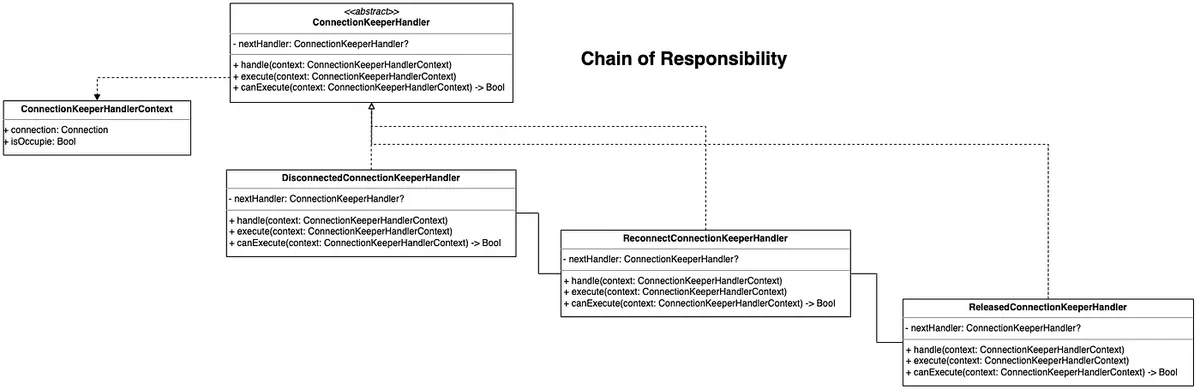
- Chain of responsibility:
ConnectionKeeperHandleris the abstract node of the chain. ThecanExcutemethod is specially extracted to prevent the case where the current node handles the request but still wants to call the next node to continue execution. Thehandlemethod links the nodes in the chain, andexcutecontains the logic for handling the request if it should be processed.
ConnectionKeeperHandlerContextis used to store the necessary data, whereisOccupieindicates whether the Connection is currently in use.
enum ConnectionState {
    case created
    case connected
    case disconnected
    case reconnecting
    case released
}

protocol Connection {
    var connectionState: ConnectionState {get}
    var url: URL {get}
    var id: UUID {get}

    init(url: URL)

    func connect()
    func reconnect()
    func disconnect()

    func sendEvent(_ event: String)
    func onEvent(_ event: String) -> AnyPublisher<Data?, Never>
}

// Socket.IO Implementation
class SIOConnection: Connection {
    let connectionState: ConnectionState = .created
    let url: URL
    let id: UUID = UUID()

    required init(url: URL) {
        self.url = url
        //
    }

    func connect() {
        //
    }

    func disconnect() {
        //
    }

    func reconnect() {
        //
    }

    func sendEvent(_ event: String) {
        //
    }

    func onEvent(_ event: String) -> AnyPublisher<Data?, Never> {
        //
        return PassthroughSubject<Data?, Never>().eraseToAnyPublisher()
    }
}

//

struct ConnectionKeeperHandlerContext {
    let connection: Connection
    let isOccupie: Bool
}

protocol ConnectionKeeperHandler {
    var nextHandler: ConnectionKeeperHandler? { get set }

    func handle(context: ConnectionKeeperHandlerContext)
    func execute(context: ConnectionKeeperHandlerContext)
    func canExcute(context: ConnectionKeeperHandlerContext) -> Bool
}

extension ConnectionKeeperHandler {
    func handle(context: ConnectionKeeperHandlerContext) {
        if canExcute(context: context) {
            execute(context: context)
        } else {
            nextHandler?.handle(context: context)
        }
    }
}

class DisconnectedConnectionKeeperHandler: ConnectionKeeperHandler {
    var nextHandler: ConnectionKeeperHandler?

    func execute(context: ConnectionKeeperHandlerContext) {
        context.connection.disconnect()
    }

    func canExcute(context: ConnectionKeeperHandlerContext) -> Bool {
        if context.connection.connectionState == .connected && !context.isOccupie {
            return true
        }
        return false
    }
}

class ReconnectConnectionKeeperHandler: ConnectionKeeperHandler {
    var nextHandler: ConnectionKeeperHandler?

    func execute(context: ConnectionKeeperHandlerContext) {
        context.connection.reconnect()
    }

    func canExcute(context: ConnectionKeeperHandlerContext) -> Bool {
        if context.connection.connectionState == .disconnected && context.isOccupie {
            return true
        }
        return false
    }
}

class ReleasedConnectionKeeperHandler: ConnectionKeeperHandler {
    var nextHandler: ConnectionKeeperHandler?

    func execute(context: ConnectionKeeperHandlerContext) {
        context.connection.disconnect()
    }

    func canExcute(context: ConnectionKeeperHandlerContext) -> Bool {
        if context.connection.connectionState == .disconnected && !context.isOccupie {
            return true
        }
        return false
    }
}
let connection = SIOConnection(url: URL(string: "wss://pinkoi.com")!)
let disconnectedHandler = DisconnectedConnectionKeeperHandler()
let reconnectHandler = ReconnectConnectionKeeperHandler()
let releasedHandler = ReleasedConnectionKeeperHandler()
disconnectedHandler.nextHandler = reconnectHandler
reconnectHandler.nextHandler = releasedHandler

disconnectedHandler.handle(context: ConnectionKeeperHandlerContext(connection: connection, isOccupie: false))
Requirement Scenario 4.
What?
The Connection we encapsulated needs to be set up before use, such as providing the URL Path, setting Config, and so on.
Why?
-
Flexible to increase or decrease construction openings
-
Reusable Construction Logic
-
Without encapsulation, external code may use the class in unintended ways.
-
e.g.:
❌
let connection = Connection()
connection.send(event) // unexpected method call, should call .connect() first
✅
let connection = Connection()
connection.connect()
connection.send(event)
// but...who knows???
How?
- Builder Pattern: A creational pattern that enables building objects step by step and reusing construction methods.
- Builder Pattern:
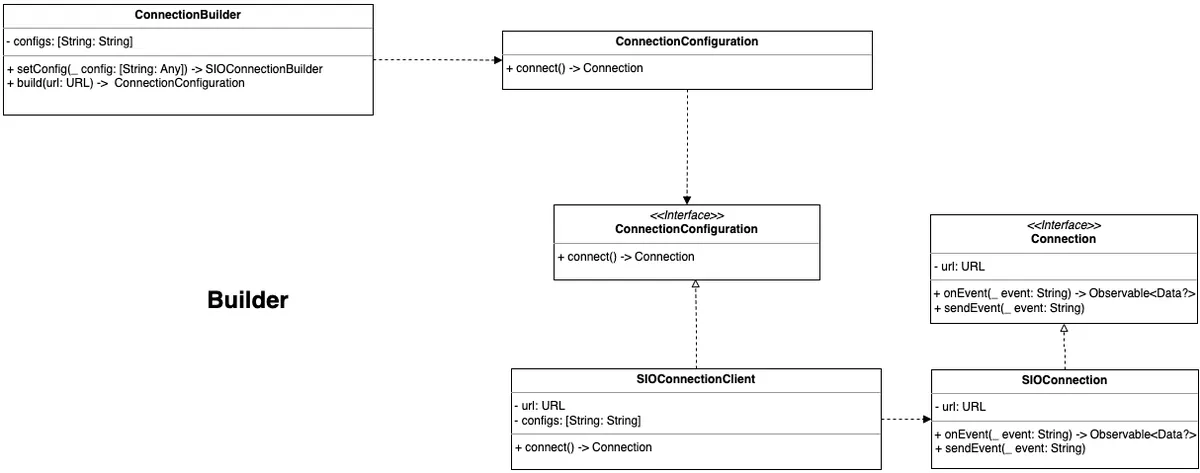
SIOConnectionBuilderis the builder forConnection, responsible for setting and storing data used during the construction of aConnection;ConnectionConfigurationis an abstract interface that ensures.connect()must be called before obtaining aConnectioninstance.
enum ConnectionState {
    case created
    case connected
    case disconnected
    case reconnecting
    case released
}

protocol Connection {
    var connectionState: ConnectionState {get}
    var url: URL {get}
    var id: UUID {get}

    init(url: URL)

    func connect()
    func reconnect()
    func disconnect()

    func sendEvent(_ event: String)
    func onEvent(_ event: String) -> AnyPublisher<Data?, Never>
}

// Socket.IO Implementation
class SIOConnection: Connection {
    let connectionState: ConnectionState = .created
    let url: URL
    let id: UUID = UUID()

    required init(url: URL) {
        self.url = url
        //
    }

    func connect() {
        //
    }

    func disconnect() {
        //
    }

    func reconnect() {
        //
    }

    func sendEvent(_ event: String) {
        //
    }

    func onEvent(_ event: String) -> AnyPublisher<Data?, Never> {
        //
        return PassthroughSubject<Data?, Never>().eraseToAnyPublisher()
    }
}

//
class SIOConnectionClient: ConnectionConfiguration {
    private let url: URL
    private let config: [String: Any]

    init(url: URL, config: [String: Any]) {
        self.url = url
        self.config = config
    }

    func connect() -> Connection {
        // set config
        return SIOConnection(url: url)
    }
}

protocol ConnectionConfiguration {
    func connect() -> Connection
}

class SIOConnectionBuilder {
    private(set) var config: [String: Any] = [:]

    func setConfig(_ config: [String: Any]) -> SIOConnectionBuilder {
        self.config = config
        return self
    }

    // url is required parameter
    func build(url: URL) -> ConnectionConfiguration {
        return SIOConnectionClient(url: url, config: self.config)
    }
}

let builder = SIOConnectionBuilder().setConfig(["test":123])


let connection1 = builder.build(url: URL(string: "wss://pinkoi.com/1")!).connect()
let connection2 = builder.build(url: URL(string: "wss://pinkoi.com/1")!).connect()
Extension: Here, you can also apply the Factory Pattern to produce SIOConnection using a factory.
The End!
These are the four scenarios encountered and the seven Design Patterns used to solve problems in this Socket.IO encapsulation.
Finally, the complete design blueprint for this Socket.IO encapsulation is attached
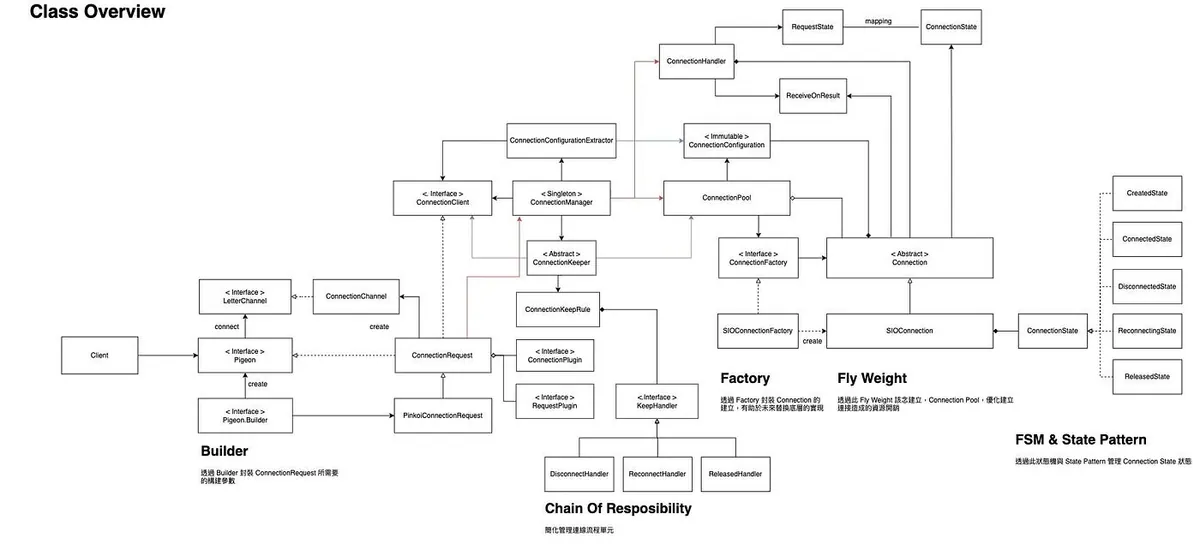
The diagram here reflects the actual design architecture, which slightly differs from the naming and examples in the text; we hope the original designer can share the design concepts and open source it in the future.
Who?
Who designed these and was responsible for the Socket.IO encapsulation project?
Sean Zheng , Android Engineer @ Pinkoi

Main architecture designer, design pattern evaluation and application, implemented design in Kotlin on the Android side.
ZhgChgLi , Engineer Lead/iOS Engineer @ Pinkoi

Platform Team project lead, pair programming, implementing designs in Swift on iOS, discussing and raising questions (a.k.a. just talking), and finally writing this article to share with everyone.


Comments