
Exploring Practical Methods for iOS HLS Cache Implementation
How to Achieve Simultaneous Playback and Caching When Using AVPlayer to Play m3u8 Streaming Video Files

photo by Mihis Alex
[2023/03/12] Update
- Next article: “Complete Guide to Implementing Local Cache with AVPlayer” teaches you how to achieve AVPlayer caching.
I have open-sourced my previous implementation. Feel free to use it if you need.
-
Custom Cache strategies can use PINCache or others…
-
Externally, just call the make AVAsset factory with the URL, and the AVAsset will support caching.
-
Using Combine to implement data flow strategy
-
Wrote some tests
About
HTTP Live Streaming (HLS) is Apple’s HTTP-based streaming media network transmission protocol.
For playing music, in non-streaming cases, we use mp3 files. The file size determines how long it takes to fully download before playback. HLS, on the other hand, splits one file into multiple small segments, playing as it reads each segment. So playback can start as soon as the first segment is received, without downloading the entire file!
.m3u8 files record the bitrate, playback order, duration of these segmented .ts files, as well as the overall audio information. They can also support encryption, decryption, low-latency live streaming, and more.
.m3u8 file example (aviciiwakemeup.m3u8):
#EXTM3U
#EXT-X-VERSION:3
#EXT-X-ALLOW-CACHE:YES
#EXT-X-TARGETDURATION:10
#EXT-X-MEDIA-SEQUENCE:0
#EXTINF:9.900411,
aviciiwakemeup–00001.ts
#EXTINF:9.900400,
aviciiwakemeup–00002.ts
#EXTINF:9.900411,
aviciiwakemeup–00003.ts
#EXTINF:9.900411,
.
.
.
#EXTINF:6.269389,
aviciiwakemeup-00028.ts
#EXT-X-ENDLIST
EXT-X-ALLOW-CACHE has been deprecated since iOS≥ 8/Protocol Ver.7, so having this line is meaningless.
Goal
For a streaming service, cache is extremely important; audio files can range from a few MB to several GB. If every replay requires downloading the file again from the server, it puts a heavy load on the server and results in high data costs. Having a cache layer can save a lot of money for the service and also prevents users from wasting bandwidth and time on repeated downloads. It’s a win-win mechanism (but remember to set limits and clear cache regularly to avoid filling up the user’s device).
Problem
In the past, for non-streaming mp3/mp4 files, there was not much to handle. The file was downloaded to the device before playback, and playback started only after the download completed. Since the file had to be fully downloaded anyway, we could simply use URLSession to download the file first, then feed the local file path with a file:// URL to AVPlayer for playback. Alternatively, the proper method is to use AVAssetResourceLoaderDelegate to cache the downloaded data within the delegate methods.
The idea behind streaming is actually straightforward: first read the .m3u8 file, then parse its information and cache each .ts file. However, implementation proved to be much more complicated than I expected, which is why I wrote this article!
For playback, we still use iOS AVFoundation’s AVPlayer directly. There is no difference in handling streaming or non-streaming files.
Example:
let url:URL = URL(string:"https://zhgchg.li/aviciiwakemeup.m3u8")
var player: AVPlayer = AVPlayer(url: url)
player.play()
2021–01–05 Update:
As a fallback, we switched back to using mp3 files, which allows direct implementation with AVAssetResourceLoaderDelegate. For detailed implementation, please refer to “AVPlayer Streaming Cache Practical Guide”.
Implementation Plan
Several possible solutions for our goal and the issues encountered during implementation.
Solution 1. AVAssetResourceLoaderDelegate ❌
The first idea was to do the same as with mp3/mp4! Use AVAssetResourceLoaderDelegate and cache the .ts files within the Delegate methods.
However, sorry, this approach does not work because the download requests for .ts files cannot be intercepted in the Delegate. This issue is confirmed in this Q&A and the official documentation.
The implementation of AVAssetResourceLoaderDelegate can refer to “AVPlayer 邊播邊 Cache 實戰”.
Solution 2.1 URLProtocol Intercept Requests ❌
URLProtocol is a method I recently learned. All requests based on the URL Loading System (URLSession, API calls, image downloads, etc.) can be intercepted by us to modify the Request and Response, then return them as if nothing happened, secretly. You can refer to this article for more on URLProtocol.
Using this method, we plan to intercept AVFoundation AVPlayer requests for .m3u8 and .ts files. If the data is cached locally, we return the cached data directly; otherwise, we send the actual request. This approach can also achieve our goal.
Similarly, sorry, this approach also doesn’t work; because AVFoundation AVPlayer’s requests are not handled by the URL Loading System, we cannot intercept them.
There is a saying that it works on the simulator but not on a real device
Solution 2.2 Forcibly Allowing URLProtocol ❌
According to Method 2.1, the brute force approach, if I change the request URL to a custom scheme (e.g., streetVoiceCache://), AVFoundation cannot handle this request and will throw it out. This way, our URLProtocol can intercept it and do what we want.
let url:URL = URL(string:"streetVoiceCache://zhgchg.li/aviciiwakemeup.m3u8?originSchme=https")
var player: AVPlayer = AVPlayer(url: url)
player.play()
URLProtocol intercepts streetVoiceCache://zhgchg.li/aviciiwakemeup.m3u8?originSchme=https. At this point, we just need to restore it to the original URL and use URLSession to fetch the data, allowing us to handle caching here. The .ts file requests in the m3u8 will also be intercepted by URLProtocol, so we can cache them ourselves as well.
Everything seemed perfect, but when I excitedly built and ran the app, Apple slapped me in the face:
Error: 12881 “CoreMediaErrorDomain custom url not redirect”
It does not accept the Response Data I provide for the .ts file Request. I can only use the urlProtocol:wasRedirectedTo method to redirect to the original HTTPS request for playback to work properly. Even if I download the .ts file locally and then redirect to that file:// path, it is still not accepted. According to the official forum, the answer is that this cannot be done. The .m3u8 must come from HTTP/HTTPS (so even if you put the entire .m3u8 and all the segmented .ts files locally, you cannot use file:// to play them with AVPlayer). Also, .ts files cannot provide Data via URLProtocol on your own.
fxxk…
Solution 2.2–2 – Same as Solution 2.2 but combined with Solution 1 AVAssetResourceLoaderDelegate ❌
The implementation follows method 2.2, feeding AVPlayer with a custom Scheme to enter AVAssetResourceLoaderDelegate; then we handle it ourselves.
Same as 2.2 results:
Error: 12881 “CoreMediaErrorDomain custom url not redirect”
Official forum has the same answer.
It can be used for decryption processing (refer to this article or this example), but caching functionality still cannot be achieved.
Solution 3. Reverse Proxy Server ⍻ (Feasible but Not Perfect)
This method is the most common answer when looking for how to handle HLS Cache; that is, starting an HTTP Server on the APP to act as a Reverse Proxy Server.
The principle is simple: the app runs an HTTP Server on, say, port 8080, so the URL becomes http://127.0.0.1:8080/; then we can handle incoming requests and provide responses.
Applied to our case, replace the request URL with:
http://127.0.0.1:8080/aviciiwakemeup.m3u8?origin=http://zhgchg.li/
Intercept *.m3u8 requests on the HTTP Server’s Handler. When a request comes in, it will enter our Handler, allowing us to do whatever we want and control the response data. .ts files will also come through here; this is where we can implement our desired caching mechanism.
For AVPlayer, it is just a standard http://.m3u8 streaming audio file, so there will be no issues.
A complete implementation example can be found at:
Because I also referred to this example, I used GCDWebServer for the Local HTTP Server part. There is also a newer option called Telegraph. (I do not recommend CocoaHttpServer since it hasn’t been updated for a long time)
Looks good! But there’s a problem:
Our service is music streaming, not a video playback platform. In music streaming, users often switch tracks while the app runs in the background; will the Local HTTP Server still be running then?
The description of GCDWebServer states that it will automatically disconnect when entering the background and automatically resume when returning to the foreground. However, you can disable this behavior by setting the parameter GCDWebServerOption_AutomaticallySuspendInBackground:false.
However, in practice, if no requests are sent for a period of time, the server will still disconnect (and the status will be incorrect, still showing isRunning). It feels like the system is killing it. After digging into the HTTP Server approach, which is based on sockets at the core, and checking the official socket service documentation, this issue cannot be resolved. The system will suspend the server when there are no new connections in the background.
There are complicated methods found online… such as sending a long request or continuously sending empty requests to ensure the server is not suspended by the system in the background.
The above issues all occur when the app is in the background. When in the foreground, the server is stable and won’t be paused due to idling—there is no such problem!
Since it relies on other services, testing in the development environment may work fine, but in actual use, it is recommended to implement a rollback mechanism (AVPlayer.AVPlayerItemFailedToPlayToEndTimeErrorKey notification); otherwise, if the service fails, the user will get stuck.
So it's not perfect...
Solution 4. Using HTTP Client’s Own Caching Mechanism ❌
Our .m3u8/.ts files’ Response Headers include Cache-Control, Age, eTag, and other HTTP Client Cache information. Our website’s cache mechanism works perfectly on Chrome. Additionally, the official preliminary specification for the Protocol Extension for Low-Latency HLS also mentions that cache-control headers can be set for caching.
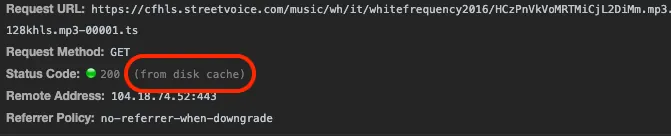
However, in reality, AVFoundation AVPlayer does not have any HTTP Client Caching effect, so this approach is also not feasible—just wishful thinking.
Solution 5. Not Using AVFoundation AVPlayer to Play Audio Files ✔
Implement audio file parsing, caching, encoding, and playback functions by yourself.
Too hardcore, requires deep technical skills and a lot of time; no research done.
Here is an open-source online player for reference: FreeStreamer. If you really choose this solution, it’s better to stand on the shoulders of giants and use a third-party library directly.
Solution 5–1. Not Using HLS
Same as Solution 5, too hardcore, requires deep technical skills and a lot of time; not explored.
Solution 6. Convert .ts Segments into .mp3/.mp4 Files ✔
No research done, but it is indeed feasible; however, it sounds complicated. You would need to handle the downloaded .ts files individually, convert them to .mp3 or .mp4 files, then play them in order, or compress them into a single file. It doesn’t seem easy to do.
If interested, you can refer to this article.
Option 7. Download the Entire File Before Playback ⍻
This method cannot be strictly called streaming with cache; it actually downloads the entire audio file first and then starts playback. For .m3u8 files, as mentioned in solution 2.2, you cannot directly download and play them locally.
To implement this, you need to use the iOS ≥ 10 API AVAssetDownloadTask.makeAssetDownloadTask, which actually packages the .m3u8 into a .movpkg stored locally for user playback.
This is more like offline playback rather than a caching feature.
Users can also view and manage downloaded audio files from “Settings” -> “General” -> “iPhone Storage” -> APP.
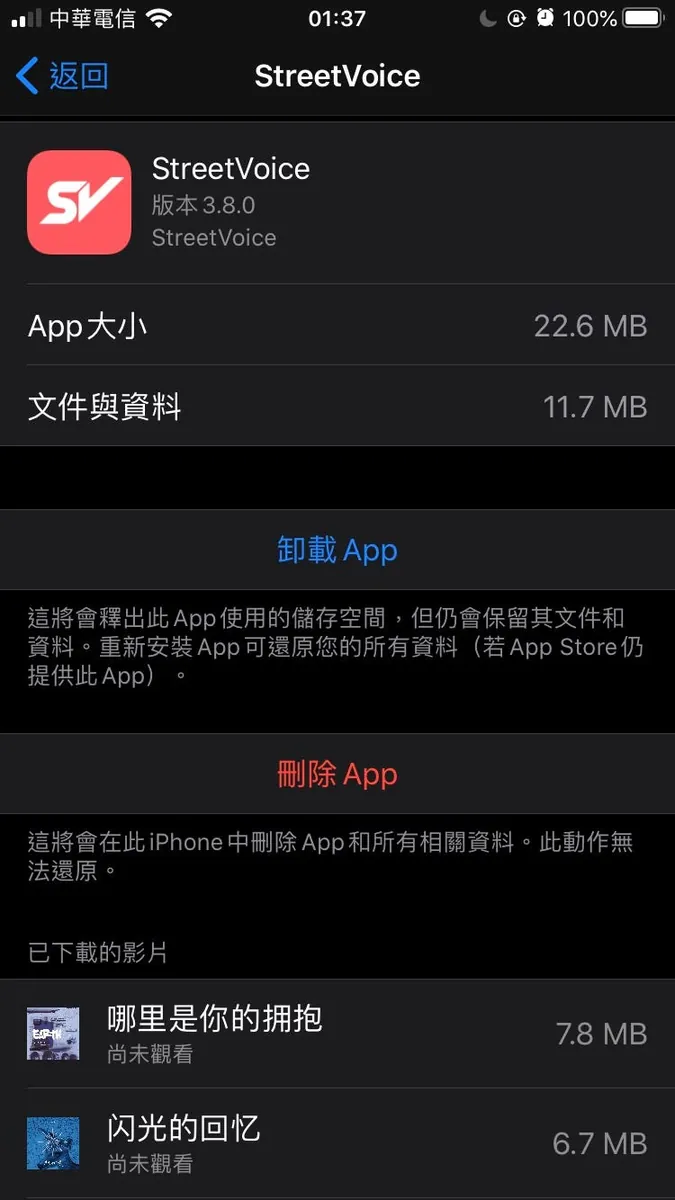
Downloaded Videos
Downloaded videos refer to media files that have been fully saved to the device storage before playback. This method ensures smooth playback without relying on network conditions.
Advantages:
- Playback is fast and stable.
- No network usage during playback.
- Suitable for offline viewing.
Disadvantages:
- Requires sufficient storage space.
- Initial download time may be long.
- Not suitable for dynamic streaming content.
Implementation typically involves downloading the entire .m3u8 playlist and all associated .ts segment files, then playing them locally using AVPlayer with a local file URL.
For detailed implementation, please refer to this example:
Conclusion
The above exploration took almost a whole week, going round and round, nearly driving me crazy; currently, there is no reliable and easy-to-deploy method.
Will update if there are new ideas!


Comments