
AVPlayer 實踐本地 Cache 功能大全
AVPlayer/AVQueuePlayer with AVURLAsset 實作 AVAssetResourceLoaderDelegate

Photo by Tyler Lastovich
[2023/03/12] Update
我將之前的實作開源了,有需求的朋友可直接使用。
- 客製化 Cache 策略,可以用 PINCache or 其他…
- 外部只需呼叫 make AVAsset 工廠,帶入 URL,則 AVAsset 就能支援 Caching
- 使用 Combine 實現 Data Flow 策略
- 寫了一些測試
前言
既上一篇「 iOS HLS Cache 實踐方法探究之旅 」後已過了大半年,團隊還是一直想要實現邊播邊 Cache 功能因為對成本的影響極大;我們是音樂串流平台,如果每次播放同樣的歌曲都要重新拿整個檔案,對我們或對非吃到飽的使用者來說都很傷流量,雖然音樂檔案頂多幾 MB,但積沙成塔都是錢!
另外因為 Android 那邊已經有實作邊播邊 Cache 的功能了,之前有比較過花費,Android 端上線後明顯節省了許多流量;相對更多使用者的 iOS 應該能有更好的節流體現。
根據 上一篇 的經驗,如果我們要繼續使用 HLS (.m3u8/.ts) 來達成目的;事情將會變得非常複雜甚至無法達成;我們退而求其次退回去使用 mp3 檔,這樣就能直接使用 AVAssetResourceLoaderDelegate 進行實作。
目標
- 播放過的音樂會在本地產生 Cache 備份
- 播放音樂時先檢查本地有無 Cache 讀取,有則不再重伺服器要檔案
- 可設 Cache 策略;上限總容量,超過時開始刪除最舊的 Cache 檔案
- 不干涉原本 AVPlayer 播放機制 (不然最快的方法就是自己先用 URLSession 把 mp3 載下來塞給 AVPlayer,但這樣就失去原本能播到哪載到哪的功能,使用者需要等待更長時間&更消耗流量)
前導知識 (1)— HTTP/1.1 Range 範圍請求、Connection Keep-Alive
HTTP/1.1 Range 範圍請求
首先我們要先了解在播放影片、音樂時是怎麼跟伺服器要求資料的;一般來說影片、音樂檔案都很大,不可能等到全部拿完才開始播放常見的是播到哪拿到了,只要有正在播放區段的資料就能運作。
要達到這個功能的方法就是透過 HTTP/1.1 Range 只返回指定資料字節範圍的資料,例如指定 0–100 就只返回 0–100 這 100 bytes 大小的資料;透過這個方法,可以依序分段取得資料,然後再彙整再一起成完整的檔案;這個方法也能運用在檔案下載續傳功能上。
如何應用?
我們會先使用 HEAD 去看 Response Header 了解到伺服器是否支援 Range 範圍請求、資源總長度、檔案類型:
curl -i -X HEAD http://zhgchg.li/music.mp3
使用 HEAD 我們能從 Response Header 得到以下資訊:
- Accept-Ranges: bytes 代表伺服器支援 Range 範圍請求 如果沒有 Response 這個值或是是 Accept-Ranges: none 都代表不支援
- Content-Length: 資源總長度,我們要知道總長度才能去分段要資料。
- Content-Type: 檔案類型,AVPlayer 播放時需要知道的資訊。
但有時我們也會使用 GET Range: bytes=0–1 ,意思是我要求 0–1 範圍的資料但實際我根本不 Care 0–1是什麼內容,我只是要看 Response Header 的資訊; 原生 AVPlayer 就是使用 GET 去看,所以本篇也照舊使用 。
但比較建議使用 HEAD 去看,一方法比較正確,另一方面萬一伺服器不支援 Range 功能;用 GET 去摸就會變強迫下載完整檔案。
curl -i -X GET http://zhgchg.li/music.mp3 -H "Range: bytes=0–1"
使用 GET 我們能從 Response Header 得到以下資訊:
- Accept-Ranges: bytes 代表伺服器支援 Range 範圍請求 如果沒有 Response 這個值或是是 Accept-Ranges: none 都代表不支援
- Content-Range: bytes 0–1/資源總長度 ,「/」後的數字及資源總長度,我們要知道總長度才能去分段要資料。
- Content-Type: 檔案類型,AVPlayer 播放時需要知道的資訊。
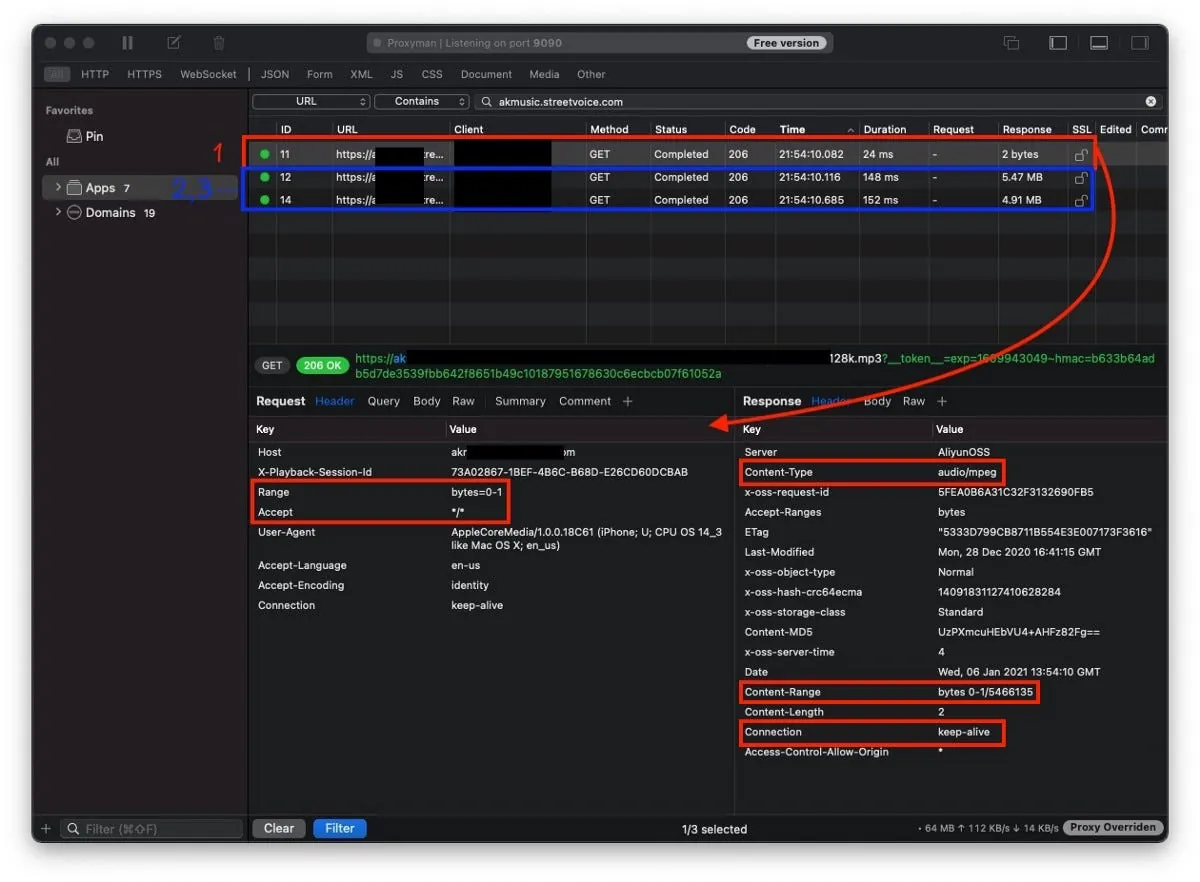
知道伺服器支援 Range 範圍請求後,就能分段發起範圍請求:
curl -i -X GET http://zhgchg.li/music.mp3 -H "Range: bytes=0–100"
伺服器會返回 206 Partial Content:
Content-Range: bytes 0-100/總長度
Content-Length: 100
...
(binary content)
這時我們就得到 Range 0–100 的 Data,可再繼續發新請求拿 Range 100–200..200–300…到結束。
如果拿的 Range 超過資源總長度會返回 416 Range Not Satisfiable。
另外,想拿完整檔案資料除了可以請求 Range 0-總長度,也可以使用 0- 方式即可:
curl -i -X GET http://zhgchg.li/music.mp3 -H "Range: bytes=0–"
其他還可以同個請求要求多個 Range 資料及下條件式子,但我們用不到,詳情可 參考這 。
Connection Keep-Alive
http 1.1 預設是開啟狀態, 此特性能實時取得已下載的資料 ,例如檔案 5 mb,能 16 kb、16 kb、16 kb… 的取得,不用等到 5mb 都好才給你。
Connection: Keey-Alive
如果發現伺服器不支援 Range、 Keep-Alive ?
那也不用搞這麼多了,直接自己用 URLSession 下載完 mp3 檔案塞給播放器就好….但這不是我們要的結果,可以請後端幫忙修改伺服器設定。
前導知識 (2) — AVPlayer 原生是如何處理 AVURLAsset 資源?
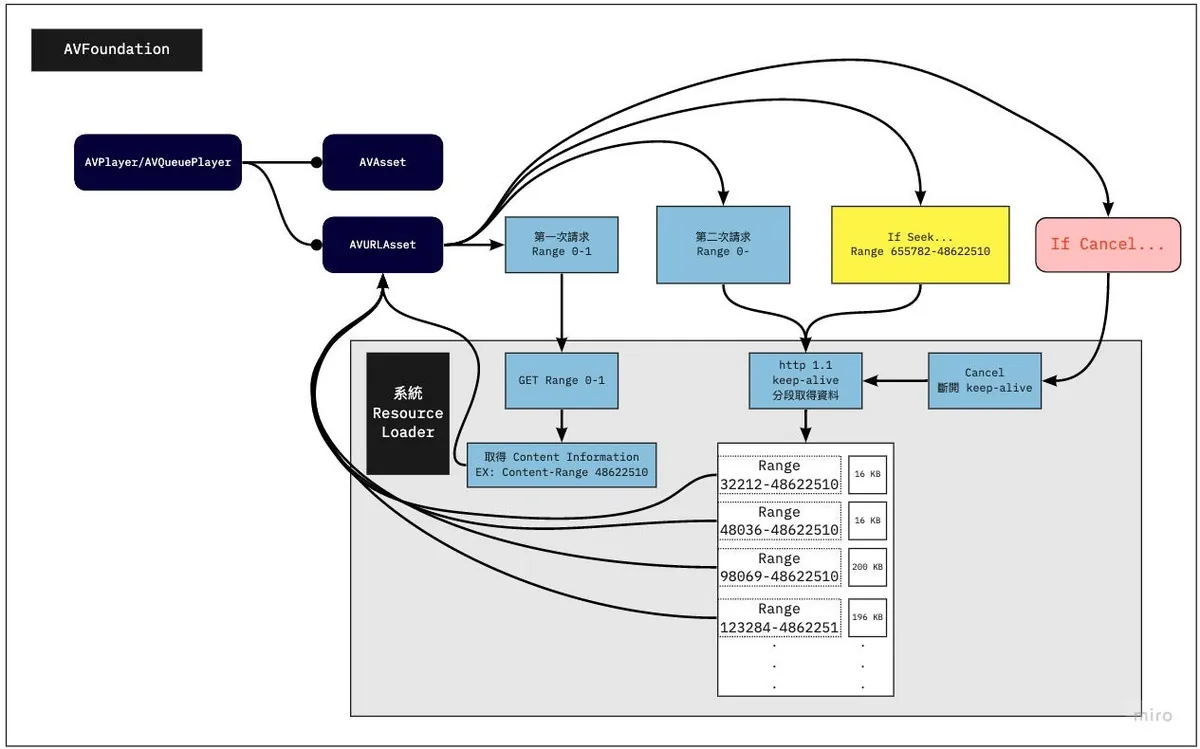
當我們使用 AVURLAsset init with URL 資源並賦予給 AVPlayer/AVQueuePlayer 開始播放之後,同上所述,首先會用 GET Range 0–1 去取得是否支援 Range 範圍請求、資源總長度、檔案類型這三個資訊。
有了檔案資訊後,會再發起第二次請求,請求從 0-總長度 的資料。
⚠️ AVPlayer 會請求從 0-總長度 的資料,並透過實時取得已下載的資料特性 ( 16 kb、16 kb、16 kb…) 取得到他覺得資料足夠後,會發起 Cancel 取消這個網路請求 (所以實際也不會拿完,除非檔案太小)。
繼續播放後才會透過 Range 往後請求資料。
(這部分跟我之前想的不一樣,我以為會是0–100、100–200..這樣請求)
AVPlayer 請求範例:
1. GET Range 0-1 => Response: 總長度 150000 / public.mp3 / true
2. GET 0-150000...
3. 16 kb receive
4. 16 kb receive...
5. cancel() // current offset is 700
6. 繼續播放
7. GET 700-150000...
8. 16 kb receive
9. 16 kb receive...
10. cancel() // current offset is 1500
11. 繼續播放
12. GET 1500-150000...
13. 16 kb receive
14. 16 kb receive...
16. If seek to...5000
17. cancel(12.) // current offset is 2000
18. GET 5000-150000...
19. 16 kb receive
20. 16 kb receive...
...
⚠️ iOS ≤12 的情況下,會先發幾個較短的請求試著摸摸看(?然後才會發要求到總長度的請求; iOS ≥ 13 則會直接發要求到總長度的請求。
還有個題外的坑,就是在觀察怎麼拿資源的時候,我使用了 mitmproxy 工具嗅探,結果發現它顯示有錯,會等到 response 全部回來才會顯示,而不是顯示分段、使用持久連接接續下載;害我嚇了一大跳!以為 iOS 很笨居然每次都要整個檔案回來!下次要用工具時要有保持一點懷疑 Orz
Cancel 發起的時機
- 前面說到的第二次請求,請求從 0 開始 到總長度的資源,有足夠 Data 後會發起 Cancel 取消請求。
- Seek 時會先發起 Cancel 取消先前的請求。
⚠️ 在 AVQueuePlayer 中切換到下一個資源、AVPlayer 更換播放資源時並不會發起 Cancel 取消前一首的請求。
AVQueue Pre-buffering
其實也是同樣呼叫 Resource Loader 處理,只是他要求的資料範圍會比較小。
實現
有了以上前導知識後我們來看實現 AVPlayer 本地 Cache 功能的原理方式。
就是之前有提到的 AVAssetResourceLoaderDelegate ,這個接口讓我們能 自行實踐 Resource Loader 給 Asset 用。
Resource Loader 實際就是個打工仔,播放器是要檔案資訊還是檔案資料,範圍哪裡都哪裡都是他告訴我們,我們去做就是。
看到有範例是一個 Resource Loader 服務所有 AVURLAsset ,我覺得是錯的,應該要一個 Resource Loader 服務一個 AVURLAsset,跟著 AVURLAsset 的生命週期,他本來就屬於 AVURLAsset。
一個 Resource Loader 服務所有 AVURLAsset 在 AVQueuePlayer 上會變得非常複雜且難以管理。
進入自訂的 Resource Loader 的時機點
要注意的是不是實踐了自己的 Resource Loader 他就會理你,只有當系統無法辨識處理這個資源的時候,才會走你的 Resource Loader。
所以我們在將 URL 資源給予 AVURLAsset 之前要先將 Scheme 換成我們自訂的 Scheme,不能是 http/https… 這些系統能處理的 Scheme。
http://zhgchg.li/music.mp3 => cacheable://zhgchg.li/music.mp3
AVAssetResourceLoaderDelegate
只有兩個方法需要實現:
- func resourceLoader(_ resourceLoader: AVAssetResourceLoader, shouldWaitForLoadingOfRequestedResource loadingRequest : AVAssetResourceLoadingRequest) -> Bool :
此方法問我們能不能處理此資源,return true 能,return false 我們也不處理(unsupported url)。
我們能從 loadingRequest 取出要請求什麼(第一次請求檔案資訊還是請求資料,請求資料的話 Range 是多少到多少);知道請求後我們自行發起請求去拿資料, 在這我們就能決定要發起 URLSession 還是從本地返回 Data 。
另外也能在此做 Data 加解密操作,保護原始資料。
- func resourceLoader(_ resourceLoader: AVAssetResourceLoader, didCancel loadingRequest : AVAssetResourceLoadingRequest) :
前述說到的 Cancel 發起時機 發起 Cancel 時…
我們可以在這去取消正在請求的 URLSession。
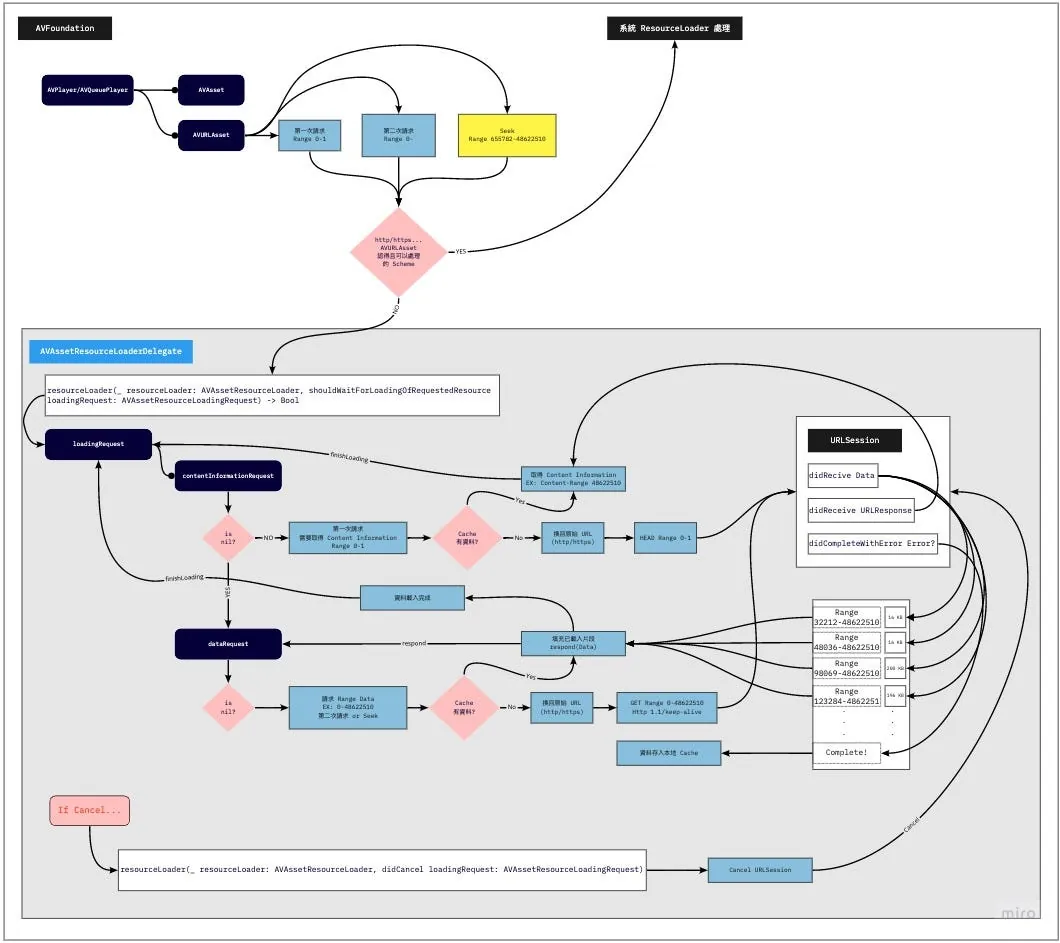
本地 Cache 實現方式
Cache 的部分我直接使用 PINCache ,將 Cache 工作交由他處理,免去我們要處理 Cache 讀寫 DeadLock、清除 Cache LRU 策略 實作上的問題。
️️⚠️️️️️️️️️️️OOM警告!
因為這邊是針對音樂做 Cache 檔案大小頂多 10 MB 上下,所以才能使用 PINCache 作為本地 Cache 工具;如果是要服務影片就無法使用此方法(可能一次要載入好幾 GB 的資料到記憶體)
■■■■■■■■■■■■■■
Lex Tang @ Twitter Says:
@zhgchgli 传统保守做法就是用 FileHandle,我写了大约 200 行 Swift 搞定这个事,它的 seek 和 read/write 能有效避免读写时的 OOM。之后 responds data request 的逻辑,可以参考 LeetCode 上 segment tree 相关的问题,如 leetcode.com/problems/range…
Tweeted at 2021-01-06 14:35:13.
■■■■■■■■■■■■■■
有這部分需求可參考大大的做法,用 FileHandle seek read/write 的特性進行處理。
開工!
不囉唆,先上完整專案:
AssetData
本地 Cache 資料物件映射實現 NSCoding,因 PINCache 是依賴 archivedData 方法 encode/decode。
import Foundation
import CryptoKit

class AssetDataContentInformation: NSObject, NSCoding {
    @objc var contentLength: Int64 = 0
    @objc var contentType: String = ""
    @objc var isByteRangeAccessSupported: Bool = false

    func encode(with coder: NSCoder) {
        coder.encode(self.contentLength, forKey: #keyPath(AssetDataContentInformation.contentLength))
        coder.encode(self.contentType, forKey: #keyPath(AssetDataContentInformation.contentType))
        coder.encode(self.isByteRangeAccessSupported, forKey: #keyPath(AssetDataContentInformation.isByteRangeAccessSupported))
    }

    override init() {
        super.init()
    }

    required init?(coder: NSCoder) {
        super.init()
        self.contentLength = coder.decodeInt64(forKey: #keyPath(AssetDataContentInformation.contentLength))
        self.contentType = coder.decodeObject(forKey: #keyPath(AssetDataContentInformation.contentType)) as? String ?? ""
        self.isByteRangeAccessSupported = coder.decodeObject(forKey: #keyPath(AssetDataContentInformation.isByteRangeAccessSupported)) as? Bool ?? false
    }
}

class AssetData: NSObject, NSCoding {
    @objc var contentInformation: AssetDataContentInformation = AssetDataContentInformation()
    @objc var mediaData: Data = Data()

    override init() {
        super.init()
    }

    func encode(with coder: NSCoder) {
        coder.encode(self.contentInformation, forKey: #keyPath(AssetData.contentInformation))
        coder.encode(self.mediaData, forKey: #keyPath(AssetData.mediaData))
    }

    required init?(coder: NSCoder) {
        super.init()
        self.contentInformation = coder.decodeObject(forKey: #keyPath(AssetData.contentInformation)) as? AssetDataContentInformation ?? AssetDataContentInformation()
        self.mediaData = coder.decodeObject(forKey: #keyPath(AssetData.mediaData)) as? Data ?? Data()
    }
}
AssetData 存放:
contentInformation: AssetDataContentInformationAssetDataContentInformation: 存放 是否支援 Range 範圍請求(isByteRangeAccessSupported)、資源總長度(contentLength)、檔案類型(contentType)mediaData: 原始音訊 Data (這邊檔案太大會 OOM)
■■■■■■■■■■■■■■
Lex Tang @ Twitter Says:
@zhgchgli AssetData.mediaData 如果取的是一个 5GB 的 4K HDR 视频,还是会 OOM吧?另外谨慎一点的话,应该先判断 Accept-Ranges 再去取 Content-Range。
Tweeted at 2021-01-31 15:06:09.
■■■■■■■■■■■■■■
PINCacheAssetDataManager
封裝 Data 存入、取出 PINCache 邏輯。
import PINCache
import Foundation

protocol AssetDataManager: NSObject {
    func retrieveAssetData() -> AssetData?
    func saveContentInformation(_ contentInformation: AssetDataContentInformation)
    func saveDownloadedData(_ data: Data, offset: Int)
    func mergeDownloadedDataIfIsContinuted(from: Data, with: Data, offset: Int) -> Data?
}

extension AssetDataManager {
    func mergeDownloadedDataIfIsContinuted(from: Data, with: Data, offset: Int) -> Data? {
        if offset <= from.count && (offset + with.count) > from.count {
            let start = from.count - offset
            var data = from
            data.append(with.subdata(in: start..<with.count))
            return data
        }
        return nil
    }
}

//

class PINCacheAssetDataManager: NSObject, AssetDataManager {

    static let Cache: PINCache = PINCache(name: "ResourceLoader")
    let cacheKey: String

    init(cacheKey: String) {
        self.cacheKey = cacheKey
        super.init()
    }

    func saveContentInformation(_ contentInformation: AssetDataContentInformation) {
        let assetData = AssetData()
        assetData.contentInformation = contentInformation
        PINCacheAssetDataManager.Cache.setObjectAsync(assetData, forKey: cacheKey, completion: nil)
    }

    func saveDownloadedData(_ data: Data, offset: Int) {
        guard let assetData = self.retrieveAssetData() else {
            return
        }

        if let mediaData = self.mergeDownloadedDataIfIsContinuted(from: assetData.mediaData, with: data, offset: offset) {
            assetData.mediaData = mediaData

            PINCacheAssetDataManager.Cache.setObjectAsync(assetData, forKey: cacheKey, completion: nil)
        }
    }

    func retrieveAssetData() -> AssetData? {
        guard let assetData = PINCacheAssetDataManager.Cache.object(forKey: cacheKey) as? AssetData else {
            return nil
        }
        return assetData
    }
}
這邊多抽出 Protocol 因為未來可能使用其他儲存方式替代 PINCache,所以其他程式在使用時是依賴 Protocol 而非 Class 實體。
⚠️
mergeDownloadedDataIfIsContinuted這個方法極其重要。
照線性播放只要一直 append 新 Data 到 Cache Data 中即可,但現實情況複雜得多,使用者可能播了 Range 0~100,直接 Seek 到 Range 200–500 播放;如何將已有的 0-100 Data 與新的 200–500 Data 合併就是一個很大的問題。
⚠️Data 合併有問題會出現可怕的播放鬼畜問題….
這邊的答案是, 我們不處理非連續資料 ;因為敝專案僅為音訊,檔案也就幾 MB (≤ 10MB) 以考量開發成本就沒做了,我只處理合併連續的資料(例如目前已有 0~100,新資料是 75~200,合併之後變0~200;如果新資料是 150~200,我則會忽略不合併處理)
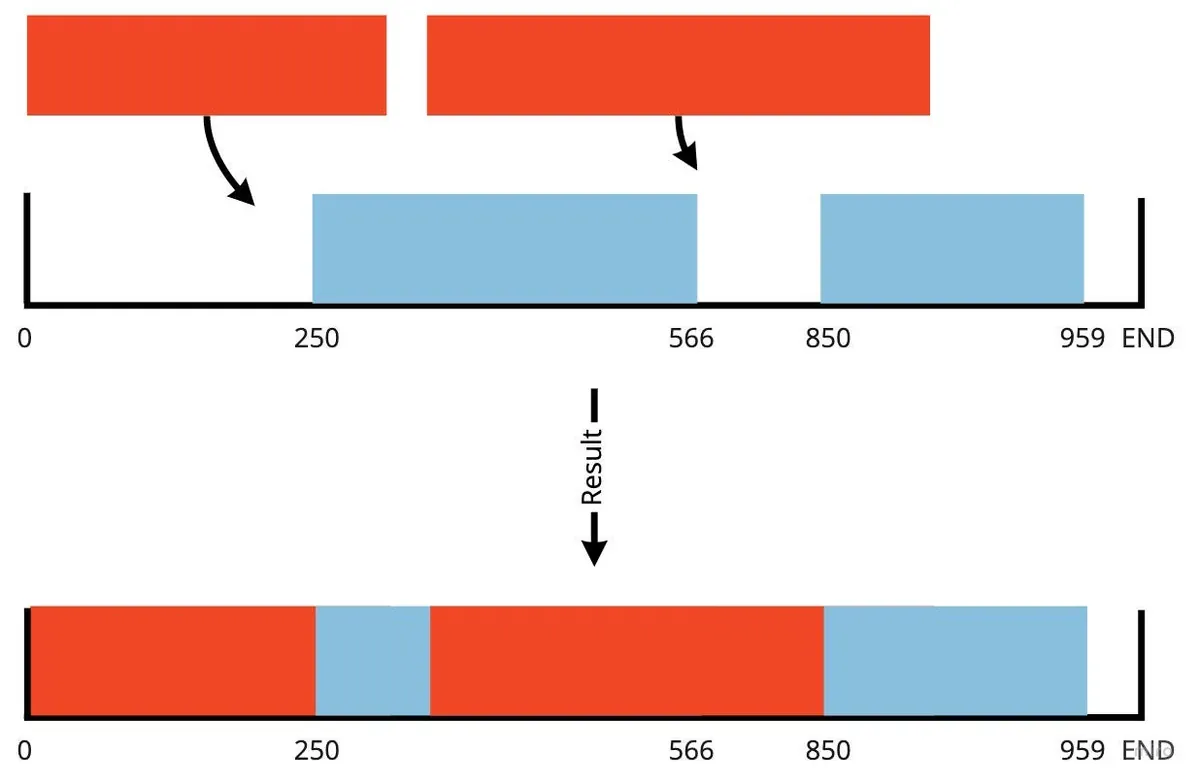
如果要考慮非連續合併,除了在儲存上要使用其他方法(要有辦法辨識空缺部分);在 Request 時也要能 Query 出哪段需要發網路請求去拿、哪段是從本地拿;要考量到這情況實作會非常複雜。
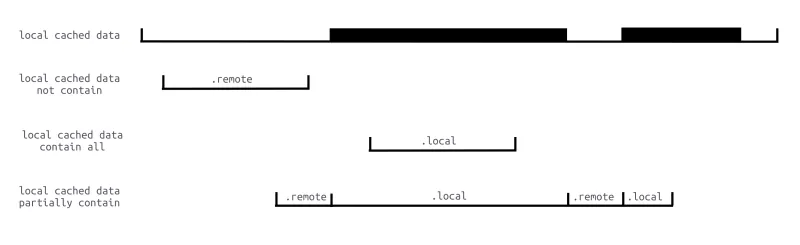
圖片取自: iOS AVPlayer 视频缓存的设计与实现
[2026/05/10] Updated
5 年過去,回頭看這段「不處理非連續資料」的妥協終於有比較乾淨的解法 — — 把「哪些 byte range 已 cached」這個 集合問題 抽出來,交給一個泛型、整數座標、閉區間的容器處理: Rangeable 。
Rangeable 是把
Hashable元素映射到「合併後的 disjoint 整數區間集合」的容器,原本是從 ZMediumToMarkdown 的 markdown render 抽出來的;同樣的 API 剛好也能解這篇文章的非連續 cache 問題,所以把這個案例補進了 RFC §1.3.1 作為第二個 reference consumer。
對應到原文的兩個痛點
- (Q1) 讀邊: 給定
Range: bytes=lo-hi,要能在 O(log n) 內回答:「[lo, hi] 之中第一段 cached prefix 在哪?第一個 gap 從哪裡開始?」 - (Q2) 寫邊: 新到一段 bytes
[a, b]後,要能自動跟現有的[0, 100]、[200, 500]……合併(包括100/101這種 integer-adjacent 的情況);本文當初的mergeDownloadedDataIfIsContinuted只處理「新資料正好接在尾巴」的 case,其它一律放棄。
Rangeable 把這兩件事拆成 transitions(over:) / subscript[i] / insert(...) 三支 API;同時把 byte 的索引 跟 byte 本體的儲存 解耦——索引交給 Rangeable<CacheToken> ,bytes 本體交給 FileHandle.seek + write 寫進 sparse file(順便解了原文中 ⚠️OOM 警告,不再需要把整顆 mp3 包成 Data 塞 PINCache)。
1) 改寫 AssetDataManager 協定
舊協定靠 mergeDownloadedDataIfIsContinuted 把連續的 Data 串起來;新協定改成「告訴我哪幾段已 cached」,由 ResourceLoader 自行決定哪些走檔案、哪些打網路:
protocol AssetDataManager: AnyObject {
    var contentInformation: AssetDataContentInformation? { get }
    func saveContentInformation(_ info: AssetDataContentInformation)
    /// 寫入下載到的片段,自動合併到 cache 索引;不要求連續。
    func saveDownloadedData(_ data: Data, offset: Int64) throws
    /// 讀取 [start, end] 內**從 start 起的連續 cached prefix**。
    /// 落在 gap 上回 nil。
    func cachedPrefix(in range: ClosedRange<Int64>) throws -> Data?
    /// 取得 [start, end] 內第一個 gap;全部都有則回 nil。
    func missingRange(in range: ClosedRange<Int64>) -> ClosedRange<Int64>?
}
2) RangeableAssetDataManager(取代 PINCacheAssetDataManager)
兩個關鍵:
- Bytes 用
FileHandle寫進 sparse file(也就是文中 Lex Tang 留言提到的FileHandle seek read/write路線)。 - 位元範圍索引用
Rangeable<CacheToken>(取代mergeDownloadedDataIfIsContinuted全部的 if-else)。
import Foundation
import Rangeable
private enum CacheToken: Hashable { case cached }
final class RangeableAssetDataManager: AssetDataManager {
    private let queue = DispatchQueue(label: "li.zhgchg.rangeableAssetDataManager")
    private let fileURL: URL
    private let metaURL: URL
    private let handle: FileHandle
    private(set) var contentInformation: AssetDataContentInformation?
    private var ranges = Rangeable<CacheToken>()
    init(cacheKey: String, root: URL) throws {
        let dir = root.appendingPathComponent("ResourceLoader", isDirectory: true)
        try FileManager.default.createDirectory(at: dir, withIntermediateDirectories: true)
        self.fileURL = dir.appendingPathComponent("\(cacheKey).bin")
        self.metaURL = dir.appendingPathComponent("\(cacheKey).meta")
        if !FileManager.default.fileExists(atPath: fileURL.path) {
            FileManager.default.createFile(atPath: fileURL.path, contents: nil)
        }
        self.handle = try FileHandle(forUpdating: fileURL)
        loadMeta()
    }
    deinit { try? handle.close() }
    func saveContentInformation(_ info: AssetDataContentInformation) {
        queue.sync {
            self.contentInformation = info
            persistMeta()
        }
    }
    func saveDownloadedData(_ data: Data, offset: Int64) throws {
        guard !data.isEmpty else { return }
        try queue.sync {
            try handle.seek(toOffset: UInt64(offset))
            try handle.write(contentsOf: data)
            // Rangeable 自動把鄰接 / 重疊的區段 union;非連續就保持兩段 disjoint。
            try ranges.insert(.cached,
                              start: Int(offset),
                              end:   Int(offset) + data.count - 1)
            persistMeta()
        }
    }
    func cachedPrefix(in range: ClosedRange<Int64>) throws -> Data? {
        try queue.sync {
            guard ranges[Int(range.lowerBound)].objs.contains(.cached) else { return nil }
            let evs = try ranges.transitions(lo: Int(range.lowerBound),
                                             hi: Int(range.upperBound))
            // close 的 coordinate 是 cached 區段結束點 + 1(RFC §4.1.1)
            let runEndExclusive: Int64 = {
                if let close = evs.first(where: { $0.kind == .close }),
                   let c = close.coordinate {
                    return Int64(c)
                }
                return range.upperBound + 1
            }()
            let sliceEndExclusive = min(runEndExclusive, range.upperBound + 1)
            let length = Int(sliceEndExclusive - range.lowerBound)
            try handle.seek(toOffset: UInt64(range.lowerBound))
            return try handle.read(upToCount: length)
        }
    }
    func missingRange(in range: ClosedRange<Int64>) -> ClosedRange<Int64>? {
        queue.sync {
            let evs = (try? ranges.transitions(lo: Int(range.lowerBound),
                                               hi: Int(range.upperBound))) ?? []
            let firstByteCached = ranges[Int(range.lowerBound)].objs.contains(.cached)
            if firstByteCached {
                guard let close = evs.first(where: { $0.kind == .close }),
                      let gapStart = close.coordinate,
                      Int64(gapStart) <= range.upperBound else { return nil }
                let nextOpen = evs.first(where: {
                    $0.kind == .open && ($0.coordinate ?? .max) > gapStart
                })?.coordinate
                let gapEnd = nextOpen.map { Int64($0) - 1 } ?? range.upperBound
                return Int64(gapStart)...min(gapEnd, range.upperBound)
            } else {
                let nextOpen = evs.first(where: { $0.kind == .open })?.coordinate
                let gapEnd = nextOpen.map { Int64($0) - 1 } ?? range.upperBound
                return range.lowerBound...gapEnd
            }
        }
    }
    private func loadMeta() {
        guard let data = try? Data(contentsOf: metaURL),
              let dict = try? JSONSerialization.jsonObject(with: data) as? [String: Any]
        else { return }
        if let info = dict["info"] as? [String: Any] {
            let ci = AssetDataContentInformation()
            ci.contentLength = (info["len"] as? NSNumber)?.int64Value ?? 0
            ci.contentType = info["type"] as? String ?? ""
            ci.isByteRangeAccessSupported = (info["range"] as? Bool) ?? false
            self.contentInformation = ci
        }
        if let segs = dict["segments"] as? [[Int]] {
            for seg in segs where seg.count == 2 {
                try? ranges.insert(.cached, start: seg[0], end: seg[1])
            }
        }
    }
    private func persistMeta() {
        var dict: [String: Any] = [:]
        if let ci = contentInformation {
            dict["info"] = ["len": ci.contentLength,
                            "type": ci.contentType,
                            "range": ci.isByteRangeAccessSupported]
        }
        // Rangeable.getRange(of:) 一次回傳「合併後」的所有 disjoint 區段
        dict["segments"] = ranges.getRange(of: .cached).map { [$0.lo, $0.hi] }
        if let data = try? JSONSerialization.data(withJSONObject: dict) {
            try? data.write(to: metaURL, options: .atomic)
        }
    }
}
原本的
mergeDownloadedDataIfIsContinuted整個 if-else 沒了;取而代之的是ranges.insert(.cached, ...),Rangeable 自己處理重疊 / 鄰接合併。
3) ResourceLoader.shouldWait… 改寫
舊版本「本地不夠就整段打網路」改成「先吐 cached prefix → 再針對 gap 打網路」。後段如果之前下載過,下一輪 loadingRequest 推進 currentOffset 後就會被 cachedPrefix 接走:
func resourceLoader(_ resourceLoader: AVAssetResourceLoader,
                    shouldWaitForLoadingOfRequestedResource loadingRequest: AVAssetResourceLoadingRequest) -> Bool {
    let type = ResourceLoader.resourceLoaderRequestType(loadingRequest)
    if type == .contentInformation {
        if let info = manager.contentInformation {
            loadingRequest.contentInformationRequest?.contentLength = info.contentLength
            loadingRequest.contentInformationRequest?.contentType   = info.contentType
            loadingRequest.contentInformationRequest?.isByteRangeAccessSupported = info.isByteRangeAccessSupported
            loadingRequest.finishLoading()
            return true
        }
        return startNetworkRequest(for: loadingRequest, type: .contentInformation)
    }
    let req = ResourceLoader.resourceLoaderRequestRange(type, loadingRequest)
    let lo = req.start
    let hi: Int64 = {
        switch req.end {
        case .requestTo(let e): return e - 1
        case .requestToEnd:     return manager.contentInformation?.contentLength ?? lo
        }
    }()
    guard lo <= hi else { loadingRequest.finishLoading(); return true }
    // 1) 先把能從本地拿的 prefix 餵給播放器
    if let cached = try? manager.cachedPrefix(in: lo...hi), !cached.isEmpty {
        loadingRequest.dataRequest?.respond(with: cached)
        let nextOffset = lo + Int64(cached.count)
        if nextOffset > hi {
            loadingRequest.finishLoading()
            return true
        }
        // 2) 餵完後還有缺,從 gap 起點開網路請求
        return startNetworkRequest(for: loadingRequest,
                                   type: .dataRequest,
                                   from: nextOffset, to: hi)
    }
    return startNetworkRequest(for: loadingRequest,
                               type: .dataRequest,
                               from: lo, to: hi)
}
AVPlayer 的 cancel/seek 機制不用動:seek 到 5000 → 觸發新的
loadingRequest,新一輪cachedPrefix直接從 5000 那段拿(只要之前下載過);cancel 上一輪 → 已 partial 寫進 sparse file 的 bytes 仍保留在Rangeable索引中,不會掉資料。
CachingAVURLAsset
AVURLAsset 是 weak 持有 ResourceLoader Delegate,所以這邊建議自己建立一個 AVURLAsset Class 繼承自 AVURLAsset,在內部建立、賦予、持有 ResourceLoader ,讓他跟著 AVURLAsset 的生命週期;另外也可以儲存原始 URL、CacheKey 等資訊…。
class CachingAVURLAsset: AVURLAsset {
    static let customScheme = "cacheable"
    let originalURL: URL
    private var _resourceLoader: ResourceLoader?

    var cacheKey: String {
        return self.url.lastPathComponent
    }

    static func isSchemeSupport(_ url: URL) -> Bool {
        guard let components = URLComponents(url: url, resolvingAgainstBaseURL: false) else {
            return false
        }

        return ["http", "https"].contains(components.scheme)
    }

    override init(url URL: URL, options: [String: Any]? = nil) {
        self.originalURL = URL

        guard var components = URLComponents(url: URL, resolvingAgainstBaseURL: false) else {
            super.init(url: URL, options: options)
            return
        }

        components.scheme = CachingAVURLAsset.customScheme
        guard let url = components.url else {
            super.init(url: URL, options: options)
            return
        }

        super.init(url: url, options: options)

        let resourceLoader = ResourceLoader(asset: self)
        self.resourceLoader.setDelegate(resourceLoader, queue: resourceLoader.loaderQueue)
        self._resourceLoader = resourceLoader
    }
}
使用:
if CachingAVURLAsset.isSchemeSupport(url) {
  let asset = CachingAVURLAsset(url: url)
  let avplayer = AVPlayer(asset)
  avplayer.play()
}
其中 isSchemeSupport() 是用來判斷 URL 是否支援掛我們的 Resource Loader(排除 file:// )。
originalURL 存放原始資源 URL。
cacheKey 存放這個資源的 Cache Key,這邊直接用檔案名稱當 Cache Key。
cacheKey 請依照現實場景做調整,如果檔案名稱未 hash 可能重複就建議先 hash 後當 key 避免碰撞;如果要 hash 整個 URL 當 key 也要注意 URL 是否會變動 (例如有用 CDN)。
Hash 可使用 md5…sha..,iOS ≥ 13 可直接使用 Apple 的 CryptoKit ,其他就上 Github 找吧!
ResourceLoaderRequest
import Foundation
import CoreServices

protocol ResourceLoaderRequestDelegate: AnyObject {
    func dataRequestDidReceive(_ resourceLoaderRequest: ResourceLoaderRequest, _ data: Data)
    func dataRequestDidComplete(_ resourceLoaderRequest: ResourceLoaderRequest, _ error: Error?, _ downloadedData: Data)
    func contentInformationDidComplete(_ resourceLoaderRequest: ResourceLoaderRequest, _ result: Result<AssetDataContentInformation, Error>)
}

class ResourceLoaderRequest: NSObject, URLSessionDataDelegate {
    struct RequestRange {
        var start: Int64
        var end: RequestRangeEnd

        enum RequestRangeEnd {
            case requestTo(Int64)
            case requestToEnd
        }
    }

    enum RequestType {
        case contentInformation
        case dataRequest
    }

    struct ResponseUnExpectedError: Error { }

    private let loaderQueue: DispatchQueue

    let originalURL: URL
    let type: RequestType

    private var session: URLSession?
    private var dataTask: URLSessionDataTask?
    private var assetDataManager: AssetDataManager?

    private(set) var requestRange: RequestRange?
    private(set) var response: URLResponse?
    private(set) var downloadedData: Data = Data()

    private(set) var isCancelled: Bool = false {
        didSet {
            if isCancelled {
                self.dataTask?.cancel()
                self.session?.invalidateAndCancel()
            }
        }
    }
    private(set) var isFinished: Bool = false {
        didSet {
            if isFinished {
                self.session?.finishTasksAndInvalidate()
            }
        }
    }

    weak var delegate: ResourceLoaderRequestDelegate?

    init(originalURL: URL, type: RequestType, loaderQueue: DispatchQueue, assetDataManager: AssetDataManager?) {
        self.originalURL = originalURL
        self.type = type
        self.loaderQueue = loaderQueue
        self.assetDataManager = assetDataManager
        super.init()
    }

    func start(requestRange: RequestRange) {
        guard isCancelled == false, isFinished == false else {
            return
        }

        self.loaderQueue.async { [weak self] in
            guard let self = self else {
                return
            }

            var request = URLRequest(url: self.originalURL)
            self.requestRange = requestRange
            let start = String(requestRange.start)
            let end: String
            switch requestRange.end {
            case .requestTo(let rangeEnd):
                end = String(rangeEnd)
            case .requestToEnd:
                end = ""
            }

            let rangeHeader = "bytes=\(start)-\(end)"
            request.setValue(rangeHeader, forHTTPHeaderField: "Range")

            let session = URLSession(configuration: .default, delegate: self, delegateQueue: nil)
            self.session = session
            let dataTask = session.dataTask(with: request)
            self.dataTask = dataTask
            dataTask.resume()
        }
    }

    func cancel() {
        self.isCancelled = true
    }

    func urlSession(_ session: URLSession, dataTask: URLSessionDataTask, didReceive data: Data) {
        guard self.type == .dataRequest else {
            return
        }

        self.loaderQueue.async {
            self.delegate?.dataRequestDidReceive(self, data)
            self.downloadedData.append(data)
        }
    }

    func urlSession(_ session: URLSession, dataTask: URLSessionDataTask, didReceive response: URLResponse, completionHandler: @escaping (URLSession.ResponseDisposition) -> Void) {
        self.response = response
        completionHandler(.allow)
    }

    func urlSession(_ session: URLSession, task: URLSessionTask, didCompleteWithError error: Error?) {
        self.isFinished = true
        self.loaderQueue.async {
            if self.type == .contentInformation {
                guard error == nil,
                      let response = self.response as? HTTPURLResponse else {
                    let responseError = error ?? ResponseUnExpectedError()
                    self.delegate?.contentInformationDidComplete(self, .failure(responseError))
                    return
                }

                let contentInformation = AssetDataContentInformation()

                if let rangeString = response.allHeaderFields["Content-Range"] as? String,
                   let bytesString = rangeString.split(separator: "/").map({String($0)}).last,
                   let bytes = Int64(bytesString) {
                    contentInformation.contentLength = bytes
                }

                if let mimeType = response.mimeType,
                   let contentType = UTTypeCreatePreferredIdentifierForTag(kUTTagClassMIMEType, mimeType as CFString, nil)?.takeRetainedValue() {
                    contentInformation.contentType = contentType as String
                }

                if let value = response.allHeaderFields["Accept-Ranges"] as? String,
                   value == "bytes" {
                    contentInformation.isByteRangeAccessSupported = true
                } else {
                    contentInformation.isByteRangeAccessSupported = false
                }

                self.assetDataManager?.saveContentInformation(contentInformation)
                self.delegate?.contentInformationDidComplete(self, .success(contentInformation))
            } else {
                if let offset = self.requestRange?.start, self.downloadedData.count > 0 {
                    self.assetDataManager?.saveDownloadedData(self.downloadedData, offset: Int(offset))
                }
                self.delegate?.dataRequestDidComplete(self, error, self.downloadedData)
            }
        }
    }
}
針對 Remote Request 的封裝,主要是服務 ResourceLoader 發起的資料請求。
RequestType :用來區分此 Request 是 第一次請求檔案資訊(contentInformation)、還是請求資料(dataRequest)
RequestRange :請求 Range 範圍,end 可指定到哪(requestTo(Int64))或全部(requestToEnd)。
檔案資訊可由:
func urlSession(_ session: URLSession, dataTask: URLSessionDataTask, didReceive response: URLResponse, completionHandler: @escaping (URLSession.ResponseDisposition) -> Void)
中取得 Response Header,另外要注意如果要改 HEAD 去摸,不會進這個要用其他方法接。
isByteRangeAccessSupported:看 Response Header 中的 Accept-Ranges == bytescontentType:播放器要的檔案類型資訊,格式是統一類識別符,不是 audio/mpeg ,而是寫作 public.mp3contentLength:看 Response Header 中的 Content-Range :bytes 0–1/ 資源總長度
⚠️這邊要注意伺服器給的格式大小寫,不一定是寫作 Accept-Ranges/Content-Range;有的伺服器的格式是小寫 accept-ranges、Accept-ranges…
補充:如果要考量大小寫可以寫 HTTPURLResponse Extension
import CoreServices

extension HTTPURLResponse {
    func parseContentLengthFromContentRange() -> Int64? {
        let contentRangeKeys: [String] = [
            "Content-Range",
            "content-range",
            "Content-range",
            "content-Range"
        ]

        var rangeString: String?
        for key in contentRangeKeys {
            if let value = self.allHeaderFields[key] as? String {
                rangeString = value
                break
            }
        }

        guard let rangeString = rangeString,
              let contentLengthString = rangeString.split(separator: "/").map({String($0)}).last,
              let contentLength = Int64(contentLengthString) else {
            return nil
        }

        return contentLength
    }

    func parseAcceptRanges() -> Bool? {
        let contentRangeKeys: [String] = [
            "Accept-Ranges",
            "accept-ranges",
            "Accept-ranges",
            "accept-Ranges"
        ]

        var rangeString: String?
        for key in contentRangeKeys {
            if let value = self.allHeaderFields[key] as? String {
                rangeString = value
                break
            }
        }

        guard let rangeString = rangeString else {
            return nil
        }

        return rangeString == "bytes" || rangeString == "Bytes"
    }

    func mimeTypeUTI() -> String? {
        guard let mimeType = self.mimeType,
           let contentType = UTTypeCreatePreferredIdentifierForTag(kUTTagClassMIMEType, mimeType as CFString, nil)?.takeRetainedValue() else {
            return nil
        }

        return contentType as String
    }
}
使用:
- contentLength = response.parseContentLengthFromContentRange()
- isByteRangeAccessSupported = response.parseAcceptRanges()
- contentType = response.mimeTypeUTI()
func urlSession(_ session: URLSession, dataTask: URLSessionDataTask, didReceive data: Data)
同前導知識所述,會實時取得已下載的資料,所以這個方法會一直進,片段片段的拿到 Data;我們將他 append 進 downloadedData 存放。
func urlSession(_ session: URLSession, task: URLSessionTask, didCompleteWithError error: Error?)
任務取消或結束時都會進這個方法,在這將已下載的資料保存下來。
如前導知識中提到的 Cancel 機制,因播放器在拿到足夠資料後就會發起 Cancel,Cancel Request;所以進到這個方法時實際會是 error = NSURLErrorCancelled ,因此不管 error 我們有拿到資料都會嘗試存下來。
⚠️ 因 URLSession 會用並行方式出去請求資料,所以請保持操作都在DispatchQueue裡,避免資料錯亂(資料錯亂一樣會出現可怕的播放鬼畜)。
️️⚠️URLSession 沒有呼叫
finishTasksAndInvalidate或invalidateAndCancel兩個方法都會強持有物件導致 Memory Leak;所以不管是取消或是完成我們都要呼叫,這樣才能在任務結束釋放 Request。
️️⚠️️️️️️️️️️️如果怕
downloadedDataOOM,可以在 didReceive Data 中就存入本地。
ResourceLoader
import AVFoundation
import Foundation

class ResourceLoader: NSObject {

    let loaderQueue = DispatchQueue(label: "li.zhgchg.resourceLoader.queue")

    private var requests: [AVAssetResourceLoadingRequest: ResourceLoaderRequest] = [:]
    private let cacheKey: String
    private let originalURL: URL

    init(asset: CachingAVURLAsset) {
        self.cacheKey = asset.cacheKey
        self.originalURL = asset.originalURL
        super.init()
    }

    deinit {
        self.requests.forEach { (request) in
            request.value.cancel()
        }
    }
}

extension ResourceLoader: AVAssetResourceLoaderDelegate {
    func resourceLoader(_ resourceLoader: AVAssetResourceLoader, shouldWaitForLoadingOfRequestedResource loadingRequest: AVAssetResourceLoadingRequest) -> Bool {

        let type = ResourceLoader.resourceLoaderRequestType(loadingRequest)
        let assetDataManager = PINCacheAssetDataManager(cacheKey: self.cacheKey)

        if let assetData = assetDataManager.retrieveAssetData() {
            if type == .contentInformation {
                loadingRequest.contentInformationRequest?.contentLength = assetData.contentInformation.contentLength
                loadingRequest.contentInformationRequest?.contentType = assetData.contentInformation.contentType
                loadingRequest.contentInformationRequest?.isByteRangeAccessSupported = assetData.contentInformation.isByteRangeAccessSupported
                loadingRequest.finishLoading()
                return true
            } else {
                let range = ResourceLoader.resourceLoaderRequestRange(type, loadingRequest)
                if assetData.mediaData.count > 0 {
                    let end: Int64
                    switch range.end {
                    case .requestTo(let rangeEnd):
                        end = rangeEnd
                    case .requestToEnd:
                        end = assetData.contentInformation.contentLength
                    }

                    if assetData.mediaData.count >= end {
                        let subData = assetData.mediaData.subdata(in: Int(range.start)..<Int(end))
                        loadingRequest.dataRequest?.respond(with: subData)
                        loadingRequest.finishLoading()
                       return true
                    } else if range.start <= assetData.mediaData.count {
                        // has cache data...but not enough
                        let subEnd = (assetData.mediaData.count > end) ? Int((end)) : (assetData.mediaData.count)
                        let subData = assetData.mediaData.subdata(in: Int(range.start)..<subEnd)
                        loadingRequest.dataRequest?.respond(with: subData)
                    }
                }
            }
        }

        let range = ResourceLoader.resourceLoaderRequestRange(type, loadingRequest)
        let resourceLoaderRequest = ResourceLoaderRequest(originalURL: self.originalURL, type: type, loaderQueue: self.loaderQueue, assetDataManager: assetDataManager)
        resourceLoaderRequest.delegate = self
        self.requests[loadingRequest]?.cancel()
        self.requests[loadingRequest] = resourceLoaderRequest
        resourceLoaderRequest.start(requestRange: range)

        return true
    }

    func resourceLoader(_ resourceLoader: AVAssetResourceLoader, didCancel loadingRequest: AVAssetResourceLoadingRequest) {
        guard let resourceLoaderRequest = self.requests[loadingRequest] else {
            return
        }

        resourceLoaderRequest.cancel()
        requests.removeValue(forKey: loadingRequest)
    }
}

extension ResourceLoader: ResourceLoaderRequestDelegate {
    func contentInformationDidComplete(_ resourceLoaderRequest: ResourceLoaderRequest, _ result: Result<AssetDataContentInformation, Error>) {
        guard let loadingRequest = self.requests.first(where: { $0.value == resourceLoaderRequest })?.key else {
            return
        }

        switch result {
        case .success(let contentInformation):
            loadingRequest.contentInformationRequest?.contentType = contentInformation.contentType
            loadingRequest.contentInformationRequest?.contentLength = contentInformation.contentLength
            loadingRequest.contentInformationRequest?.isByteRangeAccessSupported = contentInformation.isByteRangeAccessSupported
            loadingRequest.finishLoading()
        case .failure(let error):
            loadingRequest.finishLoading(with: error)
        }
    }

    func dataRequestDidReceive(_ resourceLoaderRequest: ResourceLoaderRequest, _ data: Data) {
        guard let loadingRequest = self.requests.first(where: { $0.value == resourceLoaderRequest })?.key else {
            return
        }

        loadingRequest.dataRequest?.respond(with: data)
    }

    func dataRequestDidComplete(_ resourceLoaderRequest: ResourceLoaderRequest, _ error: Error?, _ downloadedData: Data) {
        guard let loadingRequest = self.requests.first(where: { $0.value == resourceLoaderRequest })?.key else {
            return
        }

        loadingRequest.finishLoading(with: error)
        requests.removeValue(forKey: loadingRequest)
    }
}

extension ResourceLoader {
    static func resourceLoaderRequestType(_ loadingRequest: AVAssetResourceLoadingRequest) -> ResourceLoaderRequest.RequestType {
        if let _ = loadingRequest.contentInformationRequest {
            return .contentInformation
        } else {
            return .dataRequest
        }
    }

    static func resourceLoaderRequestRange(_ type: ResourceLoaderRequest.RequestType, _ loadingRequest: AVAssetResourceLoadingRequest) -> ResourceLoaderRequest.RequestRange {
        if type == .contentInformation {
            return ResourceLoaderRequest.RequestRange(start: 0, end: .requestTo(1))
        } else {
            if loadingRequest.dataRequest?.requestsAllDataToEndOfResource == true {
                let lowerBound = loadingRequest.dataRequest?.currentOffset ?? 0
                return ResourceLoaderRequest.RequestRange(start: lowerBound, end: .requestToEnd)
            } else {
                let lowerBound = loadingRequest.dataRequest?.currentOffset ?? 0
                let length = Int64(loadingRequest.dataRequest?.requestedLength ?? 1)
                let upperBound = lowerBound + length
                return ResourceLoaderRequest.RequestRange(start: lowerBound, end: .requestTo(upperBound))
            }
        }
    }
}
loadingRequest.contentInformationRequest != nil 則代表是第一次請求,播放器要求先給檔案資訊。
請求檔案資訊時我們需要賦予這三項資訊:
loadingRequest.contentInformationRequest?.isByteRangeAccessSupported:是否支援 Range 拿 DataloadingRequest.contentInformationRequest?.contentType:統一類識別符loadingRequest.contentInformationRequest?.contentLength:檔案總長度 Int64
loadingRequest.dataRequest?.requestedOffset 可取得要求 Range 的起始 offset。
loadingRequest.dataRequest?.requestedLength 可取得要求 Range 的長度。
loadingRequest.dataRequest?.requestsAllDataToEndOfResource == true 則不管要求 Range 的長度,直接拿到底。
loadingRequest.dataRequest?.respond(with: Data) 返回已載入的 Data 給播放器。
loadingRequest.dataRequest?.currentOffset 可取得當前 data offset, dataRequest?.respond(with: Data) 後 currentOffset 會跟著推移。
loadingRequest.finishLoading() 資料都載完了,告知播放器。
func resourceLoader(_ resourceLoader: AVAssetResourceLoader, shouldWaitForLoadingOfRequestedResource loadingRequest: AVAssetResourceLoadingRequest) -> Bool
播放器請求資料,我們先看本地 Cache 有無資料,有則返回;若只有部分資料則一樣返回部分,例如我本地有 0–100 ,播放器要求 0–200,則先返回 0–100。
若沒有本地 Cache、返回的資料不夠,則會發起 ResourceLoaderRequest 請求從網路拿資料。
func resourceLoader(_ resourceLoader: AVAssetResourceLoader, didCancel loadingRequest: AVAssetResourceLoadingRequest)
播放器取消請求,取消 ResourceLoaderRequest。
你可能有發現
resourceLoaderRequestRange的 offset 是看currentOffset,因為我們會先從本地dataRequest?.respond(with: Data)已下載 Data;所以直接看推移後的 offset 即可。
func private var requests: [AVAssetResourceLoadingRequest: ResourceLoaderRequest] = [:]
⚠️ requests 有的範例是只用
currentRequest: ResourceLoaderRequest來存放,這會有個問題,因為可能當前的 request 正在拿取,使用者又 seek 這時會取消舊的發起新的;但因不一定會照順序發生,可能先走發新請求再走取消;所以用 Dictionary 去存取操作還是比較安全!
⚠️讓所有操作都在同個 DispatchQueue 防止出現資料鬼畜。
deinit 時取消所有還在請求的 requests Resource Loader Deinit 即代表 AVURLAsset Deinit,代表播放器已經不需要這個資源了;所以我們可以 Cancel 還在取資料的 Request,已經載的一樣會寫入 Cache。
補充及鳴謝
感謝 Lex 汤 大大指點。
感謝 外孫女 提供開發上的意見及支持。
本篇只針對音樂小檔
影片大檔案可能會在 downloadedData、AssetData/PINCacheAssetDataManager 發生 Out Of Memory 問題。
同前述,如果要解決這個問題請使用 fileHandler seek read/wirte 去操作本地 Cache 讀取寫入(取代AssetData/PINCacheAssetDataManager);或找看看 Github 有沒有大 data write/read to file 的專案可用。
AVQueuePlayer 切換播放項目時取消正在下載的項目
同前導知識中所述,在更換播放目標時是不會發起 Cancel 的;如果是 AVPlayer 會走 AVURLAsset Deinit 所以下載也會中斷;但 AVQueuePlayer 不會,因為都還在 Queue 裡,只是播放目標換到下一首而已。
這邊唯一做法就只能接收變換播放目標通知,然後在收到通知後取消上一手的 AVURLAsset loading。
asset.cancelLoading()
音訊資料加解密
音訊加解密可在 ResourceLoaderRequest 中拿到 Data 進行、還有儲存時能在 AssetData 的 encode/decode 對存在本地的 Data進行加解密。
CryptoKit SHA 使用範本:
class AssetData: NSObject, NSCoding {
    static let encryptionKeyString = "encryptionKeyExzhgchgli"
    ...
    func encode(with coder: NSCoder) {
        coder.encode(self.contentInformation, forKey: #keyPath(AssetData.contentInformation))

        if #available(iOS 13.0, *),
           let encryptionData = try? ChaChaPoly.seal(self.mediaData, using: AssetData.encryptionKey).combined {
            coder.encode(encryptionData, forKey: #keyPath(AssetData.mediaData))
        } else {
          //
        }
    }

    required init?(coder: NSCoder) {
        super.init()
        ...
        if let mediaData = coder.decodeObject(forKey: #keyPath(AssetData.mediaData)) as? Data {
            if #available(iOS 13.0, *),
               let sealedBox = try? ChaChaPoly.SealedBox(combined: mediaData),
               let decryptedData = try? ChaChaPoly.open(sealedBox, using: AssetData.encryptionKey) {
                self.mediaData = decryptedData
            } else {
              //
            }
        } else {
            //
        }
    }
}
PINCache 相關操作
PINCache 包含 PINMemoryCache 和 PINDiskCache,PINCache 會幫我們處理從檔案讀到 Memory 或從 Memory 寫入檔案的事,我們只需要對 PINCache 進行操作。
在模擬器中查找 Cache 檔案位置:

使用 NSHomeDirectory() 取得模擬器檔案路徑
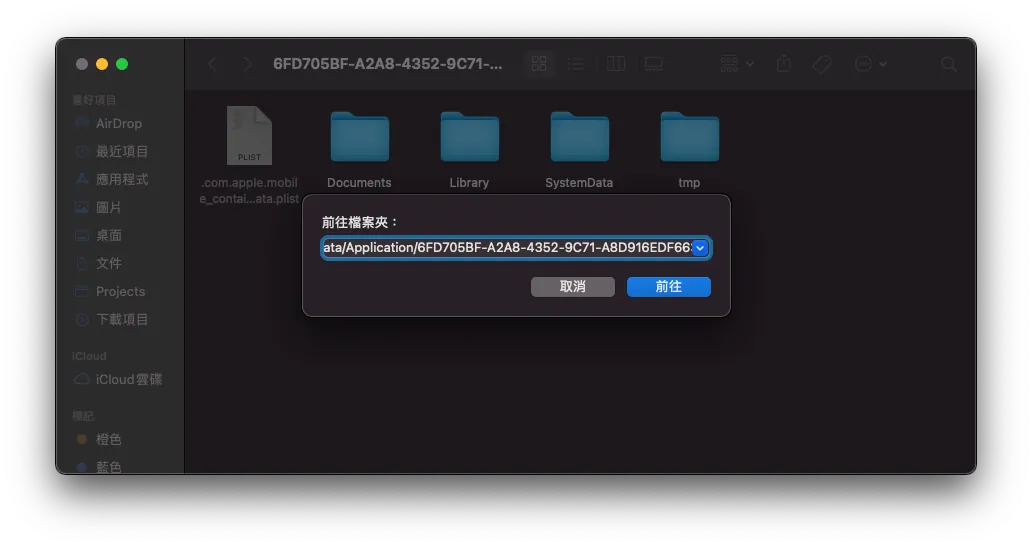
Finder -> 前往 -> 貼上路徑
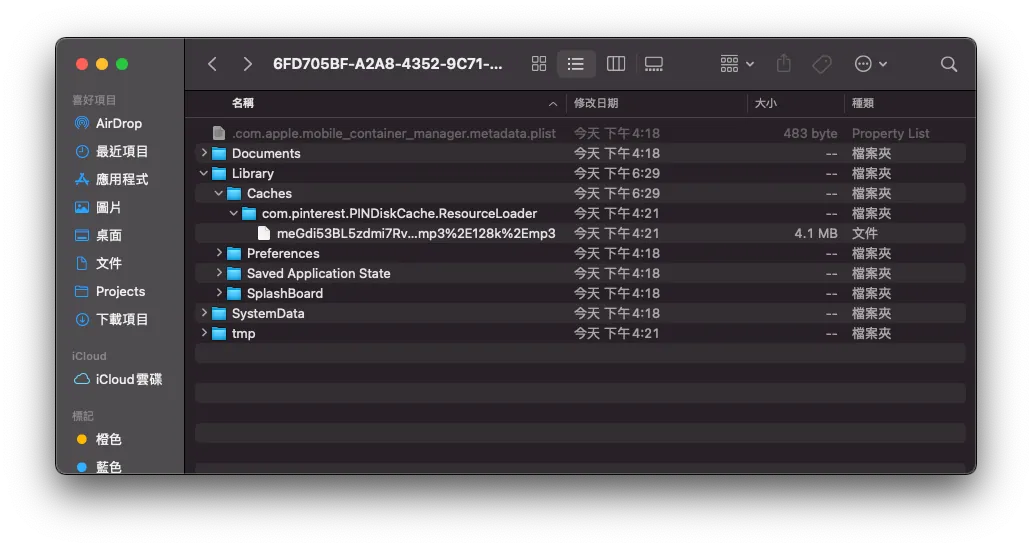
在 Library -> Caches -> com.pinterest.PINDiskCache.ResourceLoader 就是我們建的 Resource Loader Cache 目錄。
PINCache(name: “ResourceLoader”) 其中的 name 就是目錄名稱。
也可以指定 rootPath ,目錄就可以改到 Documents 底下(不怕被系統清掉)。
設定 PINCache 最大上限:
 PINCacheAssetDataManager.Cache.diskCache.byteCount = 300 * 1024 * 1024 // max: 300mb
 PINCacheAssetDataManager.Cache.diskCache.byteLimit = 90 * 60 * 60 * 24 // 90 days
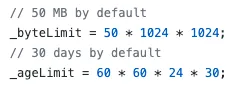
系統預設上限
設 0 的話就不會主動刪除檔案。
後記
原先太小看這個功能的困難度,以為三兩下就能處理好;結果吃盡苦頭,大概又多花了兩週處理資料儲存的問題,不過也就此徹底了解整個 Resource Loader 運作機制、 GCD 、Data。
參考資料
最後附上研究如何實作的參考資料
- iOS AVPlayer 视频缓存的设计与实现 僅講原理
- 基于AVPlayer实现音视频播放和缓存,支持视频画面的同步输出 [ SZAVPlayer ] 有附程式(很完整,但很複雜)
- CachingPlayerItem (簡易實現,較好懂但不完整)
- 可能是目前最好的 AVPlayer 音视频缓存方案 AVAssetResourceLoaderDelegate
- 仿抖音 Swift 版 [ Github ](蠻有意思的專案,復刻抖音 APP;裡面也有用到 Resource Loader)
- iOS HLS Cache 實踐方法探究之旅
延伸
- DLCachePlayer (Objective-C 版)

留言 · Comments