
自行實現 iOS NSAttributedString HTML Render
iOS NSAttributedString DocumentType.html 的替代方案

Photo by Florian Olivo
[TL;DR] 2023/03/12
重新使用其他方式開發了 「 ZMarkupParser HTML String 轉換 NSAttributedString 工具 」 ,技術細節及開發故事請前往「 手工打造 HTML 解析器的那些事 」
起源
從去年 iOS 15 發佈以來,App 始終被一項 Crash 問題長年霸榜,從數據來看,近 90 天 (2022/03/11~2022/06/08) 一共造成 2.4K+ 次閃退、影響 1.4K+ 位使用者。
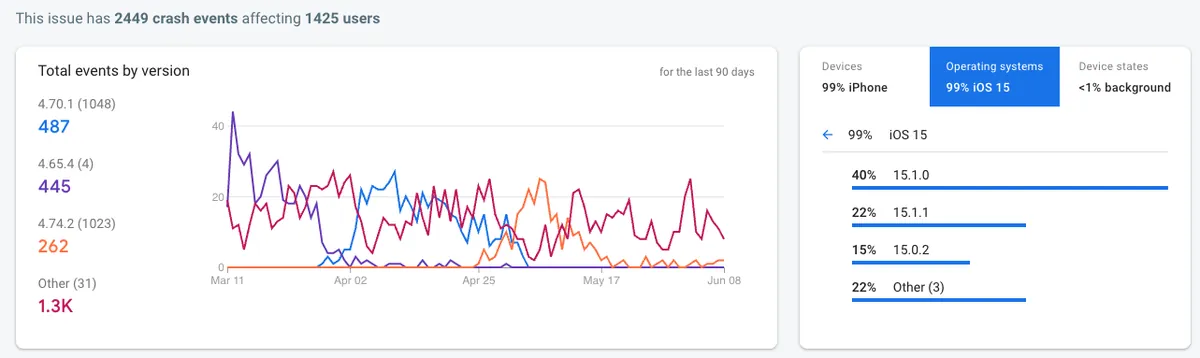
此大量閃退問題從數據上看,官方應該已在 iOS ≥ 15.2 後續的版本修復(或減少發生機率),數據已呈現趨勢下降。
最大宗受影響版本: iOS 15.0.X ~ iOS 15.X.X
另外有發現 iOS 12、iOS 13 也有零星閃退數,所以此問題應該已存在許久,只是 iOS 15 前幾版發生的機率幾乎是 100%。
閃退原因:
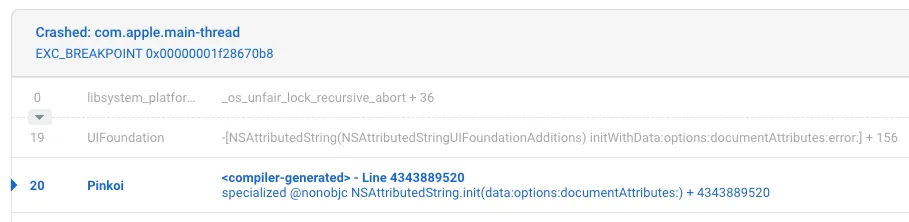
<compiler-generated> line 2147483647 specialized @nonobjc NSAttributedString.init(data:options:documentAttributes:)
NSAttributedString 在 init 時發生 Crashed: com.apple.main-thread EXC_BREAKPOINT 0x00000001de9d4e44 閃退問題。
亦有可能是操作的地方不在 Main Thread.
重現方式:
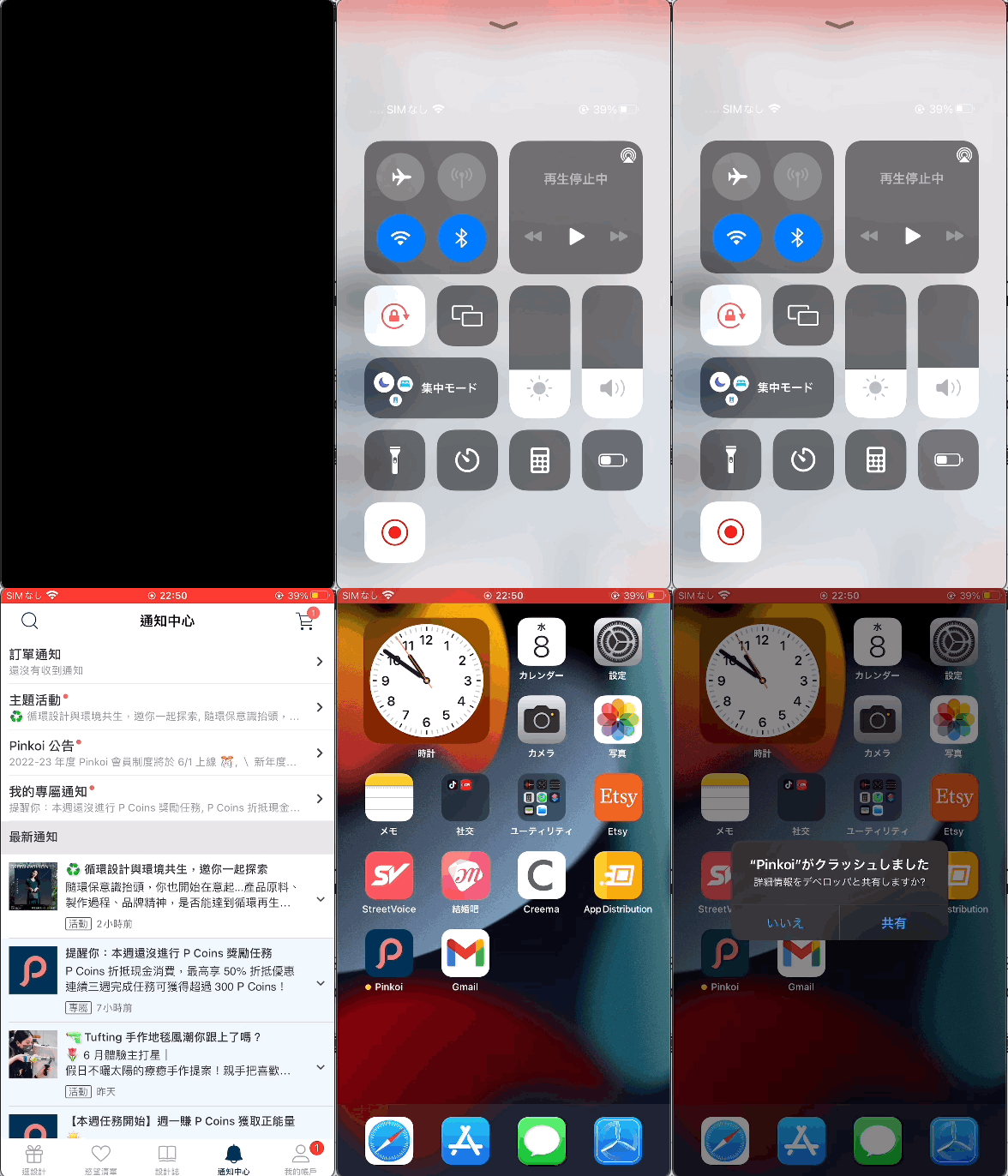
此問題大量橫空出世時,讓開發團隊想破腦袋;複測 Crash Log 上的點都沒問題,不清楚使用者是在什麼情況下發生的;直到有一次因緣巧合下我剛好切換成「省電模式」然後就觸發問題了! ! WTF ! ! !
解答
經過一番搜索發現網路上有許多相同案例,也從 App Developer Forums 找到最早的相同 閃退問題提問 ,並獲得來自 官方 的回答:
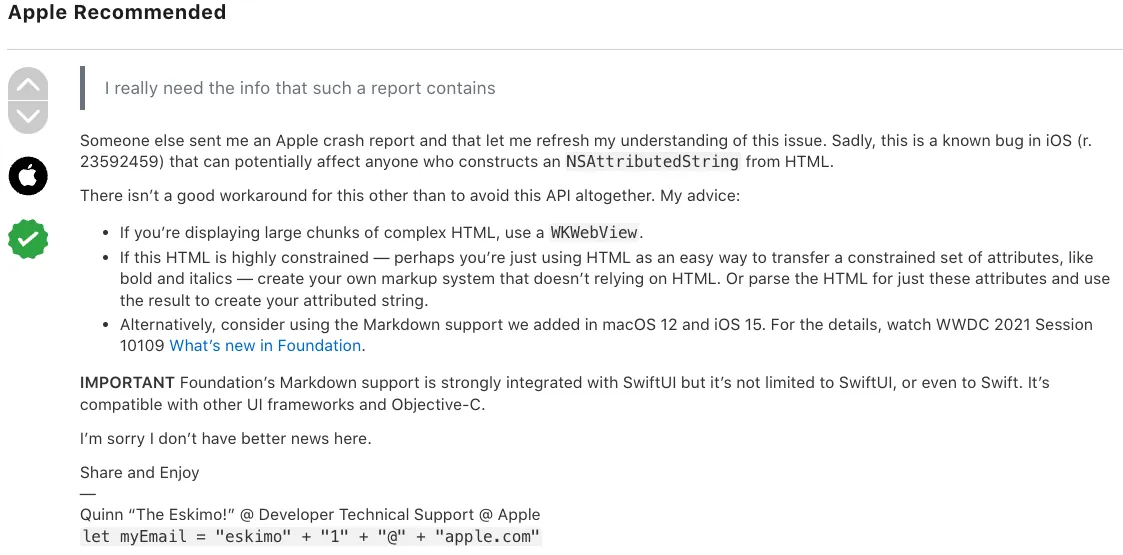
- 這是已知的 iOS Foundation Bug:自 iOS 12 就已存在
- 如要渲染複雜的、無使用上約束的 HTML:請使用 WKWebView
- 有渲染約束:可自行撰寫 HTML Parser & Render
- 直接使用 Markdown 做為渲染約束:iOS ≥ 15 NSAttributedString 可 直接使用 Markdown 格式渲染文字
渲染約束 的意思是限定 App 端能支援的渲染格式,例如只支援 粗體 、斜體、 超連結 。
補充. 渲染複雜的 HTML — 想製作文饒圖效果
可與後端共同協調ㄧ個介面:
{
  "content":[
    {"type":"text","value":"第1段純文字"},
    {"type":"text","value":"第2段純文字"},
    {"type":"text","value":"第3段純文字"},
    {"type":"text","value":"第4段純文字"},
    {"type":"image","src":"https://zhgchg.li/logo.png","title":"ZhgChgLi"},
    {"type":"text","value":"第5段純文字"}
  ]
}
可與 Markdown 組合加上支援文字渲染,或參考 Medium 做法:
"Paragraph": {
    "text": "code in text, and link in text, and ZhgChgLi, and bold, and I, only i",
    "markups": [
      {
        "type": "CODE",
        "start": 5,
        "end": 7
      },
      {
        "start": 18,
        "end": 22,
        "href": "http://zhgchg.li",
        "type": "LINK"
      },
      {
        "type": "STRONG",
        "start": 50,
        "end": 63
      },
      {
        "type": "EM",
        "start": 55,
        "end": 69
      }
    ]
}
意思是 code in text, and link in text, and ZhgChgLi, and bold, and I, only i 這段文字的:
- 第 5 到第 7 字元要標示為 程式碼 (用`Text`格式包裝)
- 第 18 到第 22 字元要標示為 連結 (用[Text](URL)格式包裝)
- 第 50 到第 63 字元要標示為 粗體(用*Text*格式包裝)
- 第 55 到第 69 字元要標示為 斜體(用_Text_格式包裝)
有規範&可描述的結構後,App 就能自行使用原生方式渲染,達到效能、使用體驗最佳化。
UITextView 做文饒圖的坑,可參考我之前的文章: iOS UITextView 文繞圖編輯器 (Swift)
Why?
在實踐解答之前我們先回歸探究問題本身,個人認為這個問題主因並非來自 Apple,官方的 Bug 只是這個問題的引爆點。
問題主要來自 App 端被當成 Web 來進行渲染 ,優點是 Web 開發快速,同個 API Endpoint 可以不用區分 Client 都給 HTML、可以彈性渲染任何想呈現的內容;缺點是 HTML 並非 App 的常見接口、不能期望 App Engineer 懂 HTML、 效能極差 、只能在 Main Thread、開發階段無法預期結果、無法確認支援規格。
再往上找問題,多半是原始需求無法確定、不能確定 App 需要支援哪些規格、為了求快,才導致直接使用 HTML 做為 App 與 Web 的接口。
效能極差
補充效能部分,實測直接使用 NSAttributedString DocumentType.html 與自行實現渲染的方式有 5~20 倍的速度差距。
Better
既然是 App 要用,更好的做法要以 App 開發方式為出發點,對 App 來說需求的調整成本比 Web 高很多;有效的 App 開發應該要基於有規格的迭代調整,當下需要確定能支援的規格,之後如果要改我們就安排時間擴充規格,無法快速的想改就改,可以減少溝通成本、增加工作效率。
- 確認需求範圍
- 確認支援的規格
- 確認接口規範 (Markdown/BBCode/…要繼續用 HTML 也行,但要是有約束的,例如只用
<b>/<i>/<a>/<u>,要在程式 明確告知 開發者) - 自行實現渲染機制
- 維護、迭代支援規格
[2023/02/27 Updated] [TL;DR]:
已更新做法,不使用 XMLParser,因容錯率為 0 :
<br> / <Congratulation!> / <b>Bold<i>Bold+Italic</b>Italic</i>
以上三種有可能出現的情境 XMLParser 解析都會出錯直接 Throw Error 顯示空白。
使用 XMLParser,HTML 字串必須完全符合 XML 規則,無法像瀏覽器或 NSAttributedString.DocumentType.html 容錯正常顯示。

改使用純 Swift 開發,透過 Regex 剖析出 HTML Tag 並經過 Tokenization,分析修正 Tag 正確性(修正沒有 end 的 tag & 錯位 tag),再轉換成 abstract syntax tree,最終使用 Visitor Pattern 將 HTML Tag 與抽象樣式對應,得到最終 NSAttributedString 結果;其中不依賴任何 Parser Lib。
— —
How?
木已成舟,回歸正題,目前已用 HTML 在渲染 NSAttributedString 那我們該如何解決上述的閃退還有效能問題呢?
Inspired by
Strip HTML 去除 HTML
在談 HTML Render 之前先談 Strip HTML,還是再提一次前文 Why? 章節所說的,App 哪裡會拿到 HTML、會拿到哪些 HTML 應該要在規格協定好;而不是 App 這邊「 可能 」會拿到 HTML,需要 Strip 掉。
套句之前主管的名言:這樣太瘋了吧?
Option 1. NSAttributedString
let data = "<div>Text</div>".data(using: .unicode)!
let attributed = try NSAttributedString(data: data, options: [.documentType: NSAttributedString.DocumentType.html, .characterEncoding: String.Encoding.utf8.rawValue], documentAttributes: nil)
let string = attributed.string
- 使用 NSAttributedString Render HTML 然後再取 string 出來就會是乾淨的 String 了
- 問題同本章問題,iOS 15 容易閃退、效能不好、只能在 Main Thread 操作
Option 2. Regex
htmlString = "<div>Test</div>"
htmlString.replacingOccurrences(of: "<[^>]+>", with: "", options: .regularExpression, range: nil)
- 最簡單有效的方式
- Regex 並不能保證完全正確 e.g
<p foo=">now what?">Paragraph</p>是合法的 HTML 但會 Strip 錯誤
Option 3. XMLParser
參考 SwiftRichString 的做法,使用 Foundation 中的 XMLParser 將 HTML 做為 XML 解析自行實現 HTML Parser & Strip 功能。
import UIKit
// Ref: https://github.com/malcommac/SwiftRichString
final class HTMLStripper: NSObject, XMLParserDelegate {
private static let topTag = "source"
private var xmlParser: XMLParser
private(set) var storedString: String
// The XML parser sometimes splits strings, which can break localization-sensitive
// string transforms. Work around this by using the currentString variable to
// accumulate partial strings, and then reading them back out as a single string
// when the current element ends, or when a new one is started.
private var currentString: String?
// MARK: - Initialization
init(string: String) throws {
let xmlString = HTMLStripper.escapeWithUnicodeEntities(string)
let xml = "<\(HTMLStripper.topTag)>\(xmlString)</\(HTMLStripper.topTag)>"
guard let data = xml.data(using: String.Encoding.utf8) else {
throw XMLParserInitError("Unable to convert to UTF8")
}
self.xmlParser = XMLParser(data: data)
self.storedString = ""
super.init()
xmlParser.shouldProcessNamespaces = false
xmlParser.shouldReportNamespacePrefixes = false
xmlParser.shouldResolveExternalEntities = false
xmlParser.delegate = self
}
/// Parse and generate attributed string.
func parse() throws -> String {
guard xmlParser.parse() else {
let line = xmlParser.lineNumber
let shiftColumn = (line == 1)
let shiftSize = HTMLStripper.topTag.lengthOfBytes(using: String.Encoding.utf8) + 2
let column = xmlParser.columnNumber - (shiftColumn ? shiftSize : 0)
throw XMLParserError(parserError: xmlParser.parserError, line: line, column: column)
}
return storedString
}
// MARK: XMLParserDelegate
@objc func parser(_ parser: XMLParser, didStartElement elementName: String, namespaceURI: String?, qualifiedName qName: String?, attributes attributeDict: [String: String]) {
foundNewString()
}
@objc func parser(_ parser: XMLParser, didEndElement elementName: String, namespaceURI: String?, qualifiedName qName: String?) {
foundNewString()
}
@objc func parser(_ parser: XMLParser, foundCharacters string: String) {
currentString = (currentString ?? "").appending(string)
}
// MARK: Support Private Methods
func foundNewString() {
if let currentString = currentString {
storedString.append(currentString)
self.currentString = nil
}
}
// handle html entity / html hex
// Perform string escaping to replace all characters which is not supported by NSXMLParser
// into the specified encoding with decimal entity.
// For example if your string contains '&' character parser will break the style.
// This option is active by default.
// ref: https://github.com/malcommac/SwiftRichString/blob/e0b72d5c96968d7802856d2be096202c9798e8d1/Sources/SwiftRichString/Support/XMLStringBuilder.swift
static func escapeWithUnicodeEntities(_ string: String) -> String {
guard let escapeAmpRegExp = try? NSRegularExpression(pattern: "&(?!(#[0-9]{2,4}|[A-z]{2,6});)", options: NSRegularExpression.Options(rawValue: 0)) else {
return string
}
let range = NSRange(location: 0, length: string.count)
return escapeAmpRegExp.stringByReplacingMatches(in: string,
options: NSRegularExpression.MatchingOptions(rawValue: 0),
range: range,
withTemplate: "&")
}
}
let test = "我<br/><a href=\"http://google.com\">同意</a>提供<b><i>個</i>人</b>身分證字號/護照/居留<span style=\"color:#FF0000;font-size:20px;word-spacing:10px;line-height:10px\">證號碼</span>,以供<i>跨境物流</i>方通關<span style=\"background-color:#00FF00;\">使用</span>,並已<img src=\"g.png\"/>了解跨境<br/>商品之物<p>流需</p>求"
let stripper = try HTMLStripper(string: test)
print(try! stripper.parse())
// 我同意提供個人身分證 字號/護照/居留證號碼,以供跨境物流方通關使用,並已了解跨境商品之物流需求
使用 Foundation XML Parser 去處理 String,實現 XMLParserDelegate 用 currentString 存放 String,因 String 有時會拆成多個 String 所以 foundCharacters 是有機會被重複呼叫的, didStartElement 、 didEndElement 找到字串開始時、結束時,將當前結果存下並清空 currentString 。
- 優點是會連帶轉換 HTML Entity to 實際字元 e.g.
g -> g - 優點是實現複雜、遇到不合規格的 HTML 會 XMLParser 失敗 e.g.
<br> 忘了寫成 <br/>
個人認為單純要 Strip HTML Option 2. 是比較好的方法 ,會介紹此方法是因為 Render HTML 也是使用相同原理,先用這個做為簡單範例 :)
HTML Render w/XMLParser
使用 XMLParser 自行實現,同 Strip 原理,我們可以多加上剖析到什麼 Tag 時要做對應的渲染方式。
需求規格:
- 支援擴充想剖析的 Tag
- 支援設定 Tag Default Style e.g <a> Tag 套用連結樣式
- 支援剖析
styleAttributed,因 HTML 會在style="color:red"上去明示要顯示的樣式 - 樣式支援更改文字粗細、大小、底線、行距、字距、背景顏色、字顏色
- 不支援 Image Tag、Table Tag…等較複雜 TAG
大家可依照自己的規格需求去刪減功能,例如不需支援背景顏色調整,則不需要開出可設定背景顏色的口。
本文只是概念實現, 並非架構上的 Best Practice ;如有明確規格、使用方式,可考慮套用些 Design Pattern 來實現,達成好維護好擴充。
⚠️⚠️⚠️ Attention ⚠️⚠️⚠️
再次提醒, 如果你的 App 是全新的或有機會直接全改成 Markdown 格式,建議還是採用以上方式,本篇自行撰寫 Render 太複雜且效能不會比 Markdown 好 。
即使你是 iOS < 15 不支援原生 Markdown,還是可以在 Github 上找到 大神做好的 Markdown Parser 方案 。
HTMLTagParser
protocol HTMLTagParser {
    static var tag: String { get } // 宣告想解析的 Tag Name, e.g. a
    var storedHTMLAttributes: [String: String]? { get set } // Attributed 解析結果將存放於此, e.g. href,style
    var style: AttributedStringStyle? { get } // 此 Tag 想套用的樣式

    func render(attributedString: inout NSMutableAttributedString) // 實現渲染 HTML to attributedString 的邏輯
}
宣告可剖析的 HTML Tag 實體,方便擴充管理。
AttributedStringStyle
protocol AttributedStringStyle {
    var font: UIFont? { get set }
    var color: UIColor? { get set }
    var backgroundColor: UIColor? { get set }
    var wordSpacing: CGFloat? { get set }
    var paragraphStyle: NSParagraphStyle? { get set }
    var customs: [NSAttributedString.Key: Any]? { get set } // 萬能設定口,建議確定可支援規格後將其抽象出來,並關閉此開口
    func render(attributedString: inout NSMutableAttributedString)
}


// abstract implement
extension AttributedStringStyle {
    func render(attributedString: inout NSMutableAttributedString) {
        let range = NSMakeRange(0, attributedString.length)
        if let font = font {
            attributedString.addAttribute(NSAttributedString.Key.font, value: font, range: range)
        }
        if let color = color {
            attributedString.addAttribute(NSAttributedString.Key.foregroundColor, value: color, range: range)
        }
        if let backgroundColor = backgroundColor {
            attributedString.addAttribute(NSAttributedString.Key.backgroundColor, value: backgroundColor, range: range)
        }
        if let wordSpacing = wordSpacing {
            attributedString.addAttribute(NSAttributedString.Key.kern, value: wordSpacing as Any, range: range)
        }
        if let paragraphStyle = paragraphStyle {
            attributedString.addAttribute(NSAttributedString.Key.paragraphStyle, value: paragraphStyle, range: range)
        }
        if let customAttributes = customs {
            attributedString.addAttributes(customAttributes, range: range)
        }
    }
}
宣告 Tag 可供設定的樣式。
HTMLStyleAttributedParser
// only support tag attributed down below
// can set color,font seize,line height,word spacing,background color

enum HTMLStyleAttributedParser: String {
    case color = "color"
    case fontSize = "font-size"
    case lineHeight = "line-height"
    case wordSpacing = "word-spacing"
    case backgroundColor = "background-color"

    func render(attributedString: inout NSMutableAttributedString, value: String) -> Bool {
        let range = NSMakeRange(0, attributedString.length)
        switch self {
        case .color:
            if let color = convertToiOSColor(value) {
                attributedString.addAttribute(NSAttributedString.Key.foregroundColor, value: color, range: range)
                return true
            }
        case .backgroundColor:
            if let color = convertToiOSColor(value) {
                attributedString.addAttribute(NSAttributedString.Key.backgroundColor, value: color, range: range)
                return true
            }
        case .fontSize:
            if let size = convertToiOSSize(value) {
                attributedString.addAttribute(NSAttributedString.Key.font, value: UIFont.systemFont(ofSize: CGFloat(size)), range: range)
                return true
            }
        case .lineHeight:
            if let size = convertToiOSSize(value) {
                let paragraphStyle = NSMutableParagraphStyle()
                paragraphStyle.lineSpacing = size
                attributedString.addAttribute(NSAttributedString.Key.paragraphStyle, value: paragraphStyle, range: range)
                return true
            }
        case .wordSpacing:
            if let size = convertToiOSSize(value) {
                attributedString.addAttribute(NSAttributedString.Key.kern, value: size, range: range)
                return true
            }
        }

        return false
    }

    // convert 36px -> 36
    private func convertToiOSSize(_ string: String) -> CGFloat? {
        guard let regex = try? NSRegularExpression(pattern: "^([0-9]+)"),
              let firstMatch = regex.firstMatch(in: string, options: [], range: NSRange(location: 0, length: string.utf16.count)),
              let range = Range(firstMatch.range, in: string),
              let size = Float(String(string[range])) else {
            return nil
        }
        return CGFloat(size)
    }

    // convert html hex color #ffffff to UIKit Color
    private func convertToiOSColor(_ hexString: String) -> UIColor? {
        var cString: String = hexString.trimmingCharacters(in: .whitespacesAndNewlines).uppercased()

        if cString.hasPrefix("#") {
            cString.remove(at: cString.startIndex)
        }

        if (cString.count) != 6 {
            return nil
        }

        var rgbValue: UInt64 = 0
        Scanner(string: cString).scanHexInt64(&rgbValue)

        return UIColor(
            red: CGFloat((rgbValue & 0xFF0000) >> 16) / 255.0,
            green: CGFloat((rgbValue & 0x00FF00) >> 8) / 255.0,
            blue: CGFloat(rgbValue & 0x0000FF) / 255.0,
            alpha: CGFloat(1.0)
        )
    }
}
實現 Style Attributed Parser 解析 style="color:red;font-size:16px" 但 CSS Style 有非常多可設定樣式,所以需要列舉可支援範圍。
extension HTMLTagParser {

    func render(attributedString: inout NSMutableAttributedString) {
        defaultStyleRender(attributedString: &attributedString)
    }

    func defaultStyleRender(attributedString: inout NSMutableAttributedString) {
        // setup default style to NSMutableAttributedString
        style?.render(attributedString: &attributedString)

        // setup & override HTML style (style="color:red;background-color:black") to NSMutableAttributedString if is exists
        // any html tag can have style attribute
        if let style = storedHTMLAttributes?["style"] {
            let styles = style.split(separator: ";").map { $0.split(separator: ":") }.filter { $0.count == 2 }
            for style in styles {
                let key = String(style[0])
                let value = String(style[1])

                if let styleAttributed = HTMLStyleAttributedParser(rawValue: key), styleAttributed.render(attributedString: &attributedString, value: value) {
                    print("Unsupport style attributed or value[\(key):\(value)]")
                }
            }
        }
    }
}
套用 HTMLStyleAttributedParser & HTMLStyleAttributedParser 抽象實現。
一些 Tag Parser & AttributedStringStyle 的實現範例
struct LinkStyle: AttributedStringStyle {
   var font: UIFont? = UIFont.systemFont(ofSize: 14)
   var color: UIColor? = UIColor.blue
   var backgroundColor: UIColor? = nil
   var wordSpacing: CGFloat? = nil
   var paragraphStyle: NSParagraphStyle?
   var customs: [NSAttributedString.Key: Any]? = [.underlineStyle: NSUnderlineStyle.single.rawValue]
}

struct ATagParser: HTMLTagParser {
    // <a></a>
    static let tag: String = "a"
    var storedHTMLAttributes: [String: String]? = nil
    let style: AttributedStringStyle? = LinkStyle()

    func render(attributedString: inout NSMutableAttributedString) {
        defaultStyleRender(attributedString: &attributedString)
        if let href = storedHTMLAttributes?["href"], let url = URL(string: href) {
            let range = NSMakeRange(0, attributedString.length)
            attributedString.addAttribute(NSAttributedString.Key.link, value: url, range: range)
        }
    }
}
struct BoldStyle: AttributedStringStyle {
   var font: UIFont? = UIFont.systemFont(ofSize: 14, weight: .bold)
   var color: UIColor? = UIColor.black
   var backgroundColor: UIColor? = nil
   var wordSpacing: CGFloat? = nil
   var paragraphStyle: NSParagraphStyle?
   var customs: [NSAttributedString.Key: Any]? = [.underlineStyle: NSUnderlineStyle.single.rawValue]
}

struct BoldTagParser: HTMLTagParser {
    // <b></b>
    static let tag: String = "b"
    var storedHTMLAttributes: [String: String]? = nil
    let style: AttributedStringStyle? = BoldStyle()
}
HTMLToAttributedStringParser: XMLParserDelegate 核心實現
// Ref: https://github.com/malcommac/SwiftRichString
final class HTMLToAttributedStringParser: NSObject {
private static let topTag = "source"
private var xmlParser: XMLParser?
private(set) var attributedString: NSMutableAttributedString = NSMutableAttributedString()
private(set) var supportedTagRenders: [HTMLTagParser] = []
private let defaultStyle: AttributedStringStyle
/// Styles applied at each fragment.
private var renderingTagRenders: [HTMLTagParser] = []
// The XML parser sometimes splits strings, which can break localization-sensitive
// string transforms. Work around this by using the currentString variable to
// accumulate partial strings, and then reading them back out as a single string
// when the current element ends, or when a new one is started.
private var currentString: String?
// MARK: - Initialization
init(defaultStyle: AttributedStringStyle) {
self.defaultStyle = defaultStyle
super.init()
}
func register(_ tagRender: HTMLTagParser) {
if let index = supportedTagRenders.firstIndex(where: { type(of: $0).tag == type(of: tagRender).tag }) {
supportedTagRenders.remove(at: index)
}
supportedTagRenders.append(tagRender)
}
/// Parse and generate attributed string.
func parse(string: String) throws -> NSAttributedString {
var xmlString = HTMLToAttributedStringParser.escapeWithUnicodeEntities(string)
// make sure <br/> format is correct XML
// because Web may use <br> to present <br/>, but <br> is not a vaild XML
xmlString = xmlString.replacingOccurrences(of: "<br>", with: "<br/>")
let xml = "<\(HTMLToAttributedStringParser.topTag)>\(xmlString)</\(HTMLToAttributedStringParser.topTag)>"
guard let data = xml.data(using: String.Encoding.utf8) else {
throw XMLParserInitError("Unable to convert to UTF8")
}
let xmlParser = XMLParser(data: data)
xmlParser.shouldProcessNamespaces = false
xmlParser.shouldReportNamespacePrefixes = false
xmlParser.shouldResolveExternalEntities = false
xmlParser.delegate = self
self.xmlParser = xmlParser
attributedString = NSMutableAttributedString()
guard xmlParser.parse() else {
let line = xmlParser.lineNumber
let shiftColumn = (line == 1)
let shiftSize = HTMLToAttributedStringParser.topTag.lengthOfBytes(using: String.Encoding.utf8) + 2
let column = xmlParser.columnNumber - (shiftColumn ? shiftSize : 0)
throw XMLParserError(parserError: xmlParser.parserError, line: line, column: column)
}
return attributedString
}
}
// MARK: Private Method
private extension HTMLToAttributedStringParser {
func enter(element elementName: String, attributes: [String: String]) {
// elementName = tagName, EX: a,span,div...
guard elementName != HTMLToAttributedStringParser.topTag else {
return
}
if let index = supportedTagRenders.firstIndex(where: { type(of: $0).tag == elementName }) {
var tagRender = supportedTagRenders[index]
tagRender.storedHTMLAttributes = attributes
renderingTagRenders.append(tagRender)
}
}
func exit(element elementName: String) {
if !renderingTagRenders.isEmpty {
renderingTagRenders.removeLast()
}
}
func foundNewString() {
if let currentString = currentString {
// currentString != nil ,ex: <i>currentString</i>
var newAttributedString = NSMutableAttributedString(string: currentString)
if !renderingTagRenders.isEmpty {
for (key, tagRender) in renderingTagRenders.enumerated() {
// Render Style
tagRender.render(attributedString: &newAttributedString)
renderingTagRenders[key].storedHTMLAttributes = nil
}
} else {
defaultStyle.render(attributedString: &newAttributedString)
}
attributedString.append(newAttributedString)
self.currentString = nil
} else {
// currentString == nil ,ex: <br/>
var newAttributedString = NSMutableAttributedString()
for (key, tagRender) in renderingTagRenders.enumerated() {
// Render Style
tagRender.render(attributedString: &newAttributedString)
renderingTagRenders[key].storedHTMLAttributes = nil
}
attributedString.append(newAttributedString)
}
}
}
// MARK: Helper
extension HTMLToAttributedStringParser {
// handle html entity / html hex
// Perform string escaping to replace all characters which is not supported by NSXMLParser
// into the specified encoding with decimal entity.
// For example if your string contains '&' character parser will break the style.
// This option is active by default.
// ref: https://github.com/malcommac/SwiftRichString/blob/e0b72d5c96968d7802856d2be096202c9798e8d1/Sources/SwiftRichString/Support/XMLStringBuilder.swift
static func escapeWithUnicodeEntities(_ string: String) -> String {
guard let escapeAmpRegExp = try? NSRegularExpression(pattern: "&(?!(#[0-9]{2,4}|[A-z]{2,6});)", options: NSRegularExpression.Options(rawValue: 0)) else {
return string
}
let range = NSRange(location: 0, length: string.count)
return escapeAmpRegExp.stringByReplacingMatches(in: string,
options: NSRegularExpression.MatchingOptions(rawValue: 0),
range: range,
withTemplate: "&")
}
}
// MARK: XMLParserDelegate
extension HTMLToAttributedStringParser: XMLParserDelegate {
func parser(_ parser: XMLParser, didStartElement elementName: String, namespaceURI: String?, qualifiedName qName: String?, attributes attributeDict: [String: String]) {
foundNewString()
enter(element: elementName, attributes: attributeDict)
}
func parser(_ parser: XMLParser, didEndElement elementName: String, namespaceURI: String?, qualifiedName qName: String?) {
foundNewString()
guard elementName != HTMLToAttributedStringParser.topTag else {
return
}
exit(element: elementName)
}
func parser(_ parser: XMLParser, foundCharacters string: String) {
currentString = (currentString ?? "").appending(string)
}
}
套用 Strip 的邏輯,我們可以幫拆好的架構在其中進行組合從 elementName 知道當前的 Tag 並套用相應的 Tag Parser 及套上定義好的 Style。
Test Result
let test = "我<br/><a href=\"http://google.com\">同意</a>提供<b><i>個</i>人</b>身分證字號/護照/居留<span style=\"color:#FF0000;font-size:20px;word-spacing:10px;line-height:10px\">證號碼</span>,以供<i>跨境物流</i>方通關<span style=\"background-color:#00FF00;\">使用</span>,並已<img src=\"g.png\"/>了解跨境<br/>商品之物<p>流需</p>求"
let render = HTMLToAttributedStringParser(defaultStyle: DefaultTextStyle())
render.register(ATagParser())
render.register(BoldTagParser())
render.register(SpanTagParser())
//...
print(try! render.parse(string: test))

// Result:
// 我{
//     NSColor = "UIExtendedGrayColorSpace 0 1";
//     NSFont = "\".SFNS-Regular 14.00 pt. P [] (0x13a012970) fobj=0x13a012970, spc=3.79\"";
//     NSParagraphStyle = "Alignment 4, LineSpacing 3, ParagraphSpacing 0, ParagraphSpacingBefore 0, HeadIndent 0, TailIndent 0, FirstLineHeadIndent 0, LineHeight 0/0, LineHeightMultiple 0, LineBreakMode 0, Tabs (\n    28L,\n    56L,\n    84L,\n    112L,\n    140L,\n    168L,\n    196L,\n    224L,\n    252L,\n    280L,\n    308L,\n    336L\n), DefaultTabInterval 0, Blocks (\n), Lists (\n), BaseWritingDirection -1, HyphenationFactor 0, TighteningForTruncation NO, HeaderLevel 0 LineBreakStrategy 0 PresentationIntents (\n) ListIntentOrdinal 0 CodeBlockIntentLanguageHint ''";
// }同意{
//     NSColor = "UIExtendedSRGBColorSpace 0 0 1 1";
//     NSFont = "\".SFNS-Regular 14.00 pt. P [] (0x13a012970) fobj=0x13a012970, spc=3.79\"";
//     NSLink = "http://google.com";
//     NSUnderline = 1;
// }提供{
//     NSColor = "UIExtendedGrayColorSpace 0 1";
//     NSFont = "\".SFNS-Regular 14.00 pt. P [] (0x13a012970) fobj=0x13a012970, spc=3.79\"";
//     NSParagraphStyle = "Alignment 4, LineSpacing 3, ParagraphSpacing 0, ParagraphSpacingBefore 0, HeadIndent 0, TailIndent 0, FirstLineHeadIndent 0, LineHeight 0/0, LineHeightMultiple 0, LineBreakMode 0, Tabs (\n    28L,\n    56L,\n    84L,\n    112L,\n    140L,\n    168L,\n    196L,\n    224L,\n    252L,\n    280L,\n    308L,\n    336L\n), DefaultTabInterval 0, Blocks (\n), Lists (\n), BaseWritingDirection -1, HyphenationFactor 0, TighteningForTruncation NO, HeaderLevel 0 LineBreakStrategy 0 PresentationIntents (\n) ListIntentOrdinal 0 CodeBlockIntentLanguageHint ''";
// }個{
//     NSColor = "UIExtendedGrayColorSpace 0 1";
//     NSFont = "\".SFNS-Bold 14.00 pt. P [] (0x13a013870) fobj=0x13a013870, spc=3.46\"";
//     NSUnderline = 1;
// }人身分證字號/護照/居留{
//     NSColor = "UIExtendedGrayColorSpace 0 1";
//     NSFont = "\".SFNS-Regular 14.00 pt. P [] (0x13a012970) fobj=0x13a012970, spc=3.79\"";
//     NSParagraphStyle = "Alignment 4, LineSpacing 3, ParagraphSpacing 0, ParagraphSpacingBefore 0, HeadIndent 0, TailIndent 0, FirstLineHeadIndent 0, LineHeight 0/0, LineHeightMultiple 0, LineBreakMode 0, Tabs (\n    28L,\n    56L,\n    84L,\n    112L,\n    140L,\n    168L,\n    196L,\n    224L,\n    252L,\n    280L,\n    308L,\n    336L\n), DefaultTabInterval 0, Blocks (\n), Lists (\n), BaseWritingDirection -1, HyphenationFactor 0, TighteningForTruncation NO, HeaderLevel 0 LineBreakStrategy 0 PresentationIntents (\n) ListIntentOrdinal 0 CodeBlockIntentLanguageHint ''";
// }證號碼{
//     NSColor = "UIExtendedSRGBColorSpace 1 0 0 1";
//     NSFont = "\".SFNS-Regular 20.00 pt. P [] (0x13a015fa0) fobj=0x13a015fa0, spc=4.82\"";
//     NSKern = 10;
//     NSParagraphStyle = "Alignment 4, LineSpacing 10, ParagraphSpacing 0, ParagraphSpacingBefore 0, HeadIndent 0, TailIndent 0, FirstLineHeadIndent 0, LineHeight 0/0, LineHeightMultiple 0, LineBreakMode 0, Tabs (\n    28L,\n    56L,\n    84L,\n    112L,\n    140L,\n    168L,\n    196L,\n    224L,\n    252L,\n    280L,\n    308L,\n    336L\n), DefaultTabInterval 0, Blocks (\n), Lists (\n), BaseWritingDirection -1, HyphenationFactor 0, TighteningForTruncation NO, HeaderLevel 0 LineBreakStrategy 0 PresentationIntents (\n) ListIntentOrdinal 0 CodeBlockIntentLanguageHint ''";
// },以供跨境物流方通關{
//     NSColor = "UIExtendedGrayColorSpace 0 1";
//     NSFont = "\".SFNS-Regular 14.00 pt. P [] (0x13a012970) fobj=0x13a012970, spc=3.79\"";
//     NSParagraphStyle = "Alignment 4, LineSpacing 3, ParagraphSpacing 0, ParagraphSpacingBefore 0, HeadIndent 0, TailIndent 0, FirstLineHeadIndent 0, LineHeight 0/0, LineHeightMultiple 0, LineBreakMode 0, Tabs (\n    28L,\n    56L,\n    84L,\n    112L,\n    140L,\n    168L,\n    196L,\n    224L,\n    252L,\n    280L,\n    308L,\n    336L\n), DefaultTabInterval 0, Blocks (\n), Lists (\n), BaseWritingDirection -1, HyphenationFactor 0, TighteningForTruncation NO, HeaderLevel 0 LineBreakStrategy 0 PresentationIntents (\n) ListIntentOrdinal 0 CodeBlockIntentLanguageHint ''";
// }使用{
//     NSBackgroundColor = "UIExtendedSRGBColorSpace 0 1 0 1";
//     NSColor = "UIExtendedGrayColorSpace 0 1";
//     NSFont = "\".SFNS-Regular 14.00 pt. P [] (0x13a012970) fobj=0x13a012970, spc=3.79\"";
//     NSParagraphStyle = "Alignment 4, LineSpacing 3, ParagraphSpacing 0, ParagraphSpacingBefore 0, HeadIndent 0, TailIndent 0, FirstLineHeadIndent 0, LineHeight 0/0, LineHeightMultiple 0, LineBreakMode 0, Tabs (\n    28L,\n    56L,\n    84L,\n    112L,\n    140L,\n    168L,\n    196L,\n    224L,\n    252L,\n    280L,\n    308L,\n    336L\n), DefaultTabInterval 0, Blocks (\n), Lists (\n), BaseWritingDirection -1, HyphenationFactor 0, TighteningForTruncation NO, HeaderLevel 0 LineBreakStrategy 0 PresentationIntents (\n) ListIntentOrdinal 0 CodeBlockIntentLanguageHint ''";
// },並已了解跨境商品之物流需求{
//     NSColor = "UIExtendedGrayColorSpace 0 1";
//     NSFont = "\".SFNS-Regular 14.00 pt. P [] (0x13a012970) fobj=0x13a012970, spc=3.79\"";
//     NSParagraphStyle = "Alignment 4, LineSpacing 3, ParagraphSpacing 0, ParagraphSpacingBefore 0, HeadIndent 0, TailIndent 0, FirstLineHeadIndent 0, LineHeight 0/0, LineHeightMultiple 0, LineBreakMode 0, Tabs (\n    28L,\n    56L,\n    84L,\n    112L,\n    140L,\n    168L,\n    196L,\n    224L,\n    252L,\n    280L,\n    308L,\n    336L\n), DefaultTabInterval 0, Blocks (\n), Lists (\n), BaseWritingDirection -1, HyphenationFactor 0, TighteningForTruncation NO, HeaderLevel 0 LineBreakStrategy 0 PresentationIntents (\n) ListIntentOrdinal 0 CodeBlockIntentLanguageHint ''";
// }
顯示結果:

Done!
這樣我們就完成了透過 XMLParser 自行實現 HTML Render 功能,並且保留擴充性跟規格性,可以從 Code 上管理、了解到目前 App 能支援的字串渲染類型。
完整 Github Repo 如下
本文同步發表於個人 Blog: [點我前往] 。
有任何問題及指教歡迎 與我聯絡 。


留言 · Comments