
Practical Application of Design Patterns—In WKWebView with Builder, Strategy & Chain of Responsibility Pattern
Design Patterns Used When Encapsulating iOS WKWebView (Strategy, Chain of Responsibility, Builder).

Photo by Dean Pugh
About Design Patterns
Before discussing Design Patterns, it’s important to mention that the classic GoF 23 design patterns were published over 30 years ago (1994). Since then, tools, languages, and software development practices have changed drastically. Many new design patterns have also emerged in different fields. Design Patterns are neither a magic solution nor the only solution. They serve more as a “common language” to apply the right pattern in the right context, reducing collaboration barriers. For example, applying the Strategy Pattern here allows future maintenance and extension to follow the pattern’s structure easily. Most design patterns also promote good decoupling, which significantly benefits extensibility and testability.
The Mindset for Using Design Patterns
-
Not the Only Solution
-
Not a Universal Solution
-
Do not force-fit; choose the appropriate design pattern based on the type of problem to solve (creation? behavior? structure?) and the goal.
-
Avoid drastic changes, as they can cause confusion for future maintainers. Just like language, everyone calls Apple “Apple.” If you define it as “Banana,” it becomes a special term that requires extra developer effort to understand.
-
Avoid using keywords whenever possible. For example, the Factory Pattern is usually named
XXXFactory; if it is not a factory pattern, this keyword should not be used in the name. -
Be cautious when creating your own patterns. Although there are only 23 classic patterns, many new ones have emerged after years of evolution in various fields. You can first refer to online resources to find suitable patterns (after all, two heads are better than one). If none fit, then propose a new design pattern and try to publish it so people from different fields and contexts can review and refine it together.
-
Code is ultimately written for human maintenance. As long as it is easy to maintain and extend, using design patterns is not always necessary.
-
The team must have a consensus on Design Patterns before using them.
-
Design Patterns Can Be Combined with Other Design Patterns
-
Getting started with Design Patterns requires continuous practical experience to develop a keen sense of which scenarios are suitable or unsuitable for their application.
Helpful Tool ChatGPT
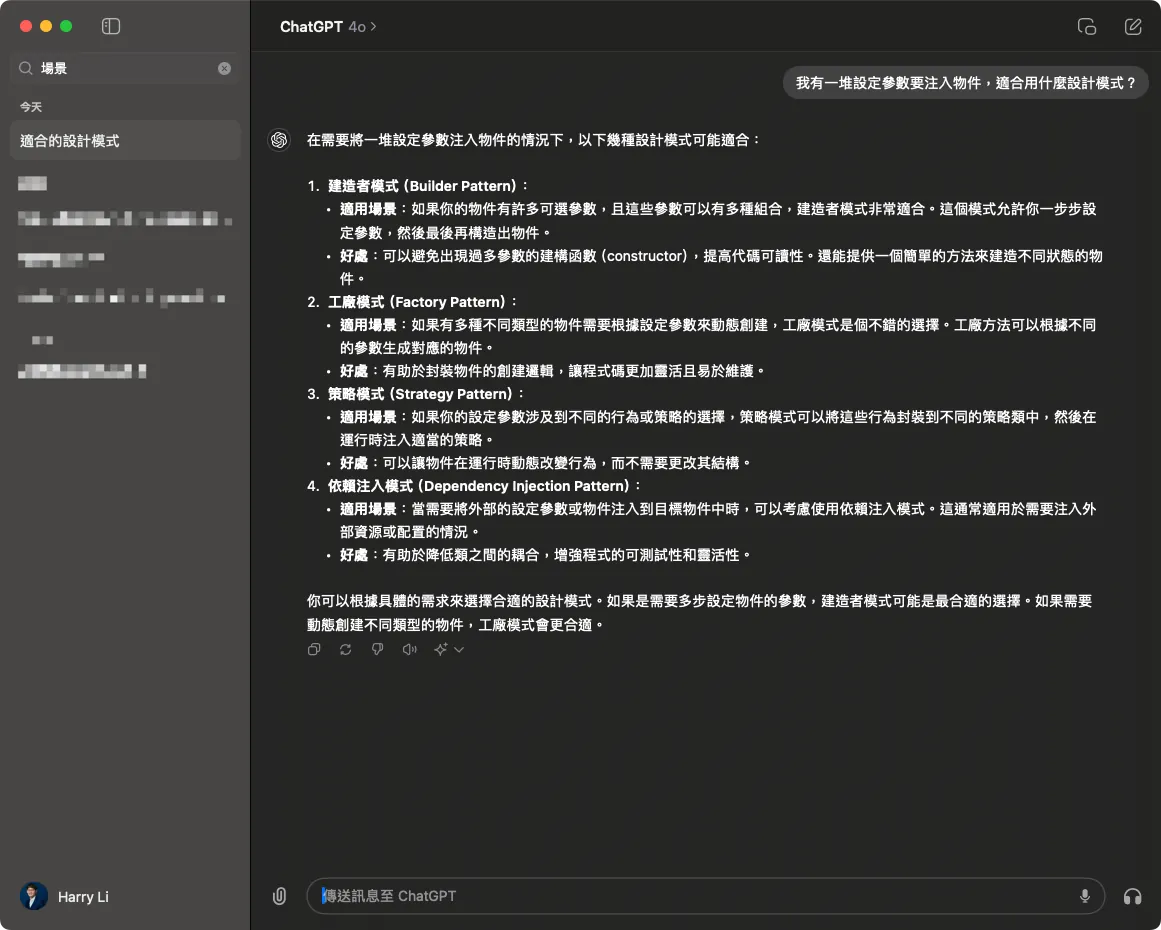
Since ChatGPT appeared, learning the practical application of Design Patterns has become easier. Just describe your problem specifically and ask which design patterns suit the scenario. It can provide several possible patterns along with explanations. Although not every answer is perfect, it at least offers feasible directions. We only need to explore these patterns further and combine them with our real-world problems to finally choose a good solution!
Practical Application Scenarios of Design Patterns in WKWebView
This Design Patterns practical application focuses on consolidating the WKWebView features in the current codebase and sharing insights on applying Design Patterns at several appropriate logical abstraction points when developing a unified WKWebView component.
The complete demo project code will be attached at the end of the article.
Original Non-Abstracted Implementation
class WKWebViewController: UIViewController {

    // MARK - Define some variables and flags for injecting features during external init...

    // Simulate business logic: flag to match special paths to open native pages
    let noNeedNativePresent: Bool
    // Simulate business logic: flag for DeeplinkManager check
    let deeplinkCheck: Bool
    // Simulate business logic: is it the home page?
    let isHomePage: Bool
    // Simulate business logic: WKUserScripts to inject into WKWebView
    let userScripts: [WKUserScript]
    // Simulate business logic: WKScriptMessageHandlers to inject into WKWebView
    let scriptMessageHandlers: [String: WKScriptMessageHandler]
    // Whether to allow overriding ViewController title from WebView title
    let overrideTitleFromWebView: Bool

    let url: URL

    // ...
}
// ...
extension OldWKWebViewController: WKNavigationDelegate {
    // MARK - iOS WKWebView navigationAction Delegate, used to decide how to handle the upcoming link
    // Must call decisionHandler(.allow) or decisionHandler(.cancel) at the end
    // decisionHandler(.cancel) will stop loading the upcoming page

    // Here simulates different logic based on different variables and flags:

    func webView(_ webView: WKWebView, decidePolicyFor navigationAction: WKNavigationAction, decisionHandler: @escaping (WKNavigationActionPolicy) -> Void) {
        guard let url = navigationAction.request.url else {
            decisionHandler(.allow)
            return
        }

        // Simulate business logic: WebViewController deeplinkCheck == true (means need to check with DeepLinkManager and open page)
        if deeplinkCheck {
            print("DeepLinkManager.open(\(url.absoluteString)")
            // Simulate DeepLinkManager logic, if URL can be opened successfully then open and end flow.
            // if DeepLinkManager.open(url) == true {
                decisionHandler(.cancel)
                return
            // }
        }

        // Simulate business logic: WebViewController isHomePage == true (means opening home page) & WebView is browsing home page, then switch TabBar Index
        if isHomePage {
            if url.absoluteString == "https://zhgchg.li" {
                print("Switch UITabBarController to Index 0")
                decisionHandler(.cancel)
            }
        }

        // Simulate business logic: WebViewController noNeedNativePresent == false (means need to match special path to open native page)
        if !noNeedNativePresent {
            if url.pathComponents.count >= 3 {
                if url.pathComponents[1] == "product" {
                    // match http://zhgchg.li/product/1234
                    let id = url.pathComponents[2]
                    print("Present ProductViewController(\(id)")
                    decisionHandler(.cancel)
                } else if url.pathComponents[1] == "shop" {
                    // match http://zhgchg.li/shop/1234
                    let id = url.pathComponents[2]
                    print("Present ShopViewController(\(id)")
                    decisionHandler(.cancel)
                }
                // more...
            }
        }

        decisionHandler(.allow)
    }
}
// ...
Problem
-
Setting variables and switches directly in the class makes it unclear which ones are for configuration.
-
Directly exposing the WKUserScript variable externally; we want to control the injected JS and only allow specific behaviors to be injected.
-
Unable to control WKScriptMessageHandler registration rules.
-
When initializing similar WebViews, injection parameter rules must be repeatedly written, preventing reuse.
-
Inside the
navigationAction Delegate, the flow is controlled by variables. Changing or removing steps requires modifying the entire code, which may break the existing workflow.
Builder Pattern 建造者模式
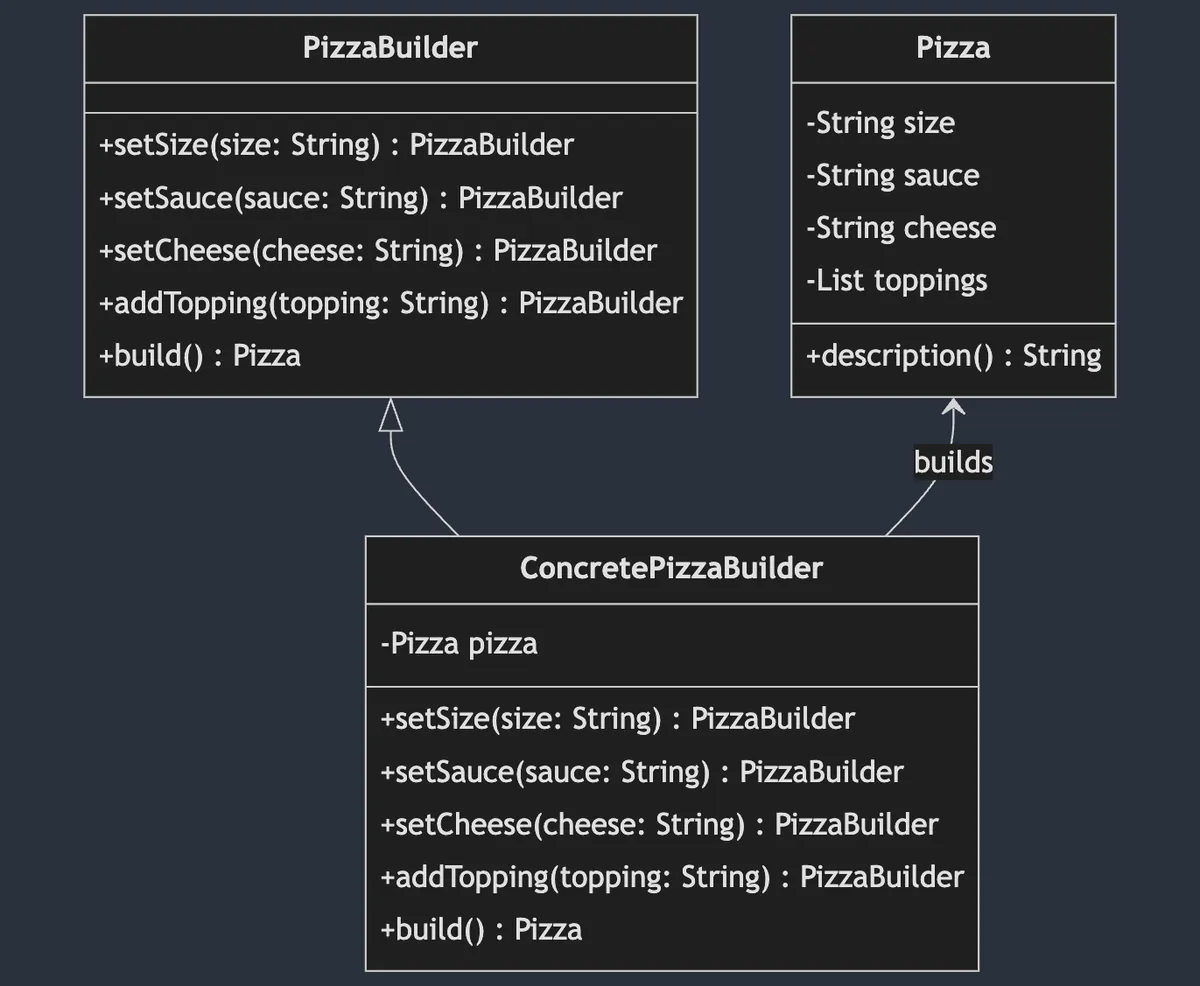
Builder Pattern belongs to the creational design patterns. It separates the steps and logic of object creation, allowing users to set parameters step by step and reuse configurations, ultimately creating the target object. Additionally, the same creation steps can produce different object implementations.
The above diagram uses making Pizza as an example. The steps to make a Pizza are divided into several methods declared in the PizzaBuilder Protocol (Interface). ConcretePizzaBuilder is the actual object that makes the Pizza, which could be a Vegetarian PizzaBuilder or a Meat PizzaBuilder. Different Builders may use different ingredients, but they all ultimately build() to produce a Pizza object.
WKWebView Scenario
Back to the WKWebView scenario, our final output object is MyWKWebViewConfiguration. We unify all the variables needed for configuring WKWebView into this object and use the Builder Pattern MyWKWebViewConfigurator to gradually complete the construction of the Configuration.
public struct MyWKWebViewConfiguration {
    let headNavigationHandler: NavigationActionHandler?
    let scriptMessageStrategies: [ScriptMessageStrategy]
    let userScripts: [WKUserScript]
    let overrideTitleFromWebView: Bool
    let url: URL
}
// All parameters are only exposed internally within the Module (Internal)
MyWKWebViewConfigurator (Builder Pattern)
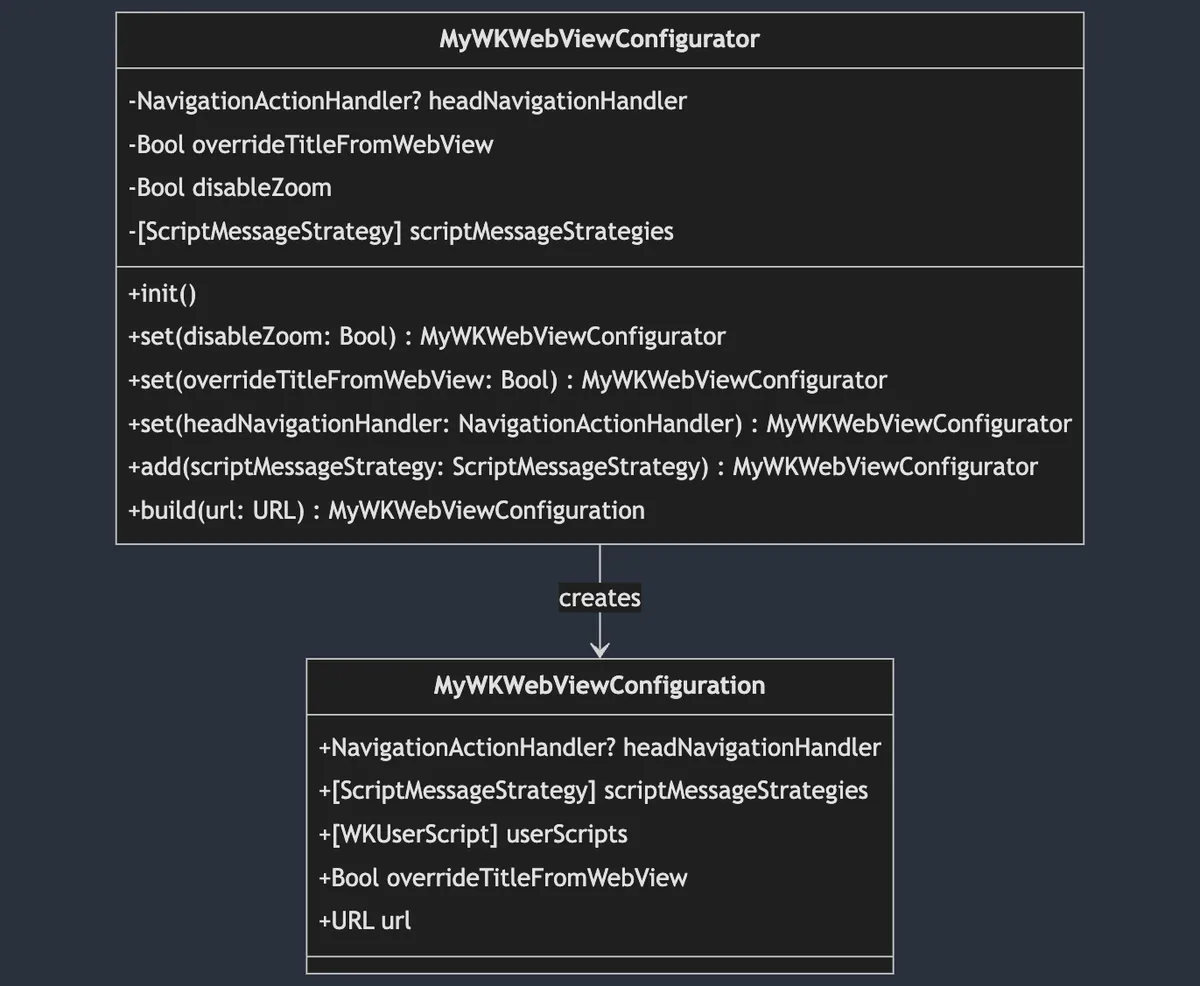
Here, since I only need to build for MyWKWebView, I did not further split
MyWKWebViewConfiguratorinto multiple protocols (interfaces).
public final class MyWKWebViewConfigurator {

    private var headNavigationHandler: NavigationActionHandler? = nil
    private var overrideTitleFromWebView: Bool = true
    private var disableZoom: Bool = false
    private var scriptMessageStrategies: [ScriptMessageStrategy] = []

    public init() {

    }

    // Parameter encapsulation, internal control
    public func set(disableZoom: Bool) -> Self {
        self.disableZoom = disableZoom
        return self
    }

    public func set(overrideTitleFromWebView: Bool) -> Self {
        self.overrideTitleFromWebView = overrideTitleFromWebView
        return self
    }

    public func set(headNavigationHandler: NavigationActionHandler) -> Self {
        self.headNavigationHandler = headNavigationHandler
        return self
    }

    // You can encapsulate additional logic rules here
    public func add(scriptMessageStrategy: ScriptMessageStrategy) -> Self {
        scriptMessageStrategies.removeAll(where: { type(of: $0).identifier == type(of: scriptMessageStrategy).identifier })
        scriptMessageStrategies.append(scriptMessageStrategy)
        return self
    }

    public func build(url: URL) -> MyWKWebViewConfiguration {
        var userScripts:[WKUserScript] = []
        // Attach only when created
        if disableZoom {
            let script = "var meta = document.createElement('meta'); meta.name='viewport'; meta.content='width=device-width, initial-scale=1.0, maximum-scale=1.0, user-scalable=no'; document.getElementsByTagName('head')[0].appendChild(meta);"
            let disableZoomScript = WKUserScript(source: script, injectionTime: .atDocumentEnd, forMainFrameOnly: true)
            userScripts.append(disableZoomScript)
        }

        return MyWKWebViewConfiguration(headNavigationHandler: headNavigationHandler, scriptMessageStrategies: scriptMessageStrategies, userScripts: userScripts, overrideTitleFromWebView: overrideTitleFromWebView, url: url)
    }
}
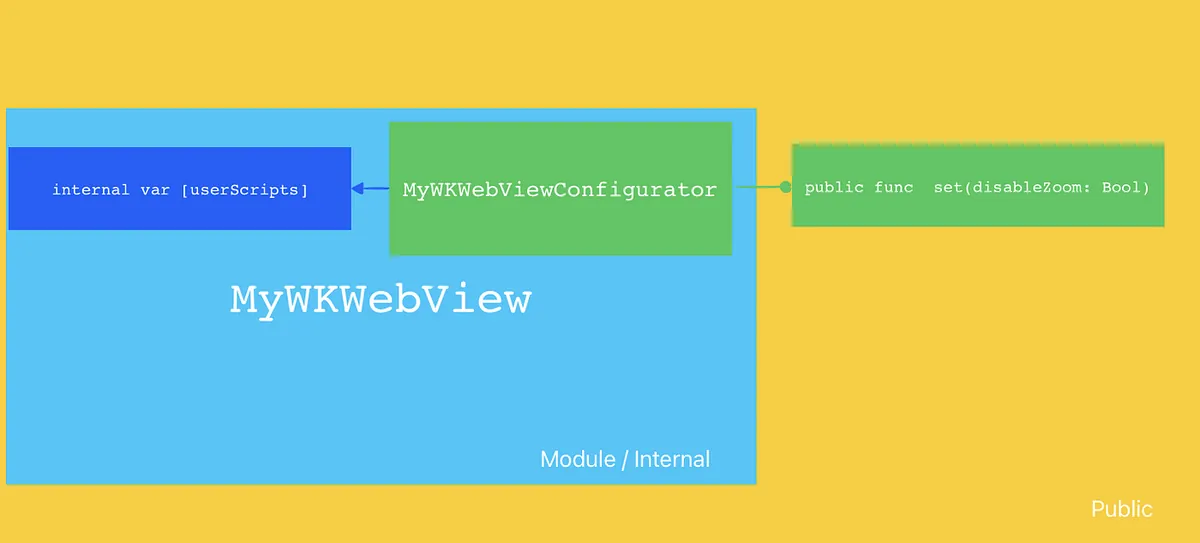
Adding an extra layer also allows better use of Access Control to restrict parameter access. In this scenario, we want to inject WKUserScript directly into MyWKWebView, but we don’t want to expose too much freedom for users to inject arbitrarily. Therefore, by combining the Builder Pattern with Swift Access Control, once MyWKWebView is placed inside a module, MyWKWebViewConfigurator exposes an operation method func set(disableZoom: Bool) externally. Internally, when creating MyWKWebViewConfiguration, it attaches the WKUserScript. All parameters of MyWKWebViewConfiguration are immutable from outside and can only be generated through MyWKWebViewConfigurator.
MyWKWebViewConfigurator + Simple Factory
After having the MyWKWebViewConfigurator Builder, we can create a simple factory to encapsulate and reuse the creation steps.
struct MyWKWebViewConfiguratorFactory {
    enum ForType {
        case `default`
        case productPage
        case payment
    }

    static func make(for type: ForType) -> MyWKWebViewConfigurator {
        switch type {
        case .default:
            return MyWKWebViewConfigurator()
                .add(scriptMessageStrategy: PageScriptMessageStrategy())
                .set(overrideTitleFromWebView: false)
                .set(disableZoom: false)
        case .productPage:
            return Self.make(for: .default).set(disableZoom: true).set(overrideTitleFromWebView: true)
        case .payment:
            return MyWKWebViewConfigurator().set(headNavigationHandler: paymentNavigationActionHandler)
        }
    }
}
Chain of Responsibility Pattern 責任鏈模式
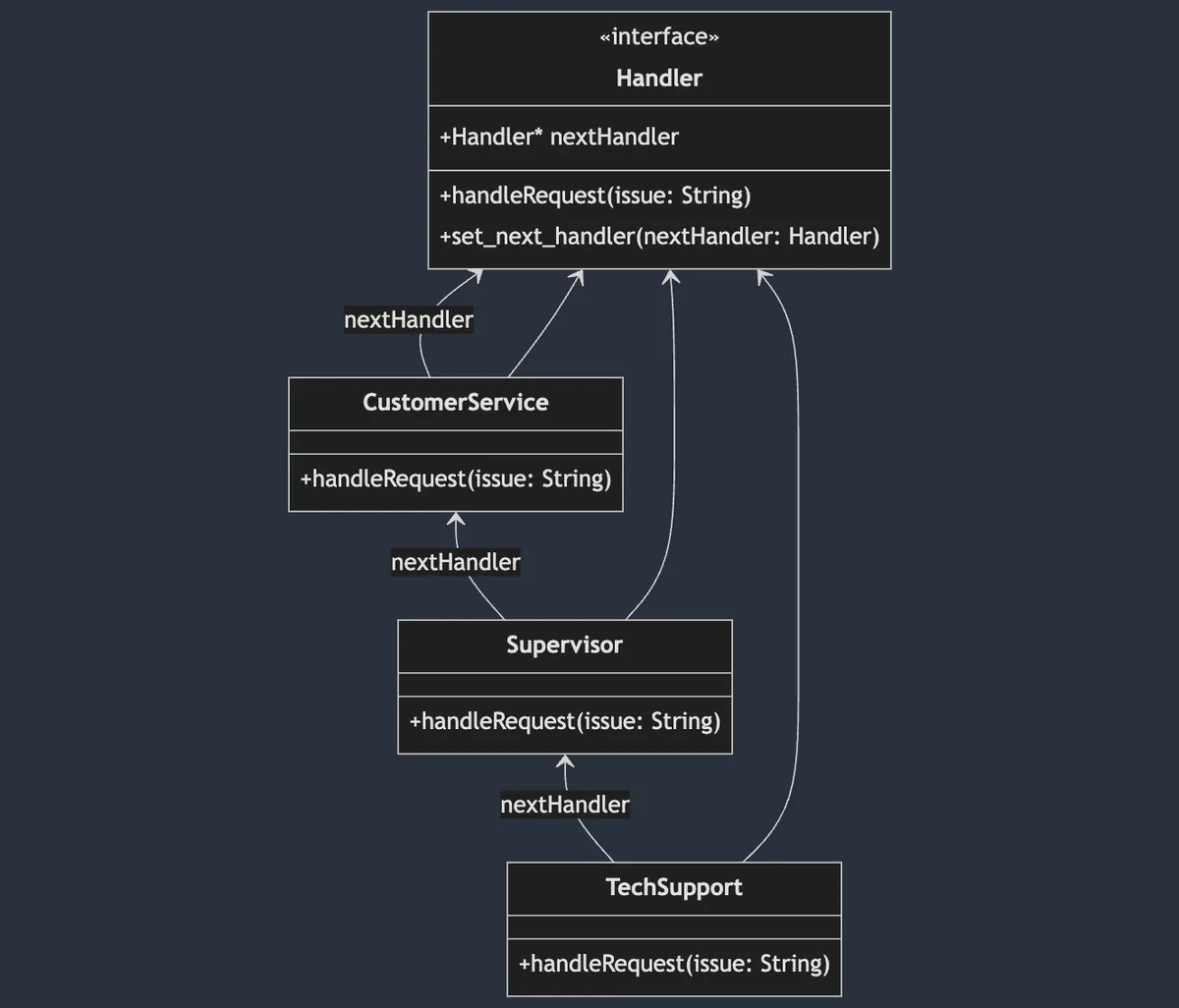
The Chain of Responsibility Pattern is a behavioral design pattern that encapsulates object processing operations and links them in a chain structure. The request is passed along the chain until it is handled; the linked operations can be freely combined and reordered.
Chain of Responsibility focuses on whether you want to handle the incoming item or skip it , so it should not partially handle or modify the input object before passing it to the next; if that is needed, then it’s another Interceptor Pattern.
The above diagram uses Tech Support (or OnCall..) as an example. When a problem object arrives, it first goes through CustomerService. If they cannot handle it, the issue is passed down to the next level, Supervisor. If still unresolved, it continues down to TechSupport. Additionally, different chains of responsibility can be formed for different problems. For instance, issues from major clients may start directly with the Supervisor. The Swift UIKit Responder Chain also uses the Chain of Responsibility pattern to respond to user actions in the UI.
WKWebView Scenario
In our WKWebView scenario, it is mainly applied in the delegate method func webView(_ webView: WKWebView, decidePolicyFor navigationAction: WKNavigationAction, decisionHandler: @escaping (WKNavigationActionPolicy) -> Void).
When the system receives a URL request, it passes through this method to let us decide whether to allow the navigation. After processing, call
decisionHandler(.allow)ordecisionHandler(.cancel)to notify the result.
In the implementation of WKWebView, many conditions arise, or some pages need to be handled differently and bypassed:
// Original implementation...
func webView(_ webView: WKWebView, decidePolicyFor navigationAction: WKNavigationAction, decisionHandler: @escaping (WKNavigationActionPolicy) -> Void) {
        guard let url = navigationAction.request.url else {
            decisionHandler(.allow)
            return
        }

        // Simulate business logic: WebViewController deeplinkCheck == true (means need to check with DeepLinkManager and open page)
        if deeplinkCheck {
            print("DeepLinkManager.open(\(url.absoluteString)")
            // Simulate DeepLinkManager logic, if URL can be opened successfully, open it and end process.
            // if DeepLinkManager.open(url) == true {
                decisionHandler(.cancel)
                return
            // }
        }

        // Simulate business logic: WebViewController isHomePage == true (means it's the homepage) & WebView is browsing homepage, then switch TabBar Index
        if isHomePage {
            if url.absoluteString == "https://zhgchg.li" {
                print("Switch UITabBarController to Index 0")
                decisionHandler(.cancel)
            }
        }

        // Simulate business logic: WebViewController noNeedNativePresent == false (means need to match special paths to open native pages)
        if !noNeedNativePresent {
            if url.pathComponents.count >= 3 {
                if url.pathComponents[1] == "product" {
                    // match http://zhgchg.li/product/1234
                    let id = url.pathComponents[2]
                    print("Present ProductViewController(\(id)")
                    decisionHandler(.cancel)
                } else if url.pathComponents[1] == "shop" {
                    // match http://zhgchg.li/shop/1234
                    let id = url.pathComponents[2]
                    print("Present ShopViewController(\(id)")
                    decisionHandler(.cancel)
                }
                // more...
            }
        }

        // more...
        decisionHandler(.allow)
}
As time goes by and features become more complex, the logic here will increase. If the processing order also needs to change, it can become a disaster.
NavigationActionHandler (Chain of Responsibility Pattern)
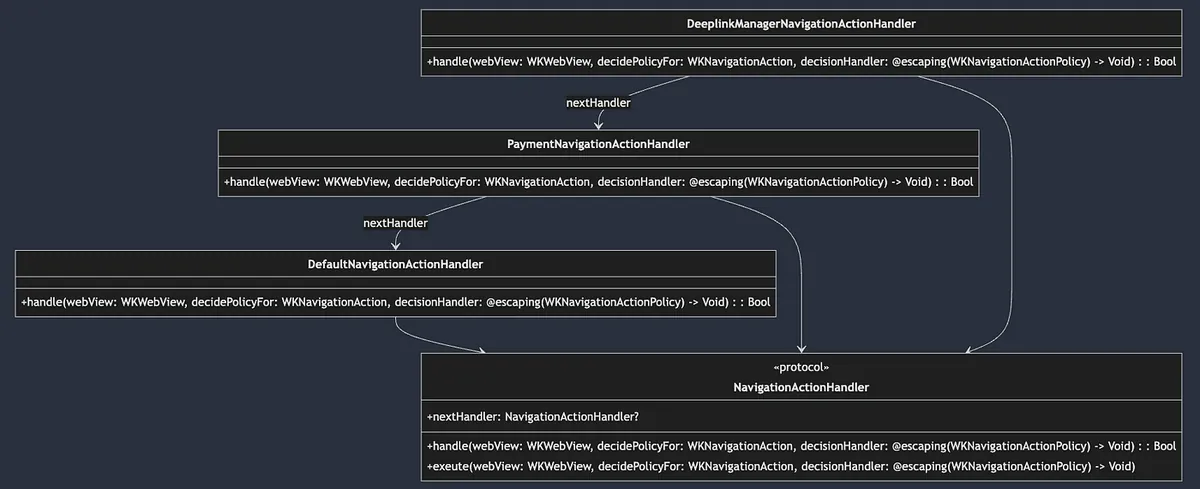
First, define the Handler Protocol:
public protocol NavigationActionHandler: AnyObject {
    var nextHandler: NavigationActionHandler? { get set }

    /// Handles navigation actions for the web view. Returns true if the action was handled, otherwise false.
    func handle(webView: WKWebView, decidePolicyFor navigationAction: WKNavigationAction, decisionHandler: @escaping (WKNavigationActionPolicy) -> Void) -> Bool
    /// Executes the navigation action policy decision. If the current handler does not handle it, the next handler in the chain will be executed.
    func exeute(webView: WKWebView, decidePolicyFor navigationAction: WKNavigationAction, decisionHandler: @escaping (WKNavigationActionPolicy) -> Void)
}

public extension NavigationActionHandler {
    func exeute(webView: WKWebView, decidePolicyFor navigationAction: WKNavigationAction, decisionHandler: @escaping (WKNavigationActionPolicy) -> Void) {
        if !handle(webView: webView, decidePolicyFor: navigationAction, decisionHandler: decisionHandler) {
            self.nextHandler?.exeute(webView: webView, decidePolicyFor: navigationAction, decisionHandler: decisionHandler) ?? decisionHandler(.allow)
        }
    }
}
-
The operation will be implemented in
func handle(). Returntrueif there is further processing, otherwise returnfalse. -
func execute()is the default chain access implementation. It traverses the entire operation chain starting from here. The default behavior is that whenfunc handle()returnsfalse(meaning this node cannot handle it), it automatically calls the nextnextHandler’sexecute()to continue processing until the end.
Implementation:
// Default implementation, usually placed last
public final class DefaultNavigationActionHandler: NavigationActionHandler {
    public var nextHandler: NavigationActionHandler?

    public init() {

    }

    public func handle(webView: WKWebView, decidePolicyFor navigationAction: WKNavigationAction, decisionHandler: @escaping (WKNavigationActionPolicy) -> Void) -> Bool {
        decisionHandler(.allow)
        return true
    }
}

//
final class PaymentNavigationActionHandler: NavigationActionHandler {
    var nextHandler: NavigationActionHandler?

    func handle(webView: WKWebView, decidePolicyFor navigationAction: WKNavigationAction, decisionHandler: @escaping (WKNavigationActionPolicy) -> Void) -> Bool {
        guard let url = navigationAction.request.url else {
            return false
        }

        // Simulate business logic: Payment related, two-factor verification WebView...etc
        print("Present Payment Verify View Controller")
        decisionHandler(.cancel)
        return true
    }
}

//
final class DeeplinkManagerNavigationActionHandler: NavigationActionHandler {
    var nextHandler: NavigationActionHandler?

    func handle(webView: WKWebView, decidePolicyFor navigationAction: WKNavigationAction, decisionHandler: @escaping (WKNavigationActionPolicy) -> Void) -> Bool {
        guard let url = navigationAction.request.url else {
            return false
        }


        // Simulate DeepLinkManager logic, if URL can be opened successfully, open it and end the process.
        // if DeepLinkManager.open(url) == true {
            decisionHandler(.cancel)
            return true
        // } else {
            return false
        //
    }
}

// More...
Usage:
extension MyWKWebViewController: WKNavigationDelegate {
    public func webView(_ webView: WKWebView, decidePolicyFor navigationAction: WKNavigationAction, decisionHandler: @escaping (WKNavigationActionPolicy) -> Void) {
       let headNavigationActionHandler = DeeplinkManagerNavigationActionHandler()
       let defaultNavigationActionHandler = DefaultNavigationActionHandler()
       let paymentNavigationActionHandler = PaymentNavigationActionHandler()

       headNavigationActionHandler.nextHandler = paymentNavigationActionHandler
       paymentNavigationActionHandler.nextHandler = defaultNavigationActionHandler

       headNavigationActionHandler.exeute(webView: webView, decidePolicyFor: navigationAction, decisionHandler: decisionHandler)
    }
}
This way, when a request is received, it will be processed sequentially according to the chain we defined.
Combine with the previous Builder Pattern MyWKWebViewConfigurator by exposing headNavigationActionHandler as a parameter, allowing external control over the WKWebView’s handling requirements and order:
extension MyWKWebViewController: WKNavigationDelegate {
    public func webView(_ webView: WKWebView, decidePolicyFor navigationAction: WKNavigationAction, decisionHandler: @escaping (WKNavigationActionPolicy) -> Void) {
        configuration.headNavigationHandler?.exeute(webView: webView, decidePolicyFor: navigationAction, decisionHandler: decisionHandler) ?? decisionHandler(.allow)
    }
}

//...
struct MyWKWebViewConfiguratorFactory {
    enum ForType {
        case `default`
        case productPage
        case payment
    }

    static func make(for type: ForType) -> MyWKWebViewConfigurator {
        switch type {
        case .default:
            // Simulate default case with these handlers
            let deplinkManagerNavigationActionHandler = DeeplinkManagerNavigationActionHandler()
            let homePageTabSwitchNavigationActionHandler = HomePageTabSwitchNavigationActionHandler()
            let nativeViewControllerNavigationActionHandlera = NativeViewControllerNavigationActionHandler()
            let defaultNavigationActionHandler = DefaultNavigationActionHandler()

            deplinkManagerNavigationActionHandler.nextHandler = homePageTabSwitchNavigationActionHandler
            homePageTabSwitchNavigationActionHandler.nextHandler = nativeViewControllerNavigationActionHandlera
            nativeViewControllerNavigationActionHandlera.nextHandler = defaultNavigationActionHandler

            return MyWKWebViewConfigurator()
                .add(scriptMessageStrategy: PageScriptMessageStrategy())
                .add(scriptMessageStrategy: UserScriptMessageStrategy())
                .set(headNavigationHandler: deplinkManagerNavigationActionHandler)
                .set(overrideTitleFromWebView: false)
                .set(disableZoom: false)
        case .productPage:
            return Self.make(for: .default).set(disableZoom: true).set(overrideTitleFromWebView: true)
        case .payment:
            // Simulate payment page only needs these handlers, with paymentNavigationActionHandler having highest priority
            let paymentNavigationActionHandler = PaymentNavigationActionHandler()
            let deplinkManagerNavigationActionHandler = DeeplinkManagerNavigationActionHandler()
            let defaultNavigationActionHandler = DefaultNavigationActionHandler()

            paymentNavigationActionHandler.nextHandler = deplinkManagerNavigationActionHandler
            deplinkManagerNavigationActionHandler.nextHandler = defaultNavigationActionHandler

            return MyWKWebViewConfigurator().set(headNavigationHandler: paymentNavigationActionHandler)
        }
    }
}
Strategy Pattern 策略模式
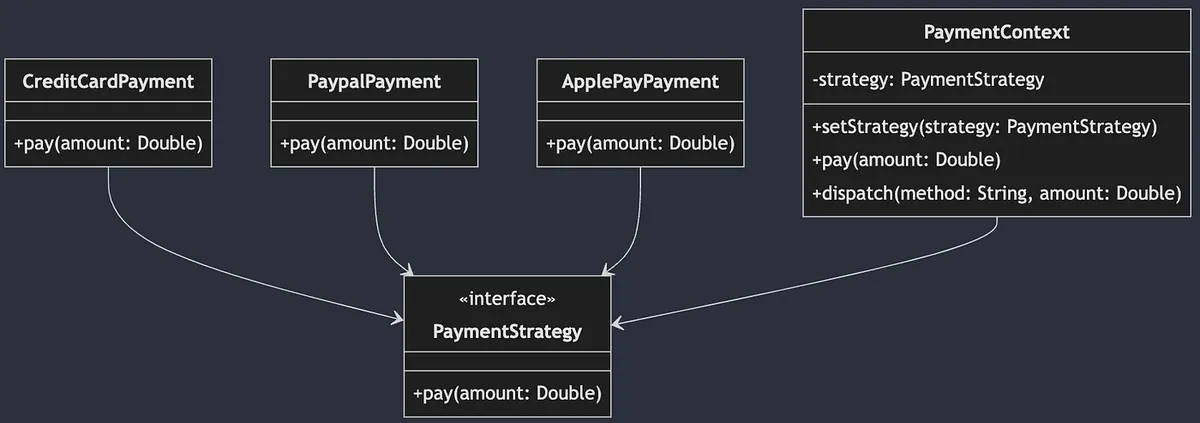
The Strategy Pattern is part of behavioral design patterns. It abstracts the actual operations, enabling us to implement multiple different operations that can be flexibly switched according to different scenarios.
The above diagram uses different payment methods as an example. We abstract payment as a Payment Protocol (Interface), and each payment method implements its own version. In the PaymentContext (simulating external use), the corresponding Payment instance is created based on the user’s chosen payment method, and pay() is called uniformly to process the payment.
WKWebView Scenario
Used in the interaction between WebView and the front-end page.
When the front-end JavaScript calls:
window.webkit.messageHandlers.Name.postMessage(Parameters);
It will enter WKWebView to find the corresponding
WKScriptMessageHandlerclass byNameand execute the operation.
The system already defines the Protocol and the corresponding func add(_ scriptMessageHandler: any WKScriptMessageHandler, name: String) method. We only need to implement our own WKScriptMessageHandler and add it to the WKWebView. The system will then use the Strategy Pattern to dispatch the received name to the corresponding concrete strategy for execution.
Here, we simply extend the WKScriptMessageHandler protocol with an additional identifier: String for use in add(.. name:):
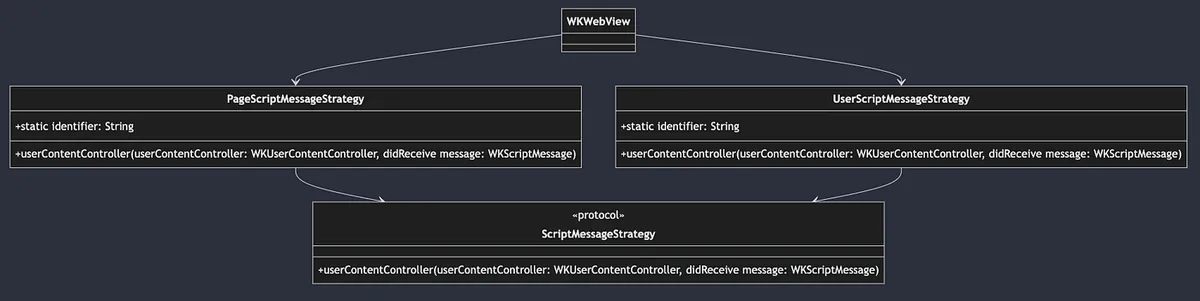
public protocol ScriptMessageStrategy: NSObject, WKScriptMessageHandler {
    static var identifier: String { get }
}
Implementation:
final class PageScriptMessageStrategy: NSObject, ScriptMessageStrategy {
    static var identifier: String = "page"

    func userContentController(_ userContentController: WKUserContentController, didReceive message: WKScriptMessage) {
        // Simulate called from js: window.webkit.messageHandlers.page.postMessage("Close");
        print("\(Self.identifier): \(message.body)")
    }
}

//

final class UserScriptMessageStrategy: NSObject, ScriptMessageStrategy {
    static var identifier: String = "user"

    func userContentController(_ userContentController: WKUserContentController, didReceive message: WKScriptMessage) {
        // Simulate called from js: window.webkit.messageHandlers.user.postMessage("Hello");
        print("\(Self.identifier): \(message.body)")
    }
}
WKWebView Registration Usage:
var scriptMessageStrategies: [ScriptMessageStrategy] = []
scriptMessageStrategies.forEach { scriptMessageStrategy in
  webView.configuration.userContentController.add(scriptMessageStrategy, name: type(of: scriptMessageStrategy).identifier)
}
Combining with the previous Builder Pattern, MyWKWebViewConfigurator manages the registration of ScriptMessageStrategy externally:
public final class MyWKWebViewConfigurator {
    //...

    // You can encapsulate the logic for adding new rules here
    public func add(scriptMessageStrategy: ScriptMessageStrategy) -> Self {
        // Here, if there is a duplicate identifier, the old one will be removed first
        scriptMessageStrategies.removeAll(where: { type(of: $0).identifier == type(of: scriptMessageStrategy).identifier })
        scriptMessageStrategies.append(scriptMessageStrategy)
        return self
    }
    //...
}

//...

public class MyWKWebViewController: UIViewController {
    //...
    public override func viewDidLoad() {
        super.viewDidLoad()

        //...
        configuration.scriptMessageStrategies.forEach { scriptMessageStrategy in
            webView.configuration.userContentController.add(scriptMessageStrategy, name: type(of: scriptMessageStrategy).identifier)
        }
        //...
    }
}
Question: Can this scenario also be implemented using the Chain of Responsibility Pattern?
At this point, some might wonder if the Strategy Pattern here can be replaced by the Chain of Responsibility Pattern?
Both of these design patterns are behavioral and can be interchangeable; however, the choice depends on the specific scenario. Here, it is a typical Strategy Pattern where WKWebView decides which Strategy to use based on the Name. If the requirement involves possible chained dependencies or recovery relationships between different Strategies—for example, if AStrategy fails, it passes to BStrategy—then the Chain of Responsibility Pattern would be considered.
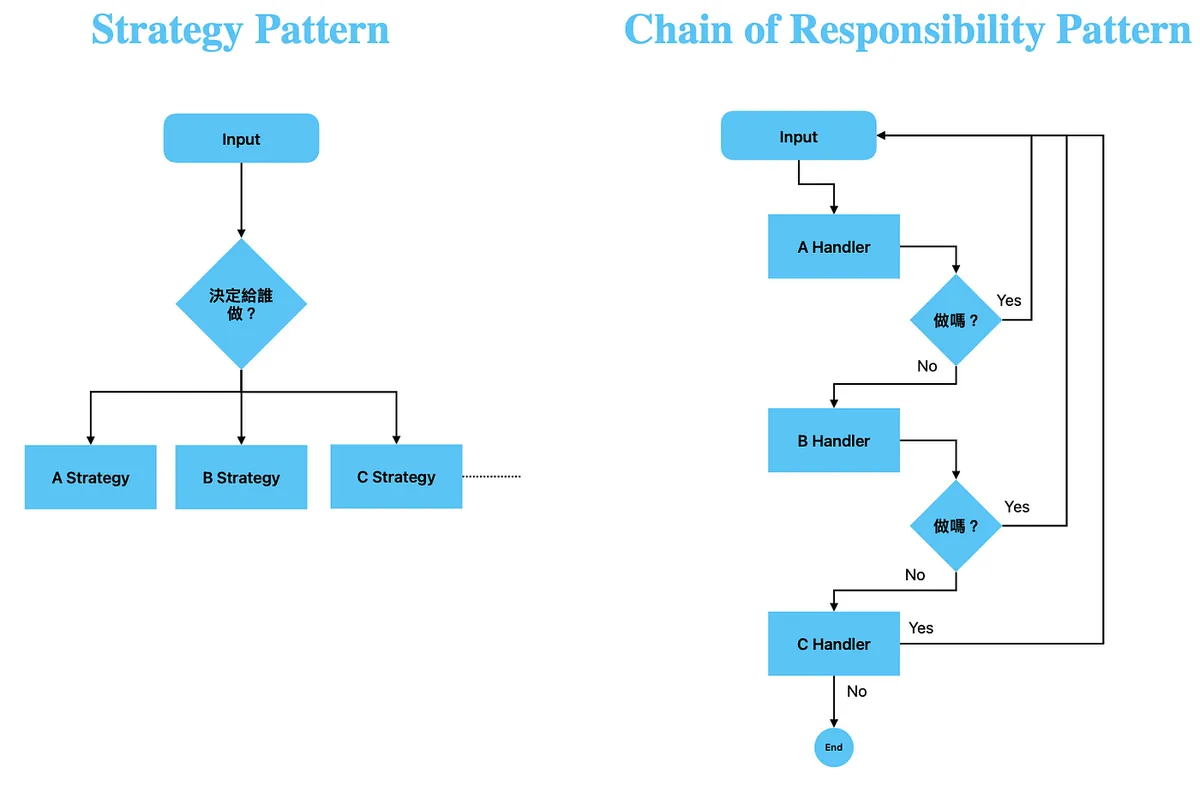
Strategy vs. Chain of Responsibility
-
Strategy Pattern: Clearly defined dispatch execution strategies with no relation between strategies.
-
Chain of Responsibility Pattern: Each implementation determines the execution strategy. If it cannot handle the request, it passes it to the next implementation.
Complex scenarios can be achieved by combining the Strategy Pattern with the Chain of Responsibility Pattern inside.
Final Combination
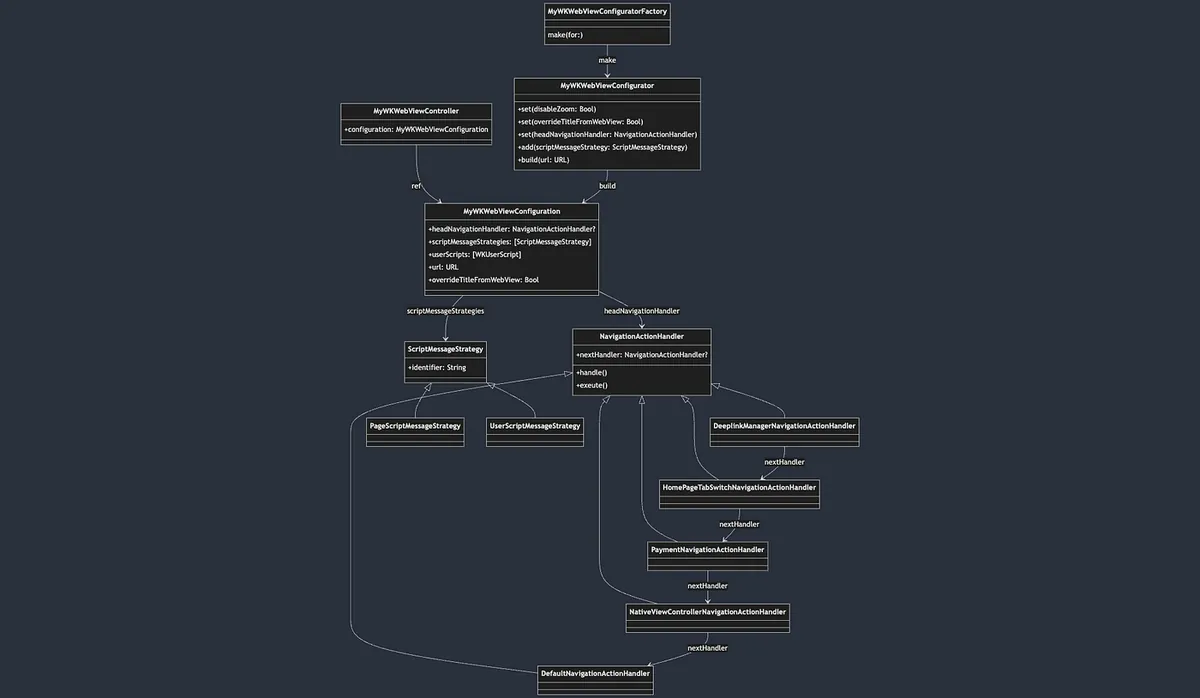
-
Simple Factory Pattern
MyWKWebViewConfiguratorFactory-> Encapsulates the creation steps ofMyWKWebViewConfigurator -
Builder Pattern
MyWKWebViewConfigurator-> EncapsulatesMyWKWebViewConfigurationparameters and construction steps -
MyWKWebViewConfigurationInjection -> Used byMyWKWebViewController -
Chain of Responsibility Pattern In
MyWKWebViewController, the functionfunc webView(_ webView: WKWebView, decidePolicyFor navigationAction: WKNavigationAction, decisionHandler: @escaping (WKNavigationActionPolicy) -> Void)callsheadNavigationHandler?.exeute(webView: webView, decidePolicyFor: navigationAction, decisionHandler: decisionHandler)to execute the chain processing. -
Strategy Pattern The
webView.configuration.userContentController.addUserScript(XXX)inMyWKWebViewControllerdispatches the corresponding JS Caller to the appropriate handling strategy.

Comments